
TLDR overview
- The SonarQube Remediation Agent autonomously fixes your project’s backlog issues, turning technical-debt cleanup into a review-and-merge task by opening validated PR on GitHub or Azure DevOps.
- Reach for the Remediation Agent when a GitHub-bound SonarQube Cloud project has accumulated reliability, security, and maintainability issues that would take engineers hours or days to clear by hand.
- Now generally available inside Sonar Agent Essentials, the SonarQube Remediation Agent covers the Solve stage of the Agent Centric Development Cycle (AC/DC), clearing the debt that AI-generated code compounds so engineers stay focused on new work.
- Select issues on the SonarQube Cloud Issues page, click Assign to Agent, and the agent generates each fix in a sandbox and verifies it doesn't introduce new issues, then opens a branch-protected pull request that a fresh analysis checks against your quality gate.
AI agents now write a large share of the code landing in your repositories, and they write faster than any review process was designed to keep up with. The resulting issues backlog grows longer and longer, and isn't going away on its own. The SonarQube Remediation Agent, generally available as of June 30, 2026, is built for exactly this problem: it works through the reliability, security, and maintainability issues already sitting in your project, and hands you back validated pull requests. This guide walks you through pointing the agent at a GitHub-bound SonarQube Cloud project and clearing real backlog issues, using a fork of the AWS CLI (a large Python codebase) as the example project. The SonarQube Remediation Agent represents the Solve stage of the Agent Centric Development Cycle (AC/DC), the counterpart to Sonar Vortex, which handles Guide and Verify inside the agent's coding loop.
When to use this
Use this blueprint when you own a SonarQube Cloud project bound to GitHub and have a pile of open issues that nobody has time to triage by hand. That backlog grows fastest right after a stretch of AI-assisted development, when generated code ships quicker than it gets verified. The SonarQube Remediation Agent is a good fit when the fixes are mechanical and rule-scoped: renaming a shadowed method, extracting a duplicated literal, or replacing a leaked secret. It supports issues in C#, Java, JavaScript, TypeScript, and Python, plus secrets findings.
What you'll achieve
- The SonarQube Remediation Agent enabled on a GitHub-bound SonarQube Cloud project, with a registered OpenAI or Anthropic LLM key.
- BLOCKER backlog issues on
mainassigned from the Issues page and processed in a single sandboxed, quality-gate-validated agent session. - A merged, branch-protected PR that closes
python:S6437leaked-secret vulnerabilities.
Architecture
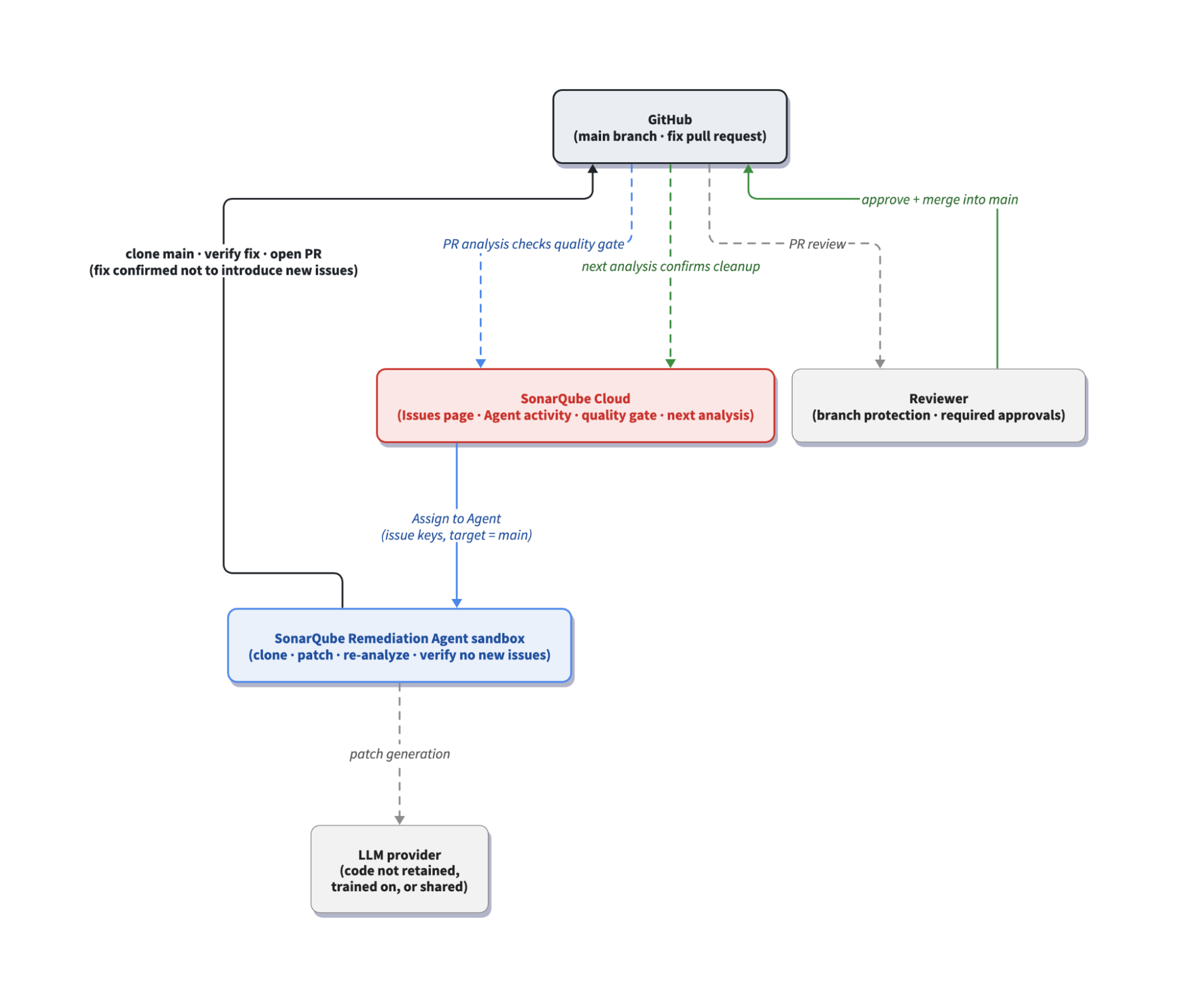
The Remediation Agent kicks-in when you assign it issues from the Issues page on SonarQube Cloud, or directly from the SonarQube CLI. SonarQube Cloud hands those issues to the agent, which does all of its work in an isolated sandbox. Inside that sandbox, the agent clones the bound GitHub repository, sends each affected code snippet to the LLM provider key you configured, and generates a fix for each supported rule. It applies the patch, then verifies the fix in the sandbox to confirm it resolves the original issue without introducing new ones. This is the part that separates the agent from a plain code generator: a fix that doesn't hold up is discarded rather than shipped. The verified fixes are pushed to a new branch and opened as a pull request, and a fresh analysis then runs on that PR to check the changes against your quality gate. From there, your existing branch protection and the quality gate check govern the merge exactly as they would for a pull request that a teammate opened.
Prerequisites
You should have a working SonarQube Cloud and GitHub setup before you start, specifically:
- A SonarQube Cloud project on a Team (annual) or Enterprise plan, bound to a GitHub repository, with analysis running and an analyzed main branch.
- The SonarQube Agent GitHub app installed on the repository (a GitHub admin installs it from Administration → AI capabilities → Remediation Agent).
- An active Sonar Agent Essentials subscription on your organization. Agent Essentials packages the SonarQube Remediation Agent together with Sonar Vortex.
- An OpenAI or Anthropic API key added under Administration → AI capabilities → LLM API Keys. The agent runs on your own provider key, so usage is billed to your provider account. You can store up to three keys per organization and you choose the provider, not the model.
- The Remediation Agent enabled under Administration → AI capabilities → Remediation Agent, with Manual backlog remediation toggled on.
Step 1 — Identify issues on the main branch
Open SonarQube Cloud and navigate to the Issues tab of your project. To focus the agent on the highest-impact work first, filter by Severity and select Blocker.
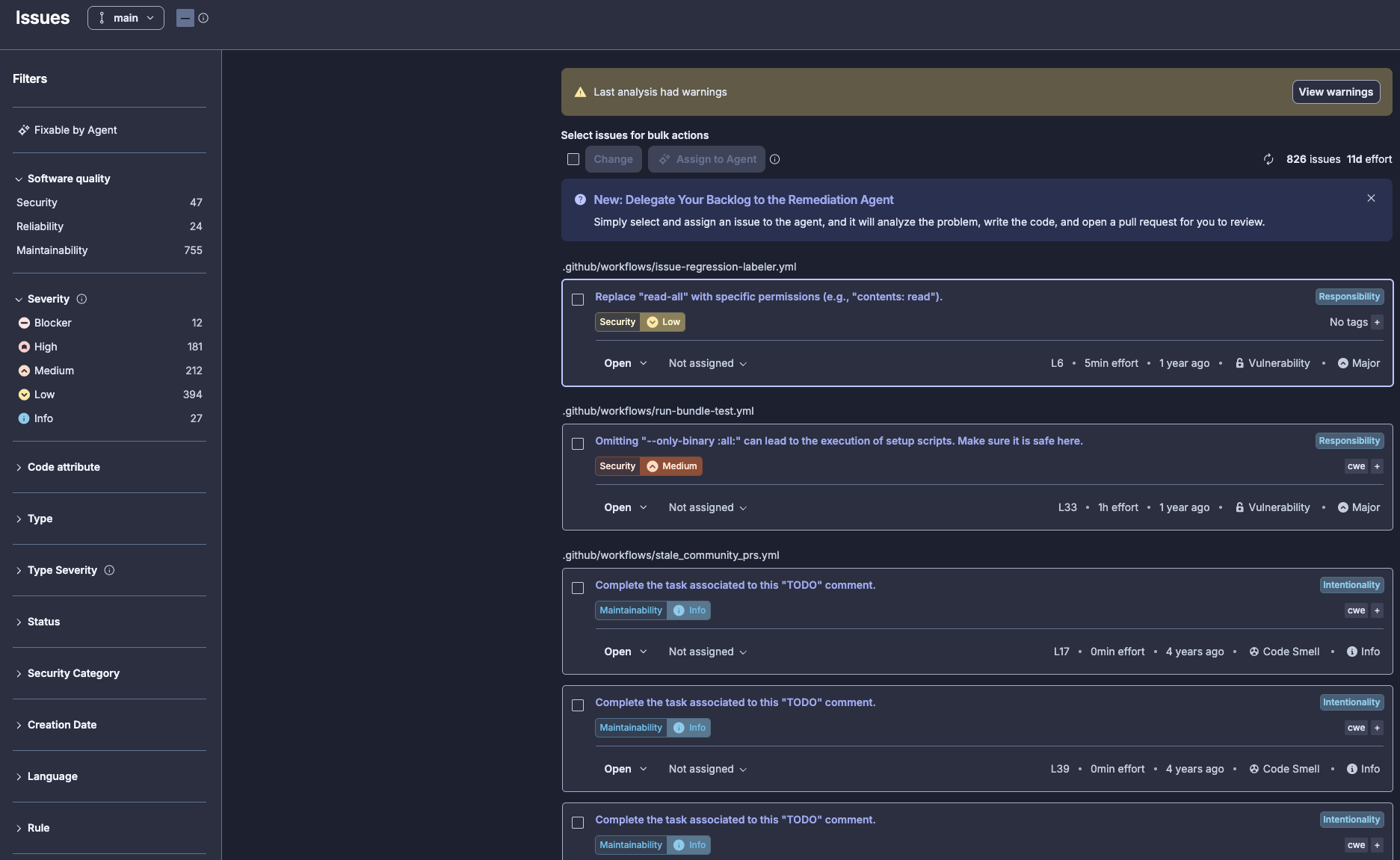
Step 2 — Assign issues to the Remediation Agent
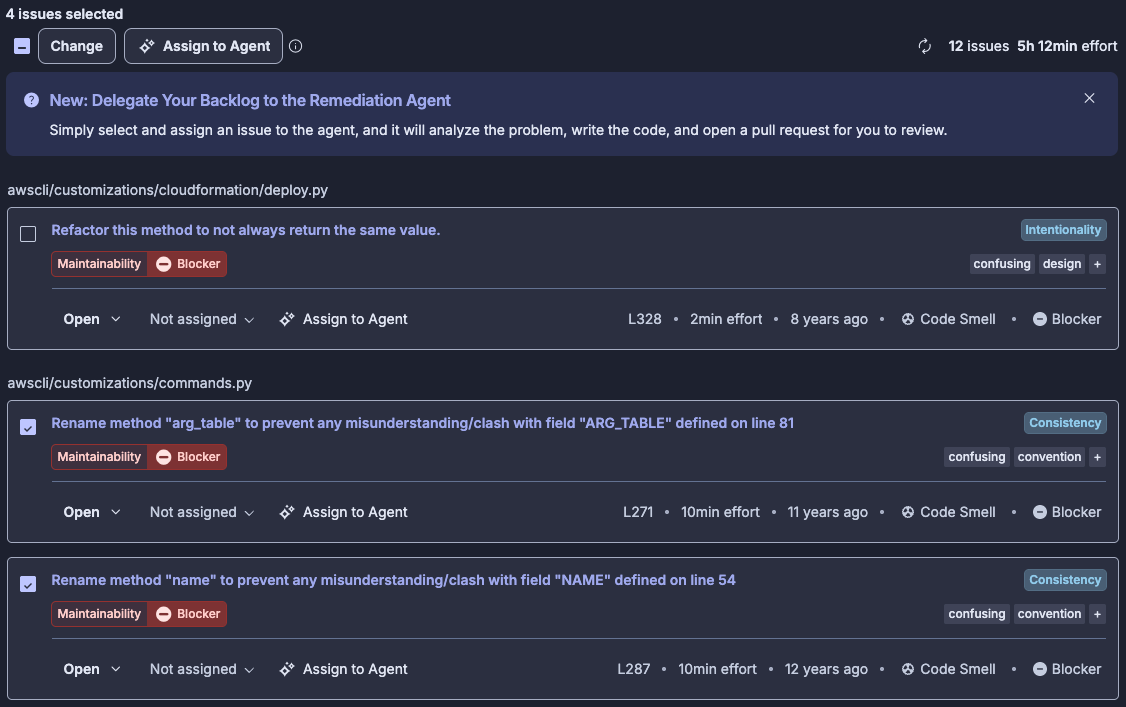
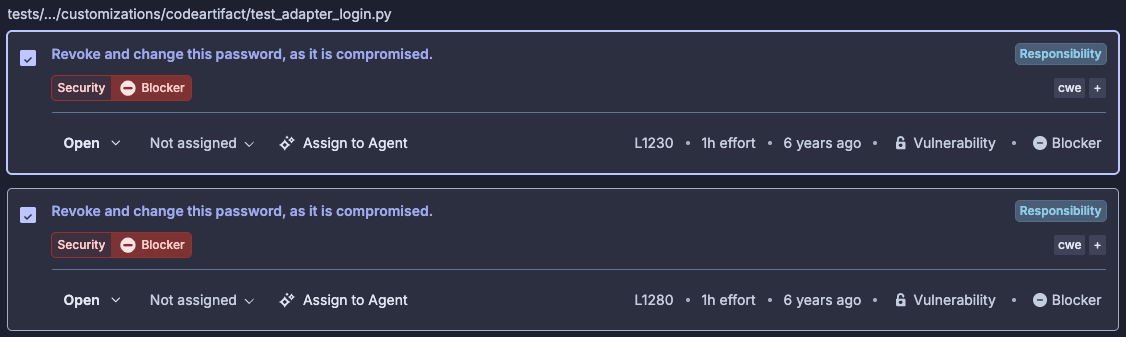
Select the checkboxes for the issues you want the agent to handle. In this example, we select four Blocker issues spread across two files:
awscli/customizations/commands.py— rename the methodarg_tableto prevent a clash with the fieldARG_TABLEdefined on line 81 (L271, ~10 min effort, code smell), and rename the methodnameto prevent a clash with the fieldNAMEdefined on line 54 (L287, ~10 min effort, code smell).tests/unit/customizations/codeartifact/test_adapter_login.py— revoke and change a compromised password (python:S6437, at L1230 and L1280, ~1 hr effort, vulnerability).
Click Assign to Agent in the toolbar. You can assign up to 20 issues in a single action.
Step 3 — Monitor the agent session
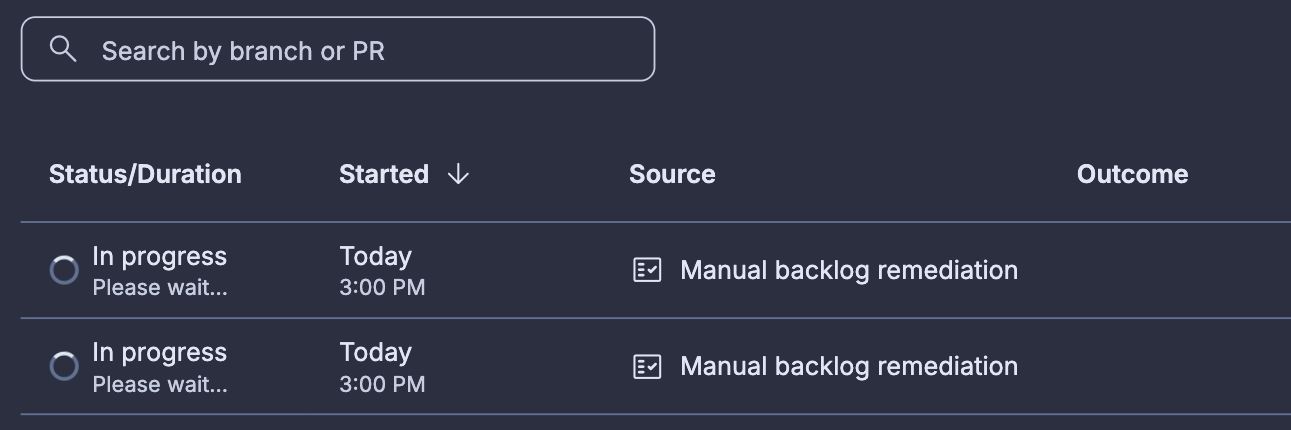
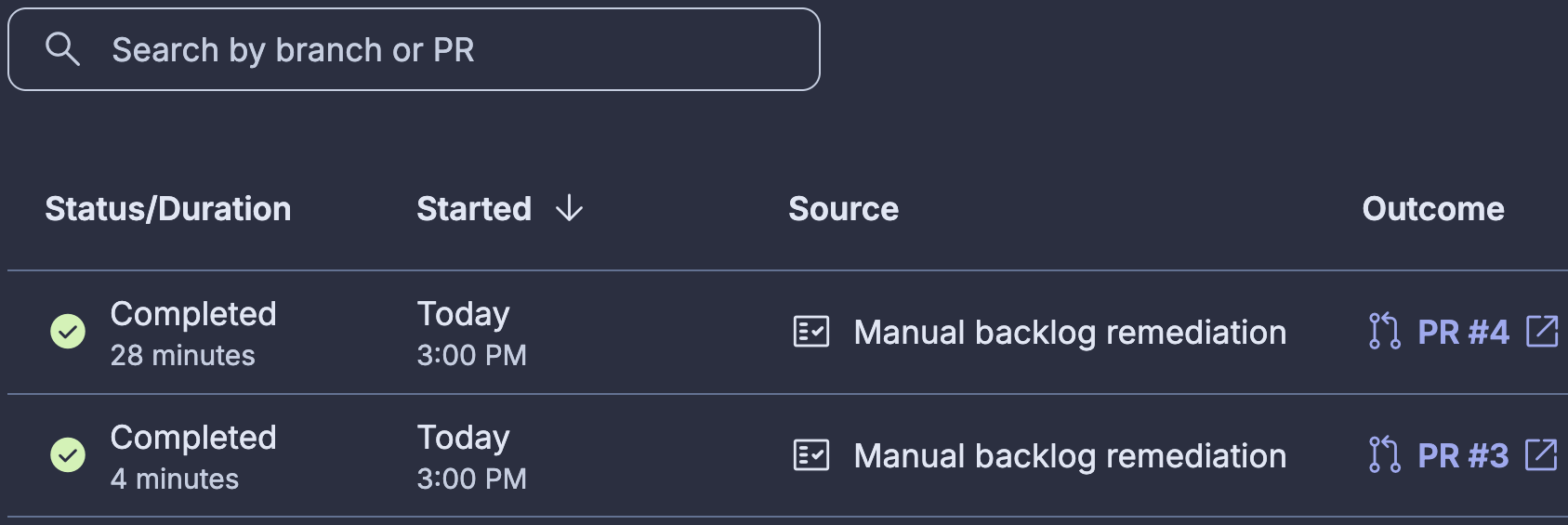
Navigate to the Remediation Agent page for the project. You'll see two rows for the session you just submitted, with the status moving from In progress to Completed. Each row shows the duration, submission timestamp, and source of backlog fixes so you can tell manual backlog remediation assignment apart from automatic (scheduled) runs.
During the run, the agent is doing its sandboxed work: cloning the repo, applying patches per rule, and re-analyzing the patched code against the project's quality gate. You don't need to do anything here; if the run fails (usually because a fix would regress the quality gate) the row records the failure and no PR is opened.
Step 4 — Review and merge the fix PR on GitHub
Click on a PR # in the Outcome column to navigate directly to the PR, or switch over to GitHub and open Pull requests on the bound repository. The agent's PR will be sitting in the active list under a branch name that follows the pattern remediate-main-<timestamp>-<hash>. In our example, we select PR #3 and the corresponding branch is remediate-main-20260720-200044-4b342014.
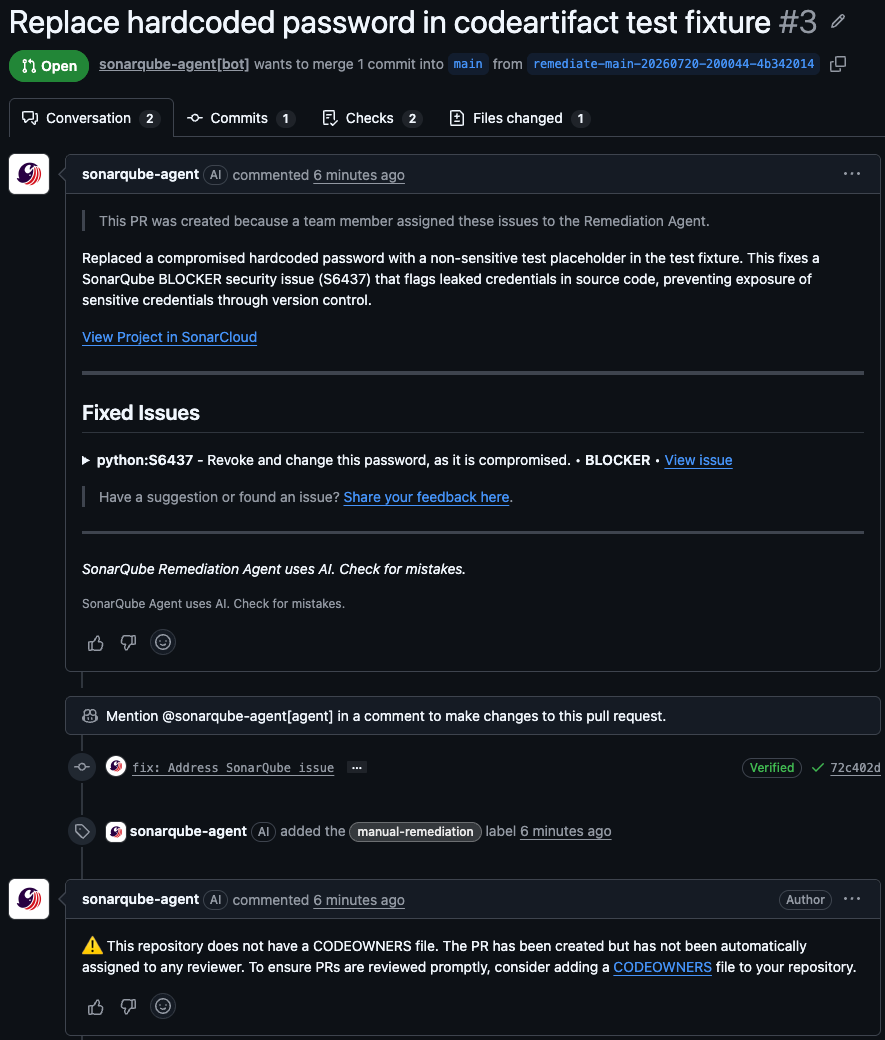
The agent grouped the two BLOCKER security issue fixes (S6437) into a single PR against main, because fixes are batched by rule key and file type. The PR description is the agent's own writeup of what changed and why:
This PR was created because a team member assigned these issues to the Remediation Agent. Replaced a compromised hardcoded password with a non-sensitive test placeholder in the test fixture. This fixes a SonarQube BLOCKER security issue (S6437) that flags leaked credentials in source code, preventing exposure of sensitive credentials through version control.
Underneath, the Fixed Issues block lists each rule key, severity, and source location, so a reviewer can trace each line of the diff back to the rule that triggered it:
python:S6437 — Revoke and change this password, as it is compromised. • BLOCKER • View issue Location: tests/unit/customizations/codeartifact/test_adapter_login.py:1280
Why is this an issue? In most cases, trust boundaries are violated when a secret is exposed in a source code repository or an uncontrolled deployment environment. Unintended people who don't need to know the secret might get access to it. They might then be able to use it to gain unwanted access to associated services or resources.
What changed: Replaces the hardcoded password 'JgCXIr5xGG' with a clearly non-sensitive test placeholder 'test-password' in a test fixture string. This is one of several occurrences of the same leaked secret that the static analysis flagged as a compromised password embedded in source code.
You can also examine the fix at the code level, before and after, in the GitHub diff view:
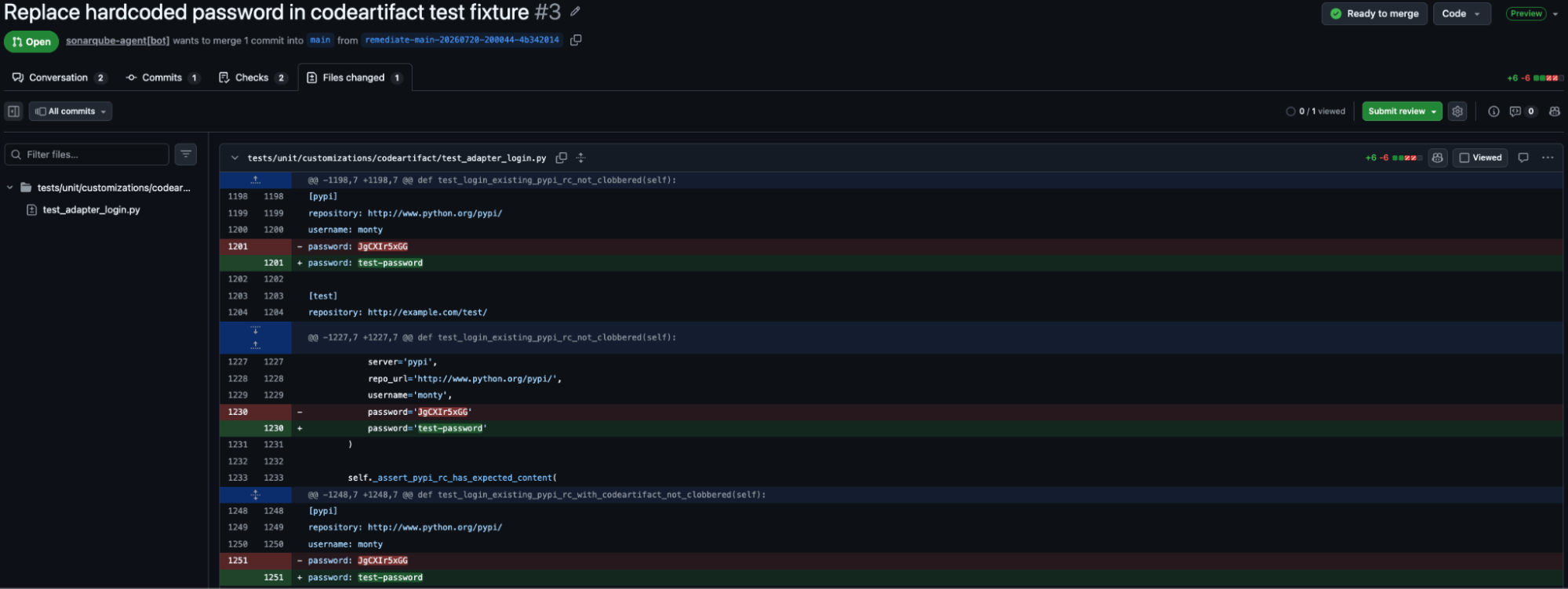
The PR shows a passing quality gate check, which is the same gate the agent validated against in its sandbox before opening the PR in the first place. Once your project's required reviewers approve, click Complete to merge. Branch protection rules apply to the agent's PR exactly the same way they apply to a human-generated PR; required reviewers, required builds, and merge strategy are all enforced.
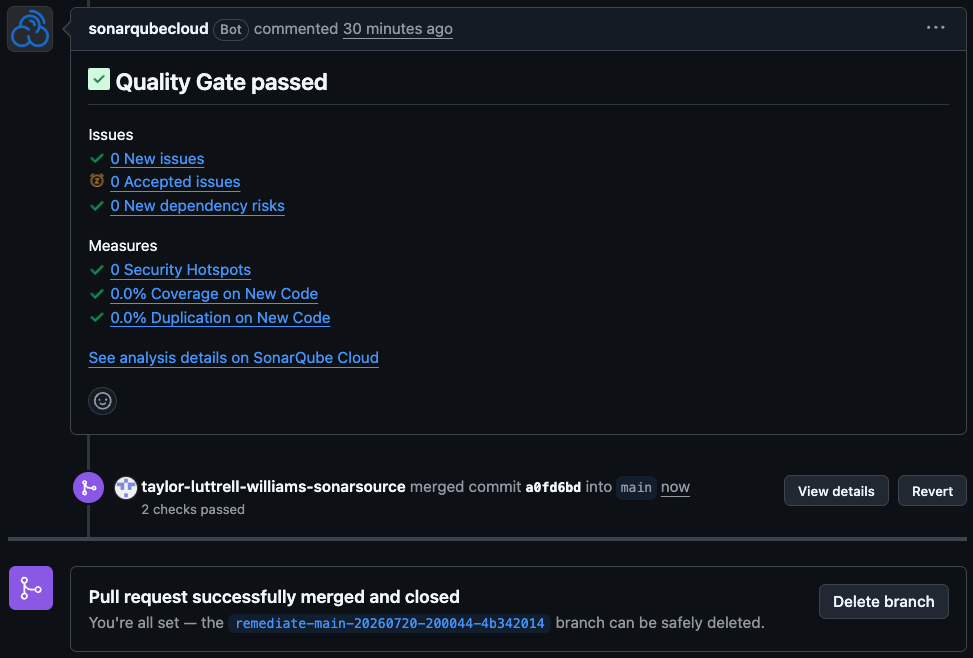
After the PR merges and the next analysis of main runs, the fixed issues drop off your backlog. Return to the Issues page, filter by Blocker again, and confirm the S6437 finding is no longer listed.
Step 5 — (Optional) automate backlog remediation
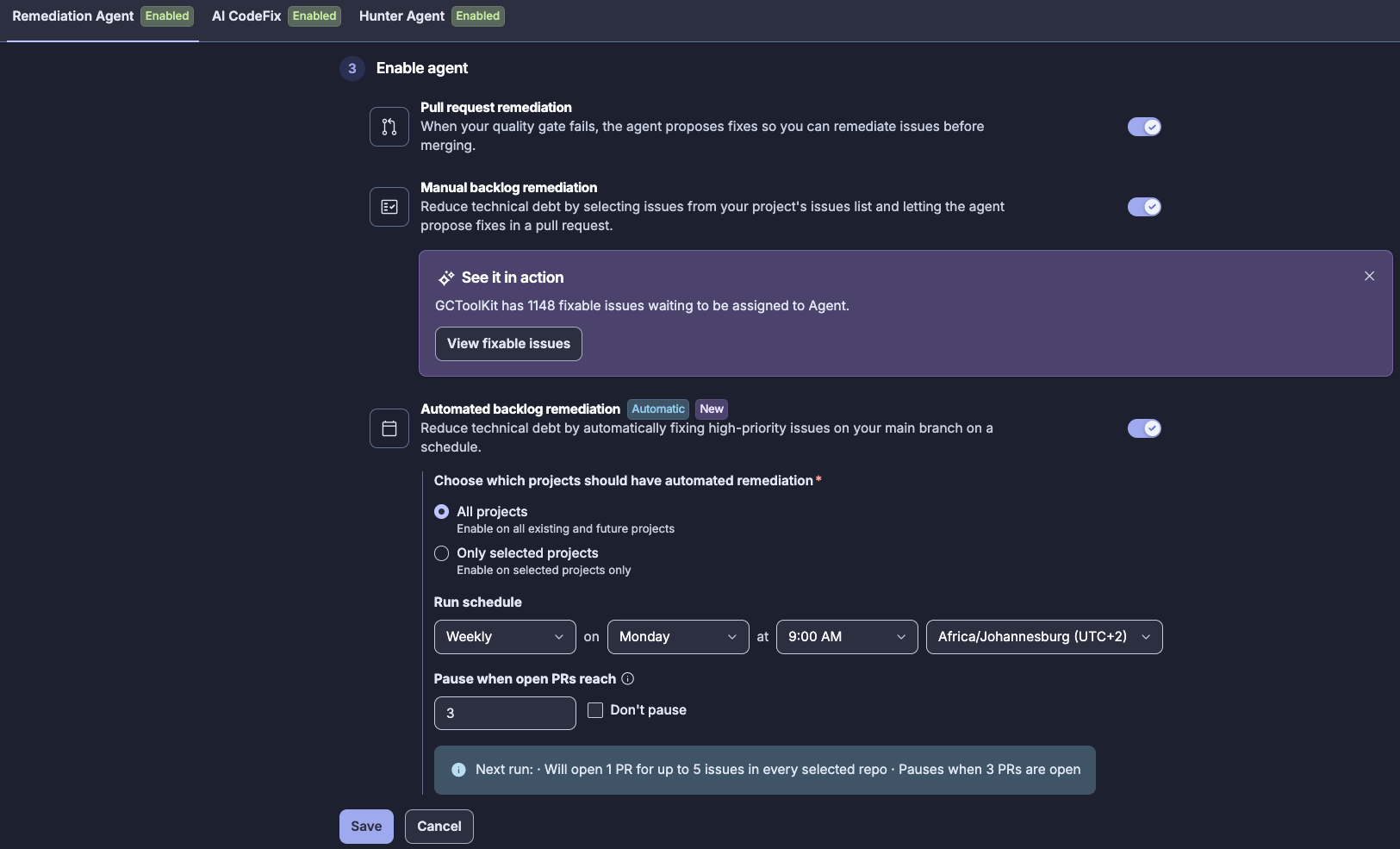
In addition to handling backlog remediation manually, the Remediation Agent can also tackle your issues backlog on a scheduled basis. Automating backlog remediation can help to further alleviate the burden of issues resolution. From your project or organization dashboard on SonarQube Cloud, navigate to Administration → AI capabilities → Remediation Agent and toggle on Automated backlog remediation. Select the project scope (All projects or Only selected project) and configure the Run schedule (Daily or Weekly, Day, Time, and Timezone). You can also select whether to Pause when open PRs reach a particular number (user defined); in this case, the agent pauses creation of new PRs when this number is reached, but existing PRs from other sources are not counted. Conversely, select Don’t pause to opt out of this feature.
Step 6 — (Optional) remediate PR issues
The Remediation Agent isn't limited to your backlog. On GitHub-bound projects, it can also fix issues in your latest pull requests. When a pull request analysis fails your quality gate, the Quality Gate failed comment that SonarQube posts includes a Fix automatically checkbox that opens a separate PR with fixes for the eligible new issues that PR introduced. This runs on the same closed-loop validation as backlog remediation. PR remediation is GitHub-only, and the agent won't offer it when a PR introduces more than 20 new issues.
Keep this distinct from AI code review. Gitar is Sonar's AI code reviewer: it reviews the changes in a pull request and commits fixes, iterating, if necessary, automatically until the pipeline goes green. The Remediation Agent works from issues that SonarQube analysis has already surfaced, existing issues in your main branch backlog or new issues introduced in a pull request, while Gitar reviews the incoming change itself.
What to know
- This blueprint focuses on backlog remediation against
main. The agent also remediates issues in your latest GitHub PRs (see Step 6), and for AI code review of the PR itself, that job belongs to Gitar. - The agent works with Azure DevOps as well as GitHub. If your repositories live in Azure Repos, follow the companion blueprint linked in Next Steps.
- Rules the agent deems too complex for automated resolution stay in the backlog for a human to handle.
- You can invoke the agent from the SonarQube CLI instead of the Issues page. The
sonar remediatecommand submits backlog issues to the SonarQube Remediation Agent, which generates fix PRs; in interactive mode, the CLI fetches eligible issues and presents a multi-select prompt. - You bring your own OpenAI or Anthropic key, and usage is billed to your provider account under your provider's data agreement.
- The agent's pull requests get no special treatment. They go through the same branch protection, required reviewers, required builds, and quality gate as any PR a person opens. Enforcement on repository admins follows your own GitHub branch protection settings, exactly as it would for a human's PR.
Next steps
- Fix backlog issues with the SonarQube Remediation Agent on Azure DevOps — the same workflow for Azure Repos-bound projects.
- Introducing Sonar Vortex and the SonarQube Remediation Agent — how the SonarQube Remediation Agent fits into Sonar Agent Essentials.
- The future is AC/DC: the Agent Centric Development Cycle — the Guide, Verify, Solve framework behind this process.
- Remediation Agent documentation and Administer the Remediation Agent — the authoritative configuration reference.