
TLDR overview
- Sonar Context Augmentation integrates SonarQube analysis into OpenAI Codex CLI to provide coding guidelines and architecture context before code generation.
- Users create a project-scoped TOML config and an
AGENTS.mddirective to automate the pre-generation context loading (the "Guide" phase in Sonar's Agent Centric Development Cycle) using the SonarQube MCP server. - The setup enables architecture-aware code navigation, allowing agents to trace call flows and perform semantic searches, primarily for Java projects.
- Implementation requires a SonarQube Personal Access Token (PAT), Docker, and specific environment variables to ensure secure, project-specific AI tool access.
Overview
The setup configures Sonar Context Augmentation with OpenAI Codex CLI so the agent consults your project's SonarQube Cloud analysis before writing code. You'll create a project-scoped TOML config, add an operational directive, and verify the connection. By the end, Codex calls get_guidelines automatically at the start of every session.
In the Agent Centric Development Cycle, the "Guide" phase is the step where the agent loads context before writing anything and happens before code generation. Context Augmentation is Sonar's implementation of that phase, feeding your project's coding guidelines, current architecture, intended architecture, and issue history into the agent's context through the SonarQube MCP server.
When to use this
You want Codex CLI to check your SonarQube analysis before generating code, not just after. If you're already using the SonarQube MCP server for post-generation issue scanning and quality gate checks, Context Augmentation adds the pre-generation layer.
What you'll achieve
- Codex calls
get_guidelinesautomatically before code edits, loading your project's SonarQube coding guidelines and context into the agent's context - Architecture-aware code navigation for Java projects (module graphs, call flow tracing, semantic search)
- Same SonarQube intelligence whether you use Codex, Claude Code, or another MCP-compatible agent
Architecture
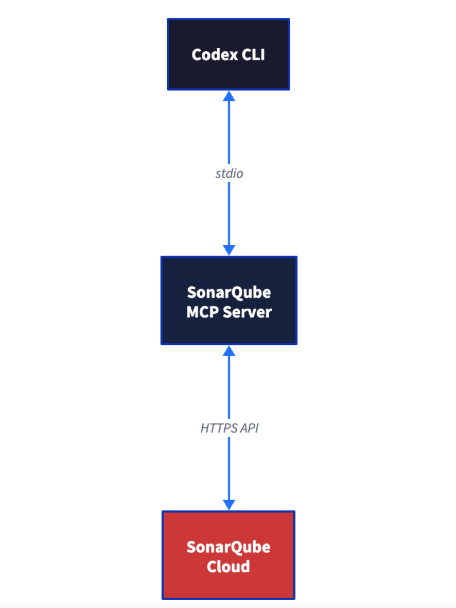
The MCP server runs as a Docker container on your machine. Codex communicates with it over stdio, and the server proxies tool calls to the SonarQube Cloud API. The volume mount maps your project directory into the container so architecture tools can read your codebase architecture without uploading source code.
Prerequisites
- SonarQube Cloud Team or Enterprise plan with Context Augmentation enabled in your organization's admin settings. An org admin must enable it at SonarQube Cloud > Administration > Agent-Centric Development section. Without this step, the CAG tools will not appear in your MCP connection. Context Augmentation is currently in beta. Check plans and pricing if you're not sure which plan you're on.
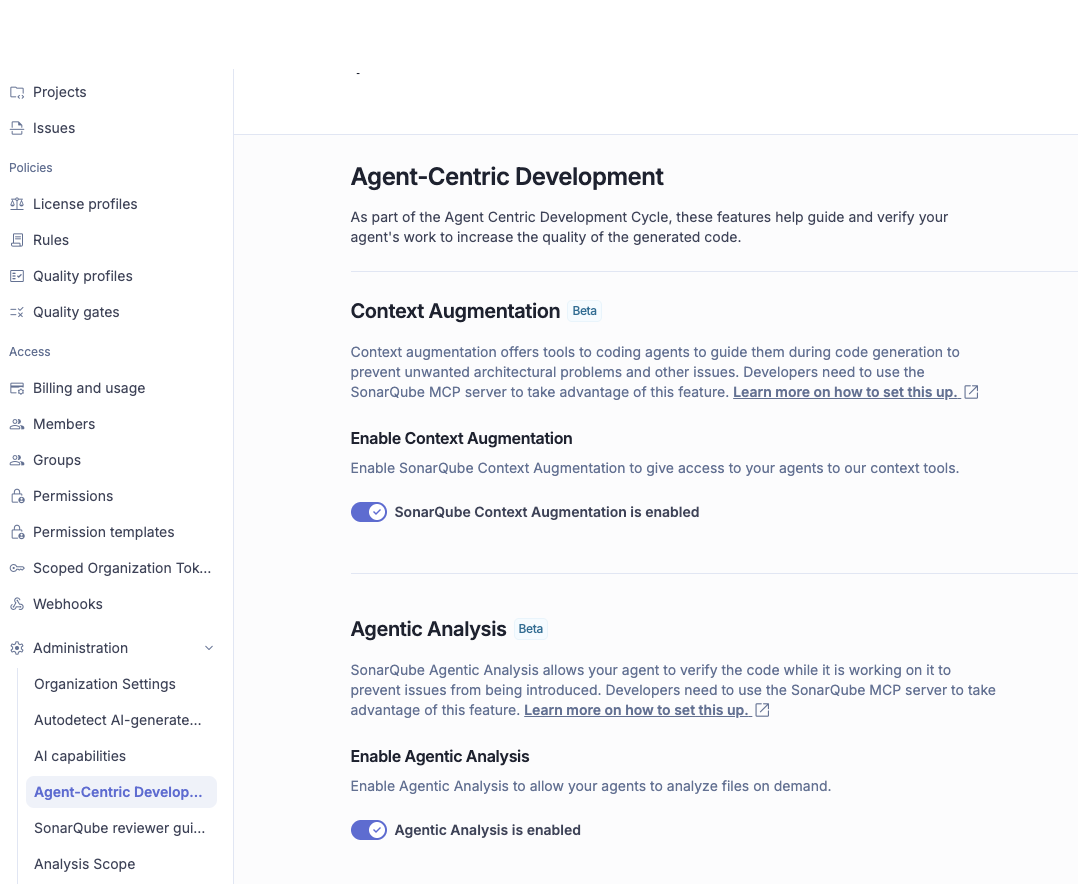
- A SonarQube Cloud project analyzed via CI pipeline (not Automatic Analysis) on a long-lived branch. Context Augmentation reads from your project's analysis history, so the project needs at least one completed analysis.
- Docker installed and running
- Codex CLI v0.118.0 or later. Install with
npm install -g @openai/codex. - A SonarQube Cloud personal access token (PAT). Generate one at My Account > Security > Generate Token. Must be a PAT. Scoped Organization Tokens (SOTs) will not work with the MCP server.
Step 1 — Project-scoped MCP config
Create .codex/config.toml in your project root:
[mcp_servers.sonarqube]
command = "docker"
args = [
  "run", "-i", "--rm", "--pull=always",
  "-e", "SONARQUBE_URL",
  "-e", "SONARQUBE_TOKEN",
  "-e", "SONARQUBE_ORG",
  "-e", "SONARQUBE_PROJECT_KEY",
  "-e", "SONARQUBE_TOOLSETS",
  "-v", "/ABSOLUTE/PATH/TO/YOUR/PROJECT:/app/mcp-workspace:rw",
  "mcp/sonarqube"
]

[mcp_servers.sonarqube.env]
SONARQUBE_URL = "https://sonarcloud.io"
SONARQUBE_ORG = "<YourOrganizationKey>"
SONARQUBE_PROJECT_KEY = "<YourProjectKey>"
SONARQUBE_TOOLSETS = "cag"
Replace the placeholders:
<YourOrganizationKey>— your SonarQube Cloud organization key<YourProjectKey>— your SonarQube Cloud project key/ABSOLUTE/PATH/TO/YOUR/PROJECT— the full absolute path to your local clone (e.g.,/Users/yourname/projects/myapp). Relative paths cause silent failures. On Windows, use forward slashes:C:/Users/yourname/projects/myapp.
SONARQUBE_TOKEN is deliberately absent from the [mcp_servers.sonarqube.env] section. You'll export it as a shell environment variable in Step 3. Docker reads it from your host environment via the -e SONARQUBE_TOKEN flag in the args, so the token never appears in a committed file.
The file is project-scoped (.codex/config.toml), not the global ~/.codex/config.toml. The Context Augmentation docs explicitly warn against using global config for CAG because the volume mount and project key are repository-specific.
The SONARQUBE_TOOLSETS = "cag" value enables only the Context Augmentation tools. To also enable SonarQube Agentic Analysis for post-generation verification, change the value to "cag,projects,analysis". The SonarQube docs provide the CAG config in JSON format; the TOML above is a verified translation from the Context Augmentation docs page.
Step 2 — Automatic Guide phase behavior
Create AGENTS.md in your project root (not inside .codex/):
# SonarQube Agentic Workflow - Usage Directive (MUST FOLLOW)

## GUIDE Phase - Before Generating Code
1. Call `get_guidelines` for project context and coding standards
2. Locate existing code with `search_by_signature_patterns` or `search_by_body_patterns`
3. Read implementation with `get_source_code`

When changing architecture or dependencies:
- Check `get_current_architecture` and `get_intended_architecture`
- Analyze impact using:
  - `get_upstream_call_flow` / `get_downstream_call_flow` - trace method calls
  - `get_references` - find all usages
  - `get_type_hierarchy` - check inheritance

## VERIFY Phase - After Generating Code
1. Read Phase: Load current state of relevant source files
2. Analysis Phase: Call `run_advanced_code_analysis` with:
   - filePath: Project-relative path
   - branchName: Active development branch
   - fileScope: ["MAIN"] or ["TEST"]
3. Evaluation & Remediation:
   - Call `show_rule` for every issue
   - Mandatory fix CRITICAL or HIGH severity issues
4. Verification: Re-run analysis after fixes
Note: The VERIFY phase calls run_advanced_code_analysis, which requires SONARQUBE_TOOLSETS to include projects,analysis (see Next steps). If you're using the cag-only config from Step 1, the VERIFY phase instructions will be present in your directive but the tool won't be available until you update the toolset value. The Guide phase, pre-generation context loading, works fully with cag alone.
This directive is what makes get_guidelines fire before every coding task. Without it, Codex may skip the Guide phase (pre-generation step) entirely. The directive content is identical across agents. Claude Code reads it from CLAUDE.md, Gemini from GEMINI.md, Cursor from .cursor/rules/. Codex reads AGENTS.md.
The file goes in the project root so it travels with the repo. Every contributor who uses Codex on this project gets the same behavior.
Step 3 — Working MCP connection
Export your token and launch Codex:
export SONARQUBE_TOKEN="<your-personal-access-token>"
cd /path/to/your/project
codex
For persistent token storage, add the export to your shell profile (.zshrc, .bashrc) or use a tool like direnv with a gitignored .envrc file. Launch Codex from the same terminal session where the variable is set. If you open Codex from a different terminal window, SONARQUBE_TOKEN won't be available and the MCP server will fail to authenticate silently.
Once Codex starts, verify the connection by typing /mcp in the Codex prompt. You should see the sonarqube server as connected with these tools listed:
get_guidelinessearch_by_signature_patternssearch_by_body_patternsget_upstream_call_flowget_downstream_call_flowget_source_codeget_type_hierarchyget_referencesget_current_architectureget_intended_architecture
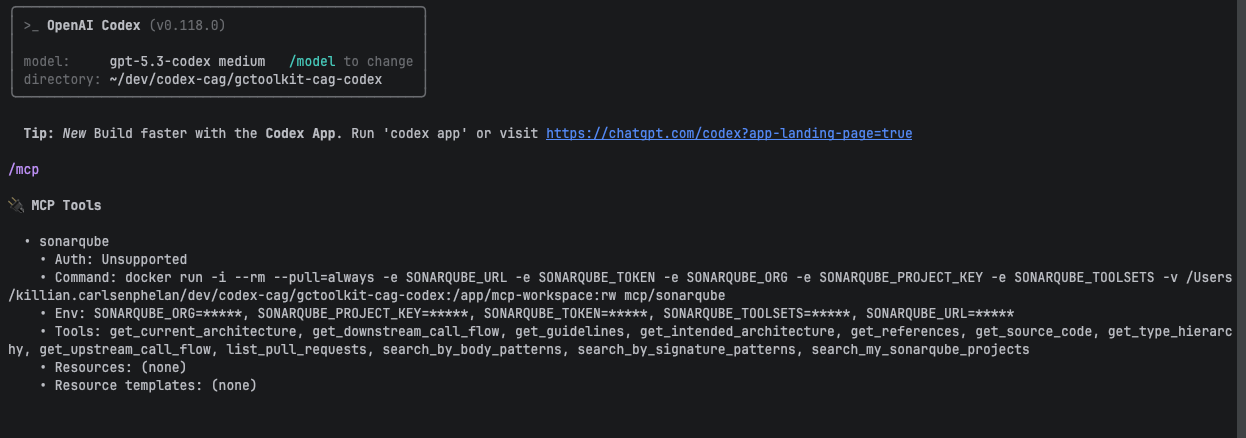
Unlike Claude Code (which requires ENABLE_TOOL_SEARCH=false to load MCP tools eagerly), Codex loads them eagerly by default. No additional configuration needed.
If the tools don't appear:
- No CAG tools at all, only
search_my_sonarqube_projectsandlist_pull_requests? In our testing, this indicates Context Augmentation isn't enabled for your organization. An org admin needs to enable it in SonarQube Cloud settings. - Only
search_my_sonarqube_projectsandrun_advanced_code_analysisvisible? The Docker image is outdated. Rundocker pull mcp/sonarqubeand restart Codex. - Only
get_guidelinesvisible with "Name does not resolve" errors? Check thatSONARQUBE_URLis set tohttps://sonarcloud.io(orhttps://sonarqube.usfor US region).
Step 4 — Working guidelines call
Give Codex a coding task against your project. Any task that involves editing code should trigger the Guide phase. Look for a get_guidelines tool call in the output before Codex edits any files.
The Context Augmentation docs also recommend two quick checks. Run each in a fresh Codex session:
What is Guide and Verify?
Codex should describe the two-phase SonarQube workflow: Guide feeds context before code generation, Verify validates quality after.
- What is the current architecture of the project?
Codex should call get_current_architecture and return your project's current architecture. For a Java project, expect a response describing modules and their component relationships.
If any test fails, check that AGENTS.md is in the project root (not inside .codex/) and that you restarted Codex after creating it.
Example: GCToolKit error handling task
We prompted Codex against Microsoft's GCToolKit, a multi-module Java project for analyzing GC logs:
- Fix the error handling issues in GCLogFileSegment.java
Before editing any files, Codex called get_guidelines automatically, loading the project's coding guidelines before writing a single line of code:
Called sonarqube.get_guidelines({"mode":"project_based"})

### Rules

1. Java: Constant names should comply with a naming convention
2. Java: Resources should be closed
3. Java: String literals should not be duplicated
4. Java: Switch cases should end with an unconditional "break" statement
5. Java: Methods should not be empty
6. Java: Methods and field names should not be the same or differ only by capitalization
7. Java: Child class fields should not shadow parent class fields
8. Java: Short-circuit logic should be used in boolean contexts
9. Java: TestCases should contain tests
10. Java: Sections of code should not be commented out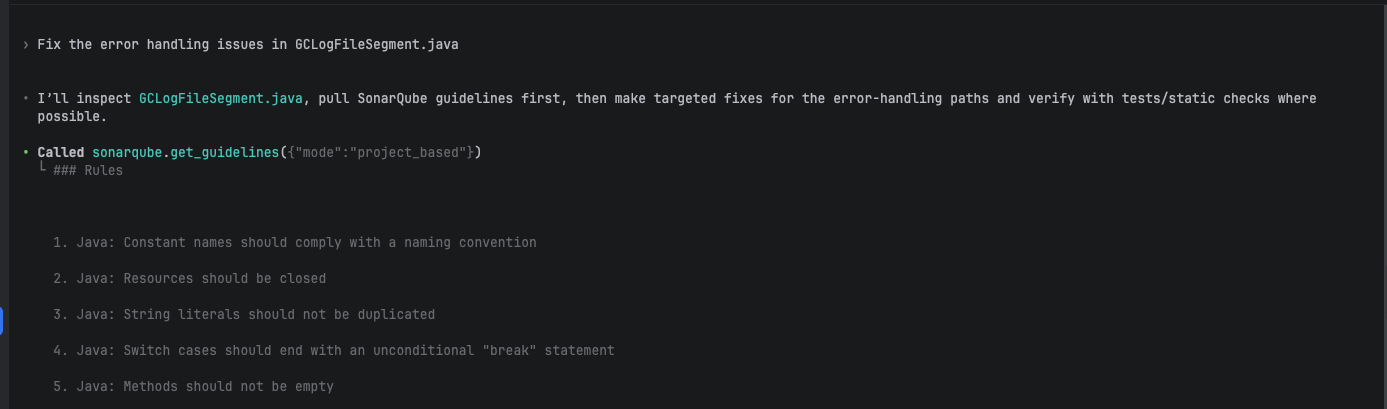
Codex didn't stop at guidelines. Following the AGENTS.md directive, it ran the full Guide phase: get_guidelines to load the project's coding guidelines, then search_by_signature_patterns to resolve the class structure, then get_source_code to read the implementation before making any changes.
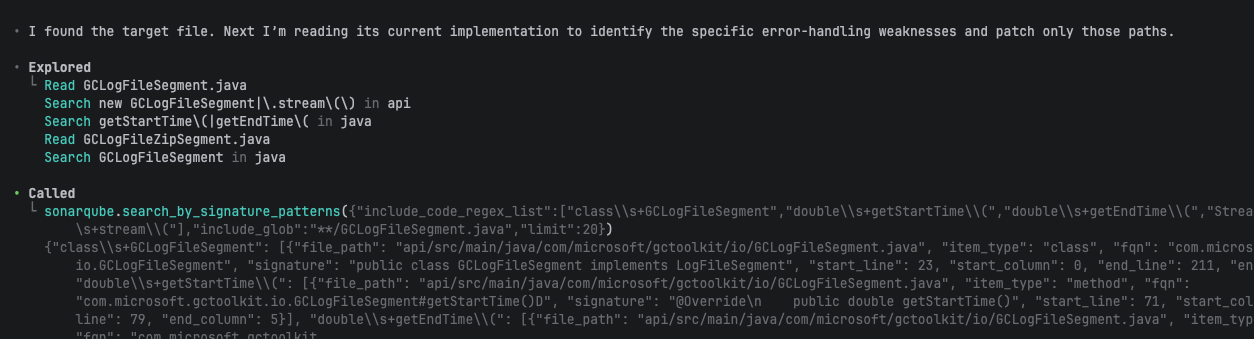
With that context loaded, Codex applied five targeted fixes to GCLogFileSegment.java:
- Removed
NullPointerException-based control flow ingetStartTime()andgetEndTime() stream()returnsStream.empty()instead of printing stack traces and returning null- Try-with-resources for
RandomAccessFileintail() - Try-with-resources in
ageOfJVMAtLogStart() - Simplified comparators after filtering guarantees valid timestamps
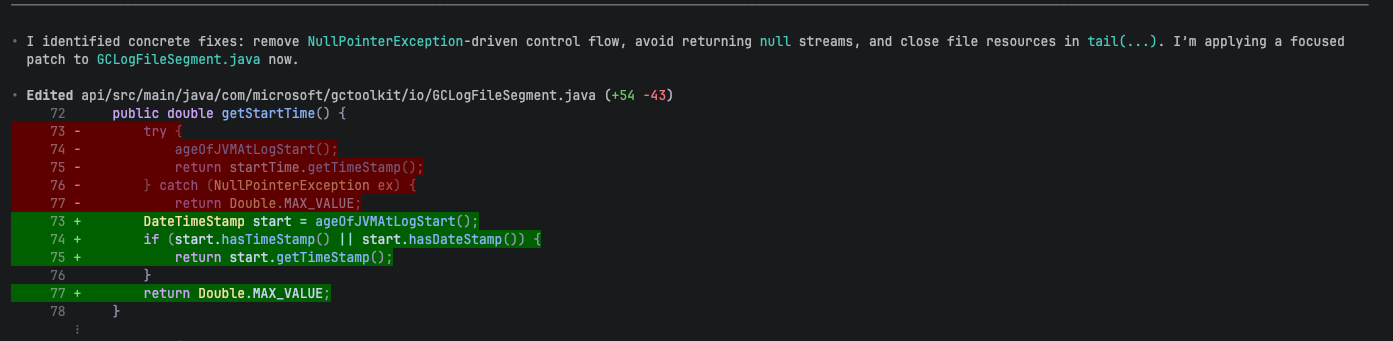
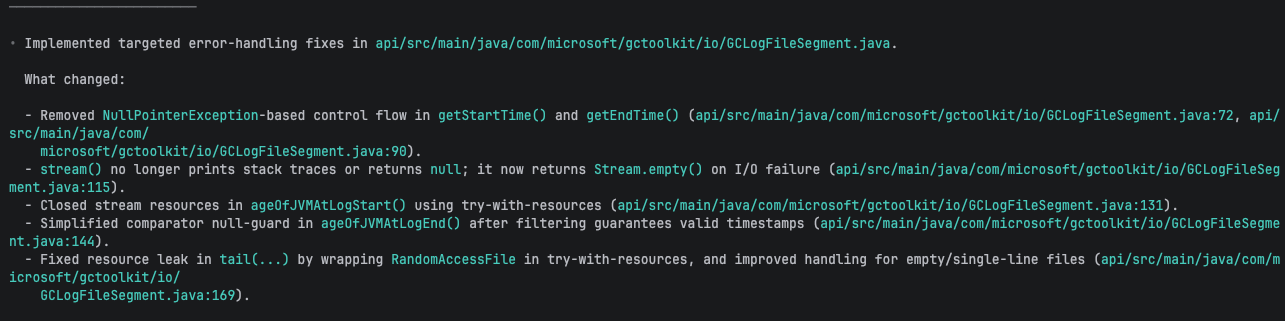
Codex used project_based mode here. The combined mode tailors guidelines to the prompt's categories, but both work.
Architecture tools (Java)
Once the core setup is working, the architecture tools become available for Java projects. The agent can map module dependencies, trace call flows, search code semantically, and walk type hierarchies, all derived from your project's SonarQube analysis. C#, Python, JavaScript, and TypeScript have partial support.
Module architecture
Ask Codex about your project's architecture:
- What is the current architecture of this project?
In our demo, Codex probed all five ecosystems in parallel (java, js, ts, py, cs) to discover what was available. Only Java returned data; the rest returned "Ecosystem 'X' not loaded. Available: java". The result was a five-module hub-and-spoke architecture centered on gctoolkit-api:
gctoolkit-api          (core, no outbound dependencies)
gctoolkit-integration  → depends on gctoolkit-api
gctoolkit-parser       → depends on gctoolkit-api
gctoolkit-sample       → depends on gctoolkit-api
gctoolkit-vertx        → depends on gctoolkit-api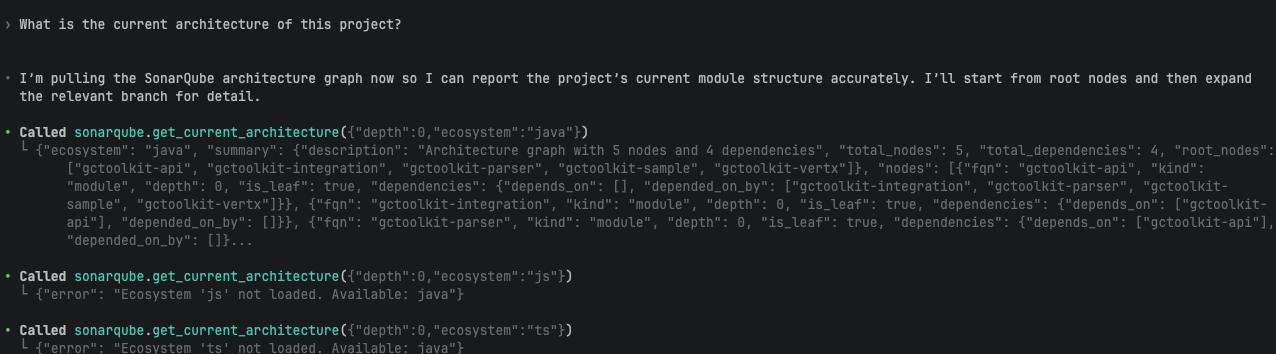
This is the current architecture, auto-derived from your analyzed code. For the intended architecture (which module dependencies are allowed and which are forbidden), a tech lead configures intended architecture in the SonarQube Cloud UI under Project Settings > Architecture. The demo project didn't have intended architecture configured, which is typical for projects that haven't adopted architecture management yet.
Call flow tracing
The architecture tools compose. We prompted:
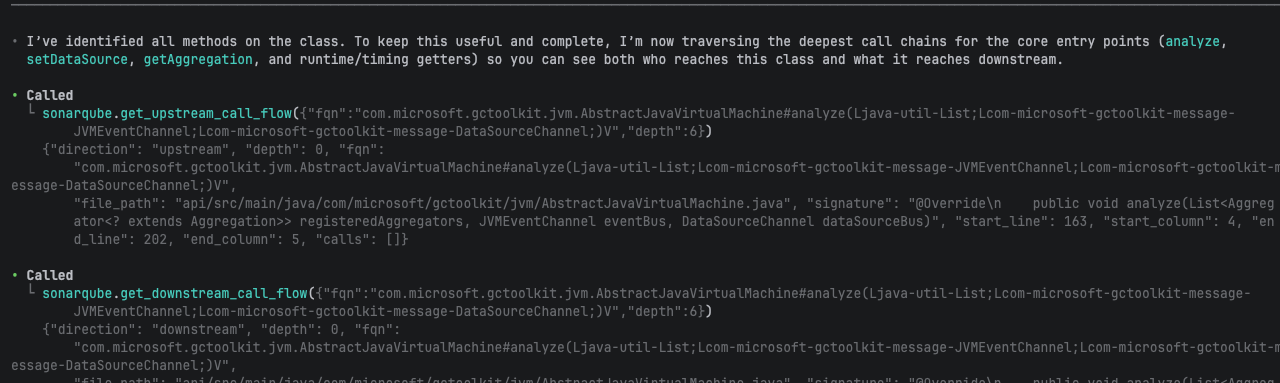
- Show me what calls AbstractJavaVirtualMachine and what it calls downstream. I want to understand the full call chain
Codex orchestrated seven architecture tools in a single session: search_by_signature_patterns to resolve the class, get_references and get_type_hierarchy for coupling and inheritance, get_source_code to read the implementation, get_upstream_call_flow and get_downstream_call_flow at depth 6, and search_by_body_patterns to find interface call sites. The result was a complete map from Main.main() through GCToolKit.analyze() to AbstractJavaVirtualMachine.analyze() and its downstream dispatch into Diary, Aggregator, and EventSource.
The interesting moment: get_upstream_call_flow returned empty for analyze() because it's called via the JavaVirtualMachine interface, not the abstract class directly. Codex worked around this by using get_references on the interface and search_by_body_patterns to find the actual .analyze( call sites. The tools don't handle interface dispatch automatically, but they give the agent enough information to resolve it.
Code search
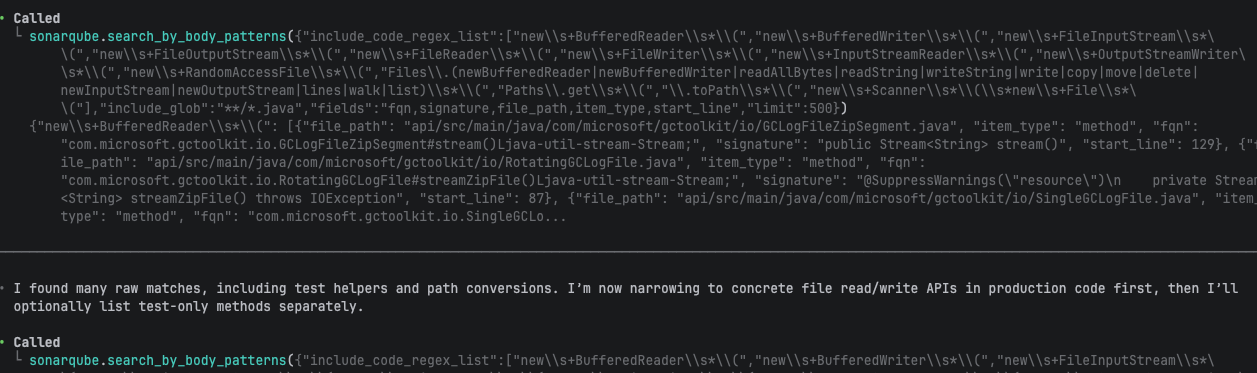
The search_by_body_patterns and search_by_signature_patterns tools provide regex-based search over your project's analyzed code graph. Unlike text-based grep, these return structured results with FQNs, file paths, and line numbers.
Find all the methods in the project that handle file I/O operations, such as those using BufferedReader, FileInputStream, etc
Codex constructed regex patterns covering 13+ I/O APIs and found 14 production methods across 7 files. It split the search by **/src/main/** versus **/src/test/** to separate production code from test helpers.
What to know
- Only Personal Access Tokens (PATs) work. Scoped Organization Tokens (SOTs) fail silently and the MCP server connects but returns empty results.
- Volume mount path must be absolute. Relative paths (like
./) cause the MCP server to start without errors but return empty architecture results. This is the most common setup issue. get_guidelinesworks for all languages. Seven of the nine architecture tools (call flow, semantic search, type hierarchy, references, source code) are Java only as of the time of writing.get_current_architectureandget_intended_architecturehave partial support for C#, Python, JavaScript, and TypeScript, with module-level graphs but no method-level navigation.- The
AGENTS.mddirective triggersget_guidelinesat the start of every session, even read-only exploration tasks like architecture queries. The directive doesn't distinguish coding from exploration, and this is expected behavior. - Intended architecture requires manual setup.
get_intended_architecturereturns nothing unless a tech lead has configured intended architecture in SonarQube Cloud. Without it, no deviation issues are raised. - To enable
run_advanced_code_analysisfor the Verify phase, setSONARQUBE_TOOLSETS = "cag,projects,analysis". The"cag"value enables only the Guide phase tools.
Next steps
- Run your CI pipeline to analyze the agent's changes through SonarQube Cloud and confirm they pass the quality gate. Context Augmentation improves what the agent generates, but the quality gate is the final verification.
- Enable Agentic Analysis by setting
SONARQUBE_TOOLSETS = "cag,projects,analysis". This adds the Verify phase: after generating code, the agent can runrun_advanced_code_analysisto check its own output before you commit. See the Agentic Analysis docs. - Read the full Context Augmentation documentation for advanced configuration, tool reference, and architecture feature details: Sonar Context Augmentation docs
- Try the same setup with Claude Code. The companion article covers the equivalent workflow with JSON config and
CLAUDE.md: Get started with Sonar Context Augmentation and Claude Code
