
TLDR Overview
- The SonarQube Remediation Agent is an AI-powered tool that automatically fixes existing maintainability, security, and reliability issues on a project's main branch by generating validated pull requests.
- Users can initiate backlog fixes by selecting eligible issues from the SonarQube Cloud Issues page and clicking "Assign to Agent" to trigger the automated resolution process.
- The agent utilizes a sandbox analysis loop to verify each fix, ensuring it resolves the original violation without introducing new issues before delivering a PR to GitHub.
- This workflow currently supports Java, JavaScript, TypeScript, and Python, providing a clear audit trail and independent PRs for each issue to streamline technical debt cleanup.
Overview
The SonarQube Remediation Agent (currently in beta) fixes existing code issues on your main branch. No checking out old code, no context-switching into files you haven't touched in months. You select issues from the SonarQube Cloud Issues page, click Assign to Agent, and the agent delivers validated fix PRs targeting main on GitHub.
This blueprint covers the backlog fixing workflow only. It assumes you've already completed the companion blueprint, Fix pull request issues with the SonarQube Remediation Agent, which walks through installing the GitHub App and enabling the agent.
When to use this
Issues on the main branch accumulate because fixing them means triaging old violations and reading into unfamiliar code, then verifying each change doesn't break anything. The backlog grows. Use this workflow when you want to batch-fix maintainability, security, and reliability issues that have been sitting on main and turn backlog cleanup into a review-and-merge task.
What you'll achieve
- Existing issues on your main branch assigned to the Remediation Agent directly from the SonarQube Cloud Issues page
- Validated fix PRs targeting main, each generated and verified by the agent's sandbox analysis loop before reaching you
- A clear audit trail on the Agent activity page: every session logged with its outcome and timestamp
Architecture
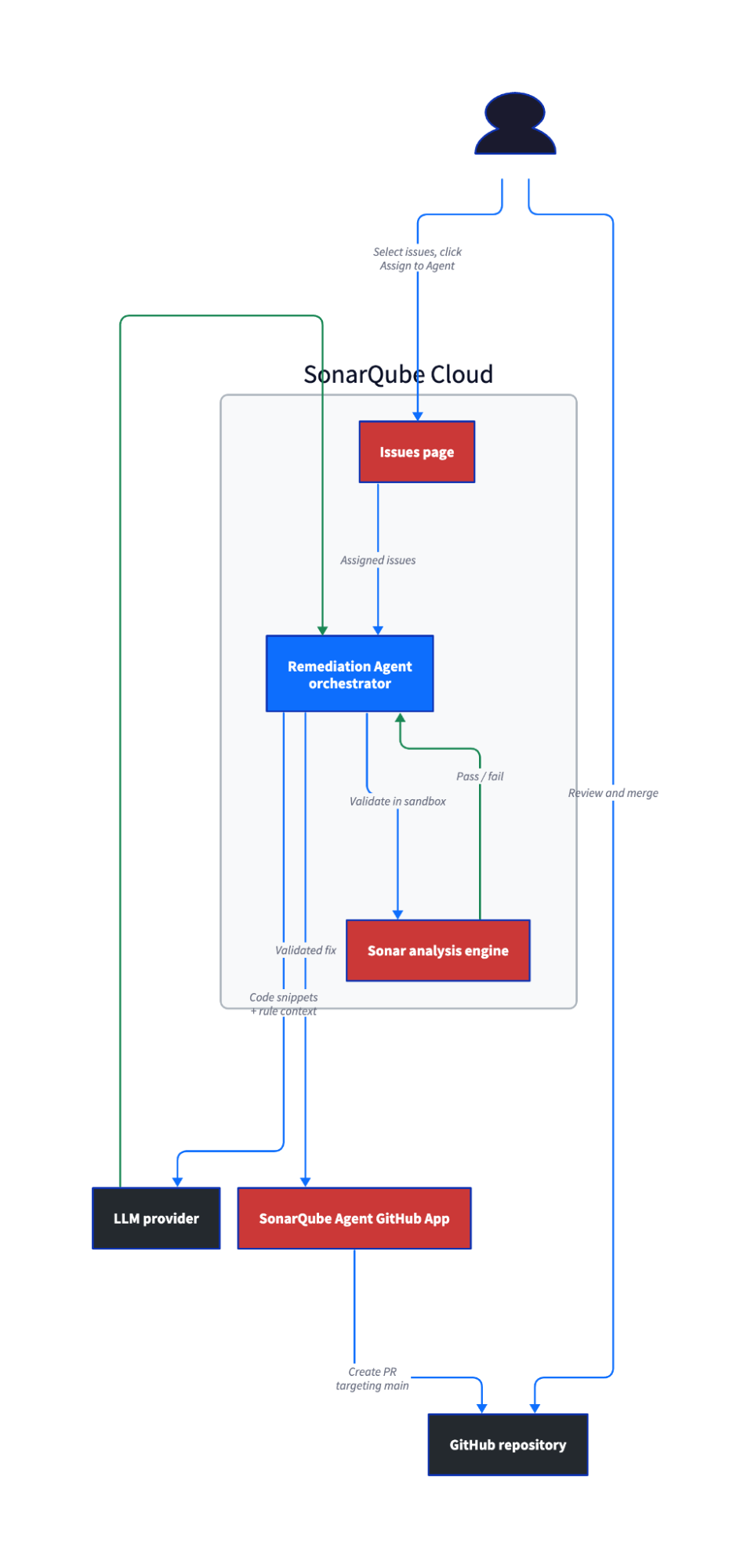
The validation loop works the same way as the PR workflow: the agent generates a fix and applies it in a sandbox, where Sonar's analysis engine re-scans the patched code. Fixes that introduce new issues or fail to resolve the original one get discarded. Only validated fixes reach you as PRs.
One difference from the PR workflow: backlog fixes produce one PR per issue, each targeting the main branch. The PR workflow bundles fixes into a single PR targeting your feature branch. This means you review and merge each fix independently.
Prerequisites
- Companion blueprint completed: the SonarQube Agent GitHub App is installed, and backlog fixes are enabled in Administration > AI capabilities > AI agent
- A SonarQube Cloud project on a Team (annual) or Enterprise plan — see plans and pricing
- Existing issues on the main branch in a supported language (Java, JavaScript, TypeScript, or Python) or matching a secrets detection rule
- A GitHub repository connected to SonarQube Cloud with automatic analysis or CI-based analysis configured
Step 1 — Issues identified on the main branch
Open your project in SonarQube Cloud and click Issues in the left navigation. Confirm the branch selector at the top shows your default branch (typically main).
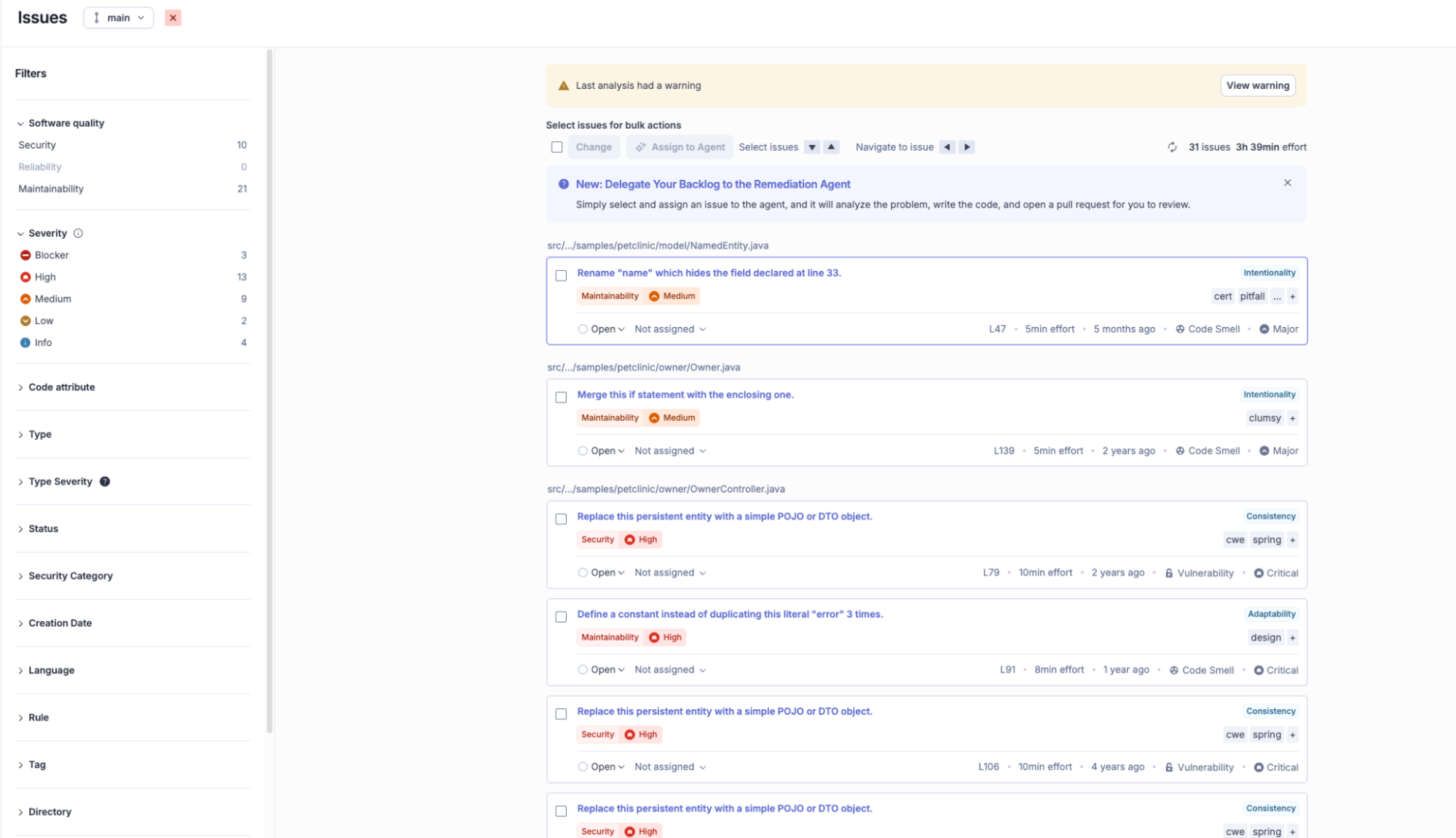
The Issues page lists every open issue on the branch, grouped by software quality and severity. Browse the list, as these are the backlog items you want the agent to work through.
Step 2 — Issues assigned to the agent
Use the checkboxes next to individual issues to select the ones you want the agent to fix. The Assign to Agent button in the toolbar above the issue list activates once at least one eligible issue is selected.
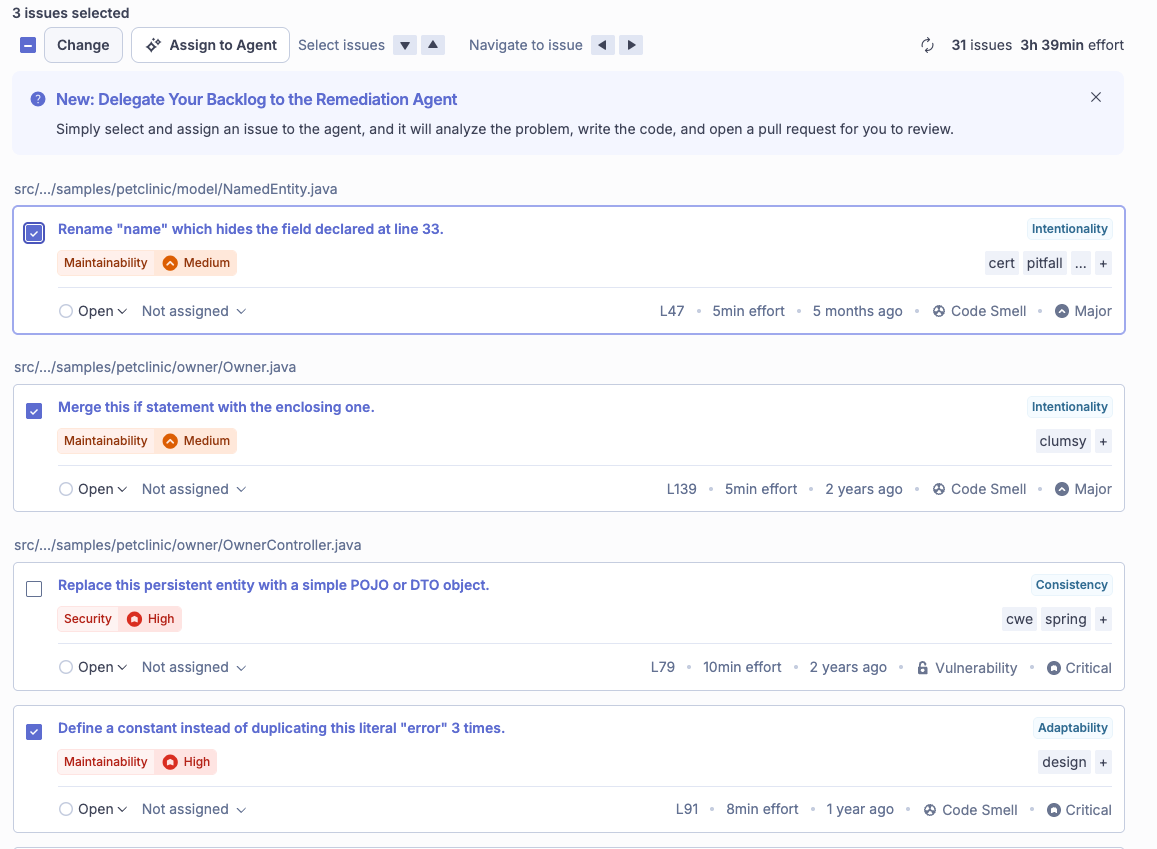
Eligibility depends on language and rule support. Java, JavaScript, TypeScript, Python, and Secrets rules are supported, but certain rules per language are excluded (the full exclusion list is in the Remediation Agent documentation). If you select a mix of eligible and ineligible issues, a warning appears after clicking the button; only the eligible issues proceed.
Click Assign to Agent. A notification confirms the issues have been submitted and shows an estimated completion time.
That's your only action. Everything from here until the fix PRs arrive is automatic.
Step 3 — Agent activity monitored
Navigate to the Agent activity page for the project. An entry for your backlog fix session appears with:
- Status: In progress (then Completed once fixes are generated)
- Duration: Time spent on fix generation
- Submission timestamp: When you clicked "Assign to Agent"
- Source: "Backlog fixes" (distinguishing it from PR fix sessions, which show the branch name)
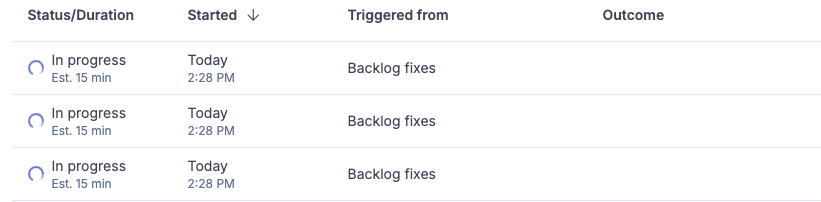
If you previously ran the PR workflow on the same project, both entry types appear on this page. The source label is how you tell them apart.
Step 4 — Fix PRs reviewed and merged
The agent creates one PR per issue, each targeting the main branch. Navigate to your GitHub repository's pull request list or click the PR link from the Agent activity page once the session completes.
Each fix PR includes:
- A "Fixed Issues" summary with expandable details for the resolved violation
- The issue key in the commit message, linking back to the corresponding issue in SonarQube Cloud
- The SonarQube Agent listed as the PR author
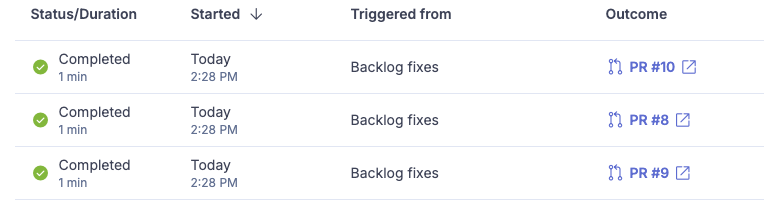
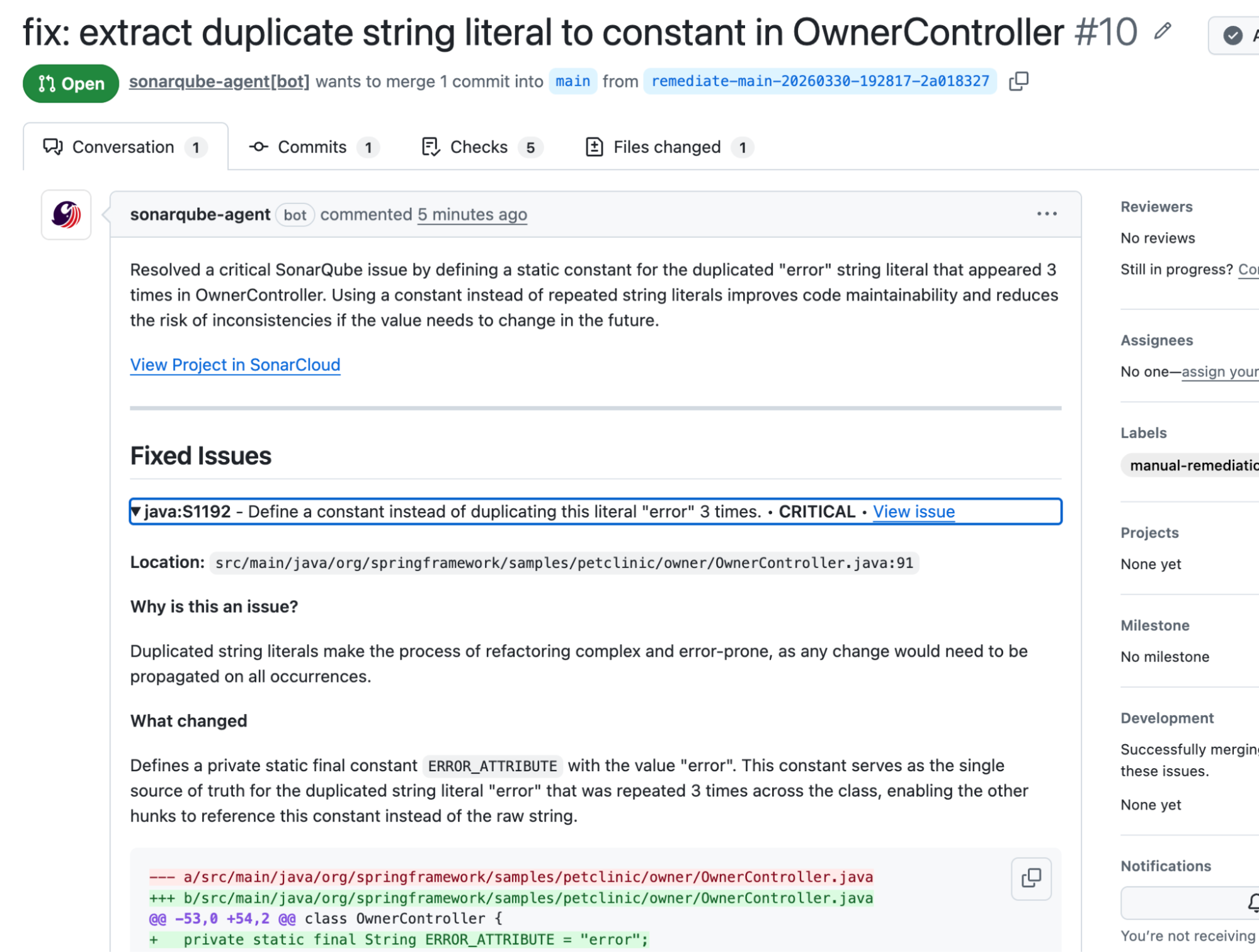
In the demo walkthrough, the agent fixed three issues on a Spring PetClinic project:
The S1192 fix is representative of what the agent produces. The original code duplicated the string "error" across three addFlashAttribute calls:
redirectAttributes.addFlashAttribute("error", "There was an error in creating the owner.");The agent extracted it to a constant and replaced all three occurrences:
private static final String ERROR_ATTRIBUTE = "error";

// Each call site updated:
redirectAttributes.addFlashAttribute(ERROR_ATTRIBUTE, "There was an error in creating the owner.");
Review each fix PR the way you would any contribution. Merge when you're satisfied.
If your repository has branch protection rules requiring reviews before merging to main, those apply to the agent's PRs too. Plan accordingly, as someone on the team needs to approve each one.
Step 5 — Fixes verified on the Issues page
After merging and waiting for SonarQube Cloud to re-analyze the main branch, return to the Issues page. The issues the agent fixed no longer appear in the list.
What to know
- One PR per issue. The backlog workflow creates a separate PR for each issue, unlike the PR workflow which bundles fixes into a single PR. With three issues, you get three PRs to review and merge independently.
- Fix PRs target main. Every backlog fix PR targets the default branch directly. This is the intended behavior as the agent is fixing issues that already exist on main, so the fix goes back to main.
- GitHub only. The Remediation Agent requires the SonarQube Agent GitHub App.
- Supported languages. Java, JavaScript, TypeScript, Python, and all secrets detection rules. Other languages are not yet supported.
- Unsupported rules. Certain rules per programming language are excluded because they are too complex for automated resolution. Issues matching these rules won't be eligible for agent assignment. The full exclusion list is in the Remediation Agent documentation.
- Beta status. The Remediation Agent is free during beta on Team (annual) and Enterprise plans.
- Data privacy. Code snippets are sent to an LLM to generate fixes. Sonar's service agreements prevent the LLM provider from using code for training, storing it, or sharing it with third parties. Sonar validates every suggestion before presenting it.
Next steps
- Fix issues in your editor: SonarQube for IDE with connected mode provides AI CodeFix for individual issue suggestions during local development.
- Configure quality gates: The SonarQube Cloud quality gates documentation covers quality gate concepts and links to configuration guides.
