






집중력을 되찾으세요
탭을 이리저리 전환하며 작업 흐름을 방해받지 마세요. AI 어시스턴트 내에서 바로 SonarQube로부터 버그, 취약점, 코드 스멜에 대한 즉각적인 답변을 받아보세요. 커밋하기 전에 코드를 분석하고, 코드 품질을 워크플로우의 자연스러운 일부로 만드세요.
에이전트 코드 보증
AI 에이전트가 신뢰할 수 있는 SonarQube 분석을 활용하여 AI 코드를 검토하고 AI 네이티브 IDE 내에서 높은 기준을 유지할 수 있도록 지원합니다.

AI는 코드 작성 속도를 높여주지만, 새로운 병목 현상인 ‘검증’ 문제를 야기합니다. 코드 작성으로 절약된 시간은 느리고 수동적인 검증 프로세스로 인해 낭비되어, AI 도구의 ROI를 제한합니다.
중요한 코드 인텔리전스에 접근하려면 대화형 워크플로를 벗어나야 합니다. 이러한 끊임없는 컨텍스트 전환은 개발자의 집중력을 방해하고 AI가 제공해야 할 원활한 경험을 저해합니다.
팀이 새로운 AI 도구를 도입함에 따라, 플랫폼 엔지니어들은 취약하고 일회성인 통합으로 이루어진 불안정한 생태계를 구축하고 유지 관리해야 하는 부담을 안게 됩니다. 이러한 맞춤형 작업은 비효율적이고 비용이 많이 들며 확장성이 없습니다.
코드 검증이 사후 고려사항이 되면, AI가 생성한 코드에 버그, 취약점 및 기술적 부채가 발생하기 쉽습니다. 이는 용납할 수 없는 비즈니스 위험을 초래하고 품질 및 보안 표준을 훼손합니다.
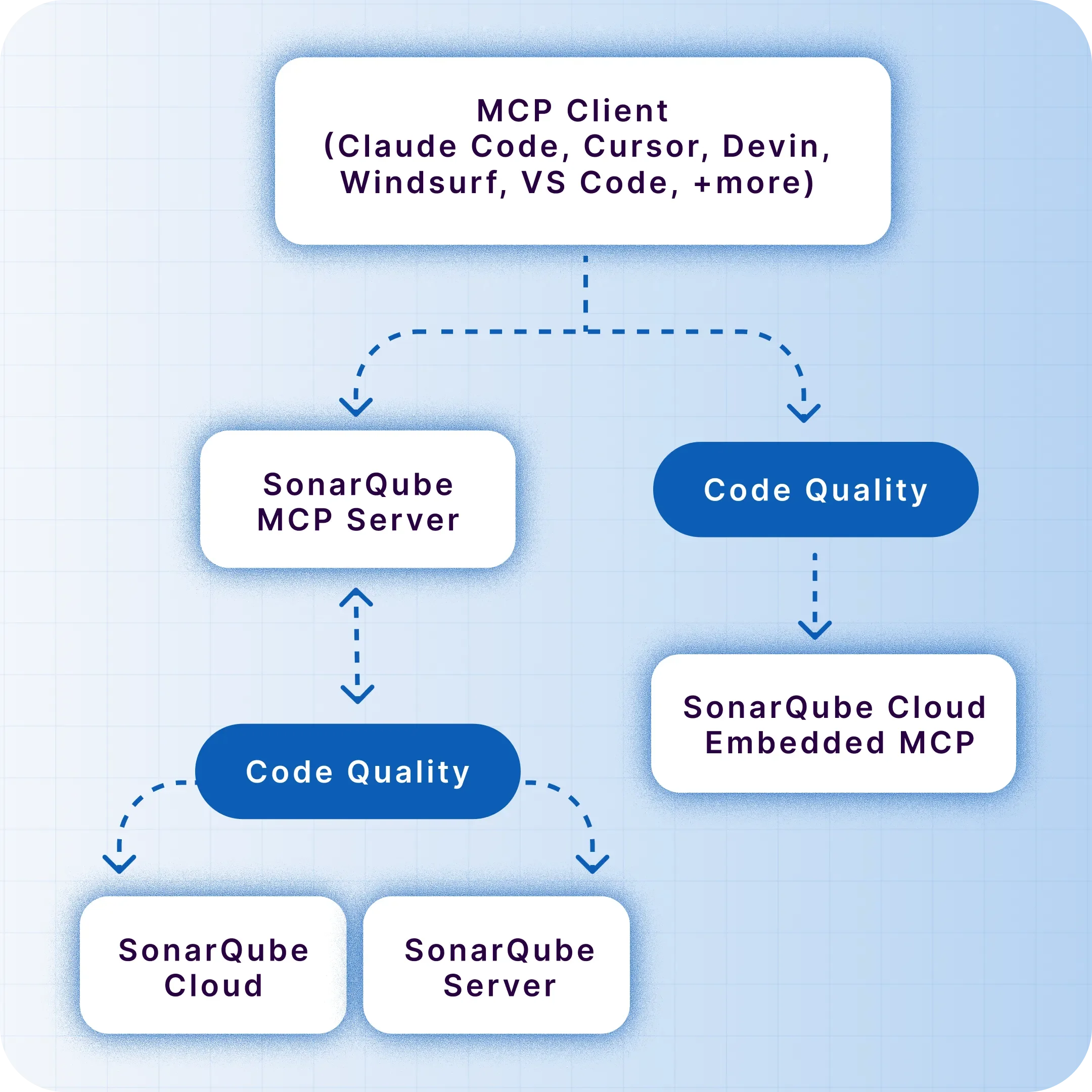
SonarQube MCP 서버는 SonarQube의 정적 분석 기능을 AI 워크플로우에 통합합니다. SonarQube Cloud용 네이티브 MCP 채널은 AI 도구를 신뢰할 수 있는 코드 인텔리전스에 연결하는, 별도의 노력 없이 바로 사용할 수 있는 방법을 제공합니다. SonarQube Server 사용자나 로컬 개발 환경의 경우, 자체 관리형 Docker 기반 채널도 이용 가능합니다.

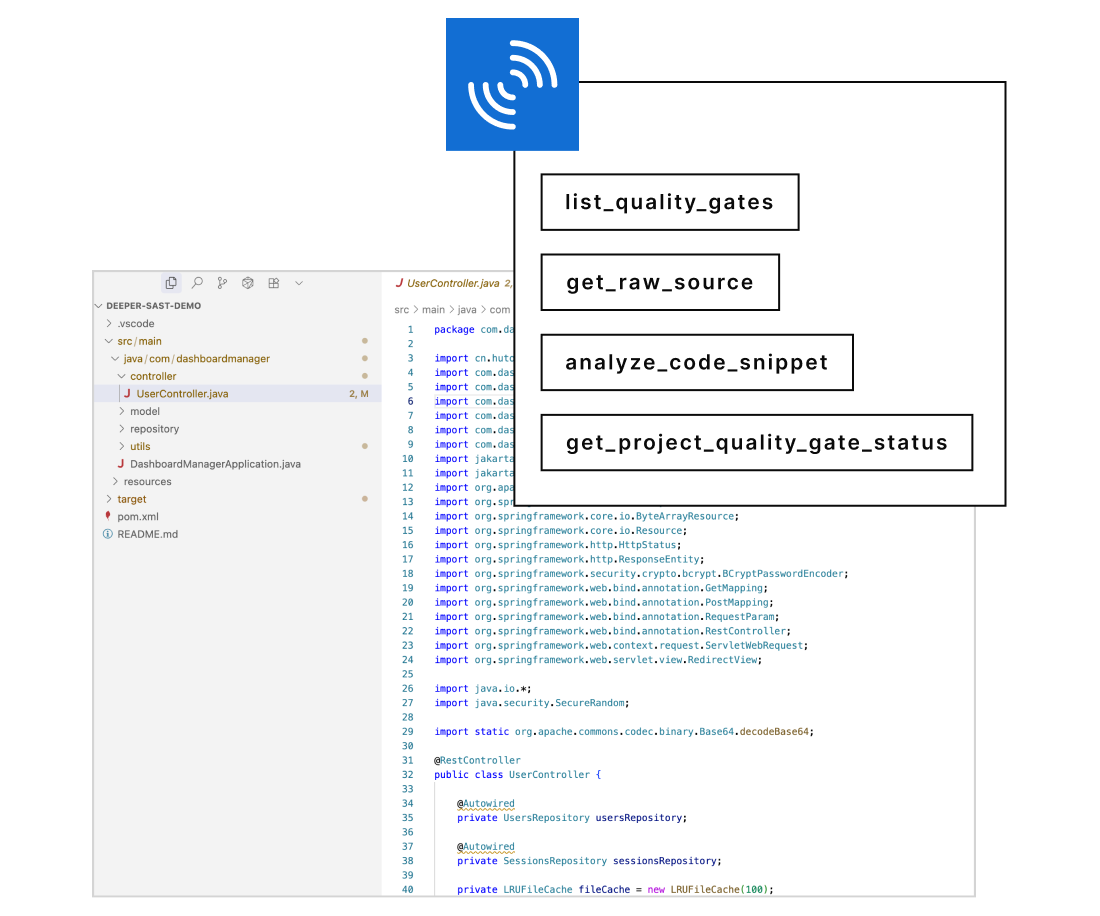
간단한 자연어 질문 하나로 프로젝트의 품질 게이트 상태를 확인하거나, SonarQube Advanced Security를 통해 프로젝트 내 종속성 위험을 검색하거나, 새로운 코드 스니펫을 분석해 보세요.
에디터와 SonarQube UI 사이를 오가야 하는 번거로움을 없애세요. 집중력을 유지하고 생산성을 높이세요.
단순한 분석을 넘어섭니다. AI 어시스턴트에서 직접 이슈 상태를 업데이트하거나 오탐을 표시하여, 인사이트를 즉시 실행으로 전환하세요.
이제 사용자는 AI 도구를 SonarQube에 연결하는 두 가지 방법 중 하나를 선택할 수 있습니다:
워크스테이션에서 Docker 컨테이너를 실행하여 IDE와 SonarQube를 연결합니다.
로컬 소프트웨어 설치 없이 중앙 집중식 액세스를 위해 SonarQube Cloud의 내장 엔드포인트를 사용합니다.

개발자가 AI 에이전트에게 코드 품질이나 보안에 대해 평이한 영어로 질문합니다. 예시 쿼리: “이 파일에 새로운 취약점이 있나요?”

MCP 서버는 요청을 SonarQube 인스턴스(Cloud 또는 Server)용 정확한 쿼리로 변환하며, search_sonar_issues_in_projects와 같이 사용해야 할 적절한 도구를 식별합니다.

AI 에이전트는 SonarQube로부터 데이터를 수신하여 개발자의 에디터 내에서 직접 명확하고 실행 가능한 답변을 제시함으로써, 원활하고 실시간적인 대화를 완성합니다.
탭을 이리저리 전환하며 작업 흐름을 방해받지 마세요. AI 어시스턴트 내에서 바로 SonarQube로부터 버그, 취약점, 코드 스멜에 대한 즉각적인 답변을 받아보세요. 커밋하기 전에 코드를 분석하고, 코드 품질을 워크플로우의 자연스러운 일부로 만드세요.
"Using Amazon Q Developer with the Sonarqube MCP server integration, developers can receive real-time security and code quality feedback directly within their IDE while preserving the immersive 'vibe coding' experience. They maintain productivity and ensure best practices."
Patrick Madec, Sr. Solutions Architect
SonarQube MCP 채널은 SonarQube Cloud용 네이티브 관리형 서비스 또는 SonarQube Server용 소스 공개 Docker 컨테이너 형태로 제공됩니다. 귀사의 환경에 적합한 배포 방식을 선택하고 지금 바로 품질 검증 자동화를 시작하세요.
4.6 / 5
The MCP Server is a centralized service that connects code analysis and developer tools so teams can consistently enforce standards, automate checks, and improve code quality across repositories. Teams get a single source of truth for code health, enabling faster remediation, standardized workflows, and reliable gates that improve release confidence.
If you are using SonarQube Cloud, no. You can connect to our managed, native MCP endpoint with zero installation. Docker is only required if you are using SonarQube Server or prefer a local-only development setup.
The MCP Server can act as a hub that complements SonarQube by coordinating analysis triggers and aggregating insights from multiple projects. It helps standardize policy enforcement so SonarQube conditions become part of your CI checks, keeping quality at the source and ensuring new code quality gates are applied consistently.
With SonarQube Cloud, the MCP Server can align cloud-based project analysis, ensuring unified governance and reporting. For developers, pairing MCP Server with SonarQube for IDE brings issues into the editor so they can fix problems before commit, strengthening quality at the source and reducing pipeline churn.
On Community Build, teams typically focus on core analysis workflows and baseline governance. The MCP Server can help standardize the basics—consistent rule usage, automated checks in CI, and streamlined reporting—so you achieve strong fundamentals for quality code without adding unnecessary complexity.
Commercial editions unlock advanced features like branch analysis, PR decoration, and enterprise governance. In those setups, the MCP Server can orchestrate broader policy management across multiple projects and repos, enhance PR workflows, and provide richer auditing—useful for larger organizations seeking robust quality at the source practices.
The MCP Server helps implement a focus on new code by making quality gates part of everyday development—on branches, pull requests, and pre-merge checks. By catching issues early, it encourages developers to keep changes small and fix problems in context, leading to better quality code with less rework.
Quality at the source is reinforced when developers see actionable feedback in the editor and CI feedback loops. The MCP Server makes those loops consistent across teams and repos, so standards don’t drift and code quality improves steadily with each change.
Yes, it’s designed to orchestrate checks across varied CI/CD platforms and many repositories, ensuring consistent enforcement and results. This is especially valuable in polyglot, multi-repo environments where maintaining unified standards can be challenging.
The MCP Server ensures that rules, gates, and reporting are applied uniformly, enabling efficient scaling without sacrificing developer velocity or code quality.
Developers benefit from immediate, in-editor feedback via SonarQube for IDE, allowing them to fix issues before committing. The MCP Server ensures those same standards are enforced in CI, creating a seamless loop where local fixes translate into passing builds and high new code quality.
This approach minimizes context switching and reduces surprise failures later in the pipeline. Developers spend less time chasing build breaks and more time writing quality code, with consistent feedback from the editor to the pull request.
By centralizing policies, the MCP Server makes it easier to enforce consistent security rules. This unified approach supports audit readiness and helps teams demonstrate adherence to internal and external standards.
Automated gates and standardized reporting reduce manual steps that can be error-prone. As a result, security and compliance become integral to the development flow, not an afterthought—improving both speed and rigor.
The MCP Server integrates quality checks into pull requests so reviewers see actionable findings before merge. This enables reviewers to focus on architecture and design decisions, while automated checks flag code smells, bugs, and vulnerabilities aligned to your policies.
Consistent, automated gates also reduce review friction—contributors know what’s required for approval, and reviewers trust that baseline quality signals are accurate. The net effect is faster, clearer decisions and higher-confidence merges.
The MCP Server coordinates analysis across multiple languages and toolchains by standardizing triggers, rules, and reporting, which is particularly helpful in monorepos. It ensures consistent gates regardless of language, keeping quality at the source across the entire codebase.
For hybrid environments, the MCP Server helps align on-prem SonarQube and SonarQube Cloud projects under a common governance layer. This harmonization enables unified visibility and policy enforcement, whether code is analyzed locally, in the cloud, or both.