高级静态应用安全测试

发现其他SAST工具遗漏的漏洞

Sonar的高级SAST不仅分析代码,更深入解析第三方库的行为,在漏洞进入生产环境前揭示深藏的安全风险。

深入探索高级SAST

SonarQube高级安全版内置的先进SAST功能,助力企业识别并解决源于第三方开源库交互的应用程序代码问题。这项独特功能使Sonar的SAST能够追踪库内数据流向,有效发现其他工具无法检测的深层安全漏洞。

高级SAST强化了原有SAST引擎,该引擎已涵盖深度污点分析、全面安全规则、云密钥检测等功能。如今凭借这项创新技术,SonarQube Server和SonarQube Cloud商业版可全面洞察主流库的内部运作机制,实现无与伦比的代码分析能力。

借助 Sonar 的高级 SAST,企业能够从容应对代码安全挑战,实现强健的应用程序安全性,并享受可靠且加固的代码库带来的优势。

立即体验 SonarQube 高级 SAST
Image
代码安全

高级 SAST 优势

Icon

发现深度隐藏的安全问题

99% 的软件应用程序使用并交互第三方库(依赖项)中的代码。当前多数SAST工具仅分析应用程序代码,而对库代码(对这些工具而言基本是黑箱)视而不见。Sonar的高级SAST将代码分析与扫描范围扩展至开源依赖项中的未知代码区域。通过扫描依赖项(库文件),Sonar SAST得以扩展数据流分析能力,发现其他工具无法察觉的深层隐藏安全隐患。高级SAST功能现已登陆SonarQube Server及SonarQube Cloud平台,支持Java、C#及JavaScript/TypeScript语言。该功能覆盖数千个顶级常用开源库及其后续(传递性)依赖项,具备自动扩展能力,未来将逐步支持更多语言与库。通过机器学习(ML)技术实现性能优化。

安全分析

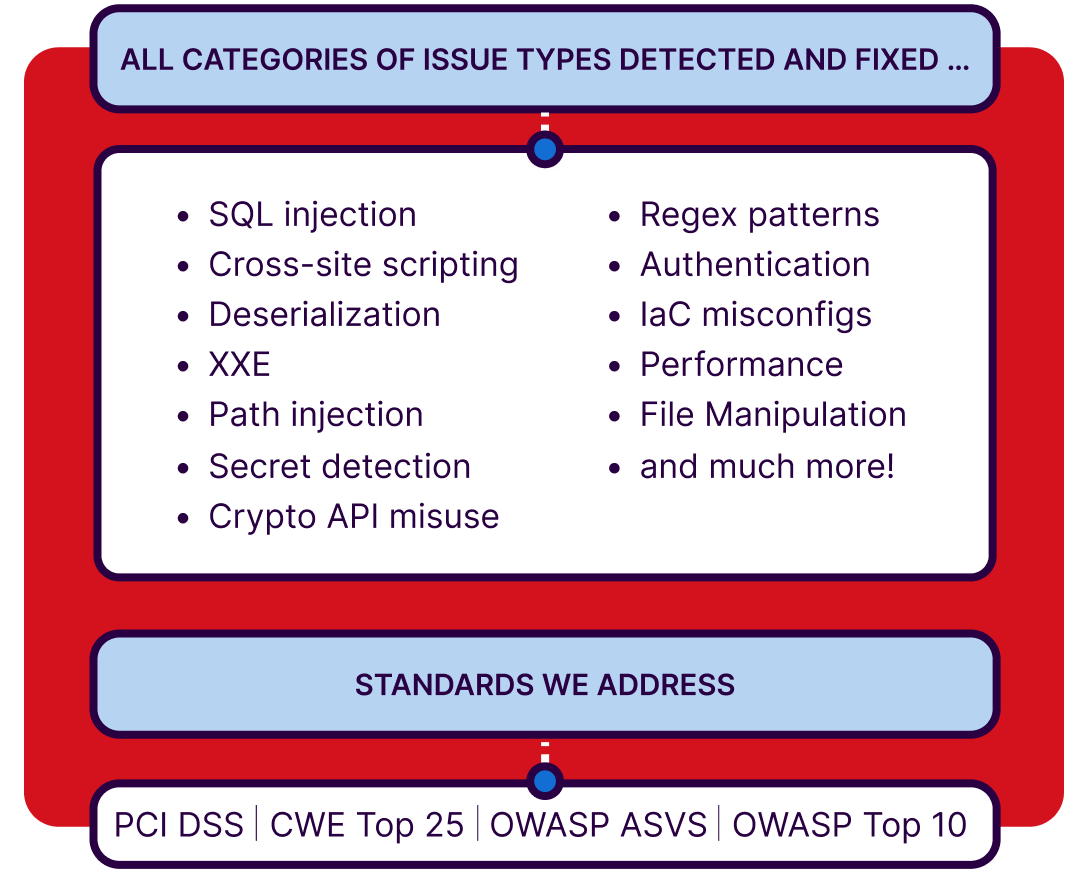
Sonar旨在检测并修复可能导致缺陷与安全漏洞的各类代码问题,支持30余种编程语言及框架。其安全分析功能可识别广泛的安全隐患,包括SQL注入漏洞、跨站脚本(XSS)代码注入攻击、缓冲区溢出、认证问题、云端密钥泄露检测等。在 SonarQube Server 企业版、数据中心版及 SonarQube Cloud 企业方案中,我们的安全规则依据 PCI DSS、CWE Top 25、OWASP ASVS、OWASP Top 10、STIG 和 CASA 等权威安全标准进行分类。

Header image
安全热点 > 代码审查 image

安全热点 > 代码审查

安全热点是需要人工审查的安全敏感代码实例。开发者通过处理安全热点,可学习评估安全风险并深化对安全编码实践的理解。

安全漏洞 > 代码修改/修复 image

安全漏洞 > 代码修改/修复

安全漏洞需立即处理。Sonar提供详细问题描述和代码高亮标记,说明代码存在风险的原因。只需遵循指引提交修复代码,即可保障应用程序安全

污点分析实现最大化防护

追踪恶意行为

确保用户提供的数据在触及关键系统(数据库、文件系统、操作系统等)前经过安全处理,是保障代码安全的关键。污点分析可追踪不可信用户输入在执行流中的传播路径——不仅限于方法内部,更涵盖跨文件传输过程。

探索更多功能
Image

关键语言的代码安全规则

获取针对重要语言的高相关性规则,借助静态应用安全测试工具保障代码安全。

支持语言包括Java、PHP、C#、C、C++、Python、JavaScript、TypeScript等。

探索所有语言
Image
代码安全

早期安全反馈,赋能开发者

主动承担

实时反馈

代码审查期间获取安全反馈,正是您深化认知并主导代码安全的机会。

jeff leaves a note about code issues

Sonar安全报告

安全报告可快速呈现代码对安全标准的合规全貌。该功能在SonarQube Server企业版/数据中心版及SonarQube Cloud企业版中提供,助您精准定位常见安全缺陷的风险等级。合规报告追踪每次发布的质量水平,为交付代码符合组织质量标准提供凭证。

报告涵盖:

  • PCI DSS(4.0版与3.2.1版)
  • OWASP十大漏洞(2021版与2017版)
  • CWE前25大缺陷(2022版、2021版与2020版)
  • OWASP应用安全验证标准(ASVS 4.0版,含1-3级)
  • STIG
  • CASA
参见OWASP十大漏洞
Image

您的端到端静态应用安全测试工具

将静态分析无缝集成至软件开发工作流

DevOps与CI/CD

将SAST集成至DevOps和CI/CD管道,可帮助组织提升软件安全态势,确保在开发生命周期早期发现漏洞。安全分析工具成为开发流程的有机组成部分,并在提交代码变更时获得实时反馈。 Sonar支持主流DevOps与CI/CD平台集成,包括GitHub、GitLab、Azure DevOps、TravisCI、CircleCI及Bitbucket。原生支持Git、Subversion等主流SCM,并通过社区支持覆盖CVS、Jazz RTC、Mercurial、TFVC等其他常用版本控制系统。

Image

拉取请求装饰

在拉取请求和开发分支内直接获取即时代码审查。在问题恶化前及时修复缺陷。

  • 实施质量门禁机制:若代码未达标准,CI/CD管道将自动终止
  • 直接在DevOps平台界面审查并优先处理代码修复
  • 为单仓库中的不同项目设置多重质量门禁,获取针对性反馈信息

SonarQube与IDE集成

  • 将卓越的代码质量工具能力直接嵌入开发者编码环境
  • 实时分析反馈
  • 代码问题高亮标注
  • 严格的代码质量标准,附带漏洞详情与修复指引
  • 可定制规则支持开发者按特定需求编码
  • 高级灵活性支持跨多种支持语言的开发者适配
Security Architect

"Sonar has helped our organization by enabling us to maintain code standards and code cleanliness."

Ricky LopezSecurity Architect/AppSec Manager

准备好保障代码安全了吗?

SAST FAQs

How does advanced SAST find vulnerabilities traditional tools can’t?

Traditional tools create a “black box” around third-party libraries, but Advanced SAST eliminates this blind spot. It extends taint analysis to trace the flow of data into and out of open source dependencies. By seeing how your code interacts with the library code, it uncovers deeply hidden, complex vulnerabilities that traditional static application testing(SAST) tools miss.

How does advanced SAST work?

Advanced SAST focuses on analyzing the interaction between your first-party code and the third-party libraries. It does not search for existing vulnerabilities inside the third-party library code. It pre-scans popular source libraries to create a knowledge base of security sensitive points- like where data enters or leaves a function. Then during the project analysis, it checks if your code is misusing those library functions in a way that creates a vulnerability in your application. 

Why do I need advanced SAST if I already use software composition analysis(SCA)?

SCA focuses on identifying known, public vulnerabilities(CVEs) within a library itself. Advanced SAST solves a different challenge; vulnerabilities that arise from the interaction between your code and third-party library code. By enabling both Advanced SAST and SCA, you get full, integrated visibility of risks that neither tool can provide alone.

What is a real-world example of a vulnerability found by Advanced SAST?

A notable example is the critical Jenkins vulnerability(CVE-2024-23897), which was caused by the insecure interaction between Jenkins code and an imported third-party library. The core issue wasn’t in either piece of the code, but in their combination. Only Advanced SAST would be capable of analyzing this specific interaction to correctly identify and raise the security vulnerability.

How are scan results and remediation suggestions presented to developers using SonarQube's SAST?

Scan results from SonarQube's SAST solution are presented in clear, actionable reports that highlight discovered vulnerabilities and suggest remediation steps. Developers receive this feedback either directly within their IDE or through integrated dashboards, making it easy to incorporate fixes promptly into their workflow.

Actionable suggestions guide developers to resolve security issues while adhering to best practices for writing quality code. By breaking down vulnerabilities to the source and recommending proper fixes, SonarQube helps bridge the gap between detection and remediation, empowering teams to reduce risk efficiently.

What makes SonarQube’s approach to quality code unique compared to other SAST solutions?

SonarQube's SAST solution stands out for its commitment to enhancing both security and maintainability within the codebase. The solution encourages developers to address not only immediate vulnerabilities but also code quality issues such as code duplication, complexity, and outdated patterns. This dual focus ensures that security improvements go hand-in-hand with sustainable development practices.

By integrating security checks into daily coding activities and emphasizing actionable feedback, SonarQube helps teams create high-quality software that evolves with changing requirements and technology landscapes. The holistic approach ensures that code is prepared for future innovation while staying secure and robust.

How often should SAST scans be run to maintain quality code in a rapidly changing codebase?

Security and quality are best maintained when SAST scans are run continuously throughout the development lifecycle. SonarQube supports automated, incremental scans with every code commit, merge request, or build, ensuring that new vulnerabilities and quality issues are detected as soon as they are introduced.

This frequent analysis allows teams to catch problems early, avoid technical debt, and keep codebases secure without slowing down delivery. By integrating SAST into the regular rhythm of development, organizations can sustain high standards for quality code and adapt quickly to new risks and challenges.

What’s the difference between SAST and DAST?

Static Application Security Testing (SAST) analyzes an application’s source code, bytecode, or binaries to find security vulnerabilities before the app runs. It’s performed early in the SDLC (pre-production), integrates with IDEs and CI pipelines, and flags issues at the line-of-code level (e.g., injection risks, insecure APIs). Fixes are typically faster because developers get precise locations and remediation guidance.

Dynamic Application Security Testing (DAST) tests a running application from the outside-in, simulating an attacker’s perspective. It requires a deployed (staging or production-like) environment and detects exploitable issues at runtime (e.g., broken authentication, misconfigurations, server errors). Findings reflect real behaviors and are less prone to false positives, but the root cause in code is less direct and fixes can take longer.