
TLDR overview
- SonarQube Remediation Agent generates fix pull requests for logic flaws detected by SonarQube Hunter Agent, including broken access control, business logic, and authentication and session flaws.
- Developers and DevSecOps engineers with Hunter Agent enabled on SonarQube Cloud can assign Hunter Agent findings to Remediation Agent from the Issues page on demand.
- Remediation Agent aids issue resolution and facilitates triaging, which shortens remediation time for the highest-risk issues in the backlog.
- Selecting a Hunter Agent issue and choosing Fix with Agent produces a pull request with a diff, a plain-language explanation of the fix at hand, and a diagram to visualize the fix itself.
SonarQube Hunter Agent scans your projects for logic-level vulnerabilities in the form of broken access control, business logic, and authentication and session flaws. SonarQube Remediation Agent generates fix pull requests for issues in your backlog, including the issues surfaced by Hunter Agent. This blueprint covers handing Hunter Agent findings to Remediation Agent, and reviewing and merging the fix PRs that Remediation Agent generates. The examples in this guide reference a small, Python web application scanned on SonarQube Cloud; scan the project of your choosing to follow along.
When to use this
- Hunter Agent is enabled on a SonarQube Cloud or Server project and has produced open findings.
- You want fixes delivered as PRs that respect your existing review standards, required checks, and branch protection.
- You want to remediate Hunter Agent findings on demand and in parallel.
This blueprint does not cover the first-time setup of either agent, setup on SonarQube Server, or fixing issues raised by standard SonarQube analysis rules. For setup, consult the Hunter Agent blueprint and the Remediation Agent blueprint for SonarQube Cloud, and this guide for SonarQube Server.
What you'll achieve
- Hunter Agent findings assigned to Remediation Agent, each returning a fix PR on a dedicated branch.
- A reviewed fix PR merged with a passing quality gate check.
Architecture
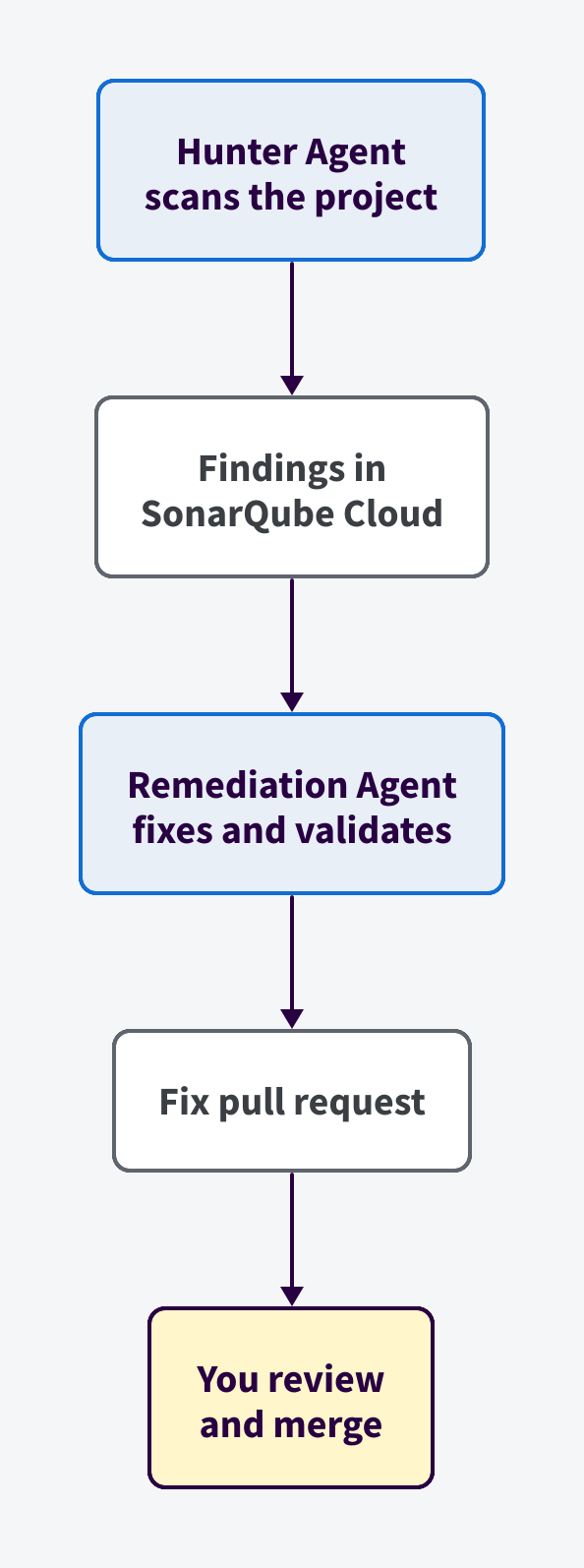
Hunter Agent scans your project on demand or on a schedule. It surfaces its findings on SonarQube as issues that appear in your backlog, tagged hunter-agent, plus a category tag such as hunter-broken-access-control or hunter-auth-session.
When issues are assigned to Remediation Agent, it works in an isolated sandbox. It clones the bound repository, generates a patch, applies it, and re-analyzes the patched code against the project's quality gate. A fix that regresses the quality gate fails the run, and no PR is opened. A fix that passes is pushed to a new branch and opened as a PR on the bound repository. The agent never merges. Required reviewers, required builds, and merge strategy apply to its PRs the same way they apply to human-authored ones.
Hunter Agent and Remediation Agent occupy the code maintenance loop of Sonar’s Agent Centric Development Cycle. Hunter Agent Verifies and Remediation Agent Solves. The flow keeps a human reviewer between the agent's fix and your main branch.
Prerequisites
- SonarQube Cloud organization on the Enterprise plan, with entitlement to Hunter Agent and Remediation Agent.
- A project bound to a GitHub repository, with analysis running on the main branch. Remediation Agent also supports GitLab and Azure DevOps, but the steps here follow a GitHub-based approach.
- Hunter Agent enabled for your organization with at least one completed scan. To get started with Hunter Agent and run your first scan, consult this blueprint.
- Remediation Agent enabled for your organization with Manual backlog remediation turned on. To get started with Remediation Agent, consult this blueprint.
- Permission to assign issues in SonarQube Cloud and to review and merge pull requests in GitHub.
Hunter Agent findings can be assigned only when their status is Open, Confirmed, or Accepted, and only on the main branch.
Step 1 — Scan your project with Hunter Agent and review the findings
Scan your project with Hunter Agent, either on demand or on a schedule. If you haven't run a scan yet, follow the Hunter Agent blueprint first.
Open the Scan results tab and examine the Open issues. Findings fall into the three categories in the agent's playbook. The scan in this walkthrough returned 46 open issues: 14 broken access control, 5 business logic, and 27 authentication and session.
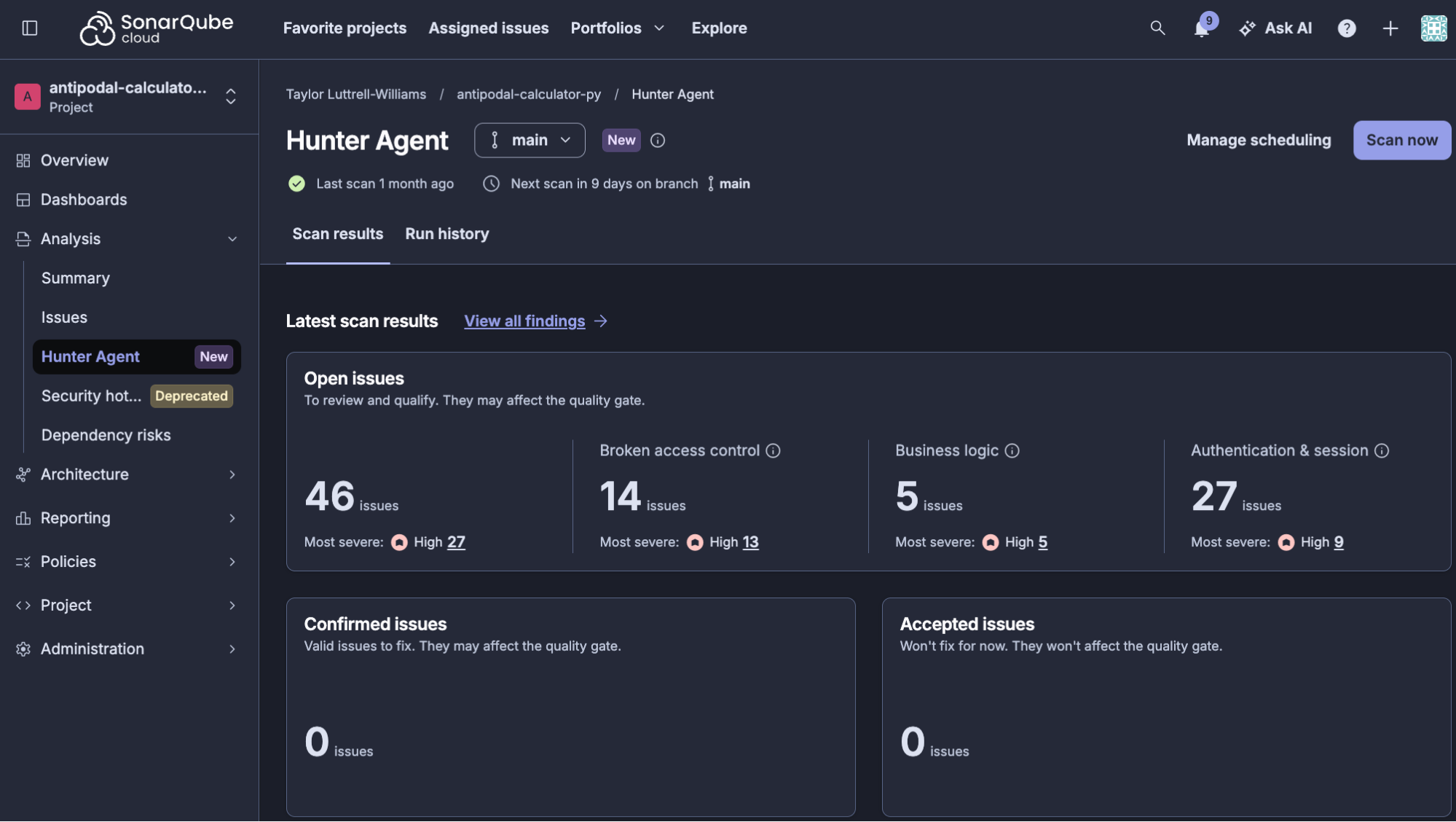
Select View all findings, any Open issues count, or any Most severe count. All three open the project's Issues page filtered to Hunter Agent findings. To filter directly, use the hunter-agent tag or a category tag such as hunter-broken-access-control.
Step 2 — Assign issues to Remediation Agent
On the Issues page, select the main branch and check the issues you want the agent to fix. This walkthrough selects three High severity Security issues across two categories, hunter-auth-session and hunter-broken-access-control:
- Any user with only an account password can reach every protected route, including admin functions, without completing MFA. (
hunter-auth-session, L27, 1h effort) - Any signed-in user can pass the admin access check because they can write their own role field. (
hunter-broken-access-control, L42, 1h effort) - An admin who has not completed MFA can permanently delete any account without the required second factor. (
hunter-auth-session, L42, 1h effort)
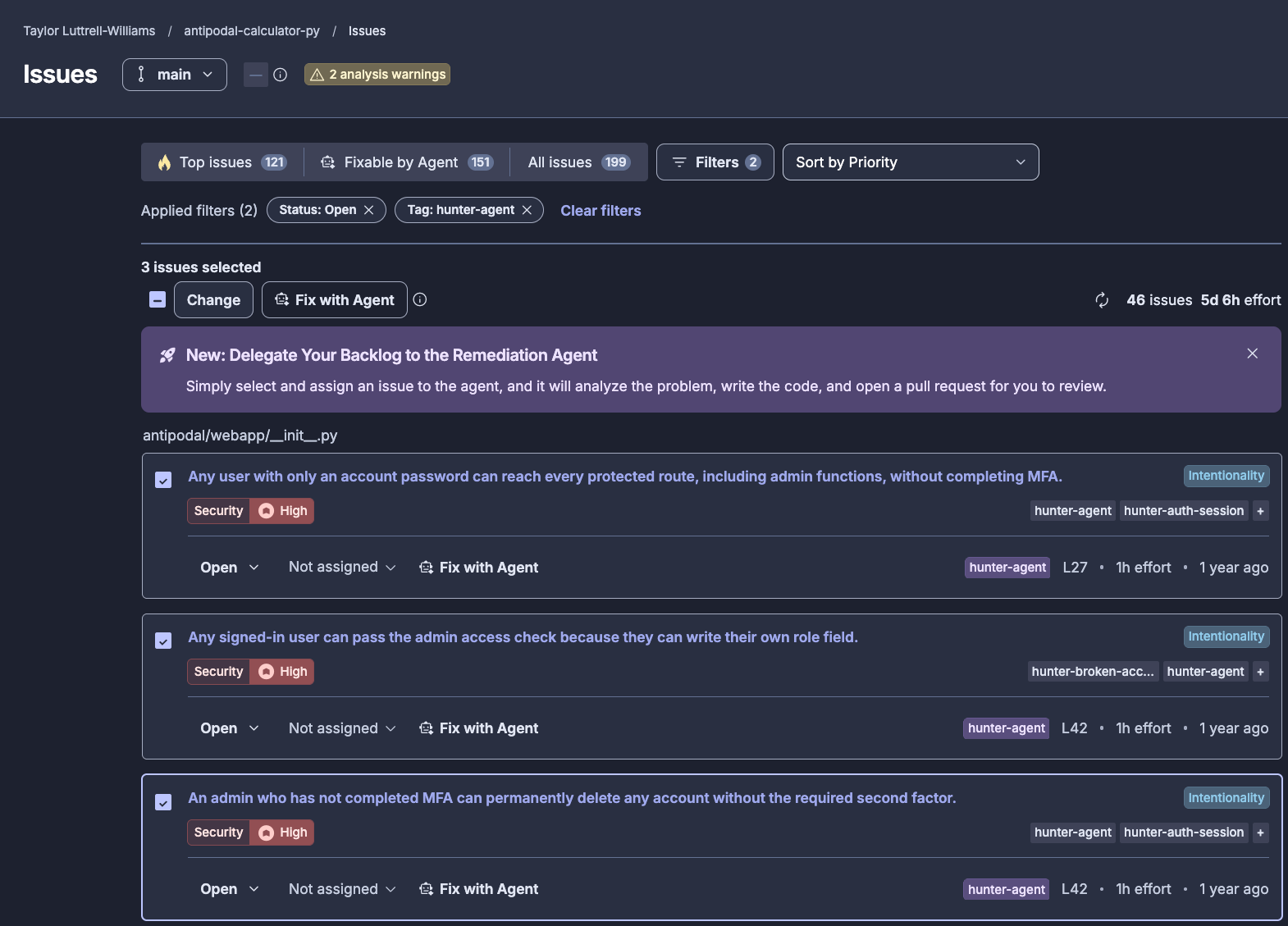
Select Fix with Agent in the toolbar, or in an individual issue box. You can select up to 20 issues in one assignment. The Fixable by Agent filter narrows the list to eligible findings. If your selection mixes eligible and ineligible issues, SonarQube Cloud warns you and submits only the eligible ones.

Step 3 — Monitor the agent session
Open the project's Remediation Agent page. Each submitted session appears as a row, and its status moves from In progress to Completed. Each row shows the duration, the submission timestamp, and the source, so you can tell manual assignments apart from scheduled runs.
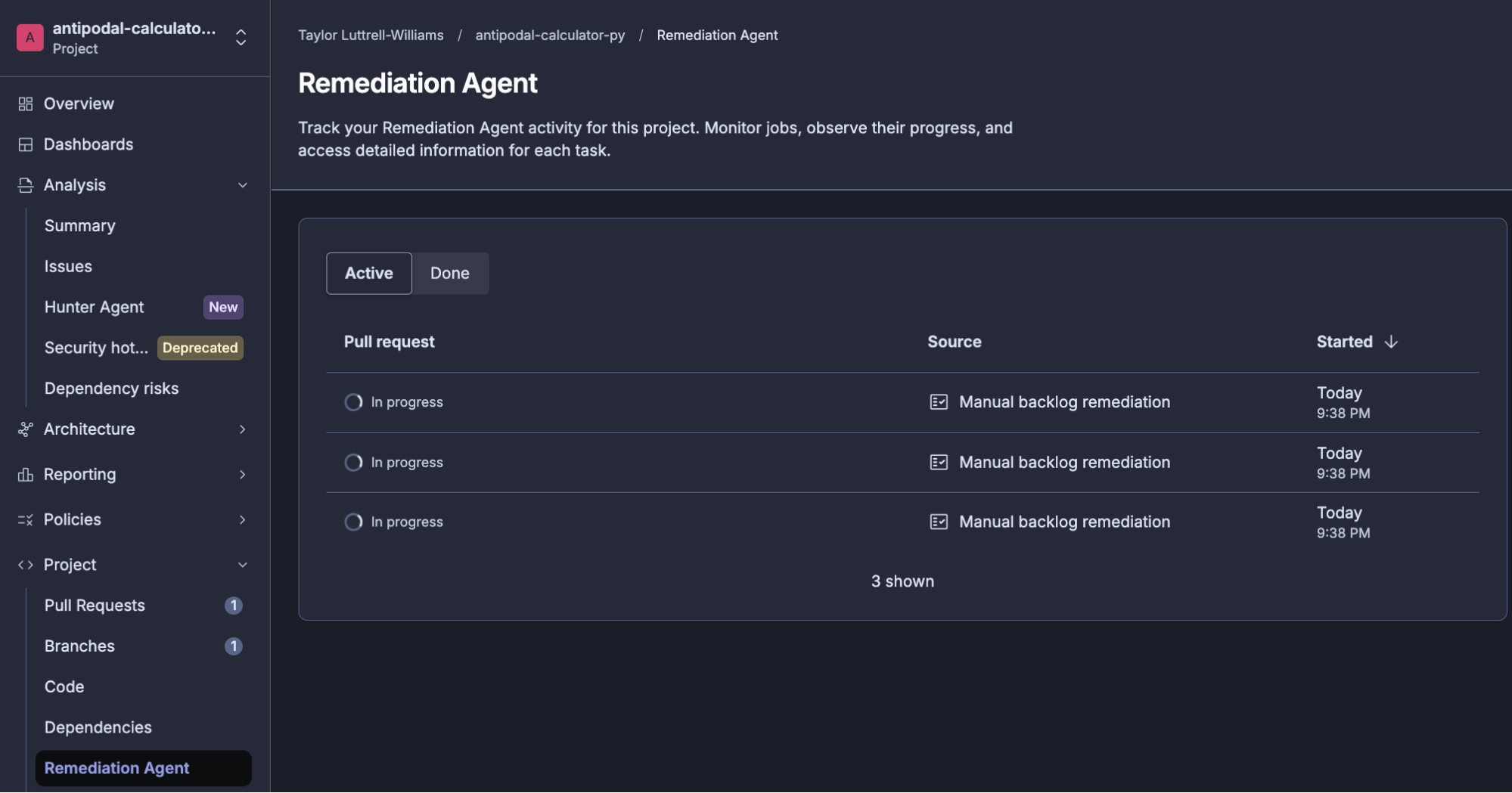
No action is needed while the agent runs. It clones the repository, applies a patch for each finding, and re-analyzes the patched code against the project's quality gate. If a run fails, usually because a fix would regress the quality gate, the row records the failure and no pull request is opened.
Each Hunter Agent finding is handled separately, so this walkthrough produced three fix PRs, one per assigned issue. All three were ready after roughly 10 minutes.
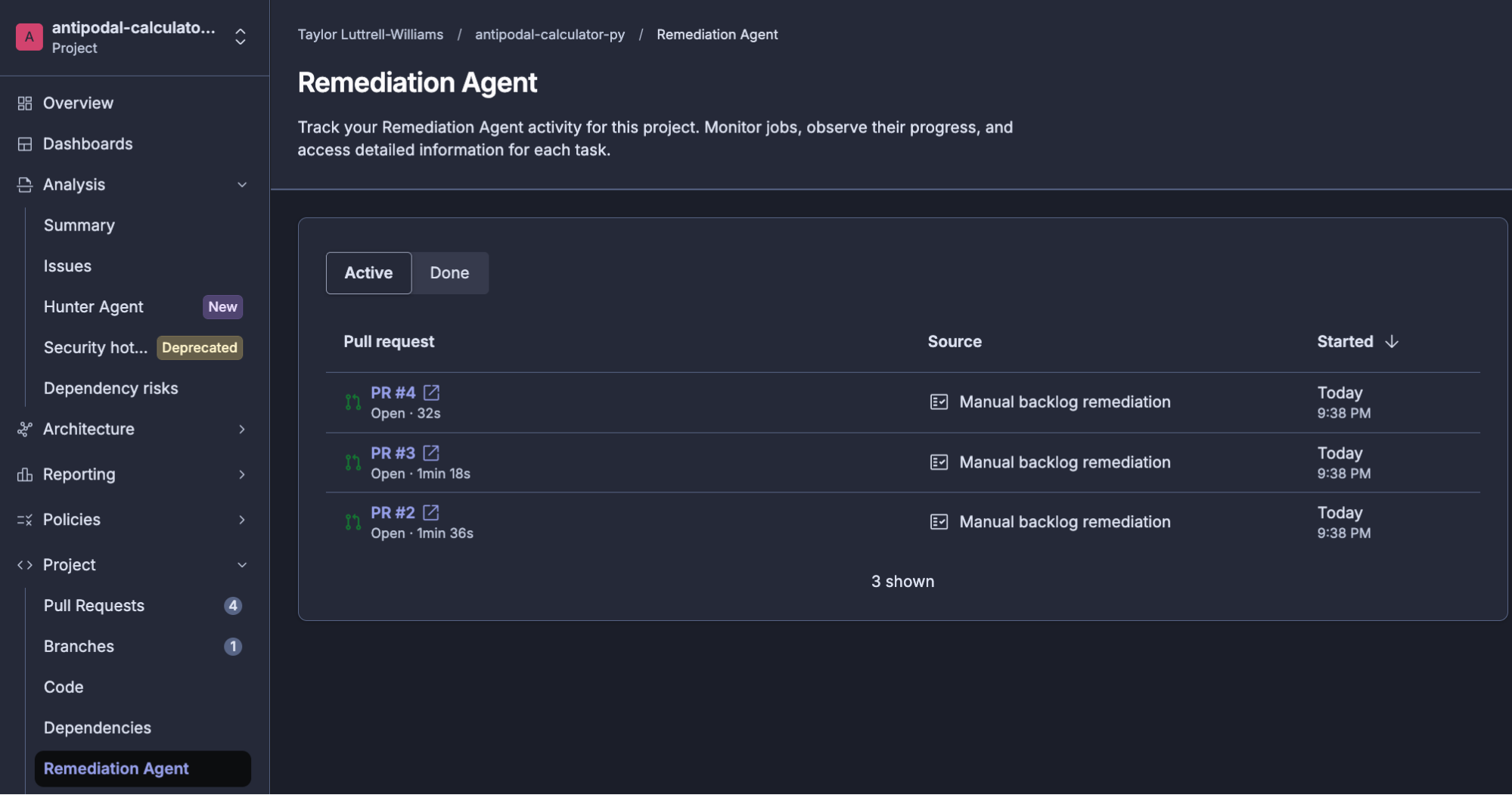
Step 4 — Review and merge the fix pull request
Select a pull request number in the pull request column, or open Pull requests on the bound repository in GitHub. The agent's branches follow the pattern remediate-main-<timestamp>-<hash>. This walkthrough opens pull request #3, on branch remediate-main-20261022-023833-d153b6ce.
The agent's description, abridged:
Problem The admin check itself is sound: it reads the user's stored role. But any signed-in user could change that stored role. One way was the profile update endpoint, which copied every key in the request onto the user record. The other was the promote endpoint, which only required a login. Either path let an ordinary account pass the admin check and reach every admin-only route. The same profile loop also let users change their own plan and credits.
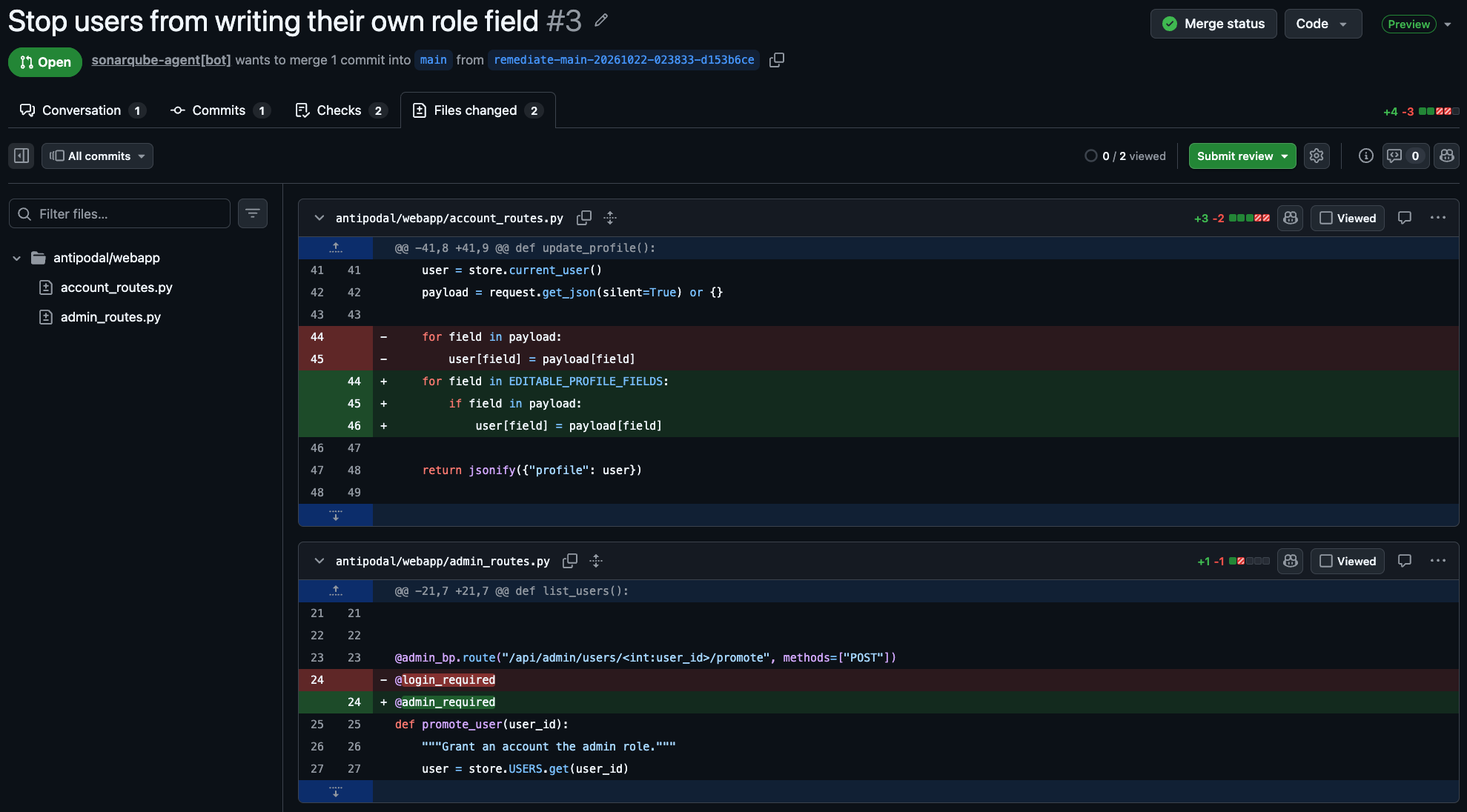
Proposed Fix The profile update now copies only the fields in the existing EDITABLE_PROFILE_FIELDS allowlist (username, email) and ignores every other key. The promote route is now guarded by @admin_required instead of @login_required, so only a current admin can grant the role.
Review before merging Profile updates now silently drop every key except username and email, with no error returned. Promote is now admin-only. No automated test covers this.
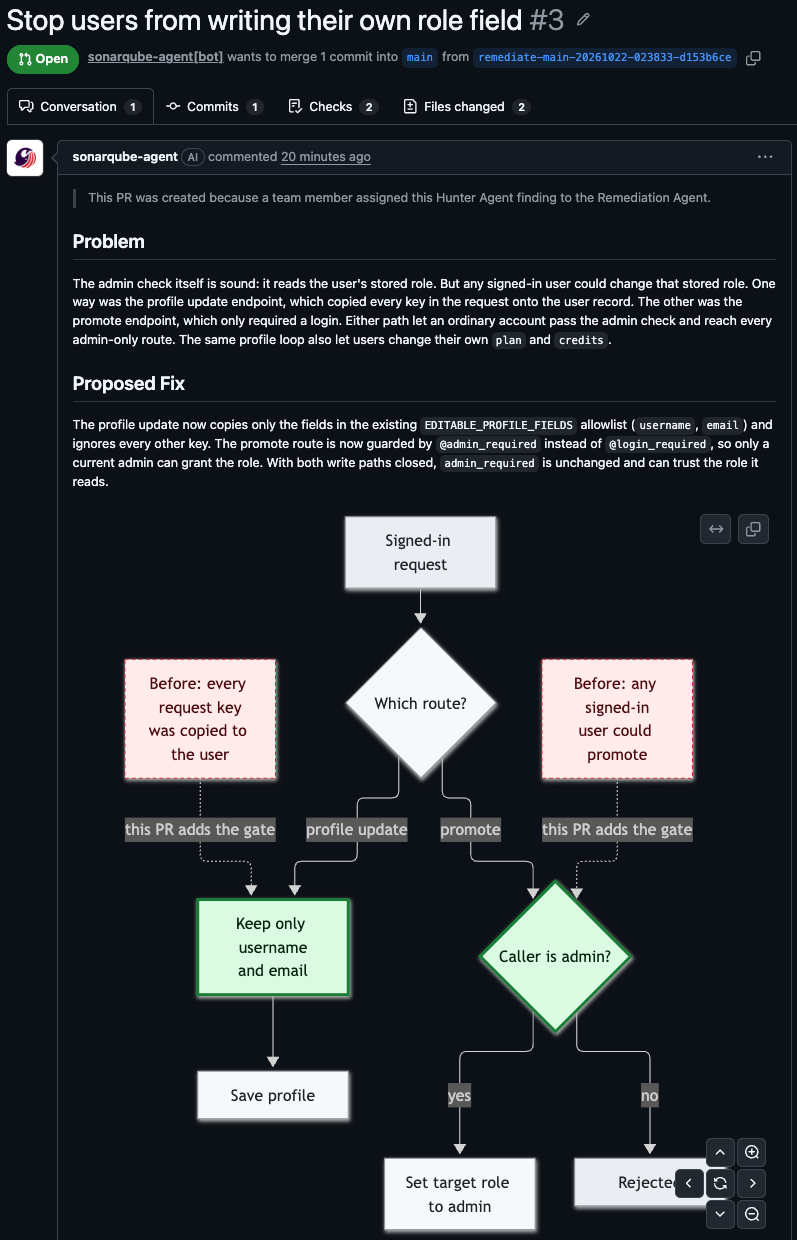
The PR description also includes a diagram of the proposed, validated fix.
Read the Review before merging notes before approving. The fix above changes behavior: any client that sets other profile fields through that endpoint stops working. The notes also give a manual verification path. As a non-admin, send a profile update that includes role and confirm the returned profile is unchanged. Call promote as that user and confirm it is rejected. Call promote as an admin and confirm it succeeds.
Inspect the change in the GitHub diff view.
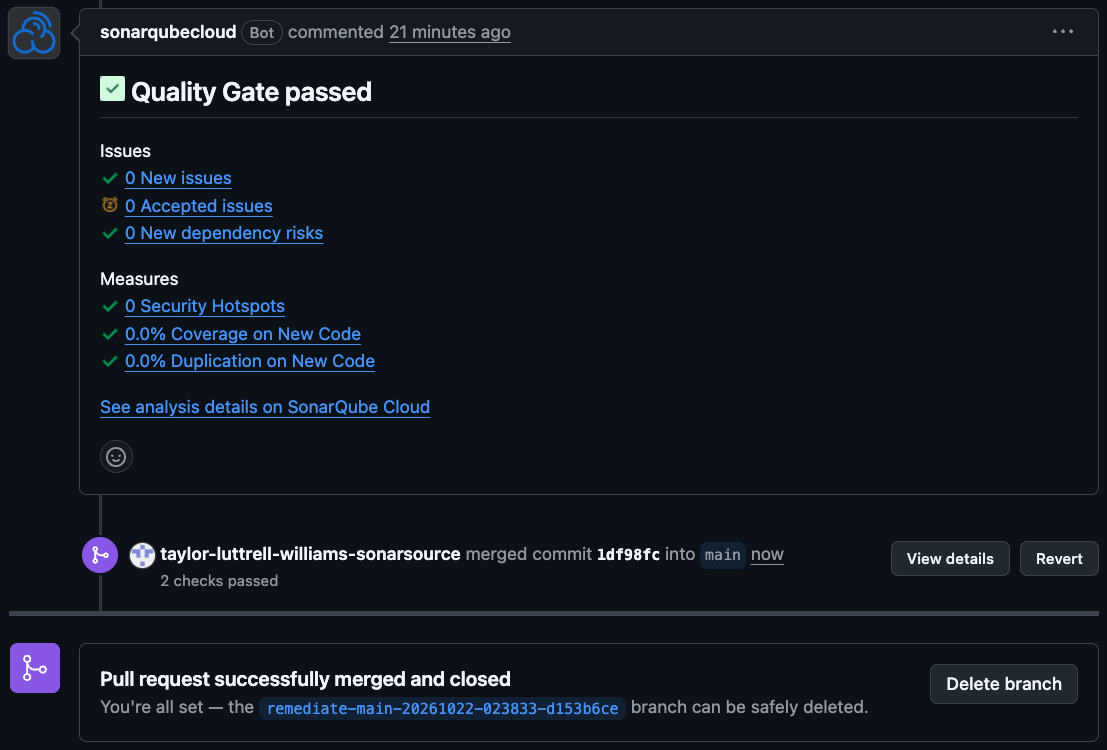
The pull request shows a passing quality gate check. This is the same gate the agent validated against in its sandbox before opening the PR. Once your required reviewers approve, select Merge pull request.
What to know
- Whenever present, read Review before merging in the PR description. A security fix can change behavior, and the agent flags when no automated test covers it.
- Each Hunter Agent finding gets its own pull request, so assigning ten findings can produce up to ten pull requests.
- Remediation Agent fixes Hunter Agent findings on the main branch only, and only findings it considers eligible.
- A run whose fix would regress the quality gate fails and opens no pull request.