





AGENTIC CODE ASSURANCE

SonarQube MCP Server

Ermöglichen Sie Ihren KI-Agenten die Verwendung der bewährten SonarQube-Analyse, um KI-Code zu überprüfen und hohe Standards innerhalb Ihrer KI-nativen IDE aufrechtzuerhalten.

Vertrauen von über 7 Millionen Entwicklern weltweit

Santander
U.S. Army
Nvidia

Wenn agentische Workflows auf Integrationschaos treffen

Engpässe bei der Verifizierung image

Engpässe bei der Verifizierung

KI beschleunigt die Code-Erstellung, schafft aber einen neuen Engpass: die Verifizierung. Die beim Schreiben von Code gewonnene Zeit geht durch einen langsamen, manuellen Verifizierungsprozess verloren, was den ROI Ihrer KI-Tools einschränkt.

Unterbrochene Workflows image

Unterbrochene Workflows

Der Zugriff auf wichtige Code-Informationen erfordert das Verlassen des dialogorientierten Workflows. Dieser ständige Kontextwechsel unterbricht die Konzentration der Entwickler und untergräbt das nahtlose Erlebnis, das KI eigentlich bieten soll.

Maßgeschneiderte Integrationen image

Maßgeschneiderte Integrationen

Wenn Ihre Teams neue KI-Tools einführen, sind Plattformingenieure damit belastet, ein fragiles Ökosystem aus instabilen, einmaligen Integrationen aufzubauen und zu warten. Diese maßgeschneiderte Arbeit ist ineffizient, kostspielig und nicht skalierbar.

Versteckte Risiken image

Versteckte Risiken

Wenn die Code-Verifizierung nur nachträglich berücksichtigt wird, kann KI-generierter Code leicht Fehler, Schwachstellen und technische Schulden verursachen. Dies schafft inakzeptable Geschäftsrisiken und untergräbt Ihre Qualitäts- und Sicherheitsstandards.

Verbinden Sie SonarQube mit Ihren KI-Assistenten und IDEs

Schließen Sie die Lücke zwischen KI und Qualität

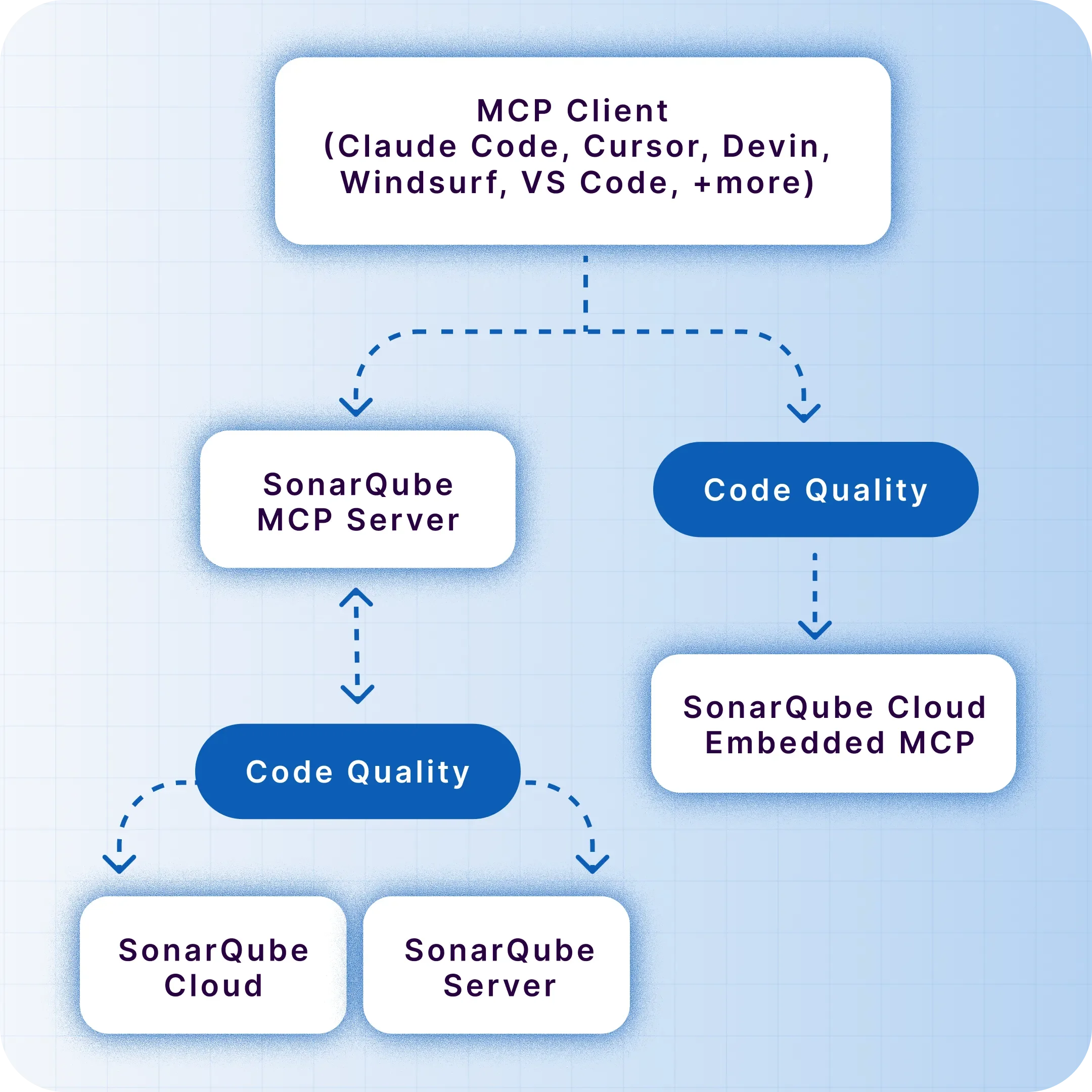
Der SonarQube MCP Server integriert die statische Analyse von SonarQube in KI-Workflows. Unser nativer MCP-Kanal für SonarQube Cloud bietet eine mühelose, sofort einsatzbereite Möglichkeit, Ihre KI-Tools mit der Code-Intelligenz zu verbinden, der Sie vertrauen. Für Nutzer des SonarQube-Servers oder für die lokale Entwicklung steht zudem ein selbstverwalteter, Docker-basierter Kanal zur Verfügung.

Kostenlos bereitstellen
Header image

Erhalten Sie sofortige Antworten

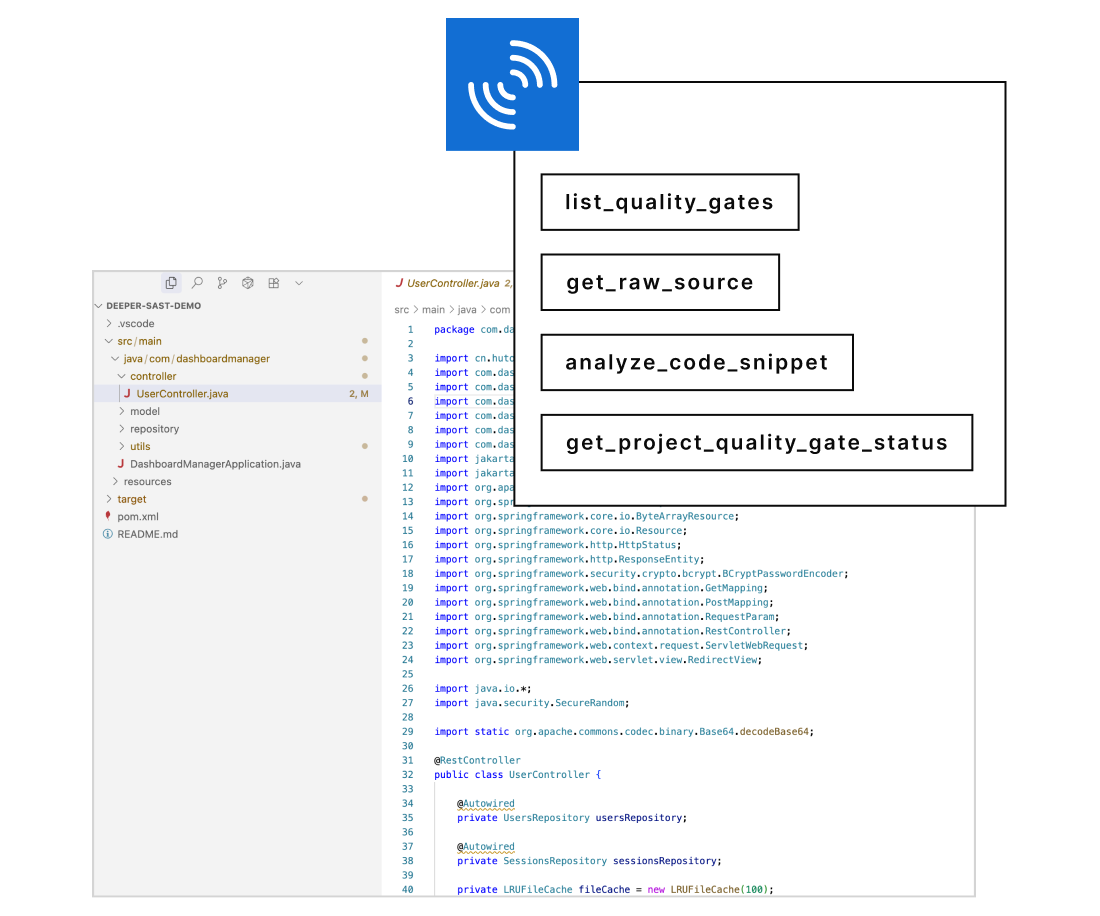
Fragen Sie den Quality-Gate-Status Ihres Projekts ab, suchen Sie mit SonarQube Advanced Security nach Abhängigkeitsrisiken in Ihrem Projekt oder analysieren Sie ein neues Code-Snippet mit einer einfachen Frage in natürlicher Sprache.

Bleiben Sie im Arbeitsfluss

Vermeiden Sie den störenden Wechsel zwischen Ihrem Editor und der SonarQube-Benutzeroberfläche. Behalten Sie den Fokus und steigern Sie Ihre Produktivität.

Maßnahmen im Kontext ergreifen

Gehen Sie über die Analyse hinaus. Aktualisieren Sie den Status eines Issues interaktiv oder markieren Sie ein Fehlalarm direkt über Ihren KI-Assistenten und setzen Sie Erkenntnisse sofort in Maßnahmen um.

Bereitstellungsoptionen

Benutzer können nun zwischen zwei Methoden wählen, um ihre KI-Tools mit SonarQube zu verbinden:

Lokale Bereitstellung image

Lokale Bereitstellung

Ausführen eines Docker-Containers auf einer Workstation, um die IDE und SonarQube zu verbinden

Cloud native image

Cloud native

Verwenden des eingebetteten Endpunkts in SonarQube Cloud für den zentralen Zugriff ohne lokale Softwareinstallation

Wie funktioniert es?

Fragen Sie in Ihrer KI-nativen IDE image

Fragen Sie in Ihrer KI-nativen IDE

Ein Entwickler stellt seinem KI-Agenten eine Frage zur Codequalität oder -sicherheit in einfachem Englisch. Beispielabfrage: „Gibt es neue Schwachstellen in dieser Datei?“

Übersetzen & abfragen image

Übersetzen & abfragen

Der MCP-Server übersetzt die Anfrage in eine präzise Abfrage für Ihre SonarQube-Instanz (Cloud oder Server) und ermittelt das richtige Tool, z. B. search_sonar_issues_in_projects.

Erhalten Sie Antworten im Kontext image

Erhalten Sie Antworten im Kontext

Der KI-Agent empfängt die Daten von SonarQube und präsentiert eine klare, umsetzbare Antwort direkt im Editor des Entwicklers, wodurch die nahtlose Echtzeit-Konversation abgeschlossen wird.

Wichtige Vorteile

Für Entwickler

Gewinnen Sie Ihren Fokus zurück

Hören Sie auf, zwischen Tabs hin und her zu springen und Ihren Arbeitsfluss zu unterbrechen. Erhalten Sie sofortige Antworten von SonarQube zu Fehlern, Schwachstellen und Code-Smells direkt in Ihrem KI-Assistenten. Analysieren Sie jeden Code vor dem Commit und machen Sie Codequalität zu einem nahtlosen Teil Ihres Workflows.

"Using Amazon Q Developer with the Sonarqube MCP server integration, developers can receive real-time security and code quality feedback directly within their IDE while preserving the immersive 'vibe coding' experience. They maintain productivity and ensure best practices."

Patrick Madec, Sr. Solutions Architect

Schaffen Sie Vertrauen in jede Zeile Code

Der SonarQube MCP-Kanal ist als nativer, verwalteter Dienst für SonarQube Cloud oder als Docker-Container mit Quellcode für SonarQube Server verfügbar. Wählen Sie die Bereitstellung, die zu Ihrer Umgebung passt, und beginnen Sie noch heute mit der Automatisierung der Qualitätsvalidierung.

Rating image

4.6 / 5

MCP Server FAQs

What is the MCP Server and how does it help teams deliver quality code?

The MCP Server is a centralized service that connects code analysis and developer tools so teams can consistently enforce standards, automate checks, and improve code quality across repositories. Teams get a single source of truth for code health, enabling faster remediation, standardized workflows, and reliable gates that improve release confidence.

Do I need Docker to use the MCP server?

If you are using SonarQube Cloud, no. You can connect to our managed, native MCP endpoint with zero installation. Docker is only required if you are using SonarQube Server or prefer a local-only development setup.

How does the MCP Server integrate with SonarQube and SonarQube for IDE?

The MCP Server can act as a hub that complements SonarQube by coordinating analysis triggers and aggregating insights from multiple projects. It helps standardize policy enforcement so SonarQube conditions become part of your CI checks, keeping quality at the source and ensuring new code quality gates are applied consistently.

With SonarQube Cloud, the MCP Server can align cloud-based project analysis, ensuring unified governance and reporting. For developers, pairing MCP Server with SonarQube for IDE brings issues into the editor so they can fix problems before commit, strengthening quality at the source and reducing pipeline churn.

What’s the difference between the MCP Server on Community Build vs commercial editions?

On Community Build, teams typically focus on core analysis workflows and baseline governance. The MCP Server can help standardize the basics—consistent rule usage, automated checks in CI, and streamlined reporting—so you achieve strong fundamentals for quality code without adding unnecessary complexity.

Commercial editions unlock advanced features like branch analysis, PR decoration, and enterprise governance. In those setups, the MCP Server can orchestrate broader policy management across multiple projects and repos, enhance PR workflows, and provide richer auditing—useful for larger organizations seeking robust quality at the source practices.

How does the MCP Server support “focus on new code” and quality at the source practices?

The MCP Server helps implement a focus on new code by making quality gates part of everyday development—on branches, pull requests, and pre-merge checks. By catching issues early, it encourages developers to keep changes small and fix problems in context, leading to better quality code with less rework.

Quality at the source is reinforced when developers see actionable feedback in the editor and CI feedback loops. The MCP Server makes those loops consistent across teams and repos, so standards don’t drift and code quality improves steadily with each change.

Can the MCP Server work with multiple CI/CD systems and repositories at scale?

Yes, it’s designed to orchestrate checks across varied CI/CD platforms and many repositories, ensuring consistent enforcement and results. This is especially valuable in polyglot, multi-repo environments where maintaining unified standards can be challenging.

The MCP Server ensures that rules, gates, and reporting are applied uniformly, enabling efficient scaling without sacrificing developer velocity or code quality.

How do developers benefit day-to-day from MCP Server plus SonarQube for IDE?

Developers benefit from immediate, in-editor feedback via SonarQube for IDE, allowing them to fix issues before committing. The MCP Server ensures those same standards are enforced in CI, creating a seamless loop where local fixes translate into passing builds and high new code quality.

This approach minimizes context switching and reduces surprise failures later in the pipeline. Developers spend less time chasing build breaks and more time writing quality code, with consistent feedback from the editor to the pull request.

What security and compliance advantages does the MCP Server provide?

By centralizing policies, the MCP Server makes it easier to enforce consistent security rules. This unified approach supports audit readiness and helps teams demonstrate adherence to internal and external standards.

Automated gates and standardized reporting reduce manual steps that can be error-prone. As a result, security and compliance become integral to the development flow, not an afterthought—improving both speed and rigor.

How does the MCP Server improve pull request workflows and code reviews?

The MCP Server integrates quality checks into pull requests so reviewers see actionable findings before merge. This enables reviewers to focus on architecture and design decisions, while automated checks flag code smells, bugs, and vulnerabilities aligned to your policies.

Consistent, automated gates also reduce review friction—contributors know what’s required for approval, and reviewers trust that baseline quality signals are accurate. The net effect is faster, clearer decisions and higher-confidence merges.

How does the MCP Server handle multi-language monorepos and hybrid (on-prem + cloud) setups?

The MCP Server coordinates analysis across multiple languages and toolchains by standardizing triggers, rules, and reporting, which is particularly helpful in monorepos. It ensures consistent gates regardless of language, keeping quality at the source across the entire codebase.

For hybrid environments, the MCP Server helps align on-prem SonarQube and SonarQube Cloud projects under a common governance layer. This harmonization enables unified visibility and policy enforcement, whether code is analyzed locally, in the cloud, or both.