

TLDR overview
- Shai-Hulud is a self-propagating npm supply chain worm that steals developer and CI credentials to republish itself across more packages.
- It executes at install time, so any Node.js project or CI pipeline that installs a compromised version is exposed, with no manifest edit required.
- SonarQube Advanced Security detects and contains it in layers: malicious package detection (SCA) raises blocker-severity risks that can fail quality gates, and a daily rescan re-flags packages that turn malicious after you install them.
- Supporting layers add a SonarQube CLI pre-commit hook, an MCP
check_dependencypre-flight for coding agents, and secrets detection.
Here we go again. A fresh wave of the self-propagating Shai-Hulud worm is surging through the npm ecosystem. Its goal now is the same as it was with every prior wave: steal developer and CI credentials, then use those credentials to republish itself inside more packages. The name is a callback to the sandworms of Dune, and the worm’s behavior tracks. Once it's burrowed itself into your dependency tree, it's hard to detect and it doesn't stay put.
If you maintain Node.js projects or run npm installs anywhere in your pipelines, this post is for you. Here we cover what the worm does, how it spreads, and how SonarQube detects and contains known bad packages before they reach production.
What is the Shai-Hulud worm and how did it start?
Shai-Hulud is a self-replicating supply chain worm targeting npm, and it has erupted in waves since September 2025. GitHub, which operates the registry, has watched the campaign escalate from opportunistic compromises into engineered attacks on maintainer workflows and CI pipelines. CISA documented one earlier wave that compromised over 500 npm packages. The mechanics are consistent across waves: an attacker gets control of a maintainer account, publishes a trojanized version of a popular package, and the malicious code gets to work the moment it's installed.
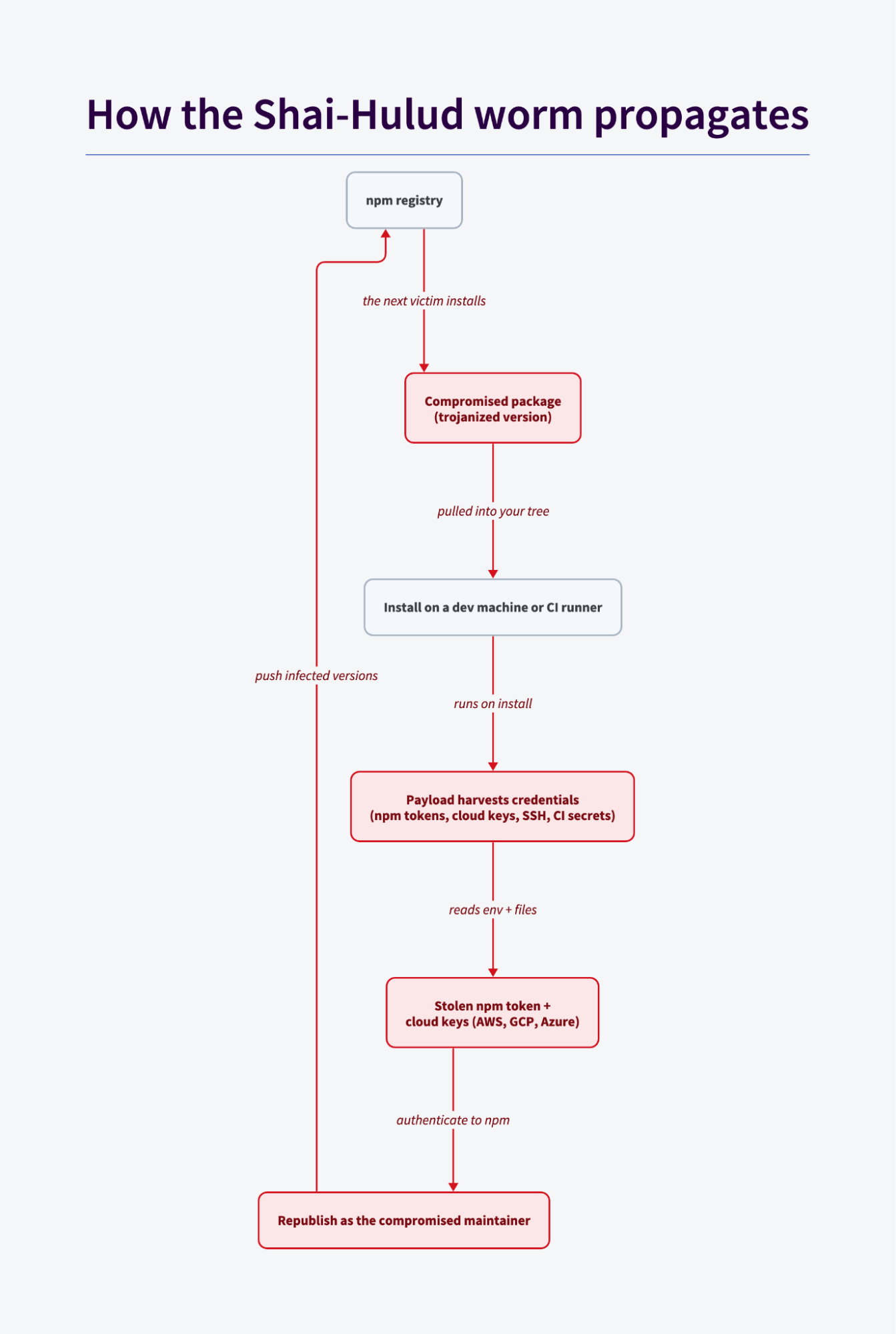
According to CISA's advisory, the payload scans the environment for sensitive credentials, targets GitHub personal access tokens and cloud API keys for AWS, GCP, and Azure, and exfiltrates what it finds. It then authenticates to the registry as the compromised maintainer and publishes infected versions of other packages that account can touch. One stolen token thereby becomes the seed for the next round of infections.
How the worm operates
- Infection — A compromised maintainer account ships a malicious version of a package. It lands in your project through a normal install or a lockfile update. It doesn't have to be a direct dependency, as a transitive package located five levels down is just as effective.
- Credential harvest — Once the code runs, it reads environment variables and well known credential file paths: npm tokens, cloud keys, SSH keys, CI secrets, etc. Anything a build agent can see, the payload can see too.
- Propagation — The worm uses the stolen npm token to authenticate as the victim and republish trojanized versions of every package that account maintains. Those packages flow out to their own dependents, and the loop repeats.
- Evolution — The newer variants go after AI coding agents for persistence. As our team documented in Mini Shai-Hulud targets AI coding agents, one variant writes a
SessionStarthook into.claude/settings.jsonso that opening a repo runsnode .claude/setup.mjsevery session, with a VS Codetasks.jsonequivalent that fires onfolderOpen. Once you open an infected repo in a trusted workspace, the attacker's code runs, with no install step required.
How SonarQube detects and contains it
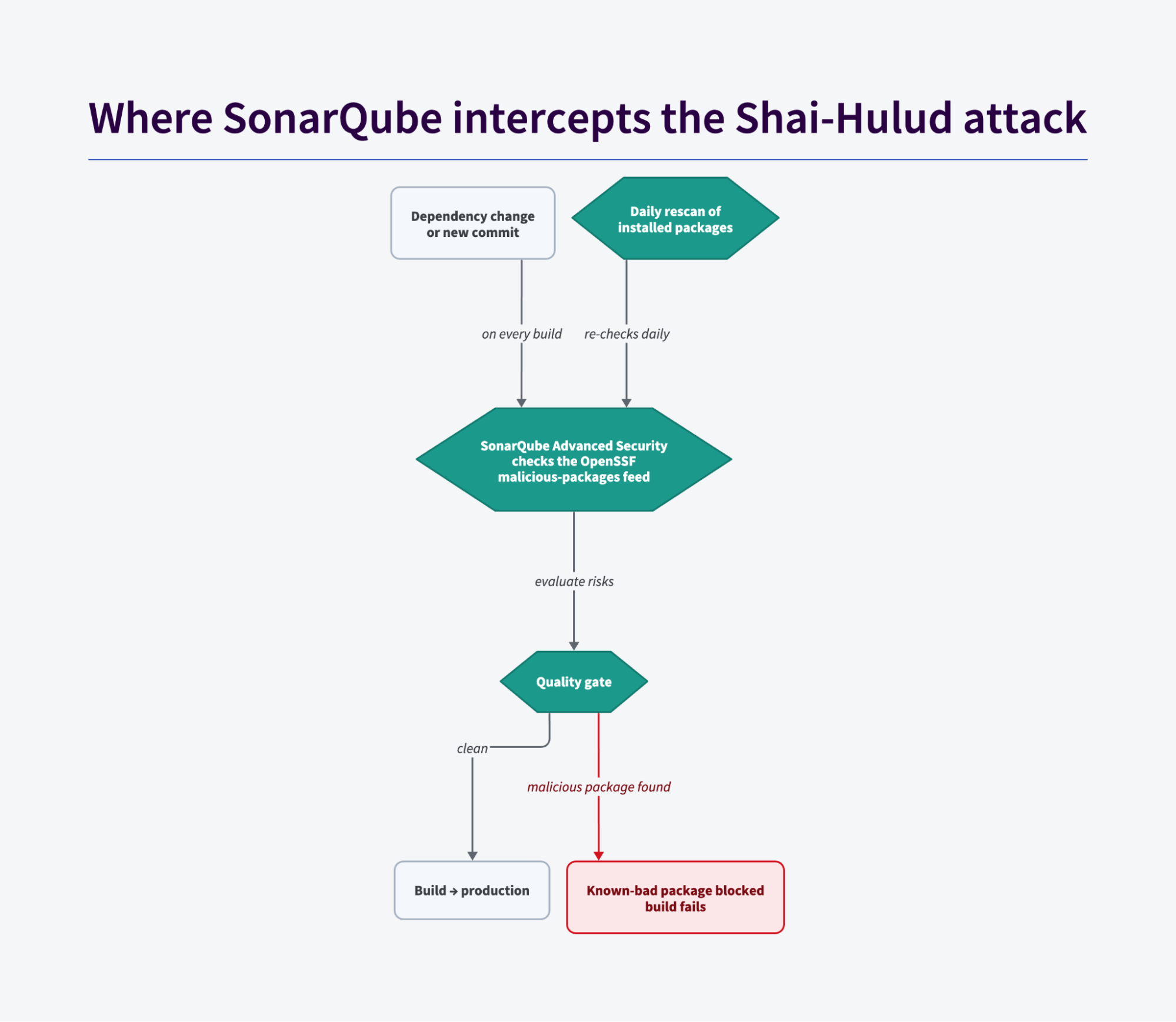
SonarQube's malicious package detection compares your dependencies against a live feed of known bad packages and flags a match as soon as its scan finds one. This is the layer that catches the worm during its propagation phase, when a compromised version is actively spreading across the ecosystem.
The primary layer — malicious package detection
SonarQube Advanced Security includes software composition analysis that checks your dependency tree against constantly updated lists of known malicious packages, drawing on community threat intelligence such as the OpenSSF Malicious Packages database. This is different from traditional CVE-based scanning. A worm like Shai-Hulud is active malware, not a vulnerability sitting in otherwise legitimate code, and it often never gets a CVE at all. It also catches what signing can't: a package can carry valid build provenance and signed attestations and still be malicious, because those verify how it was built, not whether the code that entered the pipeline was safe. This check matches the package and version against known malicious package intelligence, which is why it holds up even when a poisoned release rides a trusted, fully attested CI pipeline.
When a known bad package turns up in your tree, SonarQube surfaces it as a blocker-severity dependency risk. Add a dependency-risk condition to your quality gate, and with your pipeline set to break on a failing gate, that risk stops the build before the compromised dependency ships. npm, Yarn, pnpm, and Bun are all supported ecosystems.
SonarQube re-checks the dependencies on your permanent branches against the latest feed on a schedule, once per day by default. So a package that was clean when you installed it and later gets catalogued as malicious will be flagged on the next rescan, with no new commit required. That's the exact failure mode this attack creates: the version you pulled last week is the version that goes bad this week.
Supporting layer — catch before commit
The SonarQube CLI installs a Git pre-commit hook that runs on the developer's machine, before anything reaches CI. When a commit changes a dependency manifest or lockfile, the hook scans the changed dependencies and blocks the commit on any new risk rated medium severity or higher, which covers every malicious package risk, since those are always blocker severity. That pushes the catch point as early as it goes: a known bad package never makes it into a commit. If the scanner can't run or the network is unavailable, the hook fails open and allows the commit through, so treat it as a first line of defense rather than the only one.
Supporting layer — dependency pre-flight for agents
The SonarQube MCP Server can require a dependency check against the same threat intelligence before an agent modifies a manifest or lockfile. This class of malware spreads through dependency changes, so the check catches a known bad package at the exact point it would enter your project. It's a guardrail rather than a hard block, and like every feed-based check, it's only as good as the feed is current.
Supporting layer — secrets detection
Secrets detection won't stop the infection, but the worm's entire payoff is credential theft. If a stolen or hardcoded credential lands in your code, rules like S6418 and S2068 catch it and shrink the impacted area. Note that this serves as a containment layer, not a prevention layer.
In summary, SonarQube detects and contains known Shai-Hulud packages and helps shrink the blast radius when a stolen or hardcoded credential ends up in your code. No feed-based check catches a compromise the instant it's published, and you should be skeptical of any tool that claims to prevent every supply chain attack. SonarQube, however, gives you a net that catches this worm while it spreads and the daily rescan that flags it after the fact, the two windows through which it wreaks havoc.
Next steps
If you think you've been affected, time is of the essence and your order of operations is consequential. Work through this list from top to bottom:
- Stop the bleed — Halt affected CI/CD pipelines. If you find persistence artifacts (unexpected
SessionStarthooks, rogue background services), remove them before rotating tokens so a live payload can't recapture the new credentials. - Rotate credentials — Rotate npm tokens, GitHub personal access tokens, cloud keys (AWS, GCP, Azure), SSH keys, and CI secrets. Perform this step even if you have MFA enabled.
- Clean the tree — Audit your dependencies, remove
node_modules, and reinstall from a known good lockfile. Don't rely onlatestor a version bump alone; attackers flip tags, so pin and verify the exact resolved versions your lockfile installs. - Turn on the net — Enable software composition analysis in SonarQube Advanced Security with quality gate enforcement in CI/CD, and confirm the daily rescan is running on your permanent branches.
- Guard the agents — If you use coding agents, wire the MCP dependency pre-flight and audit your
.claude/and.vscode/config directories for injected hooks. - Catch the leaks — Enable secrets detection so that any credential that does slip into code gets flagged fast.
- Harden the install path — Disable or restrict npm install scripts (for example, install with
--ignore-scriptsin CI, or use an npm release that blocks unapproved lifecycle scripts by default) so a maliciouspreinstallcan't execute in the first place.
Here we go again
Supply chain attacks used to run once, at install time, but the newer Shai-Hulud variants persist inside the tools developers use every day, including AI coding agents that add and change dependencies on their own. That shift is exactly why defense has to live at the point of change. A feed-backed quality gate that fails the build on a known bad package is how you keep the loop clean as more of that loop becomes automated.
Shai-Hulud will likely return. The packages may carry different names, and the mechanics may shift, but the defense mustn’t: know what's in your dependencies, block the versions that are known bad, and rotate fast when something gets through.