
TLDR overview
- Sonar Vortex connects Codex CLI to SonarQube's full analysis engine, so the agent receives your project's coding guidelines and architectural constraints before it writes code, and every edit is analyzed the moment it lands.
- Vortex benefits teams running Codex CLI against an existing codebase that SonarQube Cloud already analyzes in CI, and who want standards enforced during generation instead of after a pull request triggers a pipeline.
- Verification inside the agent loop closes findings in seconds during the session, and the model corrects its own output before a human opens a diff.
- The SonarQube plugin for Codex installs from the
sonarmarketplace, and itssonar-integrateskill wires up the SonarQube MCP Server, aPostToolUsehook onapply_patchfor Vortex analysis, aUserPromptSubmithook for secrets detection, and a context augmentation skill.
Sonar Vortex provides project context delivery and runs SonarQube analysis inside an AI coding agent's loop, and in Codex CLI you enable it through the SonarQube plugin for Codex. Coding agents generate code without knowledge of a project's established standards, architecture boundaries, or issue history, and oftentimes nothing verifies their output until CI runs after a pull request. This blueprint configures Vortex inside Codex CLI to supply context before the agent writes and trigger verification as it writes: installing the plugin, running the integration, reviewing what the integration configured, guiding the agent with context and constraints, verifying the agentic loop on a real edit, and running multi-file DEEP analysis from the CLI. Every example runs against a fork of the aws-cli project, a large Python codebase.
When to use this
You want Codex CLI to abide by your project's existing coding standards and catch issues as it writes code, not after a pull request triggers CI. Reach for this blueprint when:
- You run Codex CLI against a codebase that SonarQube Cloud already analyzes.
- You want the agent following your project's conventions instead of generic language defaults.
- You want issues surfaced inside the agentic coding loop rather than by a CI-blocked pull request.
This blueprint covers the Codex CLI plugin path. If you're configuring Vortex directly from the SonarQube CLI instead, the Install Vortex for Codex guide documents both paths.
What you'll achieve
- The SonarQube plugin for Codex installed and enabled in Codex CLI, with the SonarQube MCP Server running in a container via
sonar run mcp. - A context augmentation skill delivering coding guidelines, architectural constraints, semantic code navigation, and, if enabled, dependency health checks to the agent before it writes.
- Per-edit algorithmic analysis firing from a
PostToolUsehook onapply_patch, secrets detection blocking credentials in prompts and file reads, and multi-fileDEEPanalysis available from the CLI.
Architecture
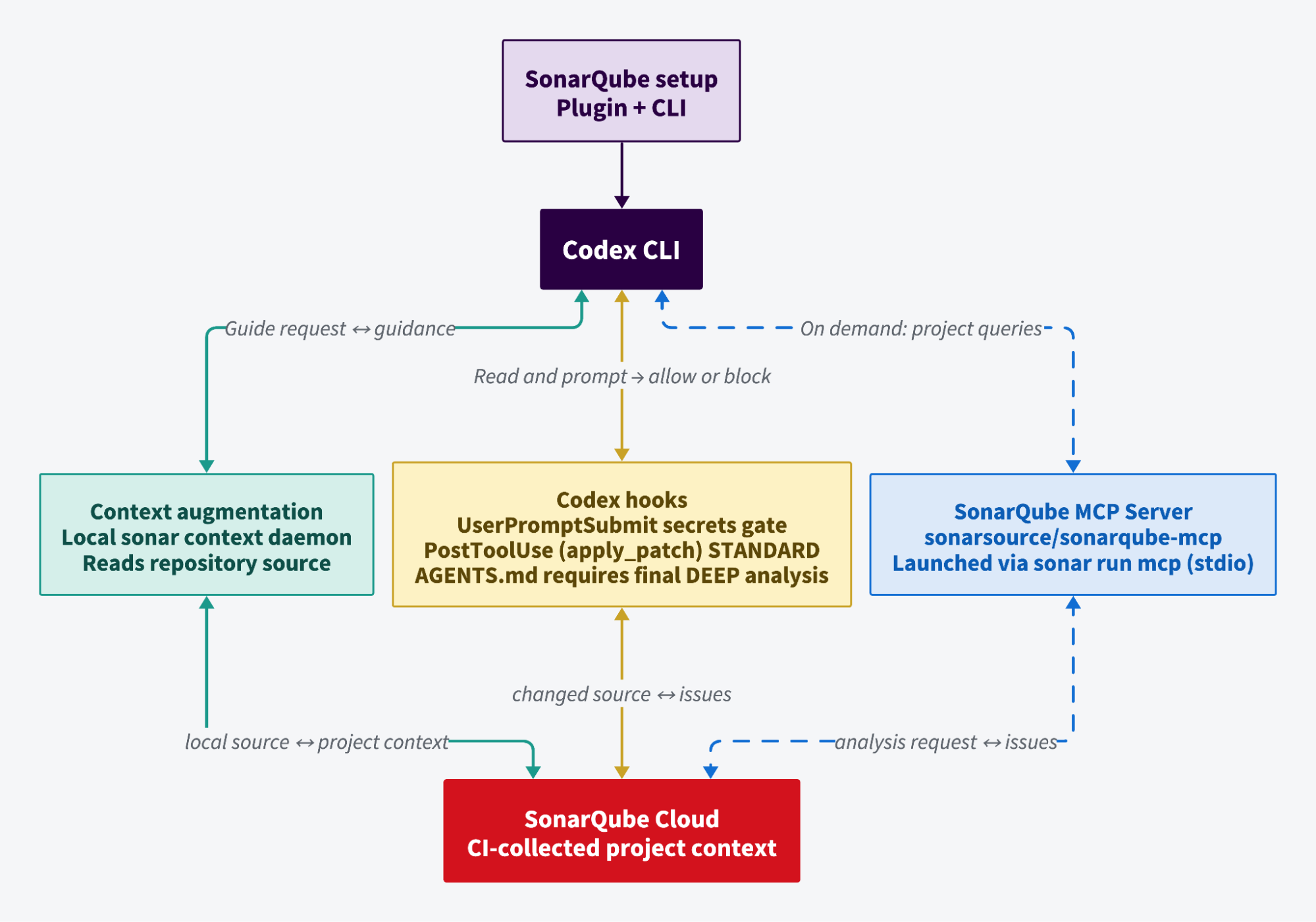
The integration is split across two layers:
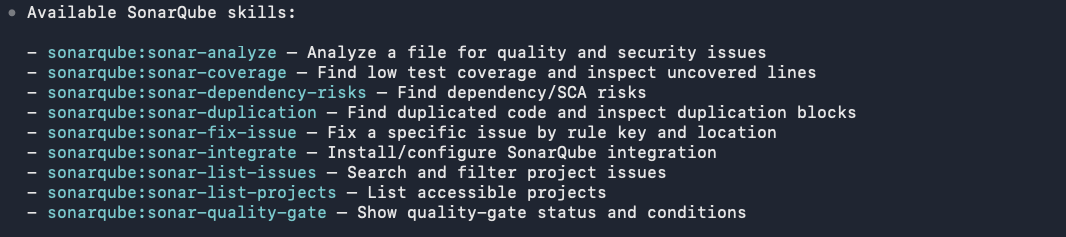
The plugin layer contributes skills, but owns no runtime infrastructure. You install it from the sonar marketplace at SonarSource/sonarqube-agent-plugins, and it lands in ~/.codex/plugins/cache/sonar/sonarqube/<version> carrying nine sonar-* skills plus an MCP manifest.
The SonarQube CLI layer does the work. sonar auth login holds your authenticated session in the OS keychain. sonar run mcp starts the SonarQube MCP Server container, which Codex talks to over stdio. Both hook scripts are four-line shells that call sonar hook codex-prompt-submit and sonar hook codex-post-tool-use, so they reuse that same keychain session, and sonar context powers context augmentation.
Context augmentation doesn't travel the MCP path on a plugin install. It runs through a local sonar context daemon over a Unix domain socket on Linux and macOS, or a named pipe on Windows, which gives it direct filesystem access. The same capabilities can be surfaced as MCP tools instead, which is the route for agents without plugin or CLI support, but you won't see them in your MCP tool list here.
What makes the analysis fast enough to sit in a coding loop is that it doesn't recompute anything. A CI run stores your project's dependencies, compiled artifacts, type information, and build configuration, tagged by project key and branch. Vortex restores that context on demand, so a single-file check returns in seconds at the same depth as a full scan.
Vortex covers the Guide and Verify stages of Sonar's Agent Centric Development Cycle: it automatically guides the agent with project context and constraints and verifies the agentic loop’s output with CI-level precision.
Prerequisites
- Codex CLI installed and operational
- SonarQube Cloud on Enterprise, or Team with an annual plan, plus a Sonar Agent Essentials subscription active for your org
- A container runtime running: Docker, Podman, or nerdctl. The MCP server runs as a container.
- (Optional) SonarQube CLI (
sonar) 1.6.0 or later. Thesonar-integrateskill installs or self-updates it, so you can skip this going in
To follow along exactly, fork aws/aws-cli, import it into SonarQube Cloud with CI-based analysis, and analyze it on a branch through CI. Vortex analysis restores the CI analysis context and Vortex context combines SonarQube Cloud project data with the local semantic nav.
Step 1 — Install and activate the plugin
Register the SonarSource marketplace, install the plugin, and confirm it's active. Open a Codex session from your project root and run all three.
codex plugin marketplace add SonarSource/sonarqube-agent-plugins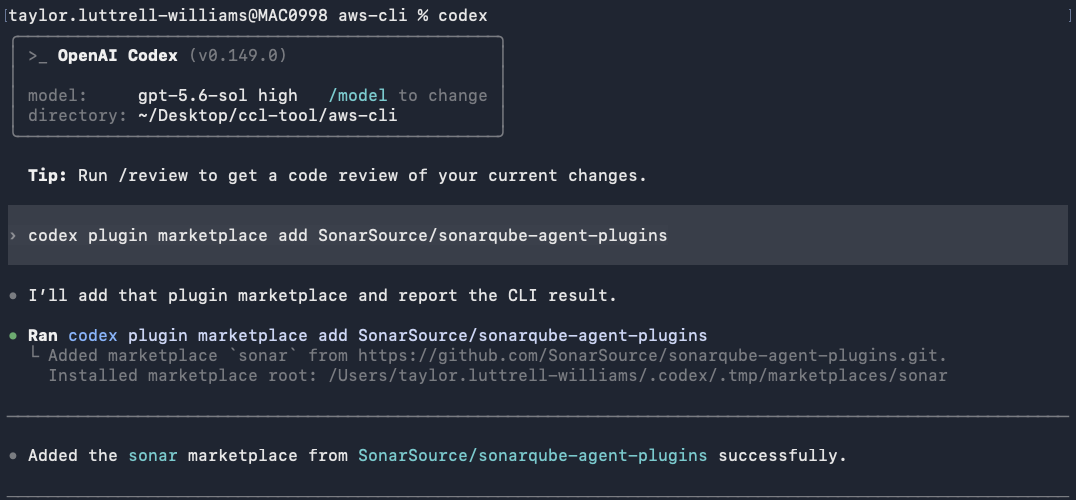
codex plugin add sonarqube@sonar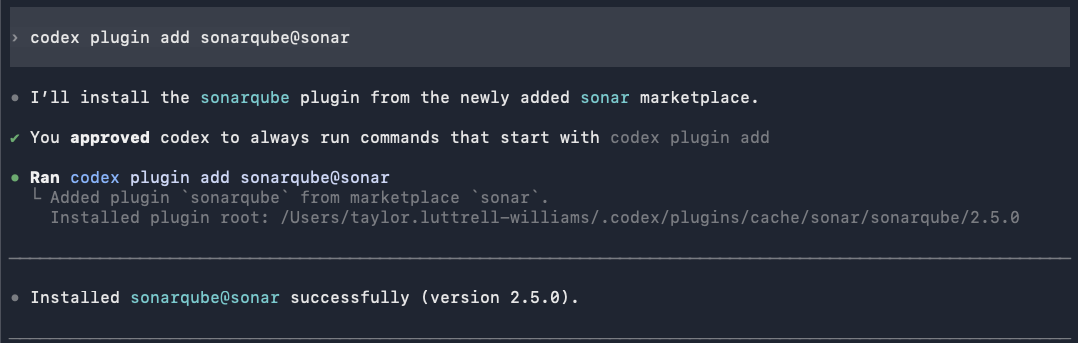
codex plugin list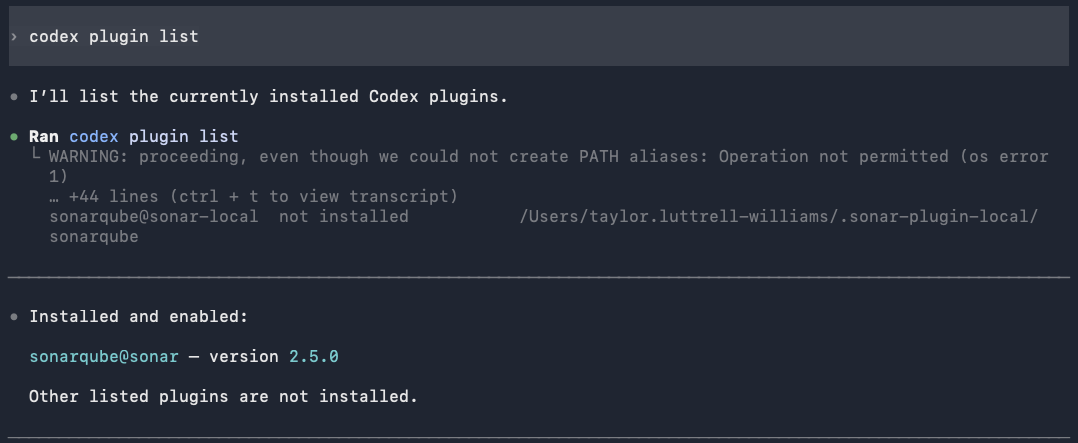
The plugin installs to ~/.codex/plugins/cache/sonar/sonarqube/2.5.0 and codex plugin list reports sonarqube@sonar — version x as installed and enabled. At this point the plugin is loaded but nothing is wired to your project yet.
Step 2 — Configure the integration
Launch a fresh Codex session so the plugin's skills register. All nine appear:
Now run the integration skill:
/sonarqube:sonar-integrateIt walks four checks:
- CLI check. Verifies the SonarQube CLI is installed and runs
sonar self-update. If the CLI isn't on your machine, it shows the install commands. - Auth check. Runs
sonar auth status. If you're already authenticated to SonarQube Cloud, it skips ahead. - Auth login. Select your region (EU or US), enter your organization key, and complete browser-based authentication. The token lands in your OS keychain.
- Integration. Choose whether to configure the current project or install globally. Choose Current project only. The skill runs
sonar integrate codexunder the hood.
Vortex installs as a single prompt covering both context and analysis. That unification shipped in SonarQube CLI 1.5.0. On older CLI versions you'll see two separate prompts for agentic analysis and context augmentation.
The summary confirms what was configured:
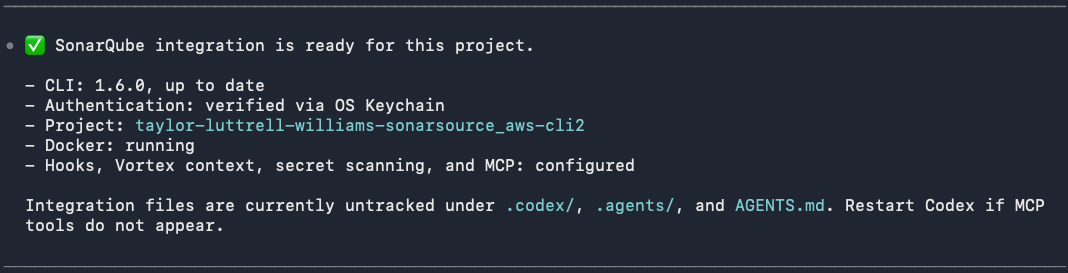
Restart Codex before continuing as the MCP server and the hooks only load at session start.
Step 3 — Review what the integration configured
This step walks the artifacts the integration wrote:
.codex/config.toml registers the MCP server:
[mcp_servers.sonarqube]
command = "sonar"
args = [ "run", "mcp", "--project", "<your-project-key>" ]
The server starts through the CLI rather than a raw docker run, which is how the CLI detects your container runtime and hands off the keychain session.
.codex/hooks.json registers two hooks:
{
    "hooks": {
      "UserPromptSubmit": [
        {
          "matcher": "*",
          "hooks": [
            {
              "type": "command",
              "command": "'.codex/hooks/sonar-secrets/build-scripts/prompt-secrets.sh'",
              "timeout": 60
            }
          ]
        }
      ],
      "PostToolUse": [
        {
          "matcher": "apply_patch",
          "hooks": [
            {
              "type": "command",
              "command": "'.codex/hooks/sonar-sqaa/build-scripts/posttool-sqaa.sh'",
              "timeout": 60
            }
          ]
        }
      ]
    }
  }
apply_patch is Codex's tool name for any file edit, so the second hook fires on every write the agent makes.
The hook scripts are four lines each. Here's posttool-sqaa.sh:
#!/bin/bash
if ! command -v sonar &> /dev/null; then
  exit 0
fi
sonar hook codex-post-tool-use --project '<your-project-key>
prompt-secrets.sh is identical apart from its last line, which calls sonar hook codex-prompt-submit. Both exit silently when the CLI isn't on PATH. This is the clearest illustration of the split described in the architecture: the hooks are thin, and the CLI does everything.
AGENTS.md at your repository root picks up two managed blocks, each delimited by HTML comments. The first, sonar:begin:codex-secrets-on-read, tells the agent to run sonar analyze secrets <path> before reading any workspace file, and to refuse the read and advise rotation if the scan hits. The second, sonar:begin:sonarqube-agentic-analysis-protocol, is titled "Vortex analysis protocol" and governs end-of-turn verification:
Vortex analysis is the final confirmation layer at the end of every turn in which you
wrote to one or more files in the workspace...

Per-edit hooks run faster STANDARD analysis. End-of-turn analysis must always use
`--depth DEEP` (including a single `--file`).
.agents/skills/sonar-context-augmentation/SKILL.md installs the context augmentation skill. Its description instructs the agent to invoke it on the first prompt, and it defines three mandatory workflows: sonar context guidelines get before generating or editing source code, sonar context dependencies check --purl <purl> before modifying a manifest or lockfile, and the sonar context navigation family in place of grep and find for locating symbols and tracing callers.
Step 4 — Guide the agent with context and constraints
You don't invoke the context skill directly. Provide the agent a natural language prompt and watch it reach for the skill on its own.
what are the coding guidelines for this project?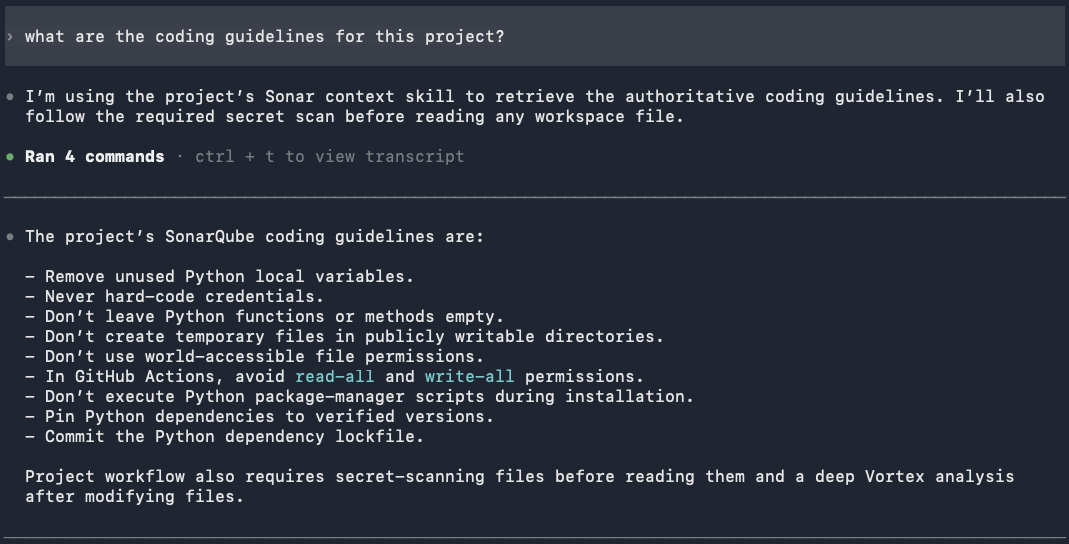
The agent returns nine guidelines specific to this codebase, not generic Python advice: remove unused local variables, never hard-code credentials, don't leave functions or methods empty, don't create temporary files in publicly writable directories, don't use world-accessible file permissions, avoid read-all and write-all permissions in GitHub Actions, don't execute package-manager scripts during installation, pin dependencies to verified versions, and commit the dependency lockfile. Each one derives from the project's real SonarQube issue history, filtered by what the agent is about to do.
Now the second query:
show me the top-level architecture of this project
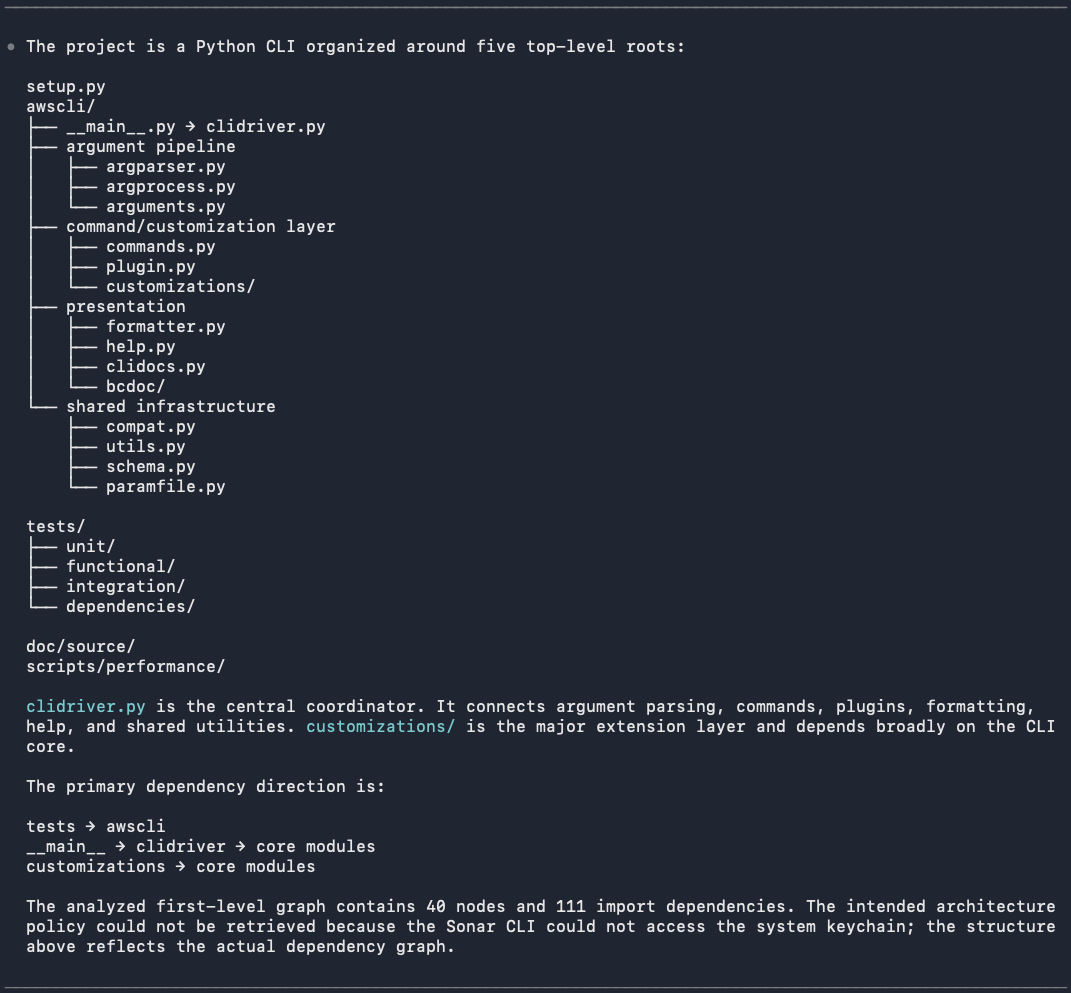
The agent starts at depth 0 and returns the five top-level roots of the awscli package: the argument pipeline, the command and customization layer, presentation, shared infrastructure, and the __main__ entry point. It identifies clidriver.py as the central coordinator and customizations/ as the major extension layer, and reports a first-level graph of 40 nodes and 111 import dependencies.
Four capability categories back these answers. Coding guidelines come from issue history. Architecture exposes the current dependency graph and any architectural constraints you've defined. Semantic navigation resolves call stacks, class hierarchies, and references using abstract syntax trees and control flow rather than keyword matching. And dependency health checks, if enabled, assess vulnerabilities, supply-chain malware, and license compliance before a package gets added, where SonarQube Advanced Security is available.
Step 5 — Verify the agentic loop
One prompt exercises the whole loop. Ask Codex for a new file:
Add s3_helper.py at the project root with an upload_with_retry(
bucket, key, file_path, max_retries=3
) function.

Implement a small boto3-based S3 upload helper using the standard upload_file transfer
API. Retry transient upload failures with exponential backoff, log each attempt, and
raise a clear error after all retries fail. Keep the public function signature as
specified. Include a TODO for adding metric emission later.
Before touching the filesystem, the agent retrieves the project's Sonar coding guidance, as the context skill requires. It confirms the guidance is compatible with the request and states its reading of max_retries, treating it as retries after the initial upload, permitting up to four total attempts, with permanent failures stopping immediately. Then it writes the file: s3_helper.py (+112 -0).
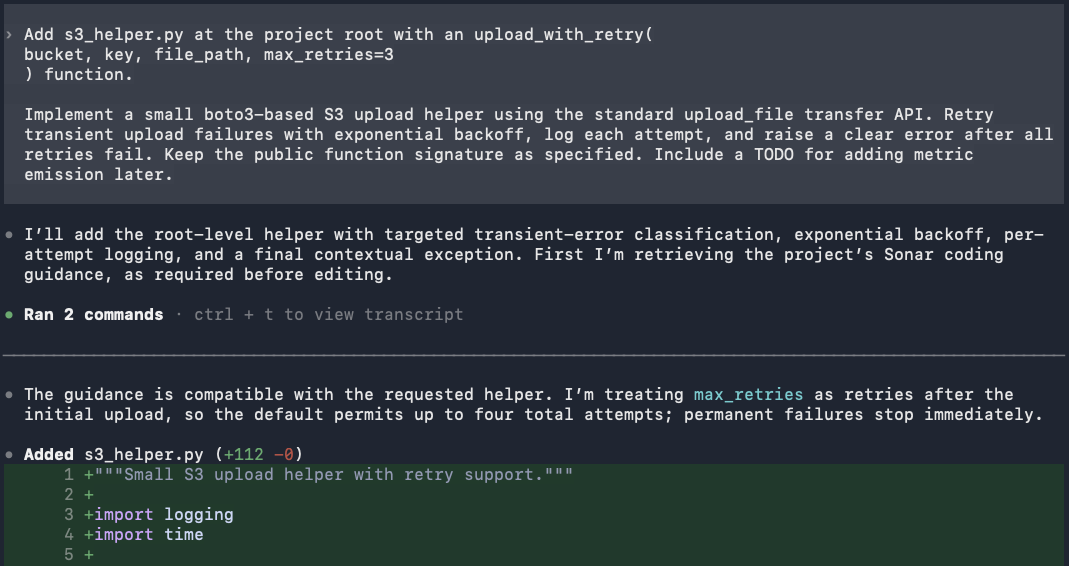
The PostToolUse hook fires on that write with no prompting, and reports two issues: the TODO marker, and a recommendation to pass ExpectedBucketOwner.
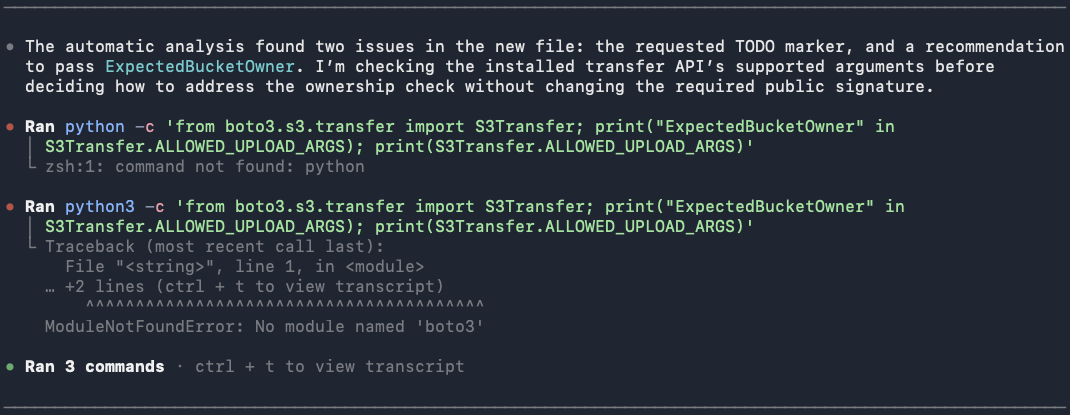
The agent doesn't accept the finding blindly. It goes looking for the installed transfer API's supported arguments before deciding how to respond. Both probes fail. The agent moves on to the authenticated DEEP pass its AGENTS.md protocol requires:
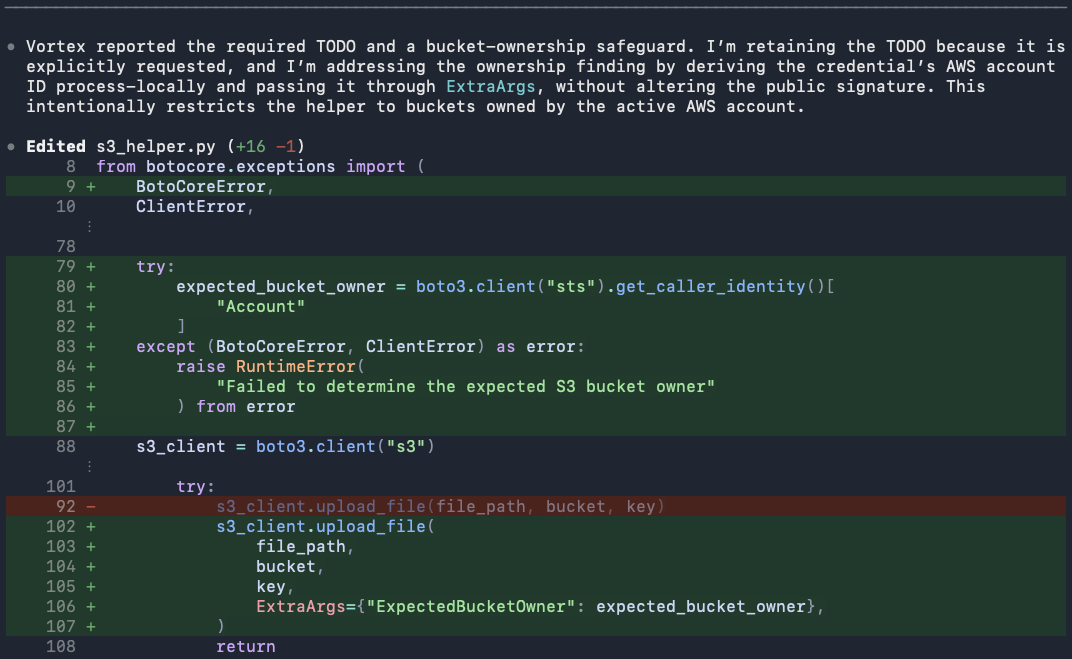
The bucket-ownership finding is python:S7608, which raises when an S3 operation runs without verifying bucket ownership through the ExpectedBucketOwner parameter. Its security impact is rated high, since an application can otherwise write into a bucket whose ownership changed underneath it.
The agent resolves it by deriving the credential's AWS account ID process-locally and passing it through ExtraArgs, leaving the public signature untouched, and it notes the trade-off: the helper is now restricted to buckets owned by the active AWS account. It keeps the TODO, because you asked for it, and says so. s3_helper.py (+16 -1). The hook fires again on the fix.
Following this loop, there are two important takeaways. First, the depths differ by moment: the hook runs STANDARD automatically on each edit, while the AGENTS.md protocol requires an explicit DEEP run before the agent sends its final reply. Second, the division of labor holds throughout. Vortex flagged and the model fixed, inside a single turn, with nobody reviewing a diff in between.
Step 6 — Run multi-file DEEP analysis
Single-file analysis won't catch issues that only appear across boundaries. Pass repeated --file flags to widen the scope:
sonar analyze agentic --file awscli/clidriver.py --file s3_helper.py2 files analyzed · 2 with issues · 2 issues found · DEEP analysisFour things govern this command:
- Two or more
--fileflags activateDEEPautomatically. You don't need to pass--depth. --depthacceptsSTANDARD, the single-file default, andDEEP.--projectand--branchare inferred from your project configuration when you run inside the project directory.- Large change sets trigger a confirmation prompt; pass
--forceto skip it.
Verify the setup
Run through this checklist to confirm every layer is live.
sonar auth status        # authenticated session against SonarQube Cloud
sonar --version          # 1.6.0 or later
sonar system status      # Vortex section shows entitlement and usage state
codex plugin list        # sonarqube@sonar, installed and enabled
docker ps --filter "ancestor=sonarsource/sonarqube-mcp"
sonar system status arrived in CLI 1.6.0 and is the fastest answer to "why isn't Vortex installing?" A genuine entitlement loss surfaces as an unhealthy status; hitting a usage limit stays healthy.
Then, in a fresh Codex session:
/mcplistssonarqubeas connected with its tools available. Context augmentation tools won't appear; they run through the local daemon, not MCP.- A prompt containing a credential-shaped string gets blocked before it reaches the model.
- Any file edit triggers the
PostToolUsehook and returns findings.
Your project should now carry these artifacts:
What to know
- Vortex analysis restores stored CI analysis context, and context augmentation draws its guidelines and architecture graph from prior analysis. For Java projects analyzed through Automatic Analysis, only basic results come back.
- Vortex is project-scoped. It's skipped on
sonar integrate codex --global, on SonarQube Server, and without organization entitlement: silently in all three cases, while secrets detection still installs, so a partial setup looks fine at a glance.sonar system statustells you which case applies to you. - Language coverage differs per capability. Vortex analysis spans 25 languages including Python, but taint analysis is limited to Java, JavaScript, TypeScript, C#, and VB.NET, and semantic navigation to Java, C#, JavaScript, TypeScript, Python, and Rust.
- Re-running
sonar integrate codexis idempotent and is your recovery path. Running it interactively against a configured project also lets you keep or remove individual features, and Vortex comes out as one unit.
Verified against SonarQube plugin for Codex 2.5.0 and SonarQube CLI 1.6.0, August 2026.
Next steps
- How to set up Sonar Vortex in Claude Code
- Introducing Sonar Vortex and the SonarQube Remediation Agent
- SonarQube agent plugins
- The future is AC/DC: the Agent Centric Development Cycle
Consult the docs: