
TLDR overview
- The SonarQube CLI brings local code analysis, project queries, and AI agent integrations into the terminal for SonarQube Cloud and SonarQube Server users.
- Local code workflows cover secrets detection, Sonar Vortex analysis of files and changes, and dependency risk checks for vulnerabilities, malware, and prohibited licenses.
- Claude Code integration connects SonarQube analysis hooks, project context, and MCP access; other supported agents include GitHub Copilot, Codex, Cursor, and Antigravity.
- Git hooks scan for secrets before commits and pushes, while terminal queries show project issues and quality gate status.
Overview
By the end of this blueprint, Claude Code will check the files it edits with Sonar Vortex and block prompts and file reads that contain hardcoded secrets. Git pre-commit and pre-push hooks will block commits and pushes that contain them. You can also check a pull request's quality gate and open issues from the terminal.
You set this up with the SonarQube CLI (sonar). The walkthrough uses SonarQube CLI 1.9.0 and a fork of GCToolKit, Microsoft's open-source Java GC log parser, on SonarQube Cloud. Apart from login, the commands are the same on SonarQube Server. Secrets detection runs on your machine. Vortex sends file content to SonarQube for analysis.
When to use this
Use this blueprint when SonarQube already analyzes your project in CI and you want that verification inside your Claude Code session while the code is being written. Keep SonarQube in your pipeline, because Vortex builds on that analysis. Without a Vortex subscription, the secrets hooks, Git hooks, and quality gate commands still work. The Agent Centric Development Cycle page covers the wider context.
What you'll achieve
- Vortex findings in Claude Code after every edit, plus a DEEP analysis before the agent ends a turn
- The SonarQube MCP Server available to the agent
- Secrets blocked in prompts, in files the agent reads, and in commits and pushes
- Quality gate and issue results for a pull request in your terminal
Architecture
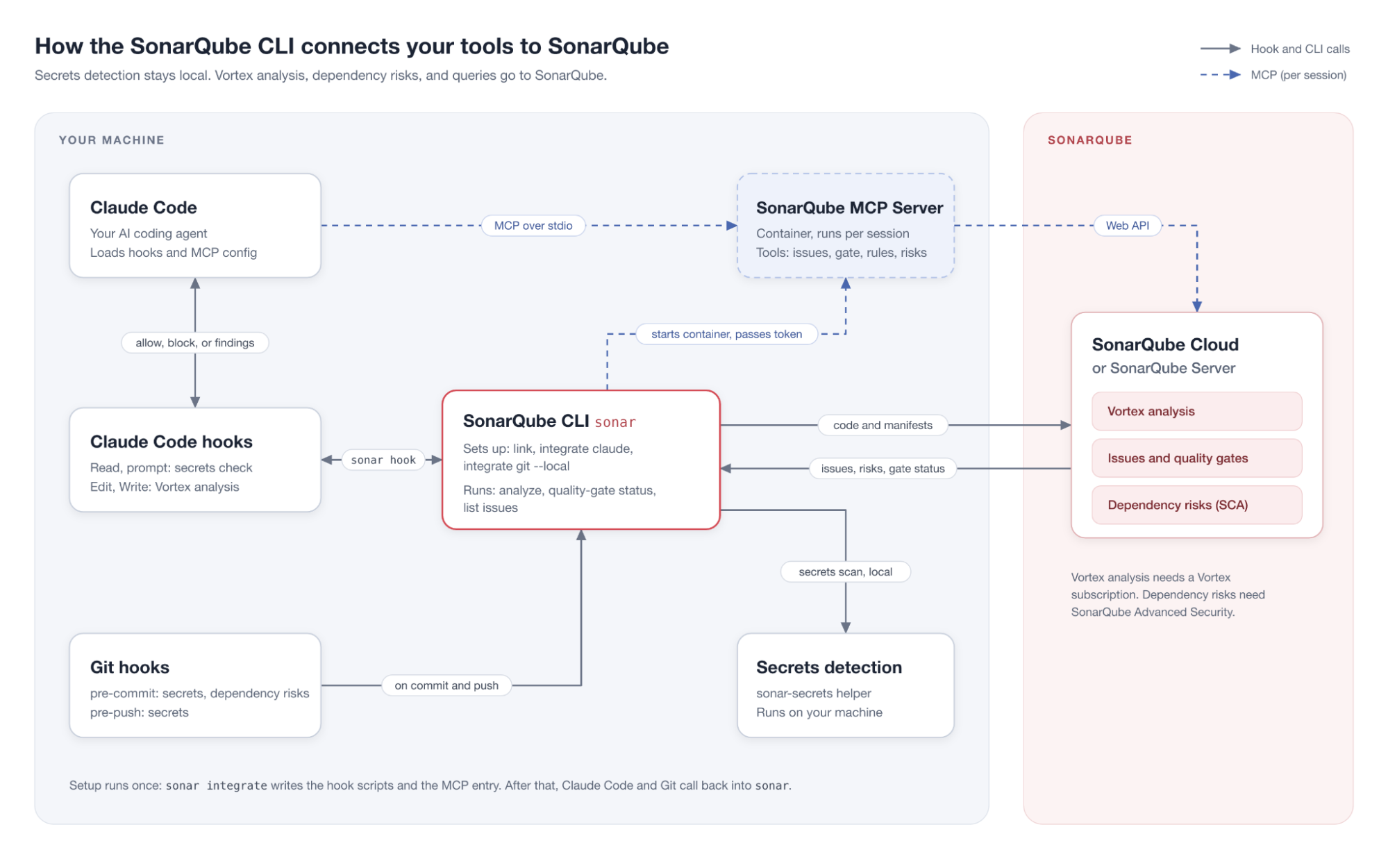
Claude Code and Git call sonar whenever a hook fires. The SonarQube MCP Server follows a separate path. Each Claude Code session runs sonar run mcp from ~/.claude.json. The CLI then starts the container and passes it the token.
Prerequisites
- A SonarQube Cloud account, or SonarQube Server 2025.1 or later, with your project imported and analyzed in CI
- A SonarQube user token.
- macOS ARM64, Linux x86-64 or ARM64, or Windows x86-64
- Git and Claude Code
- Docker, Podman, or Nerdctl, for the SonarQube MCP Server
- For Vortex, a separate subscription, as well as a SonarQube Cloud Enterprise or annual Team plan (admin guide), or SonarQube Server 2026.5 or later in Enterprise or Data Center edition (admin guide). See plans and pricing.
- For dependency-risk checks, SonarQube Advanced Security with software composition analysis (SCA) enabled (SonarQube Server 2026.4 or later)
- For Step 6, a pull request that SonarQube has analyzed
Step 1. Install and log in
On Linux or macOS, run the install script to get the latest stable release:
curl -o- https://raw.githubusercontent.com/SonarSource/sonarqube-cli/refs/heads/master/user-scripts/install.sh | bashOn Windows (PowerShell):
irm https://raw.githubusercontent.com/SonarSource/sonarqube-cli/refs/heads/master/user-scripts/install.ps1 | iexHomebrew users can run brew install sonarqube-cli instead. After an install script, restart your terminal so the new PATH entry takes effect. Then run sonar --version to confirm the install.
Log in with the OS keychain
sonar auth loginPick SonarQube Cloud and your region, create the token in the browser window that opens, and choose your organization. The CLI verifies the token and stores it in your OS keychain. For SonarQube Server, pass the URL on the command line. Confirm that you trust the server when asked:
sonar auth login --server <YOUR_SERVER_URL>Replace <YOUR_SERVER_URL> with the full URL of your SonarQube Server instance.
Use environment variables instead
WSL can't use the keychain that login depends on. WSL, CI jobs, and containers read credentials from the environment instead:
export SONARQUBE_CLI_TOKEN="<YOUR_TOKEN>"
    export SONARQUBE_CLI_ORG="<YOUR_ORG>"
    export SONARQUBE_CLI_SERVER="https://sonarqube.us"   # US region only
Set <YOUR_TOKEN> to a SonarQube user token and <YOUR_ORG> to your SonarQube Cloud organization key. For SonarQube Server, set SONARQUBE_CLI_SERVER to your server URL and leave SONARQUBE_CLI_ORG unset. Environment credentials take precedence over the keychain.
Step 2. Link the repository
Run sonar link once per repository so later commands find the SonarQube project without a --project flag:
sonar link <PROJECT_KEY>Replace <PROJECT_KEY> with the exact project key from SonarQube Cloud or SonarQube Server.
✅ Linked ~/dev/cli-demo to project kcarlsen-sonarsource_cli-demo
Config saved to ~/dev/cli-demo/.sonar-config.json
Commit .sonar-config.json to share it.
Commit .sonar-config.json to share the binding with teammates and their agents.
Step 3. Run Vortex on a file
Run sonar analyze on one file to see the findings Claude Code receives after every edit. It runs secrets detection first and then sends the file to Vortex. The command below analyzes a GCToolKit file, so substitute your own path:
sonar analyze --file api/src/main/java/com/microsoft/gctoolkit/GCToolKit.java✓ ~/dev/cli-demo/api/src/main/java/com/microsoft/gctoolkit/GCToolKit.java
✅ No secrets found · 258ms
! api/src/main/java/com/microsoft/gctoolkit/GCToolKit.java · 10 issues
[1] line 323 Reduce the total number of break and continue statements in this loop to use at most one. java:S135
[2] line 63 Rename this method name to match the regular expression '^[a-z][a-zA-Z0-9]*$'. java:S100
[3] line 71 Replace this use of System.out by a logger. java:S106
...
1 files analyzed · 1 with issues · 10 issues found · STANDARD analysisNote the java:S106 finding on line 71, because you'll ask Claude Code to fix it in Step 4. A single --file runs at STANDARD depth, while two or more files or a Git change set such as --staged default to DEEP and add cross-file findings. The command exits 51 when it finds something, and if you see Vortex analysis skipped: no project configured, the binding from Step 2 didn't resolve.
Step 4. Connect Claude Code
Run one command to add that check to Claude Code after every edit and to add the SonarQube MCP Server:
sonar integrate claude --non-interactiveThe integration installs under your home directory. It doesn't write anything into the repository:
SonarQube Integration Setup for Claude Code
...
  Connection
    ✓  Server: https://sonarcloud.io
    ✓  Organization: kcarlsen-sonarsource
    ✓  Token: valid
...
  Installed
    ✓  secret scanning hooks
...
    ✓  Vortex
...
    ✓  MCP server
       ~/.claude.json
...
  ✅  Setup complete!
...
The CLI adds five hook events to ~/.claude/settings.json and keeps the hooks already there. A secrets check runs before the Read tool and on every prompt, and a STANDARD Vortex analysis runs after every Edit or Write. Vortex Context runs at session and subagent start and tells the agent to pull your project's coding guidelines with sonar context before it edits.
The CLI also appends a protocol to ~/.claude/CLAUDE.md. The protocol tells the agent to run sonar analyze agentic --depth DEEP on every file it changed before it ends a turn, and to quote the findings verbatim. If your organization isn't entitled to Vortex, the CLI skips those pieces and installs the rest.
For MCP access, ~/.claude.json gets a sonarqube entry that runs sonar run mcp and stores no token.
Claude Code starts the server with each session. sonar run mcp starts the sonarsource/sonarqube-mcp container with your container runtime and --pull=always, and passes the token in at runtime. The agent gets tools such as get_project_quality_gate_status and show_rule.
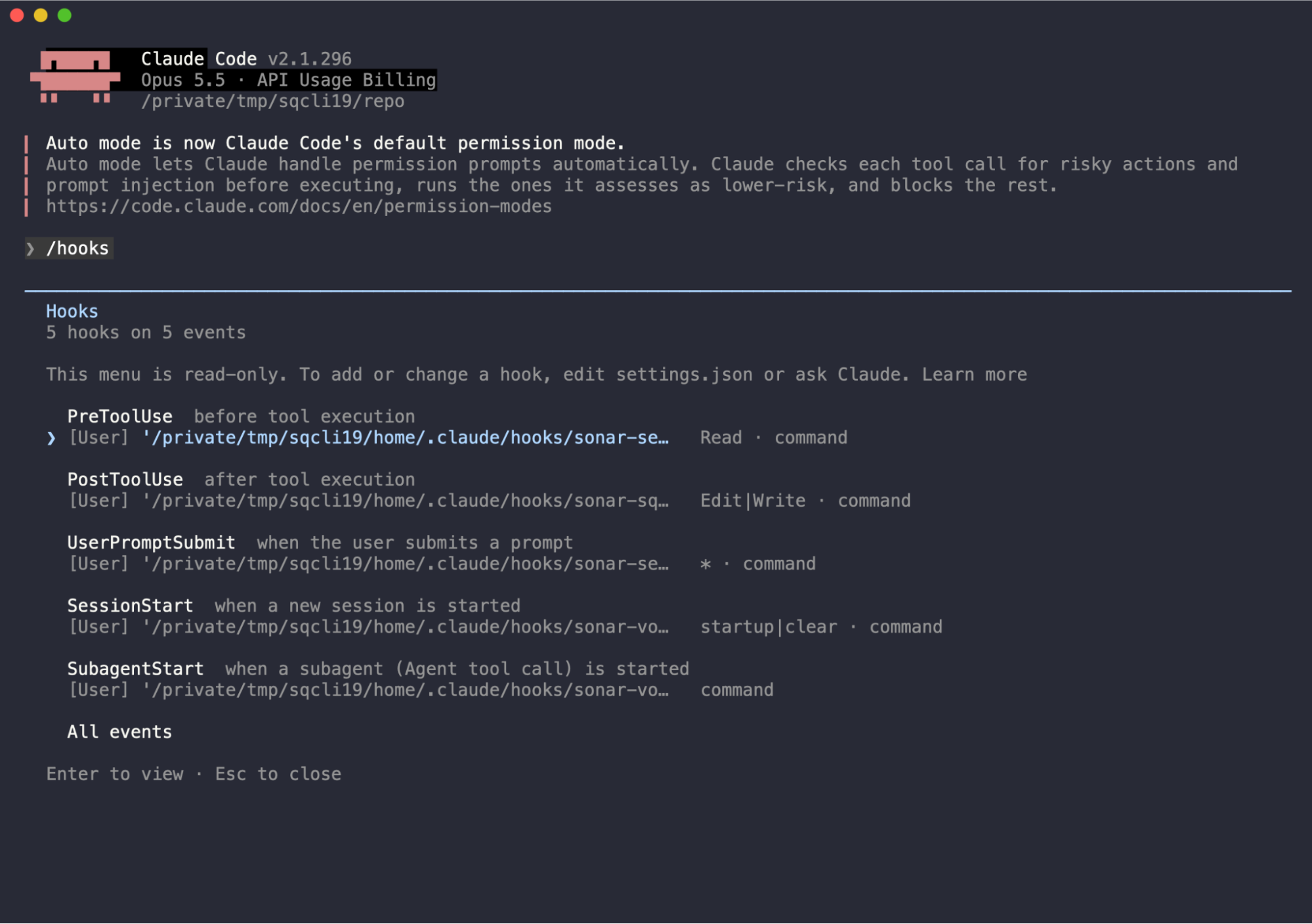
Start a new Claude Code session in the repository and open /hooks to confirm that all five Sonar hooks loaded. Without a Vortex subscription, the two secrets checks hooks appear.
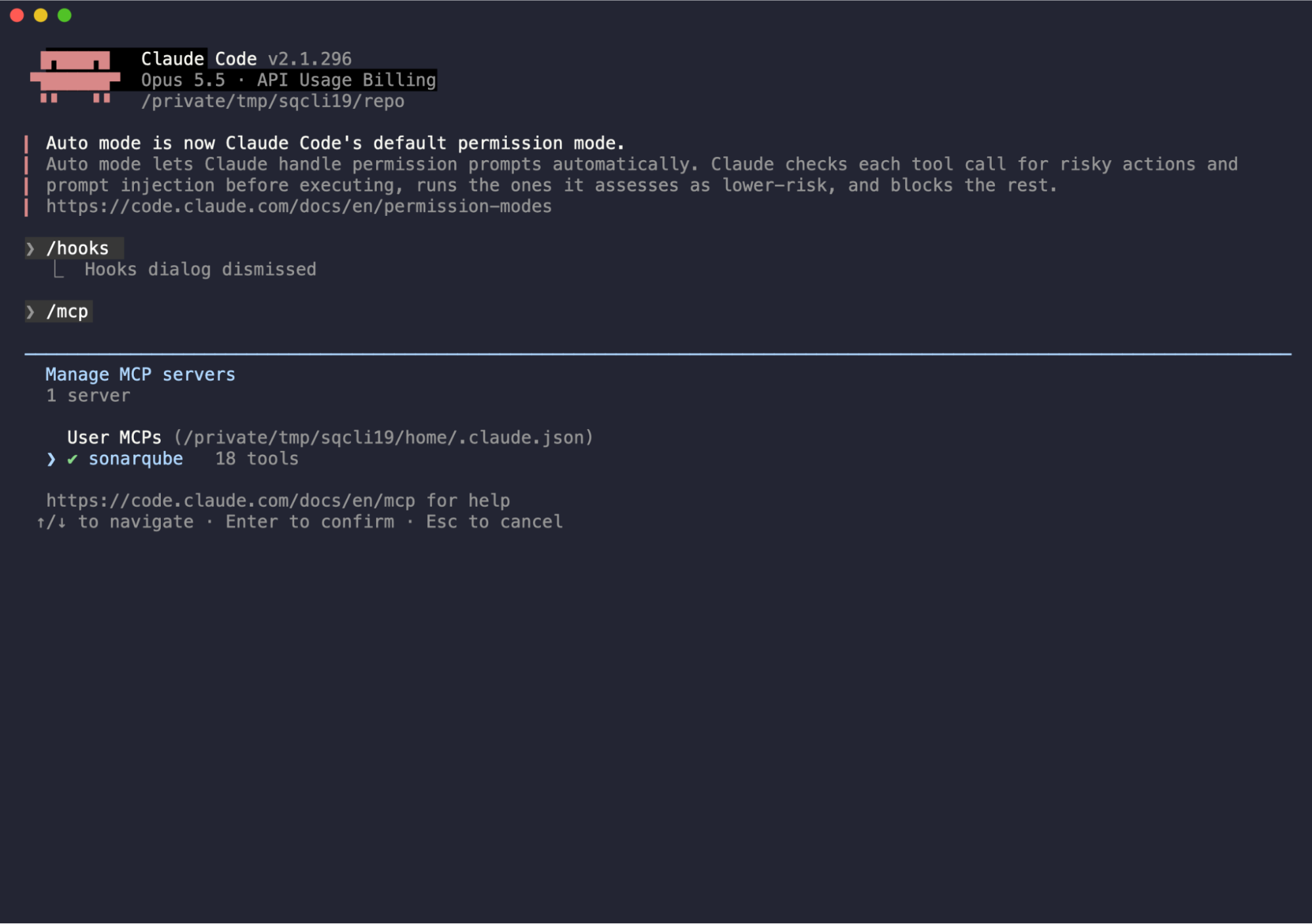
Open /mcp to see the sonarqube server (user scope, from ~/.claude.json). It shows as connected once its container is up.
Fix the finding from Step 3
Ask Claude Code to fix it:
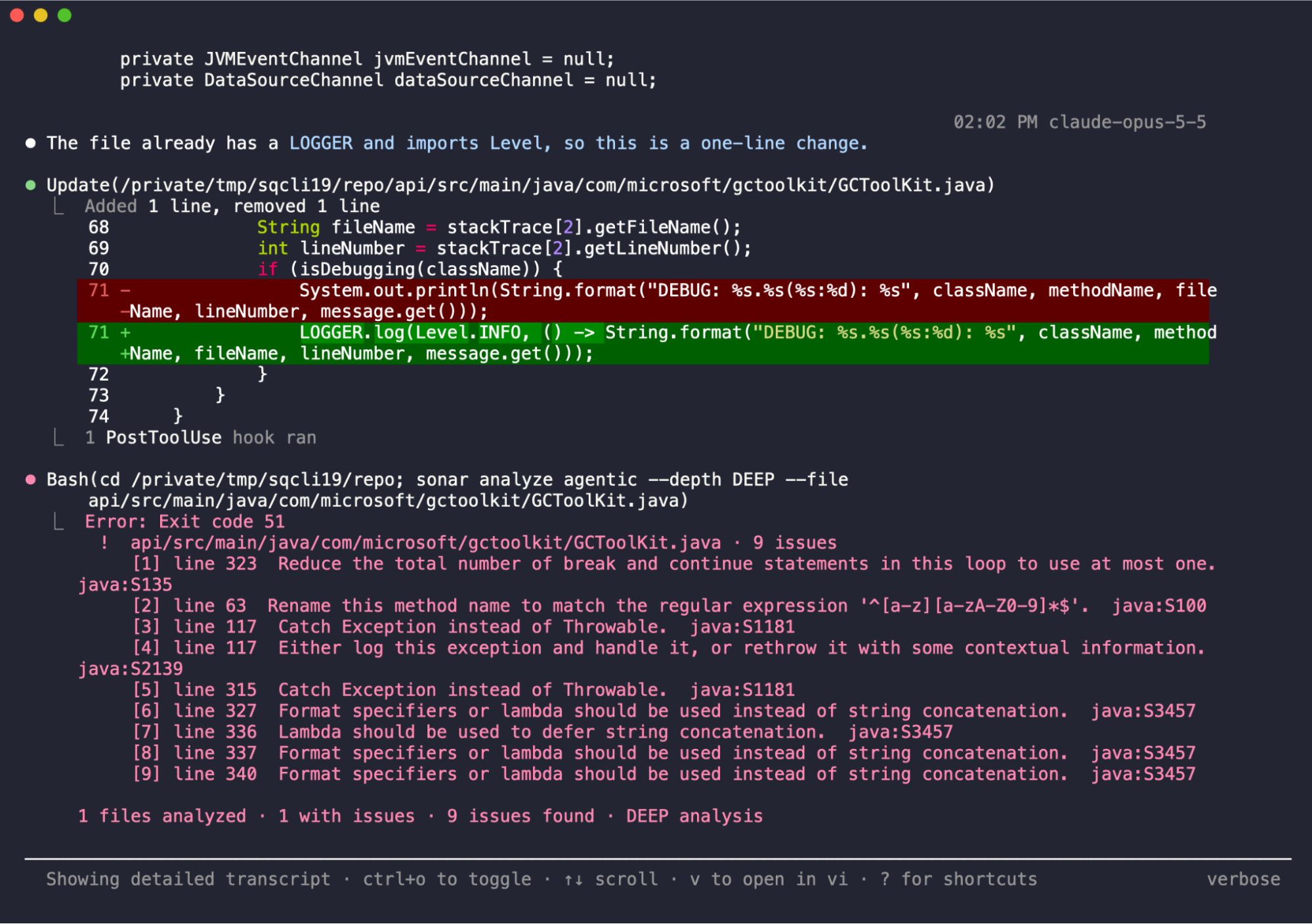
In api/src/main/java/com/microsoft/gctoolkit/GCToolKit.java, replace one System.out.println call with a java.util.logging Logger call. Make the minimal edit.You’ll see the terminal shows 1 PostToolUse hook ran. The hook sends the STANDARD result to the agent as additional context, but it’s designed to fire silently and may not appear on your screen. After the agent replaces the System.out call on line 71, the result it receives no longer includes java:S106:
!  api/src/main/java/com/microsoft/gctoolkit/GCToolKit.java · 9 issues
[1] line 323  Reduce the total number of break and continue statements in this loop to use at most one.  java:S135
[2] line 63  Rename this method name to match the regular expression '^[a-z][a-zA-Z0-9]*$'.  java:S100
[3] line 117  Catch Exception instead of Throwable.  java:S1181
...

1 files analyzed · 1 with issues · 9 issues found · STANDARD analysis
The protocol in ~/.claude/CLAUDE.md tells the agent to run sonar analyze agentic --depth DEEP --file on the changed file before it ends its turn. Claude Code asks before it runs sonar commands such as sonar analyze agentic or sonar context unless your permission settings allow them. Claude Code labels that Bash call Error: Exit code 51. Exit code 51 means the analysis found issues. In the example we are using, all of these issues are pre-existing. Vortex is designed to avoid the classic trap of “fix 1 issue, find 3 more” and will not attempt to resolve existing issues unless directed to do so.
Before Step 6, discard the edit so the branch checkout starts from a clean tree:
git restore api/src/main/java/com/microsoft/gctoolkit/GCToolKit.javaTest the secrets hook
Paste the sample prompt that sonar integrate claude printed at the end of setup. It contains a sample token. The UserPromptSubmit hook blocks it with Sonar detected secrets in prompt before it reaches the model. In headless -p mode, Claude Code's result text still echoes the original prompt, so the token stays in local output and transcripts.
Step 5. Add Git hooks
Claude Code hooks don't see commits, whether you or the agent make them. Install Git hooks in the repository:
sonar integrate git --hook pre-commit --local --non-interactive
sonar integrate git --hook pre-push --local --non-interactive
Keep the --local flag. Without it, the CLI sets git config --global core.hooksPath to a managed hooks directory for every repository on your machine. With --local, the CLI detects Husky or the pre-commit framework and installs into that setup, and it warns only when an inherited core.hooksPath shadows the hook, printing the git config --local core.hooksPath fix.
If SCA is enabled through SonarQube Advanced Security when you install the hook, the pre-commit hook also checks dependency risks whenever a relevant manifest or lockfile changes. It uploads those manifests to SonarQube for the check. The pre-push hook scans for secrets only.
Test the pre-commit hook. Create sonar-hook-verify.py in the repository root with a synthetic sk-proj- style key on line 3, then stage and commit it:
git add sonar-hook-verify.py
git commit -m test• sonar-hook-verify.py:3 — Generic Secret (secret: sk-*****************************************************)
❌ Secrets detected in staged files.
→ Remove the reported secret, then retry the commit.The hook exits 1 and blocks the commit, but the file stays staged. Remove it before you continue:
git rm --cached sonar-hook-verify.py && rm sonar-hook-verify.pyStep 6. Check the pull request
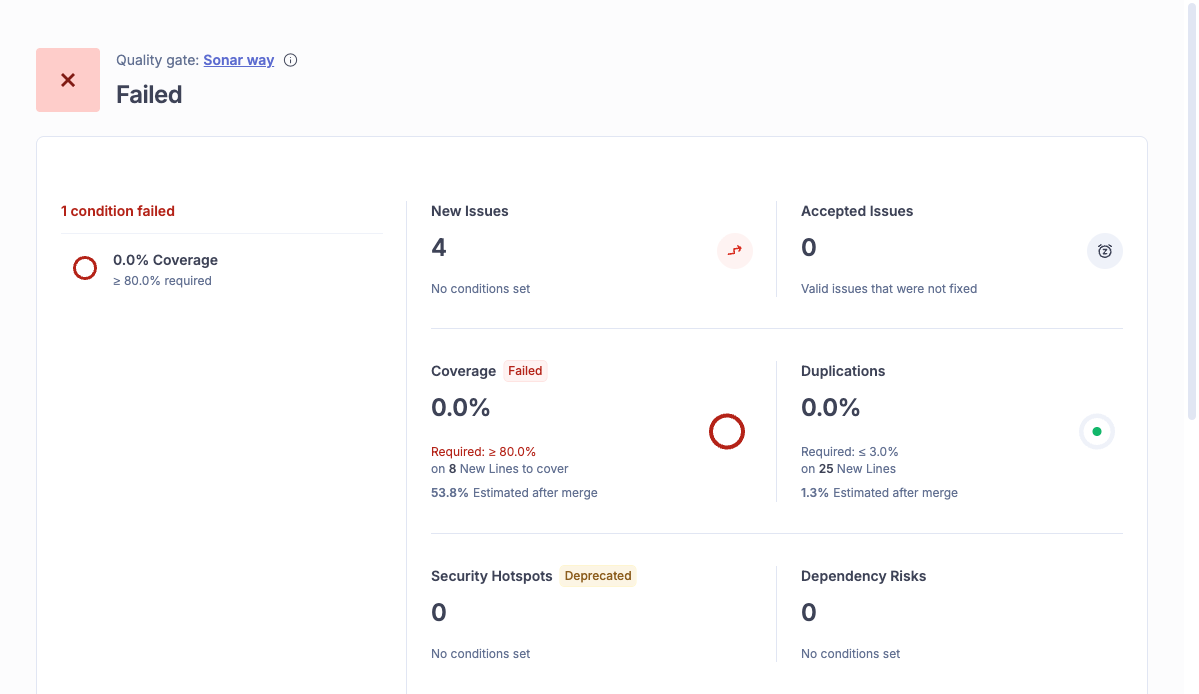
Check out the source branch of a pull request that SonarQube has analyzed. sonar quality-gate status finds the pull request by branch name:
git checkout <PR_BRANCH>
    sonar quality-gate status
Replace <PR_BRANCH> with the pull request's source branch. If your clone doesn't have that branch, create it with git checkout -b <PR_BRANCH> main instead, because detection compares branch names only.
=== Quality Gate: [✗ Failed] ===
Project:      kcarlsen-sonarsource_cli-demo
Pull Request: 1 (auto-detected from branch cli-demo-qg-test)

Conditions:
    ✗  0.0%  Coverage on New Code  (required ≥ 80%)
        0.0%  api/src/main/java/com/microsoft/gctoolkit/demo/QualityGateDemo.java
The output lists the failing condition per file with no extra flags, and the command exits 0 for a passing gate and 51 for a failing one, falling back to the default branch when no pull request matches the branch.
List the pull request's open issues with the same branch detection:
git branch --show-current
sonar list issues --statuses OPEN --format table --page-size 5cli-demo-qg-test
Using auto-detected project key: kcarlsen-sonarsource_cli-demo
Using pull request 1 (auto-detected from branch cli-demo-qg-test)
SEVERITY | RULE | MESSAGE | FILE
--------------------------------------------------------------------------------------
MINOR | java:S1128 | Remove this unused import 'java.util.List'. | api/src/main/java/com/microsoft/gctoolkit/demo/QualityGateDemo.java:3
MINOR | java:S1128 | Remove this unused import 'java.util.Set'. | api/src/main/java/com/microsoft/gctoolkit/demo/QualityGateDemo.java:5
MAJOR | java:S1144 | Remove this unused private "unusedMethod" method. | api/src/main/java/com/microsoft/gctoolkit/demo/QualityGateDemo.java:21
MAJOR | java:S106 | Replace this use of System.out by a logger. | api/src/main/java/com/microsoft/gctoolkit/demo/QualityGateDemo.java:22In scripts, pass --branch or --pull-request explicitly so the result doesn't depend on which branch is checked out.
Verify the setup
sonar system status checks the whole installation at once:
sonar system status...
✅ SYSTEM CHECK: Healthy
AUTHENTICATION
• Server: https://sonarcloud.io
• Org: kcarlsen-sonarsource
• Token: Active
...
INTEGRATIONS
• Claude Code: CONFIGURED (~/.claude/settings.json)
• MCP Server: CONFIGURED
• Native Git integration: CONFIGURED (~/dev/cli-demo/.git/hooks/pre-commit)
VORTEX
• Status: Active
• Usage limit: 0 / 100,000 (0%)What to know
- Every hook depends on
sonarbeing on thePATHthat Claude Code and Git start with. Without it, the Claude Code hook scripts exit 0. The Git hooks printsonarqube-cli not found, skipping secrets scanand let the commit or push through. - The pre-push hook scans the working-tree copies of files changed in the commits you push. If a changed file has since been deleted, the hook prints
Scan warning: '<path>' is not an accessible file or directory. - Integrations are global for your user. The Claude Code hooks and the end-of-turn DEEP analysis protocol apply to every Claude Code session you run, and a Git install without
--localapplies to every repository.
Next steps
- The SonarQube CLI documentation and quickstart list environment variables, exit codes, and project resolution.
- Analyzing local changes covers
--staged,--base, analysis depth, and JSON output. - Run dependency-risk analysis with the SCA docs.
- Other agents have their own pages under Integrations, alongside the Claude Code and Git hooks options.
- Upgrading from 1.8? Read the self-update page and the release notes.
- Share feedback on the CLI.