
TLDR overview
- Sonar Vortex connects Devin CLI to SonarQube's full analysis engine, delivering your project's coding guidelines and architectural constraints to the agent before it writes code and analyzing every edit the moment it lands.
- Vortex fits teams running Devin CLI against a codebase that SonarQube already analyzes in CI, who want project standards enforced during generation rather than after a pull request triggers a pipeline.
- Verification inside the agent loop returns CI-depth findings in seconds, so the agent corrects its own output before a human opens a diff.
- Setup installs the plugin with
devin plugins install, authenticates to SonarQube, and writes a global integration to~/.config/devin/that applies across every project.
Sonar Vortex delivers project-aware context and constraints to AI coding agents and runs SonarQube analysis inside the agent's loop, and in Devin CLI you enable it through a dedicated SonarQube plugin. Coding agents generate code without knowledge of a project's established standards, architectural boundaries, or issue history, and oftentimes nothing verifies their output until CI runs after a pull request is opened. This blueprint configures Vortex inside Devin CLI to supply context before the agent writes and trigger verification as it writes: installing the plugin, running the integration, reviewing what the integration configured, guiding the agent with context and constraints, verifying the agentic loop on a real edit, and running multi-file DEEP analysis from the CLI. Every example runs against a fork of the aws-cli project, a large Python codebase.
When to use this
You want Devin CLI to abide by your project's existing coding standards and catch issues as it writes code, not after a pull request triggers CI. Reach for this blueprint when:
- You run Devin CLI against a codebase that SonarQube Cloud already analyzes.
- You want the agent following your project's conventions instead of generic language defaults.
- You want issues surfaced inside the agentic coding loop rather than by a CI-blocked pull request.
This blueprint covers the Devin CLI plugin path. If you're configuring Vortex directly from the SonarQube CLI instead, consult the Install Vortex for Devin guide which documents both paths.
What you'll achieve
- The SonarQube plugin installed in Devin CLI, with dedicated
sonar-*skills available as/sonarqube:slash commands. - A global integration in
~/.config/devin/that registers the SonarQube MCP Server (sonar run mcp), secrets hooks, Vortex hooks, and aStophook. - Working skill calls, a verified secrets block on a file read, and end-of-turn
DEEPanalysis on code the agent writes.
Architecture
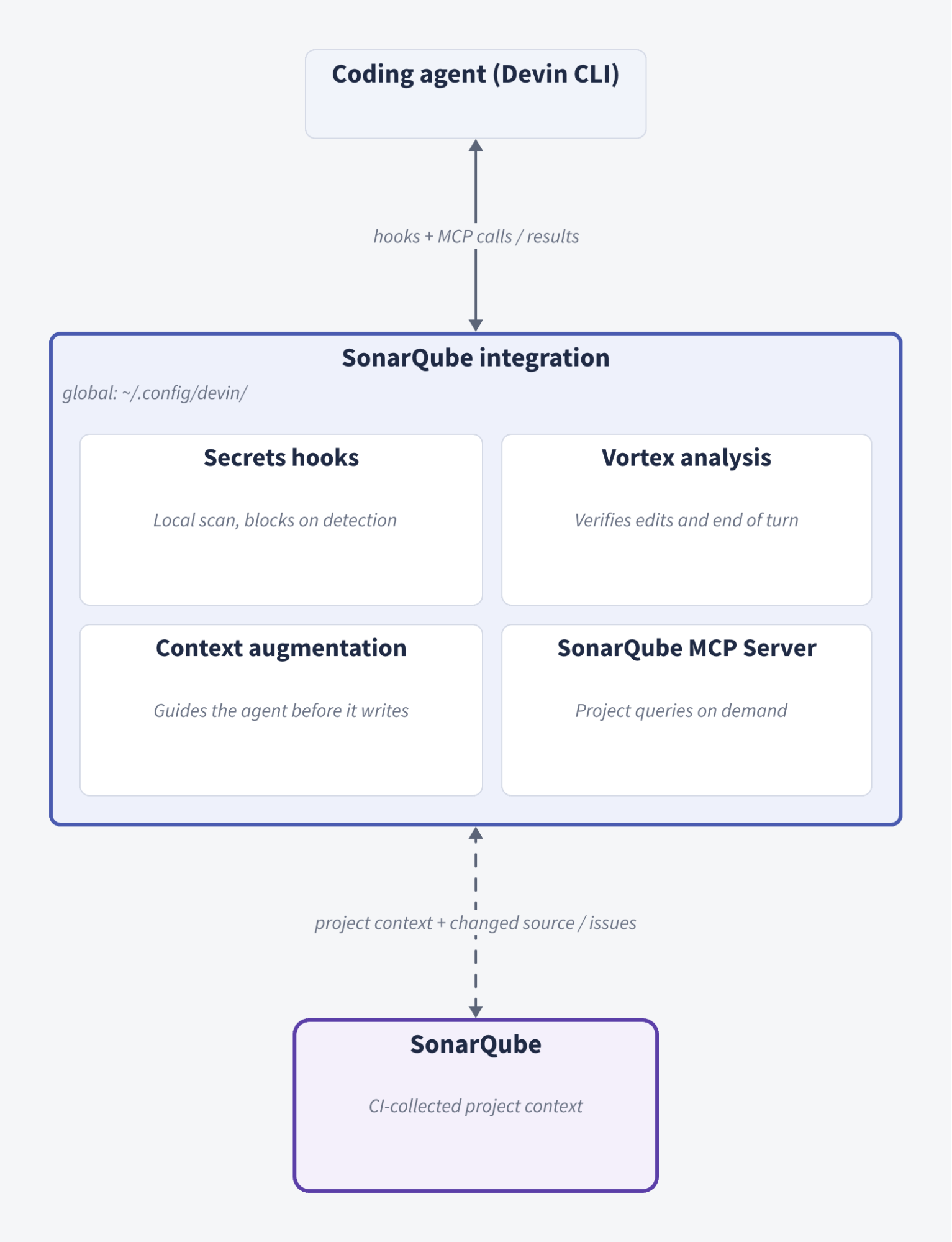
The integration is split across two layers:
The plugin layer contributes skills, but owns no runtime infrastructure and ships no hooks. You install it from SonarSource/sonarqube-agent-plugins, and its skills surface as /sonarqube: slash commands, including /sonarqube:sonar-integrate.
The SonarQube CLI layer does the work. sonar auth login holds your authenticated session in the OS keychain. sonar run mcp starts the SonarQube MCP Server container, which Devin talks to over stdio. Every hook is a thin shell wrapper that calls a sonar hook command, so all of them reuse that same keychain session.
The integration registers six hooks in ~/.config/devin/config.json:
The install is global. It writes to ~/.config/devin/ on macOS and Linux, nothing goes into your project, and the CLI offers no project-scoped mode. The end-of-turn DEEP pass is the Stop hook. When Devin ends a turn, the hook runs Vortex analysis on the files that changed and returns actionable issues to the agent so it can fix them before stopping. It runs deterministically and doesn't depend on the agent following prompt instructions. After three rounds of fixes, the agent may stop.
Vortex context doesn't travel the MCP path. It reaches Devin through the SessionStart and subagent hooks and runs through the local sonar context tool, so you won't see context tools in your MCP tool list.
The analysis is fast enough to sit in a coding loop because it doesn't recompute anything. A CI run stores your project's dependencies, compiled artifacts, type information, and build configuration, tagged by project key and branch. Vortex restores that context on demand, so a single-file check returns in seconds.
Vortex covers the Guide and Verify stages of Sonar's Agent Centric Development Cycle: it guides the agent with project-aware context and constraints, then verifies the agent’s output with CI-level precision.
Prerequisites
- Devin CLI installed and authenticated, with plugins permitted by your organization
- SonarQube Cloud on Enterprise, or Team with an annual plan, or SonarQube Server 2026.5 or later on Enterprise or Data Center edition
- a Sonar Vortex subscription active for your organization; secrets scanning and the remaining skills still work without it
- A container runtime operational: Docker, Podman, or nerdctl. The MCP server runs as a container
- (Optional) SonarQube CLI (
sonar) 1.13.0 or later, which adds theStophook. Thesonar-integrateskill installs or updates it, so you can skip this going in - (Optional) A
sonar-project.propertiesfile in the project root. The skills use it to resolve the project key
To follow along exactly, fork aws/aws-cli, import it into SonarQube Cloud with CI-based analysis, and analyze it on a long-lived branch through CI. Both Vortex capabilities restore stored CI context; without a prior run, results may degrade.
Step 1 — Install and activate the plugin
In your terminal, install the plugin from the repository:
devin plugins install SonarSource/sonarqube-agent-pluginsConfirm it's installed and inspect the skills it ships:
devin plugins list
devin skills list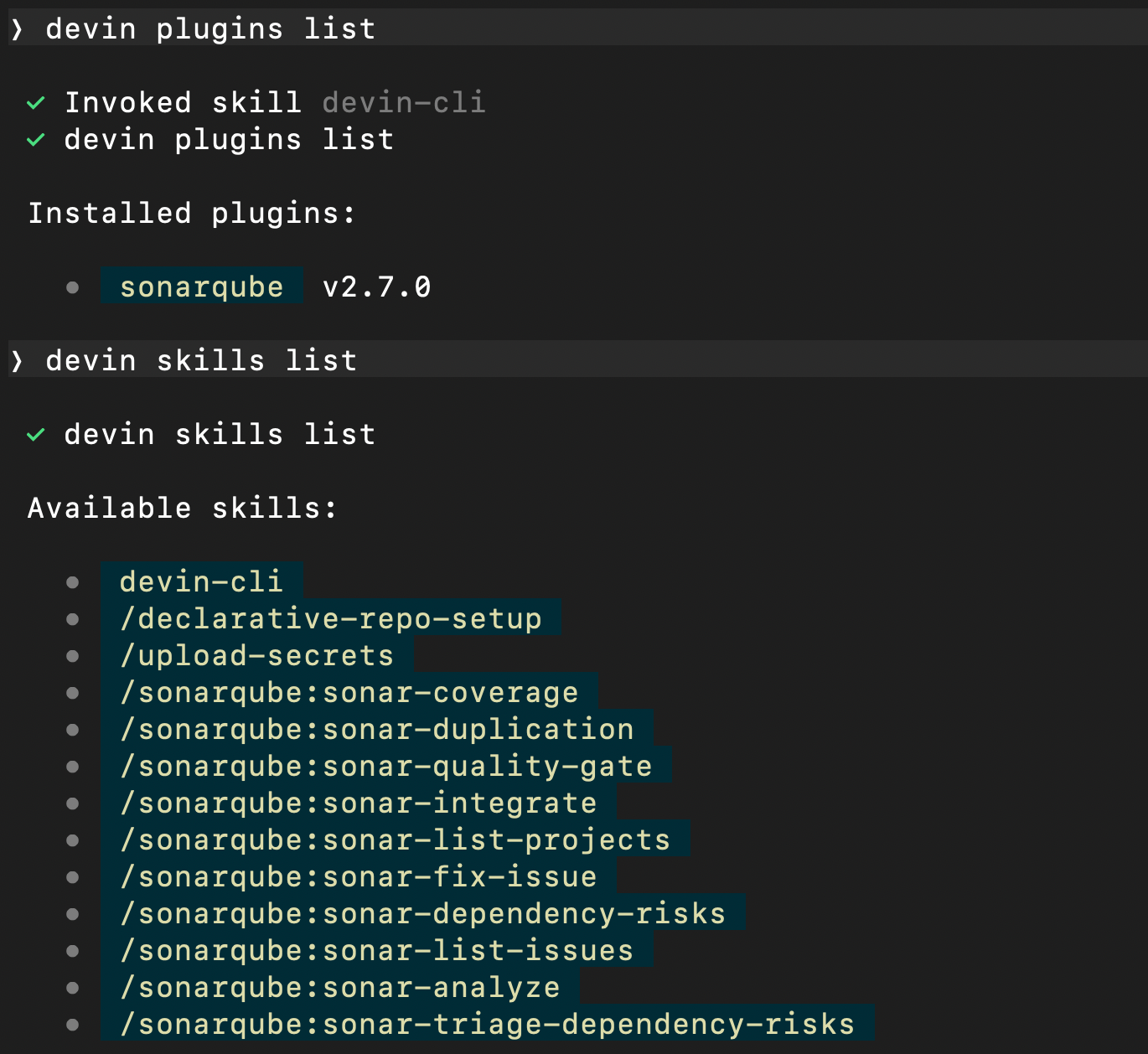
The /sonarqube: skills now appear. At this point the plugin is loaded, but nothing is yet wired up.
Step 2 — Configure the integration
In a Devin session, run the integration skill:
/sonarqube:sonar-integrateIt walks four checks:
- CLI check — verifies the SonarQube CLI is installed and current. If it isn't on your machine, the skill walks you through the installation process step by step.
- Auth check — runs
sonar auth status. If you're already authenticated to SonarQube Cloud, it skips ahead. - Auth login — select your region (EU or US), enter your organization key, and complete browser-based sign-in. The session then lands in your OS keychain.
- Integration — Runs
sonar integrate devin --non-interactive, which installs secrets hooks, Vortex, and the SonarQube MCP Server configuration. The skill doesn't ask whether to install for the current project or globally, because the install is always global.

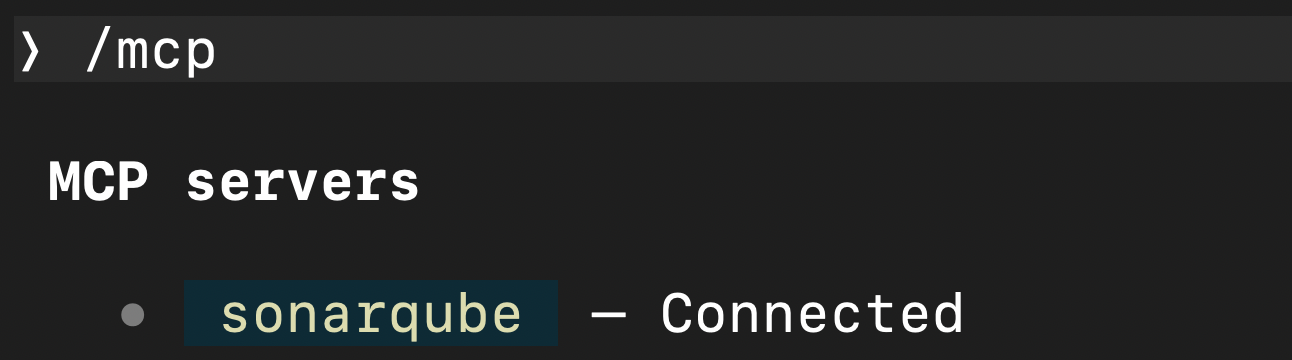
Restart Devin before continuing so it loads the new hooks and MCP configuration. Then run /hooks to confirm the SonarQube hooks are listed and /mcp to check that sonarqube is connected.
Step 3 — Review what the integration configured
This step covers the artifacts that the integration wrote. All of them live outside your project:
~/.config/devin/
├── config.json        # hook registrations
├── mcp_config.json    # SonarQube MCP Server entry
└── hooks/             # wrapper scripts called by the hooks
~/.sonar/sonarqube-cli/
├── bin/               # secrets analyzer and Vortex context binary
└── state.json
mcp_config.json registers the MCP server for every project:
{
    "mcpServers": {
      "sonarqube": {
        "command": "sonar",
        "args": [
    "run",
    "mcp"
  ]
      }
    }
  }
The server starts through the CLI rather than a raw docker run, which is how the CLI detects your container runtime and hands off the keychain session. The registration is global, so it carries no project key.
~/.config/devin/config.json holds the hook registrations. This entry runs the secrets check before every file read:
{
    "hooks": {
      "PreToolUse": [
        {
          "matcher": "^read$",
          "hooks": [
            {
              "type": "command",
              "command": "'<home>/.config/devin/hooks/sonar-secrets/build-scripts/pretool-secrets.sh'",
              "timeout": 60
            }
          ]
        }
      ]
    }
  }
Six hooks are registered in total:
On macOS and Linux, the integration installs Bash wrappers under ~/.config/devin/hooks/. With secrets detection and Vortex enabled, they’re grouped into sonar-secrets/, sonar-vortex/, sonar-sqaa/, and sonar-stop/. If a wrapper can’t find sonar on Devin’s PATH, it exits silently with status 0 without running the hook. On Windows, the integration installs PowerShell wrappers under %APPDATA%\devin\hooks\.
#!/bin/bash
if ! command -v sonar &> /dev/null; then
  exit 0
fi
sonar hook devin-pre-tool-use
When Devin attempts to finish a turn, the Stop hook invokes this command to check the current Git change set:
sonar hook agent-stop --agent devinThe Stop hook runs DEEP analysis on the current Git change set in Devin’s working directory. You don’t need to pass --project or --branch: the CLI resolves the owning SonarQube project for each file and uses the current Git branch when you’re on a named branch.
By default, the SonarQube CLI stores downloaded analyzer binaries in ~/.sonar/sonarqube-cli/bin/ and records installed integrations in ~/.sonar/sonarqube-cli/state.json. You can change the storage root with SONAR_USER_HOME.
Step 4 — Guide the agent with project-aware context and constraints
You don't need to invoke Vortex context directly. Give the agent a natural language prompt and watch as it draws on the context injected at session start.
What are the coding guidelines for this project?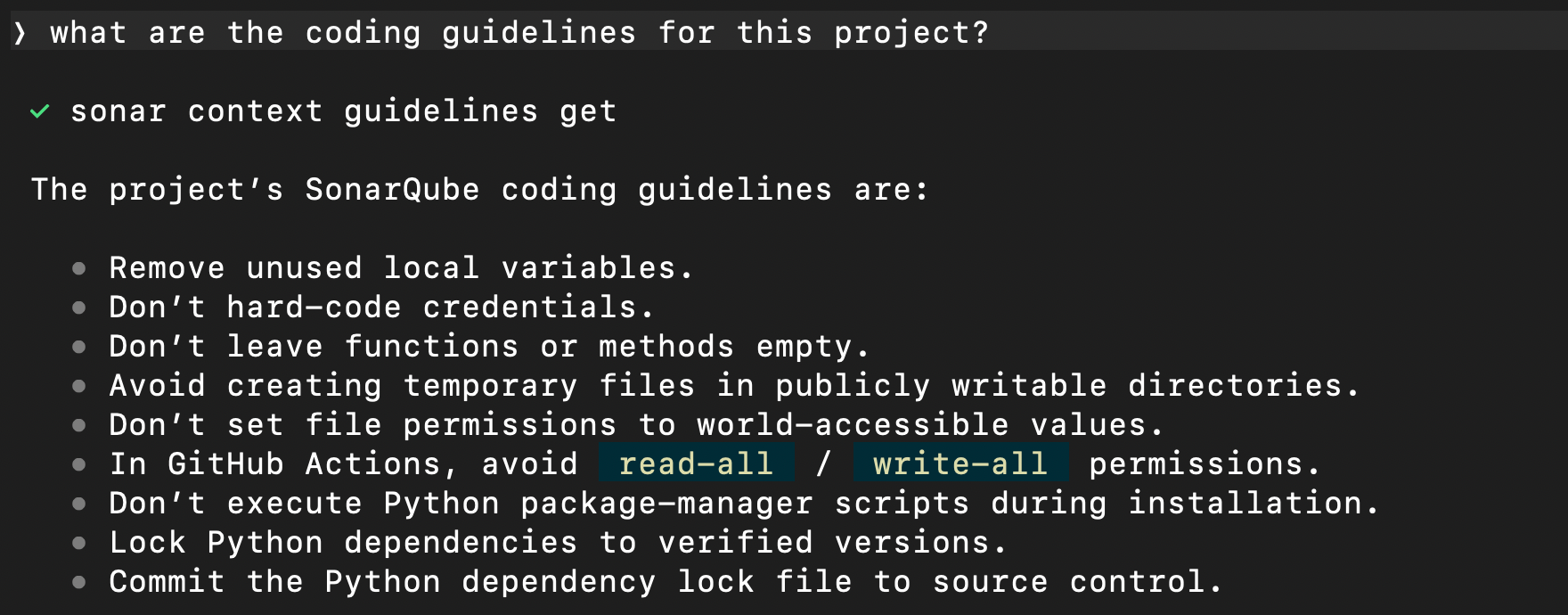
The agent returns guidelines specific to this codebase, not generic Python advice. Each one derives from the project's real SonarQube issue history, filtered by what the agent is about to do.
Now the second query:
show me the top-level architecture of this project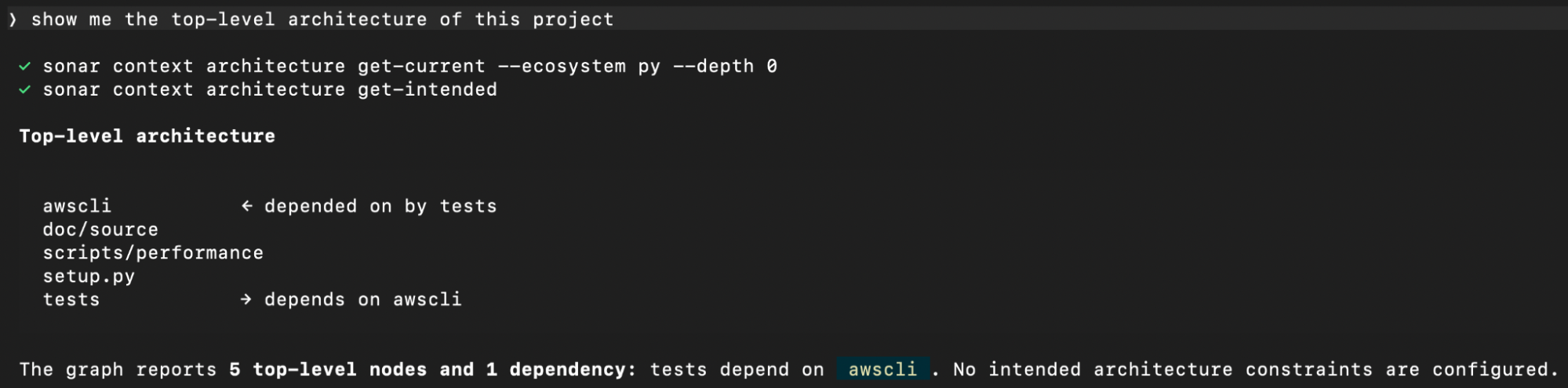
The agent describes the module layout of the awscli package from the project's dependency graph.
Four capability categories back these answers. Coding guidelines come from issue history. Architecture exposes the current dependency graph and any architectural constraints you've defined. Semantic navigation resolves call stacks, class hierarchies, and references using abstract syntax trees and control flow rather than keyword matching. Dependency health checks, where SonarQube Advanced Security is available, assess vulnerabilities, supply-chain malware, and license compliance before a package gets added.
Step 5 — Verify the agentic loop
One prompt exercises the whole loop. Ask Devin for a new file:
Add s3_helper.py at the project root with an upload_with_retry(
bucket, key, file_path, max_retries=3
) function.

Implement a small boto3-based S3 upload helper using the standard upload_file transfer
API. Retry transient upload failures with exponential backoff, log each attempt, and
raise a clear error after all retries fail. Keep the public function signature as
specified. Include a TODO for adding metric emission later.
Devin plans the work, retrieves the project's coding guidance, and writes s3_helper.py along with a unit test file. The PostToolUse hook fires on the write with no prompting and returns findings to the agent. When the agent ends its turn, the Stop hook runs the DEEP pass and returns any actionable issues so the agent can fix them before it stops.

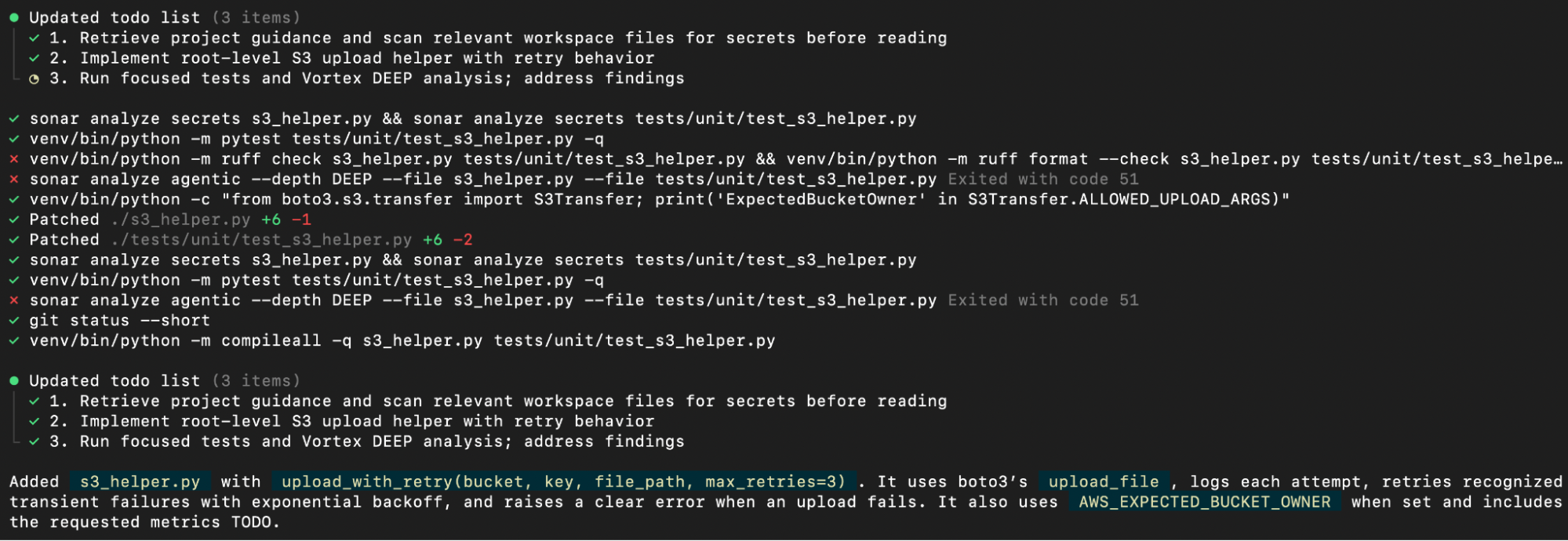
The first finding is python:S7608, which raises when an S3 operation runs without verifying bucket ownership through the ExpectedBucketOwner parameter. The agent resolves it by passing ExpectedBucketOwner through ExtraArgs, and it keeps the TODO because you asked for it. A rerun clears python:S7608, and the only remaining finding is the intentional TODO, python:S1135.
There are two key points to take away from the loop. First, the depths differ by moment: the PostToolUse hook runs STANDARD automatically on each edit, while the Stop hook runs DEEP when the agent ends its turn. Second, the division of labor holds throughout: Vortex flagged and the model fixed, inside a single turn, with nobody reviewing a diff in between.
Step 6 — Run multi-file DEEP analysis
Single-file analysis won't catch issues that only appear across file boundaries. Pass repeated --file flags to widen the scope:
sonar analyze agentic --file awscli/clidriver.py --file s3_helper.py --file awscli/customizations/s3/subcommands.py3 files analyzed · 3 with issues · 12 issues found · DEEP analysisawscli/clidriver.py and s3_helper.py each carry one finding, the TODO marker. awscli/customizations/s3/subcommands.py carries ten that were already tracked in SonarQube Cloud, so the agent leaves them alone. Analysis reports pre-existing issues on files you didn't touch.
Four things govern this command:
- Two or more
--fileflags activateDEEPautomatically. A single file defaults toSTANDARD, and--depthaccepts either value. --projectand--branchare inferred from your project configuration and git when you run inside the project directory.- Above 50 changed files, the CLI asks for confirmation.
--forceskips the prompt. Oversized requests are split into batches, which can reduce cross-file context. sonar analyze agenticexits with code51when it reports issues and0when it completes successfully without reporting any.
Verify the setup
Run through this checklist to confirm every layer is live:
sonar auth status        # authenticated session against SonarQube
sonar system status      # integration, MCP server, and Vortex status
sonar --version          # 1.13.0 or later
docker ps --filter "ancestor=sonarsource/sonarqube-mcp"
Then, in a fresh Devin session:
devin skills listshows the/sonarqube:skills./mcplistssonarqubeas connected. Context tools won't appear; Vortex context runs through the hooks and the local tool, not MCP. If/mcpshowssonarqubedisconnected, runsonar auth statusand check the container runtime.- Asking What is the current architecture of the project? returns your project's module layout.
- A prompt containing a credential-shaped string, or a read of a file containing one, is stopped by the secrets hooks.
- With Vortex enabled in SonarQube CLI 1.13.0, the
PostToolUsehook runsSTANDARDanalysis after Devin useseditorwriteand reports any findings. When Devin attempts to finish the turn, theStophook checks the current Git change set and runsDEEPanalysis if needed.
Your machine should now carry these artifacts, none of them inside your project:
What to know
- Both Vortex capabilities restore stored CI analysis context. Without a prior CI analysis on a long-lived branch, results may degrade, and Java projects analyzed through Automatic Analysis return only basic results.
- The integration is global and applies to every Devin project on your machine. Without a Vortex subscription, the Vortex components are skipped, and
sonar system statustells you which case applies. When a usage limit is reached, the hooks stay installed and analysis pauses until usage resets. - Language coverage differs per capability. Vortex analysis spans 25 languages including Python, but taint analysis is limited to Java, JavaScript, TypeScript, C#, and VB.NET, and semantic navigation to Java, C#, JavaScript, TypeScript, Python, and Rust.
- Secrets checks cover prompts and the
readtool only. Output from other tools, such as a shell command that prints a file, isn't scanned. - Restart Devin after you integrate. If MCP shows as failed or not started, check that your container runtime is running, then restart. Re-running
sonar integrate devinin your home terminal refreshes the hooks and fixes drift. If you integrated with an older CLI version, re-running it also removes Sonar's oldDEEPinstruction block from~/.config/devin/AGENTS.mdand preserves your own instructions. Running it interactively and choosing Customize removes the integration.sonar system statusis the fastest check on whether the Vortex subscription is active.
Last verified: November 2026, on macOS.
Next steps
Related Sonar guides:
- How to set up Sonar Vortex in Codex
- How to set up Sonar Vortex in GitHub Copilot CLI
- How to set up Sonar Vortex in Claude Code
- Set up the SonarQube plugin for Devin CLI
- Introducing Sonar Vortex and the SonarQube Remediation Agent
- The future is AC/DC: the Agent Centric Development Cycle
Consult the docs: