
TLDR overview
- SonarQube Cloud security issues can be imported into OpenAI Daybreak Defense Factory with
codex-security import sonar, so Codex assesses, reproduces, and fixes the exact issues SonarQube Cloud raised on a pull request. - The integration fits teams that analyze repositories with SonarQube Cloud in CI and use Codex CLI and Daybreak Defense Factory for security review and remediation.
- Codex-derived assessments can be posted back to their associated SonarQube Cloud issues as reviewer-approved comments, and Codex-generated fixes are verified by a fresh pull request analysis against the same quality gate.
- The workflow connects the SonarQube plugin for Codex, the Codex Security CLI importer, and the SonarQube CLI
sonar apicommand.
The coupling of SonarQube and OpenAI Daybreak Defense Factory unlocks code-level security findings across developer and security organizations, enabling them to rapidly discover and remediate emerging vulnerabilities. This blueprint details the integration of both from the CLI and follows a single, example pull request. Follow along as we analyze the pull request with SonarQube Cloud, select and import its surfaced security issue into Codex, assess and reproduce it, post a reviewed assessment back to SonarQube Cloud, and then fix the issue on the same pull request. The examples in this guide run against a multi-tenant Flask and SQLite application with synthetic data, and are driven from Codex CLI to inspect and validate issues from within the same environment that code is generated.
When to use this
- Your repository is analyzed by SonarQube Cloud
- You drive your agents from Codex CLI and want security triage and remediation in the same environment you generate code from.
- You want reviewers to see Codex Security assessments directly on your SonarQube Cloud issues before deciding how to handle them.
- You want Daybreak Defense Factory findings to count toward the same quality gate as SonarQube Cloud findings.
What you'll achieve
- SonarQube Cloud security issues imported into Codex for validation and remediation.
- Reviewer-approved Codex assessments posted as comments on each SonarQube Cloud issue.
- Fixes on their original PRs (verified by fresh analysis) to ensure passing quality gates.
Architecture
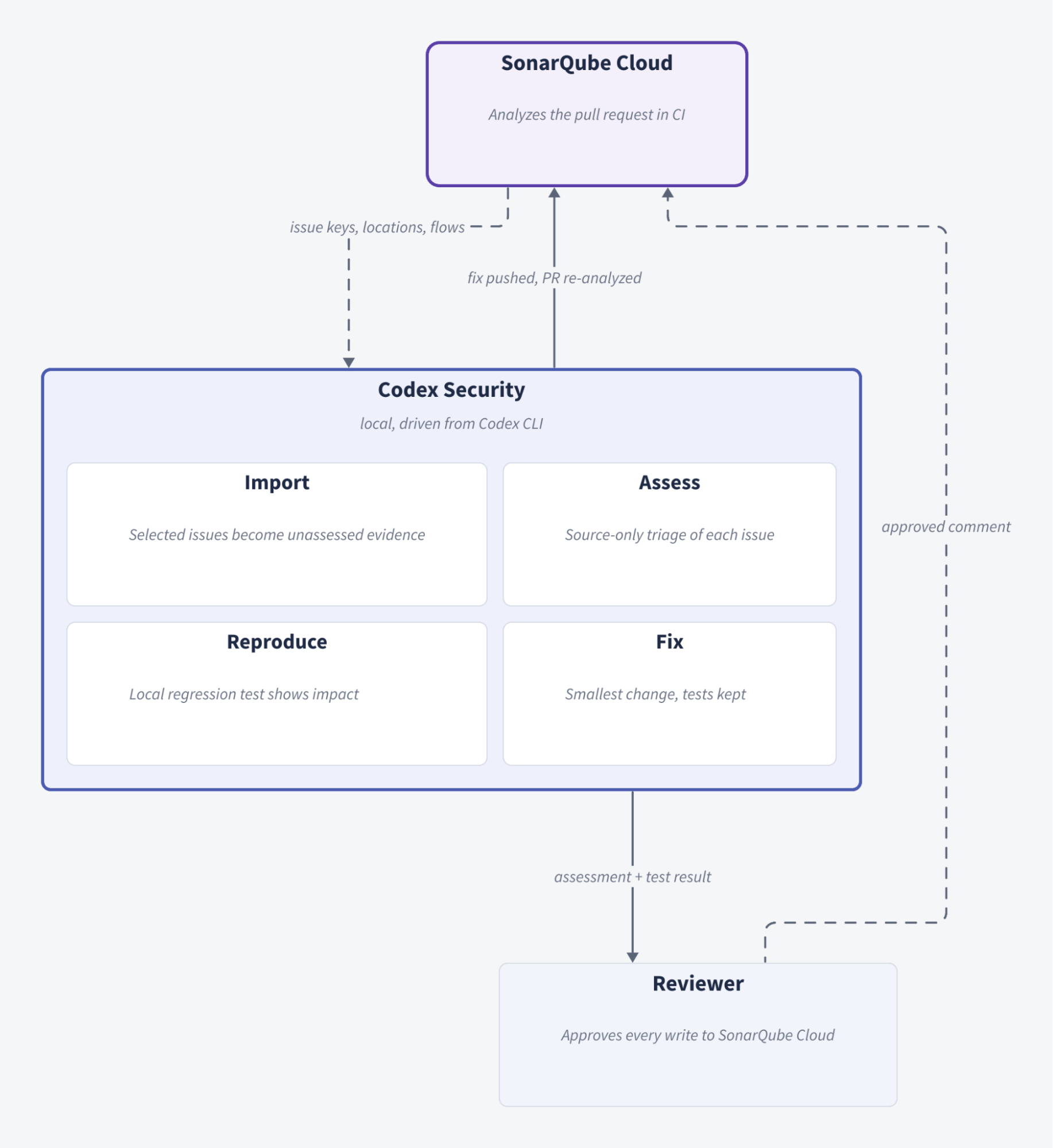
The integration contains four parts, each of which has its own identity and boundary:
Nothing syncs automatically between these parts. The importer reads SonarQube Cloud, and it never writes to it. Comments reach SonarQube Cloud only when you post them with sonar api, and they're attributed to your SonarQube Cloud user.
Prerequisites
- Codex CLI and Codex Security CLI
- A SonarQube Cloud organization with a project that's analyzed in CI on branches and pull requests
Step 1 — Enable SonarQube imports in Codex
The Sonar importer in Codex Security is opt-in. Export the flag in your shell profile so every new terminal and Codex session inherits it. For example, if you use zsh:
echo 'export CODEX_SECURITY_ENABLE_EXTERNAL_IMPORTS=1' >> ~/.zshrc
source ~/.zshrc
codex-security import sonar --help
Expected output (first lines):

If you see Read GitHub code scanning alerts instead, the flag isn't set in that shell. Restart any running Codex session after setting it.
Next, start a Codex CLI session, set up the SonarQube plugin for Codex, and perform the integration:
codex plugin marketplace add SonarSource/sonarqube-agent-plugins
codex plugin add sonarqube@sonar
$sonarqube:sonar-integrate
When running sonarqube:sonar-integrate, you are prompted to install the SonarQube CLI and authenticate to SonarQube.
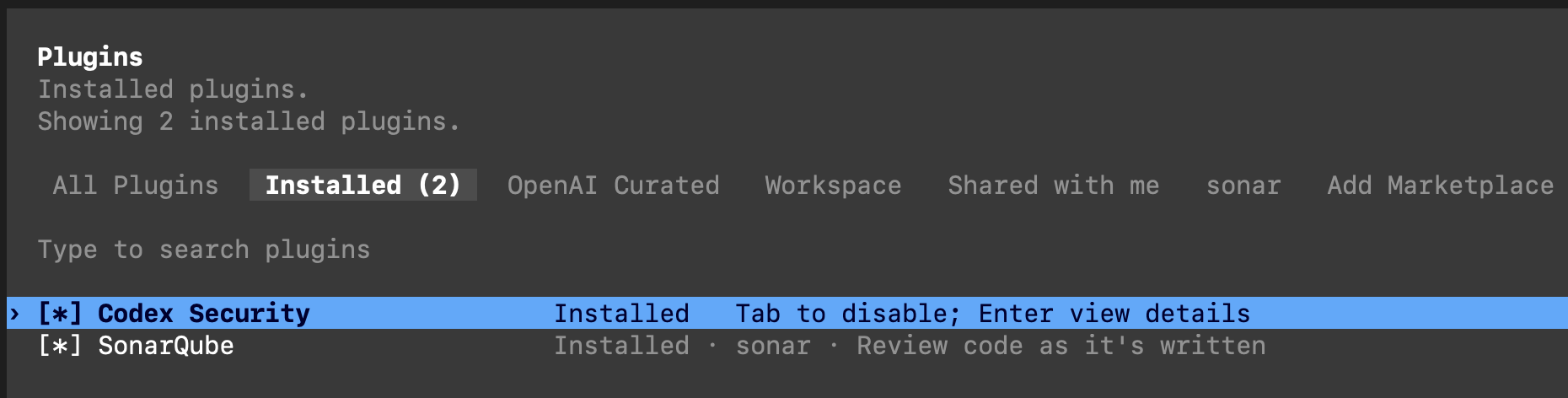
In interactive Codex, run /plugins, enable Codex Security, and restart Codex CLI.
Step 2 — Select SonarQube issues in Codex
The importer reads issues from the branch analysis, and reviewers see them on the pull request analysis. In the sample repository, pull request #1 adds a project search endpoint that builds its SQL query with an f-string (note that this code illustrates a bad security practice; our goal is to trigger a SonarQube finding):
@app.get("/projects/search")
def search_projects():
    user = current_user()
    term = request.args.get("q", "")
    query = (
        "SELECT id, name FROM projects "
        f"WHERE tenant_id = {user['tenant_id']} AND name LIKE '%{term}%' "
        "ORDER BY id"
    )
    rows = get_db().execute(query).fetchall()
    return jsonify(projects=[dict(row) for row in rows])
Once both analyses finish, invoke the SonarQube plugin’s dedicated skill (or supply a suitable, natural language prompt) to pick specific issues to hand off to Codex. Because a rule ID can match several issues, you’ll need to supply the exact keys. Start Codex in the repository checkout and run:
List open security issues for project <your-project-key> on branch <branch-name>.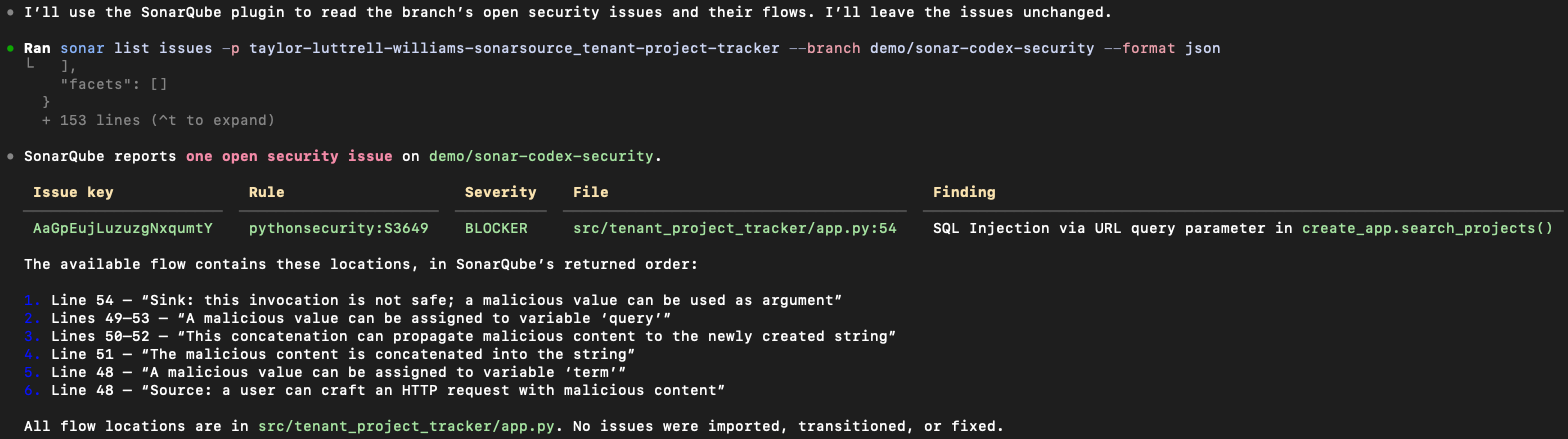
List open security issues for project <your-project-key> on PR <pr-number>.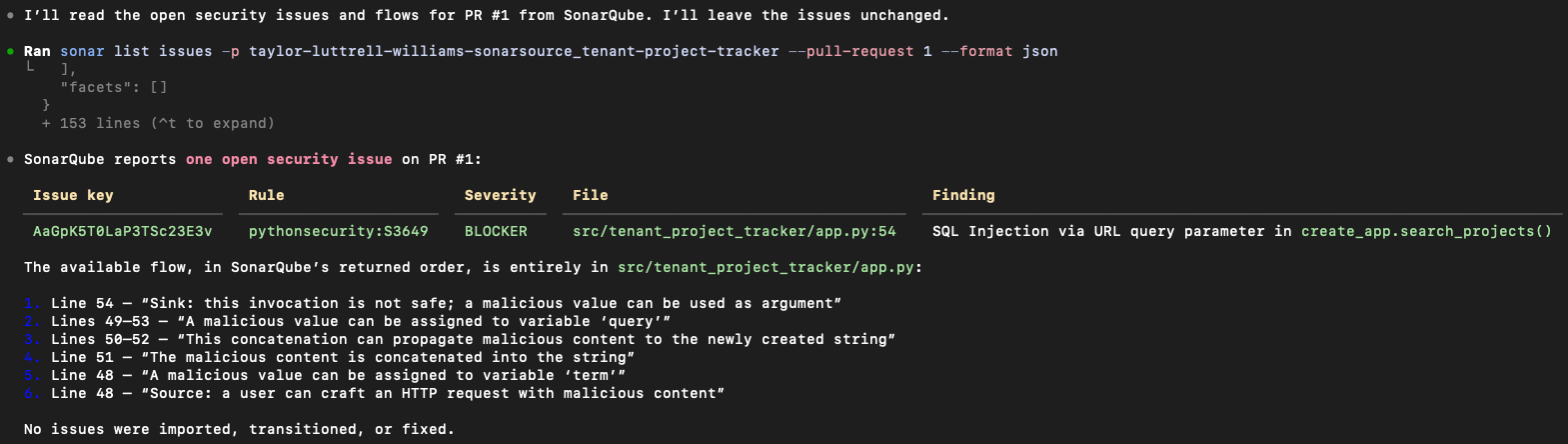
SonarQube reports the issue at line 54, where the query runs, not at line 51 where the string is built. Write down both issue keys. The branch analysis and the pull request analysis assign the same finding different keys, and every subsequent step depends on supplying the correct one.
Step 3 — Import the selected issues into Codex
Start with a dry run. The following command collects the full evidence from SonarQube Cloud using your SonarQube CLI login, then saves a private capture file without importing anything:
codex-security import sonar \
  --sonar-project <your-project-key> \
  --sonar-branch <branch-name> \
  --sonar-issue <branch-issue-key> \
  --dry-run --format json
Repeat --sonar-issue for each issue you selected. Import by --sonar-branch, not --sonar-pull-request, so you get file and line locations matched to your checkout.
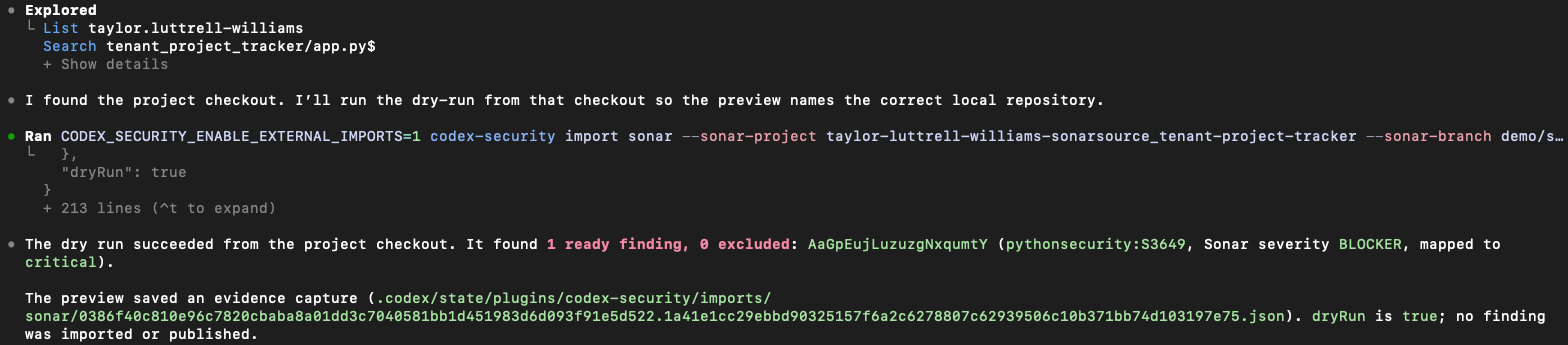
Check that every selected key is present, each location points to a file in your checkout, and the exclusion list is empty or explained. Then import from the capture and read it back:
codex-security import sonar "<capture-path-from-dry-run>" --yes
codex-security findings imported . --format json 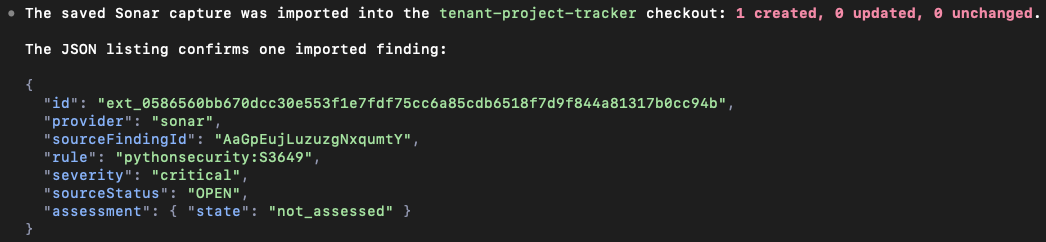
At this point, the imported findings are unassessed evidence (importing them doesn't count as an assessment).
Step 4 — Assess and reproduce each finding
The examples in this step and the next two come from the sample repository and are illustrative. Ask Codex to assess each imported issue. Keep it read-only for now:
Use $triage-finding on the actual imported evidence for Sonar issue
<branch-issue-key> and checkout commit <sha>. Preserve source evidence.
Trace input, entry point, guards, and sink. State prerequisites,
counter-evidence, proof gaps, and what the source supports.
Do not edit code, execute a PoC, or claim runtime testing.
$triage-finding and codex-security validate read the source only and don't run the application. If the assessment indicates that a finding is confirmed, add a test that demonstrates the impact. In the sample repository, this test checks that a search term can't return another tenant's projects:
"""Security regression for the project search query."""

from __future__ import annotations

from flask.testing import FlaskClient

from tests.conftest import ALICE

INJECTION_TERMS = ("%' OR 1=1 --", "' UNION SELECT id, memo FROM invoices --")


def test_search_term_cannot_cross_tenant_boundary(client: FlaskClient) -> None:
    for term in INJECTION_TERMS:
        response = client.get("/projects/search", query_string={"q": term}, headers=ALICE)
        assert response.status_code == 200, term
        names = {p["name"] for p in response.get_json()["projects"]}
        assert names <= {"Alpha", "Apollo"}, f"{term!r} leaked {names}"


def test_search_term_is_matched_literally(client: FlaskClient) -> None:
    response = client.get("/projects/search", query_string={"q": "%' OR 1=1 --"}, headers=ALICE)
assert response.get_json() == {"projects": []}uv run pytest -q tests/security; echo "pytest exit=$?"Output against the vulnerable code:
E         {'projects': [{'id': 1, 'name': 'Alpha'}, {'id': 2, 'name': 'Apollo'}, {'id': 3, 'name': 'Borealis'}]} != {'projects': []}
FAILED tests/security/test_project_search_injection.py::test_search_term_cannot_cross_tenant_boundary
FAILED tests/security/test_project_search_injection.py::test_search_term_is_matched_literally
2 failed in 0.03s
pytest exit=1
Borealis belongs to the other tenant, so the tenant boundary is crossed. Exit code 1 indicates that the assertions failed. Exit codes 2 through 5 mean pytest couldn't run the tests, so they don't count as a reproduction. The test lives in tests/security, outside the default testpaths, so regular CI stays green while the test is expected to fail. Commit the test and push it to the pull request.
Step 5 — Post the assessment to the SonarQube Cloud issue
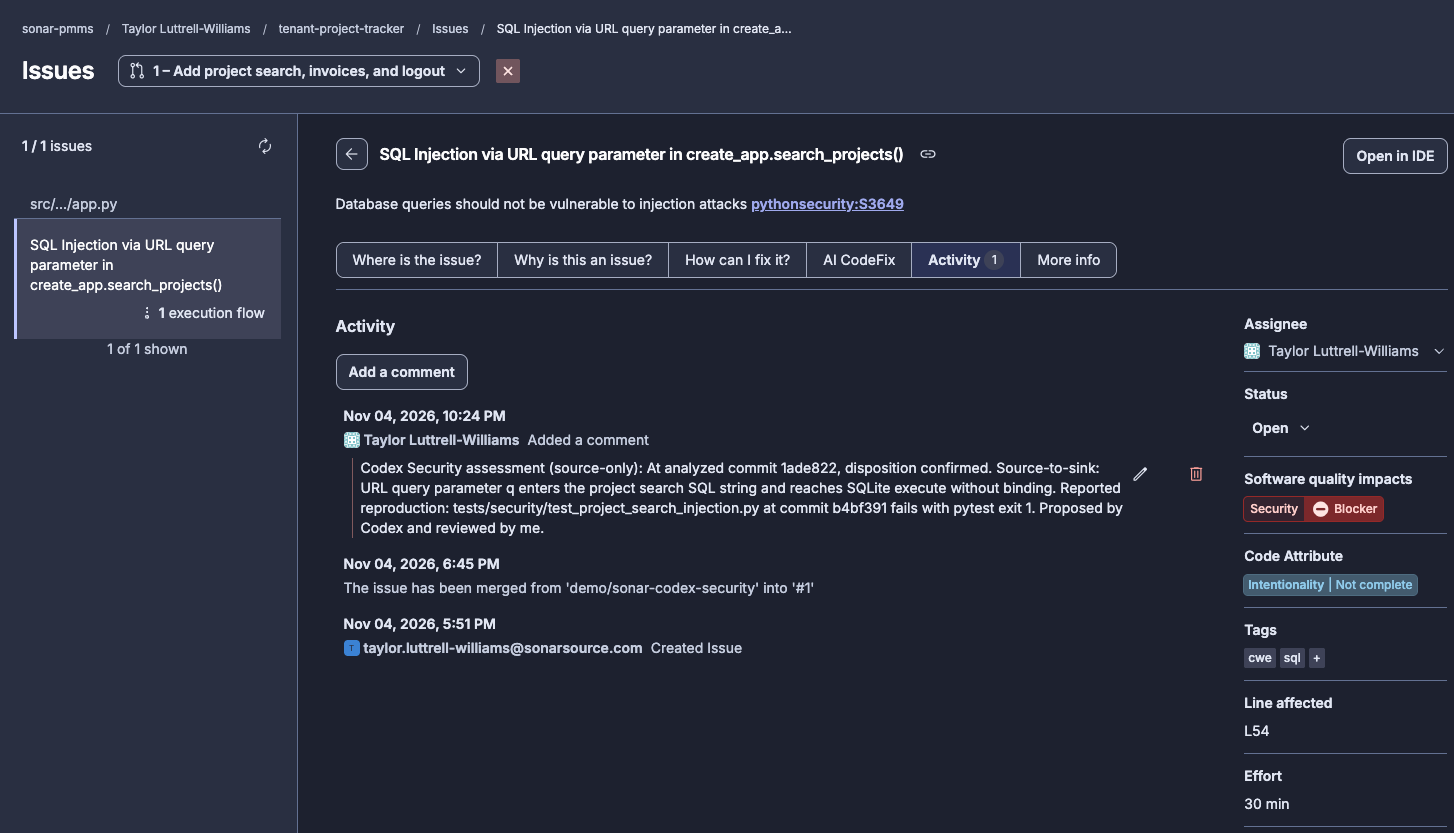
Write a comment that draws from the actual assessment and test result, read it over, then post it to the pull request issue key:
sonar api post "/api/issues/add_comment" --data '{
    "issue": "<pr-issue-key>",
    "text": "Codex Security assessment (source-only, commit <sha>). Disposition: <disposition>. Trace: q query parameter flows into an f-string passed to sqlite3 execute(). Runtime reproduction: tests/security/test_project_search_injection.py fails at <sha>. Proposed by Codex, reviewed and posted by <reviewer>."
}' 
As seen from the Issues tab on SonarQube Cloud:
Only mark an issue as a false positive when the assessment shows the finding is wrong and a reviewer agrees. "Not confirmed," "inconclusive," and "accepted risk" are different outcomes you might encounter, so don't employ the false-positive transition for them. Check which transitions are available before you use one, and read the issue back afterward:
sonar api get "/api/issues/search?organization=<org>&pullRequest=<pr-number>&issues=<pr-issue-key>&additionalFields=transitions,comments"


    sonar api post "/api/issues/do_transition" --data '{"issue":"<pr-issue-key>","transition":"falsepositive","comment":"<reviewed rationale>"}'


    sonar api get "/api/issues/search?organization=<org>&pullRequest=<pr-number>&issues=<pr-issue-key>"
The status in the readback, not the HTTP response code, tells you whether the transition occurred.
Step 6 — Fix the issue on the same pull request
Prompt Codex for the fix. Holding back on the commit and push now reserves delivery as a separate decision:
Use $fix-finding for the selected Sonar issue <branch-issue-key> with the
    original evidence and reproduction. Make the smallest appropriate fix.
    Keep the security regression test and benign behavior checks.
    Show the diff and run approved local tests. Do not commit, push,
    open a PR, or publish without separate authorization.
In the sample repository, the fix Codex committed binds the tenant ID and the search term as query parameters:
-            f"WHERE tenant_id = {user['tenant_id']} AND name LIKE '%{term}%' "
+            "WHERE tenant_id = ? AND name LIKE ? "
             "ORDER BY id"
         )
-        rows = get_db().execute(query).fetchall()
+        rows = get_db().execute(query, (user["tenant_id"], f"%{term}%")).fetchall()
Run both suites with the same assertions as before:
uv run pytest -q tests/functionality tests/security.......... [100%]
10 passed in 0.07s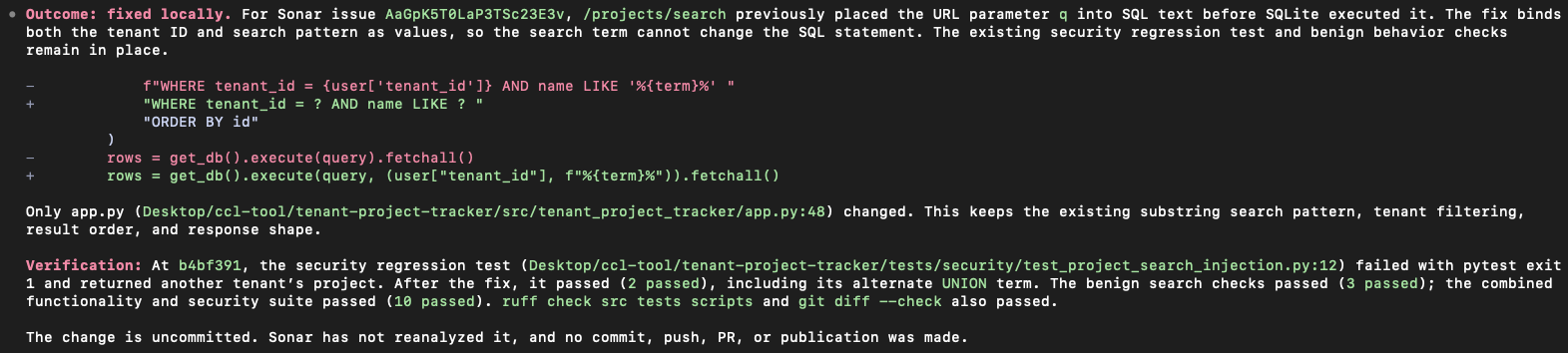
Review the diff, then commit and push it to the same branch. After both analyses finish, check the quality gate again:
sonar quality-gate status -p <your-project-key> --pull-request <pr-number> --all
As seen from the pull request on GitHub:
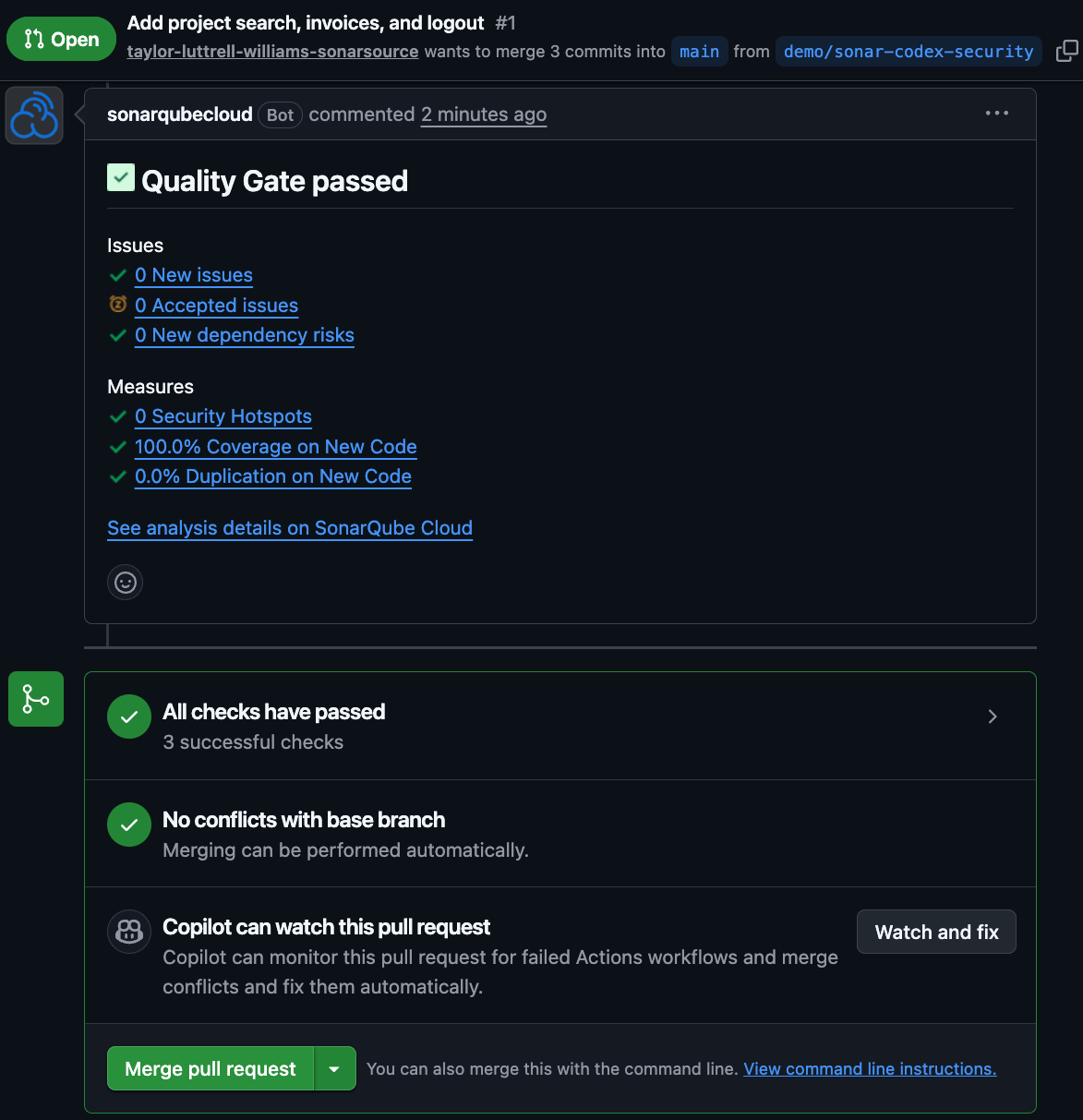
A passing pull request quality gate covers new code on that pull request only. The main dashboard is updated after the merge completes and the next analysis of main is performed.
Verify the setup
You have a working setup when all of the following are true:
codex-security findings imported .lists the SonarQube Cloud issues you selected, with their original keys.- Each assessed issue in SonarQube Cloud has a Codex assessment comment from your user. Any false-positive transition shows up in the issue readback.
uv run pytest -q tests/functionality tests/securitypasses on the pull request head, and the pull request analysis for that commit shows the original issue having closed.
What to know
- Browse permission is required on the SonarQube Cloud project to comment, and Administer Issues permission is required to mark false positives
- Importing issues, assessing them, and reproducing them are three separate steps. An import receipt isn't an assessment, and a source-only assessment from
$triage-findingorvalidateisn't runtime proof. - Branch and pull request analyses give the same issue different keys. Import using branch keys, and post comments using pull request keys.
- External issues are created only for analyses that include the SARIF report.
codex-security patchhas a--create-prflag that opens a draft pull request. This blueprint leaves it out so the fix lands on the pull request SonarQube Cloud already analyzed.