
TLDR overview
- Gitar Risk Triage labels every pull request Low, Medium, or High risk with a one-line reason. A repository rule can raise the risk for sensitive paths. In this walkthrough, a rule marked all of
lib/payments/as High, comment-only edits included. - An approval rule limits Gitar's auto-approval to Low-risk pull requests, so High-risk payment changes need a reviewer's approval.
- Cross-PR Analysis compares open pull requests during review. Two pull requests each passed CI and merged cleanly with
main, but together they would have broken subscription renewals. Gitar flagged the conflict before either one merged. - Risk Triage is included in every Gitar plan. Auto-approval requires Pro or Enterprise, and Cross-PR Analysis requires Enterprise.
Overview
Gitar is an AI code verification agent that works on your pull requests. By the end of this blueprint, Gitar's comment on every pull request will show a risk level of Low, Medium, or High, with a reason. Risk is how much harm the change could cause if something in it is wrong (Gitar calls this potential impact). It's separate from whether Gitar found bugs, so a pull request with a clean review can still be High risk.
You'll add a plain-English rule that tells Gitar to rate every change under one directory, here lib/payments/, as High risk, even a comment edit. You'll also catch two open pull requests that each pass CI and merge without a conflict but break main once both merge (because no CI run contains both changes). Finally, you'll let Gitar auto-approve only Low-risk pull requests, so a change under lib/payments/ needs a reviewer's approval.
Risk Triage assigns one risk level to the whole pull request. Cross-PR Analysis compares the pull request under review with your other open pull requests. You run the steps in your own repository. The examples below show output from a small TypeScript billing service on GitHub whose charge() helper in lib/payments/ builds payment-provider payloads.
When to use this
Use this blueprint when one part of your codebase, such as payments, authorization, or schema migrations, needs a human reviewer every time, while Gitar approves routine changes everywhere else. Cross-PR Analysis pays off once several developers or coding agents keep pull requests open against the same module, because CI never tests those open branches together.
What you'll achieve
- Every pull request Gitar reviews shows a risk level and the reason for it.
- A policy in
.gitar/config/risk.mdrates every change underlib/payments/as High risk. - Gitar posts a Cross-PR finding that names the other pull request, explains when the two break together, and suggests a fix for each.
- You close that finding after fixing the other pull request.
- A policy in
.gitar/config/approve.mdlets Gitar auto-approve only Low-risk pull requests.
Architecture
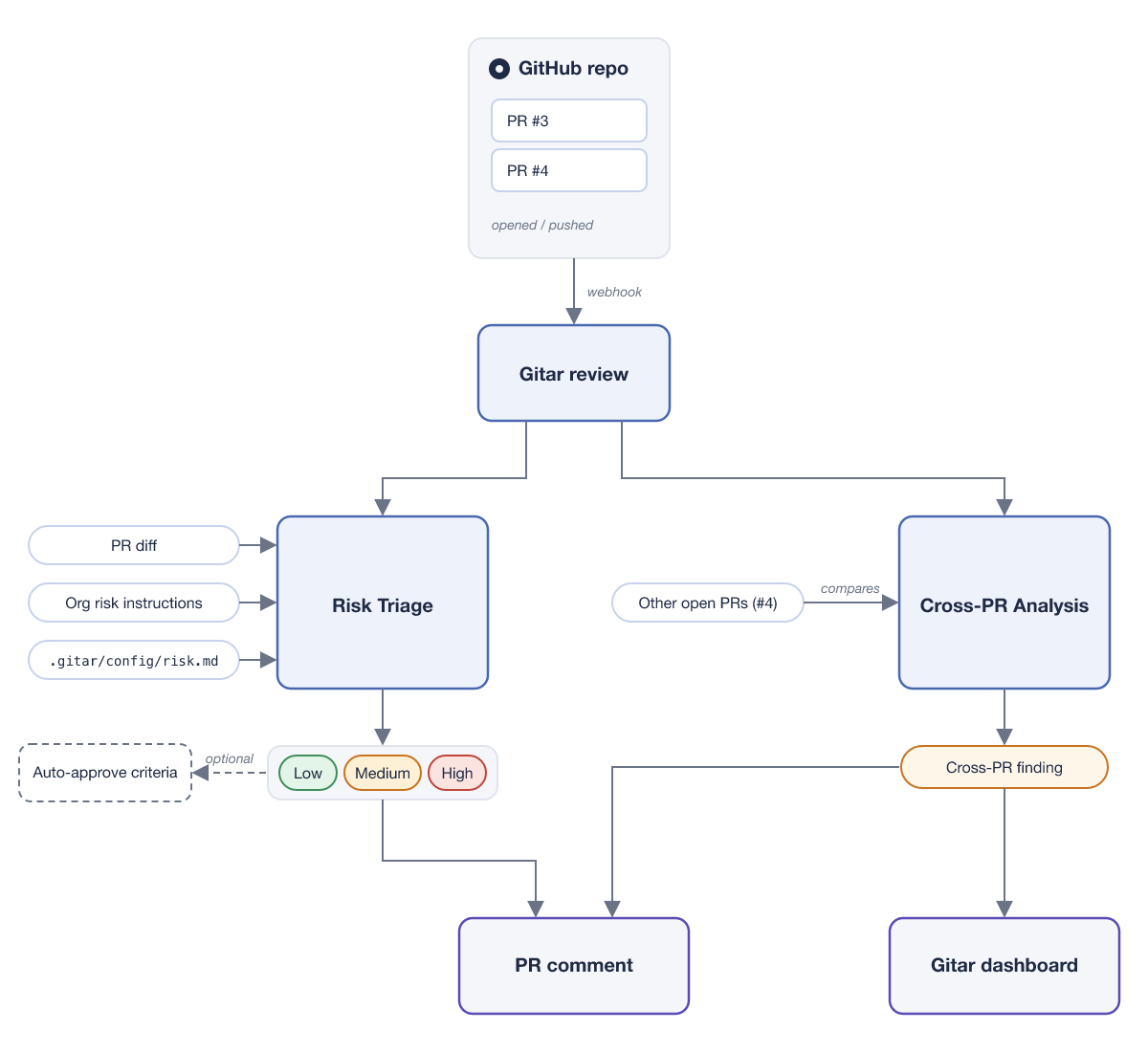
Each time a pull request opens or gets new commits, Gitar runs one review. The review rates risk from the diff and your risk guidance, and compares the pull request with other open pull requests. Both results land in the Gitar comment.
Prerequisites
- A Gitar organization on the Enterprise plan, which Cross-PR Analysis requires (Gitar plans)
- The Gitar admin role, for the settings in Step 1
- A GitHub repository with the Gitar app installed and CI that runs your tests on pull requests. To follow the walkthrough exactly, create your own copy of the sample repository with Use this template and Include all branches checked, then install Gitar on it. Its CI runs Node.js 24 with
node --test, and its branches hold the opening commit of each pull request in Steps 2 and 4. - Permission to push to the default branch, where the
.gitar/config/files live
Step 1. Check the plan and settings
In the Gitar web app, open Settings -> Configuration -> Custom Instructions and confirm that Risk classification is on. Leave Risk instructions empty for now so Gitar applies its default criteria.
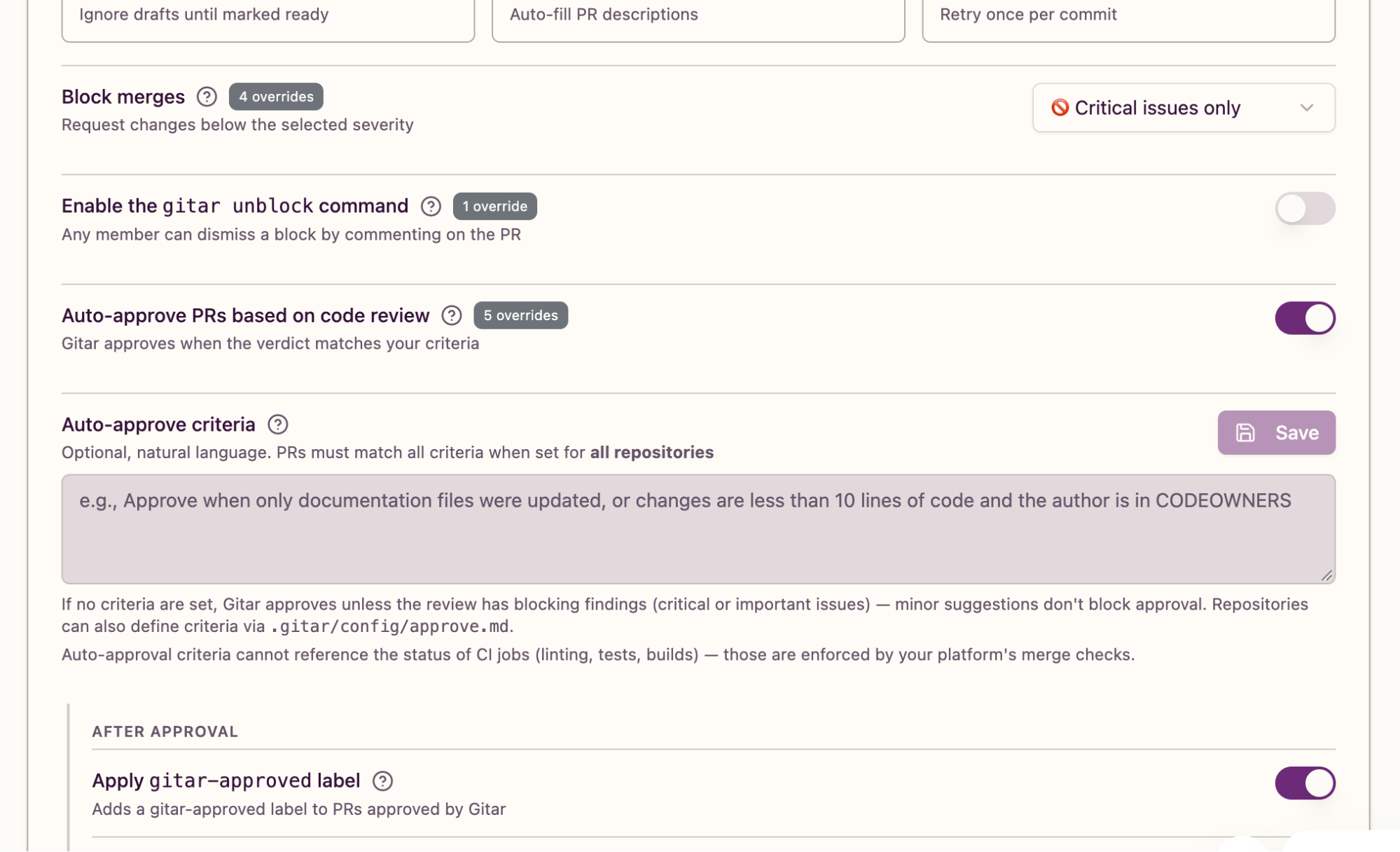
Under Settings -> Configuration, in the Behavior section, turn on Auto-approve PRs based on code review. Until your approval criteria mention risk, Gitar approves any pull request without blocking findings.
Open the Cross-PR tab of the Gitar dashboard and confirm that Cross-PR enabled is on. Enterprise organizations have it on by default.
Step 2. Read the default risk
Open two small pull requests in your repository: one that edits only documentation, and one that edits only a comment in sensitive code. In the walkthrough, #1 (docs/readme-wording) edits the README, and #2 (docs/charge-comment) edits the JSDoc wording of charge() in lib/payments/charge.ts. On main, charge() converts dollars to cents:
/**
 * Prepare a USD charge from an amount in dollars.
 * ...
 * @example
 * charge(49); // => { amountCents: 4900, currency: "USD" }
 */
export function charge(amount: number): ChargeReceipt {
  ...
  const amountCents = Math.round(amount * CENTS_PER_DOLLAR);
  ...
  return { amountCents, currency: "USD" };
}
Gitar posts one comment per pull request and edits it in place after every review. Expand its Code Review section to find the risk line. The comment on #1 reads:
Code Review ✅ Approved
🟢 Low risk · Changing README wording from “never sends” to “does not send” leaves documented payment behavior unchanged and has limited impact.
Docs-only wording clarification in the README. No issues found.
...
Auto-approval Approved
The first line is the headline verdict: Approved means Gitar found no blocking issues, and Blocked means it found at least one. Next come the risk line, a short summary of the change, and any findings, which are the issues Gitar reports. Below that is a collapsed Verification section. When Gitar compares the pull request with other open pull requests, Verification contains Broader impact -> Cross-PR, which lists the pull requests it checked. #1's comment has no Broader impact section, and #2's does. The Auto-approval line, the last line of the Verification section, says whether Gitar approved the pull request on GitHub, a separate question from the headline.
The comment on #2 shows a Low risk line too:
🟢 Low risk · The JSDoc wording change in lib/payments/charge.ts leaves executable payment behavior unchanged, so its impact is limited to documentation.By default, Gitar rates risk by what a change does to the code's behavior. A comment edit doesn't change how payments work, so Gitar rates it Low even in payment code.
Step 3. Raise the risk for a sensitive path
Commit .gitar/config/risk.md to the default branch. The policy is a plain-English sentence. Name the path, say which kinds of change it covers, and give the reason:
Any change under lib/payments/ is high risk, including comment-only and test-only changes, because these files build the charge payloads sent to the payment provider.git checkout main
git add .gitar/config/risk.md
git commit -m "Add Gitar risk configuration"
git pushGitar reads the policy at each review, and reviews run when a pull request opens and when you push commits to it, so push another comment-only commit to #2:
- * @example
+ * @example Charging 49 dollarsgit checkout docs/charge-comment
git commit -am "Label the charge JSDoc example"
git pushThe updated comment on #2 reads:
Code Review ✅ Approved
🔴 High risk · Repository policy marks lib/payments/ high risk, so this comment-only change to lib/payments/charge.ts is covered despite leaving executable behavior unchanged.
...
Auto-approval Approved
The reason now mentions the repository policy, which confirms that Gitar read risk.md. To apply a rule to every repository, put the same kind of sentence in the Risk instructions field from Step 1. Organization and repository guidance both apply, and a repository rule can raise the organization's risk level but can't lower it.
Step 4. Catch two pull requests that break together
To try it in your repository, change what a shared function requires from its callers on one branch, such as an argument's unit or a removed field. On a second branch from the same main commit, add a caller that still uses the old behavior, with a test that passes against main. Cross-PR Analysis runs only during a review, so if the first pull request's review finished before you opened the second, push a commit to the first. The rest of this step follows the walkthrough.
Pull request #3 (feat/integer-cents) changes charge() to take an amount that's already in integer cents, so it no longer converts dollars:
-  const amountCents = Math.round(amount * CENTS_PER_DOLLAR);
+  const amountCents = amount;
Pull request #4 (feat/subscription-renewals) adds a renewal flow in lib/payments/renewals.ts that still passes dollars:
export function renewSubscription(invoice: RenewalInvoice): ChargeReceipt {
    ...
    return charge(invoice.totalDollars);
  }
The test in #4 expects renewSubscription({ totalDollars: 49 }) to return { amountCents: 4900, currency: "USD" }. CI passes on both because each run tests one branch merged with main: the renewal test runs against the dollar-based charge(), and #3's branch has no renewal code to break.
The review of #3 comes back Blocked. Gitar posts the finding as a review comment on lines 17-20 of lib/payments/charge.ts and also lists it in its comment:
Code Review 🚫 Blocked 0 closed / 1 findings
🔴 High risk · Changing charge() from dollars to integer cents could make callers using the old unit contract charge customers incorrect amounts.
...
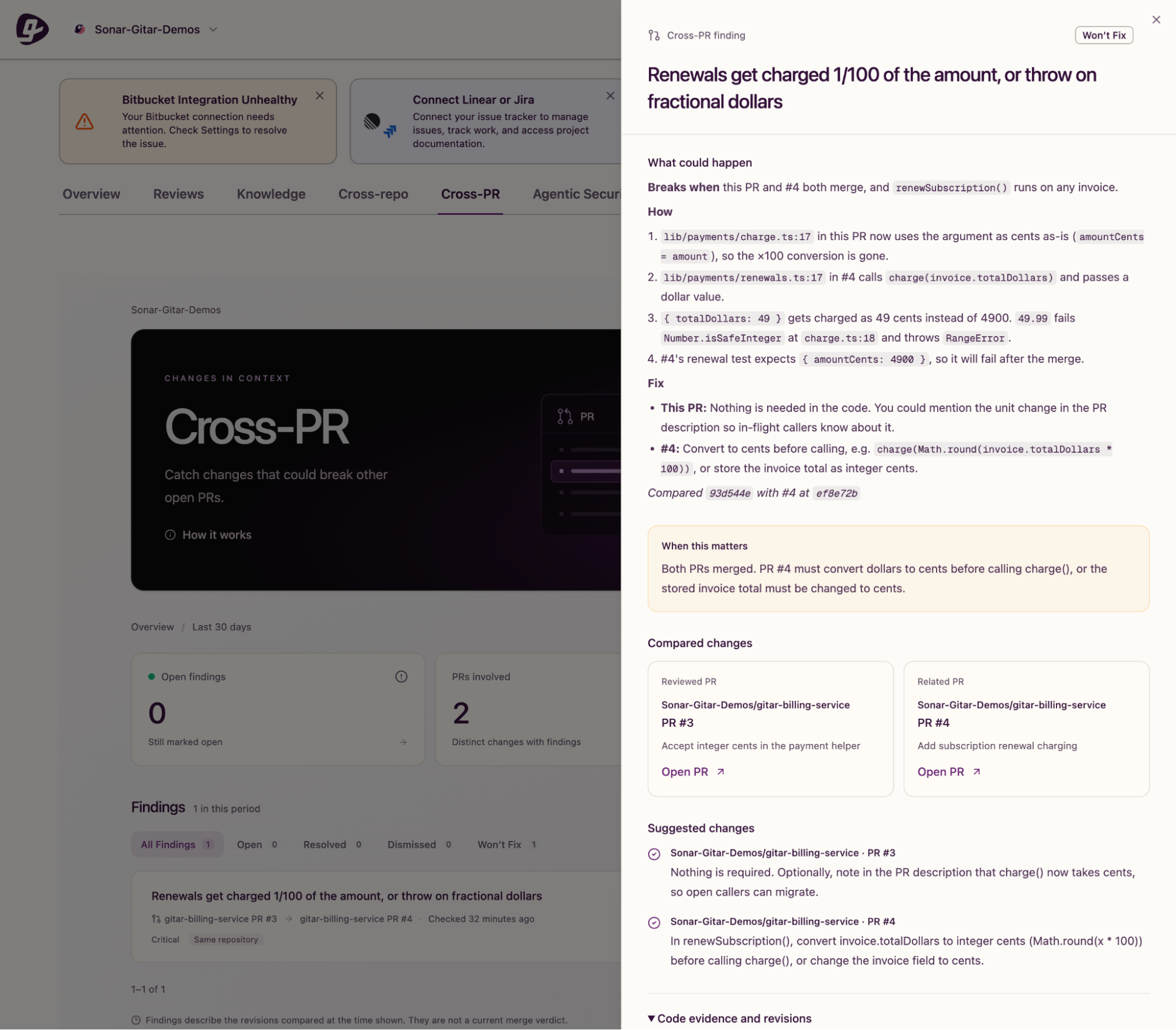
🚨 Cross-PR: Renewals get charged 1/100 of the amount, or throw on fractional dollars · #4

Breaks when this PR and #4 both merge, and `renewSubscription()` runs on any invoice.
...
3. `{ totalDollars: 49 }` gets charged as 49 cents instead of 4900. `49.99` fails `Number.isSafeInteger` at `charge.ts:18` and throws `RangeError`.
...
Fix
- This PR: Nothing is needed in the code. You could mention the unit change in the PR description so in-flight callers know about it.
- #4: Convert to cents before calling, e.g. `charge(Math.round(invoice.totalDollars * 100))`, or store the invoice total as integer cents.

Compared `93d544e` with #4 at `ef8e72b`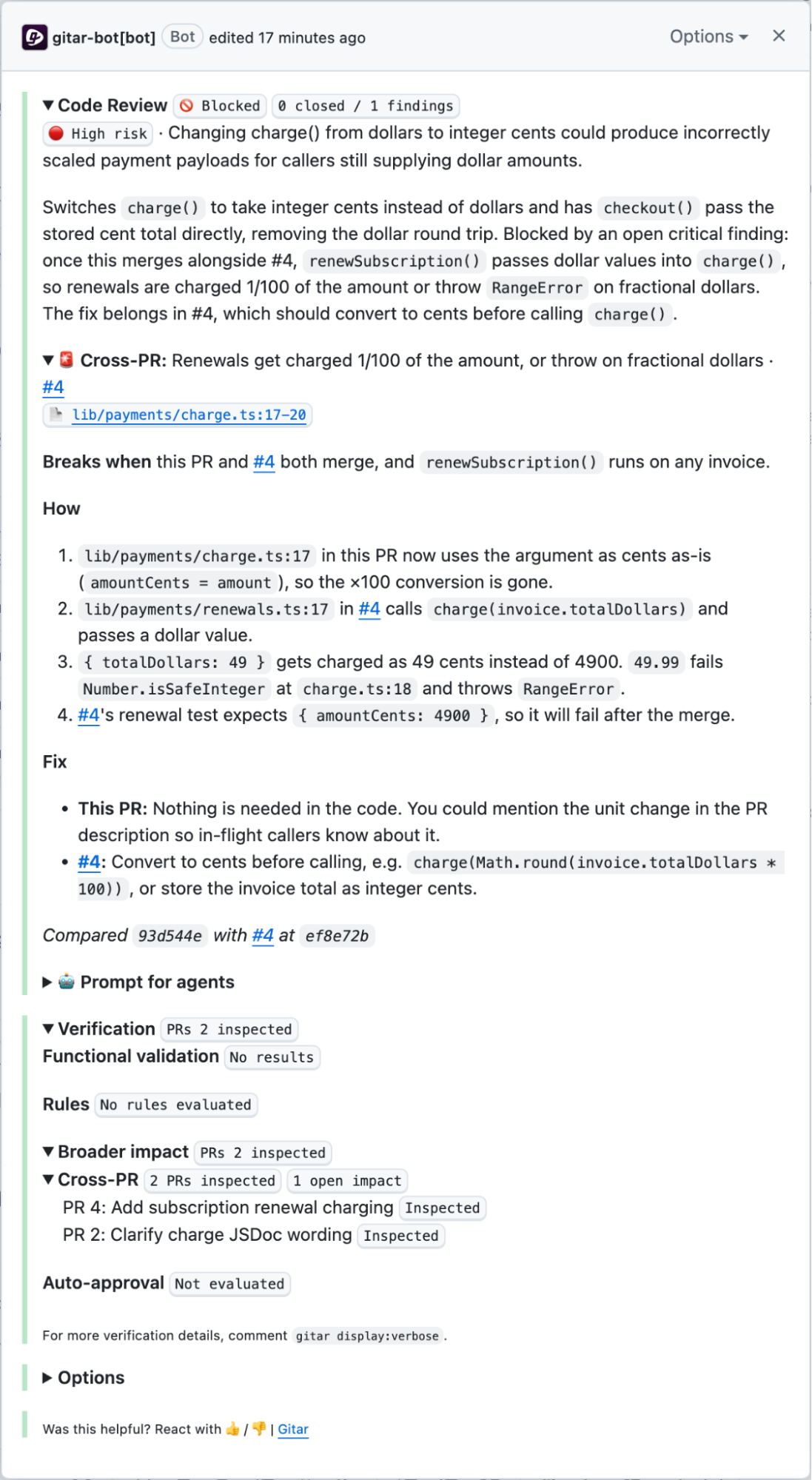
0 closed / 1 findings means one finding, still open. Gitar posts the finding on the pull request whose review spotted the conflict, here #3.
To see the failure for yourself, clone the repository into a throwaway directory, merge both branches into main there, and run the tests:
git clone <REPO_URL> scratch && cd scratch
    git merge origin/feat/integer-cents
    git merge origin/feat/subscription-renewals
    npm install && npm test
Replace <REPO_URL> with your repository's clone URL.
✔ checkout charges the stored cent total (0.655208ms)
✖ renewal charges the invoice total in cents (1.094917ms)
...
  AssertionError [ERR_ASSERTION]: Expected values to be strictly deep-equal:
  + actual - expected
    {
  +   amountCents: 49,
  -   amountCents: 4900,
      currency: 'USD'
    }
Both merges succeed without a conflict, so Git gives no warning. The renewal test fails because charge() returns 49 cents instead of 4900, and a 49.99 invoice throws RangeError: charge must fit in a safe integer number of cents.
Step 5. Coordinate the fix
The fix goes in #4: merge #3's branch into #4's branch, then change line 17 of lib/payments/renewals.ts to convert dollars to cents. #4's CI then tests the renewal flow against the cents-based charge(). Run this in your working clone:
git fetch origin
git checkout feat/subscription-renewals
git merge origin/feat/integer-cents- return charge(invoice.totalDollars);
+ return charge(Math.round(invoice.totalDollars * 100));git commit -am "Convert renewal totals to cents before charging"
git pushGitar re-reviews #4 and finds no issues. The finding on #3 stays open, because it records the commits it compared. Reply in the finding's thread on #3 so Gitar checks the new commit on #4, then click Resolve conversation. #3's headline changes to ✅ Approved. #4 now contains #3's commits, so merge #4 first, then #3.
Step 6. Auto-approve only low-risk pull requests
Commit .gitar/config/approve.md to the default branch:
Approve only low-risk pull requests. Never approve a pull request whose risk is medium or high.git checkout main
git add .gitar/config/approve.md
git commit -m "Add Gitar approval policy"
git pushUntil now, Gitar auto-approved High-risk pull requests because no approval criteria mentioned risk: #2 in Step 3, and #4 when it first opened in Step 4. With this policy, Gitar withholds approval from any pull request whose risk isn't Low. Gitar reads approve.md during a review, so an approval it gave earlier stays on GitHub until that pull request gets a new review.
To see the policy apply, push a commit to a High-risk pull request. In the walkthrough, a comment-only commit to feat/subscription-renewals started a new review of #4. The comment on #4 now reads:
Code Review ✅ Approved
🔴 High risk · Changing charge to accept cents and adding renewal billing could misstate amounts, causing subscriptions to be charged incorrectly.
...
Auto-approval Withheld
The headline still says ✅ Approved because there are no blocking findings, but the Auto-approval line now reads Withheld, with no reason given. On GitHub, Gitar's earlier approving review on #4 now shows as dismissed, so #4 needs a reviewer's approval.
New commits to #2 and #1 show the High-versus-Low split: #2 also reads Auto-approval Withheld, and #1 stays 🟢 Low risk with Auto-approval Approved. If you also write organization criteria in the Behavior section's Auto-approve criteria field, a pull request has to meet those and approve.md.
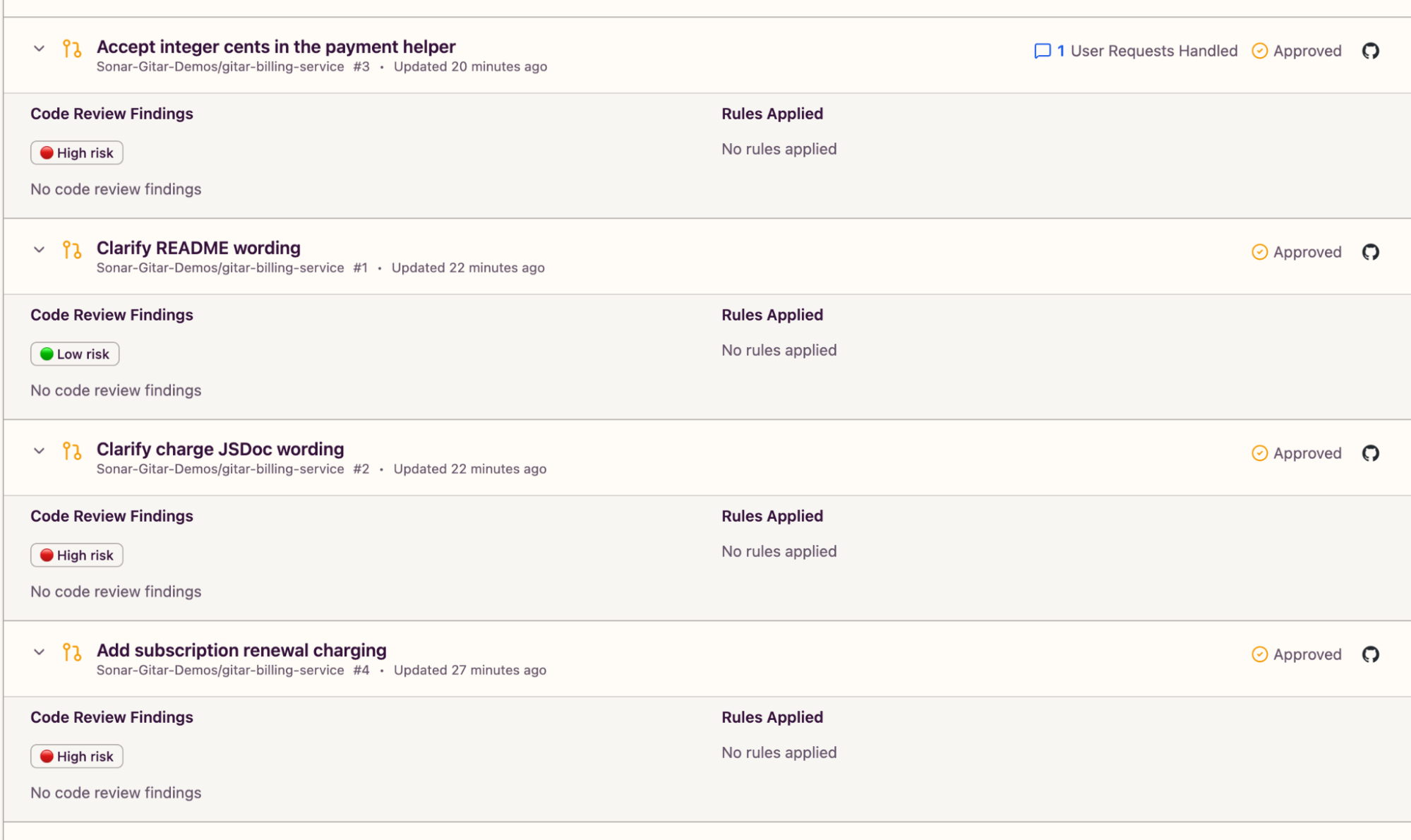
The Overview tab of the Gitar dashboard shows each pull request's risk badge next to an Approved label, which is the headline verdict, not Gitar's approval.
Step 7. Browse findings in the Gitar dashboard (optional)
Click a finding on the Cross-PR tab of the Gitar dashboard to see the breaking condition, both pull requests, the suggested change in each, and the commits compared under Code evidence and revisions. A finding you closed by resolving the GitHub conversation appears there as Won't Fix, not Resolved, so the dashboard's Resolved count stays at 0.
What to know
- A Blocked headline comes with a Changes requested review on GitHub, the review state a reviewer uses to ask for changes before a merge. The Block merges setting in the Behavior section sets which finding severities trigger that review. The default is Important or higher.
- If the risk assessment fails, Gitar applies High as a precaution, so an
approve.mdthat allows only Low risk withholds approval. - On GitLab, the dashboard tab is labeled Cross-MR.
Next steps
- The Risk Triage page covers the default criteria and how organization and repository guidance combine.
- Auto-approve and auto-merge explain criteria files and how to merge approved Low-risk pull requests automatically.
- Share one
risk.mdandapprove.mdacross repositories with a configuration repository. - For contracts that cross repository boundaries, such as an API route and its client, see Cross-Repo Analysis.