
TLDR overview
- Gitar AI code review runs on Azure DevOps pull requests, surfacing bugs and quality findings, analyzing failed Azure Pipelines runs, and applying fix commits to the pull request branch.
- Gitar fits Azure DevOps Services organizations that want AI review and automated remediation on every pull request without adding a task to an existing pipeline definition.
- Gitar’s findings arrive with a proposed fix rather than just a comment, so the round trip between reviewer and author that a review cycle normally costs can be resolved on the pull request itself.
- A dedicated Azure DevOps service account with a scoped personal access token connects the organization to Gitar, which provisions project-level service hooks and reviews pull requests out of band from the pipeline.
Gitar is Sonar's AI code review platform. It reviews pull requests, analyzes CI failures, and commits fixes to the branch. Review tools that stop at a comment still leave the author to interpret the finding and write the change; Gitar produces the fix and can push it as a commit to the pull request branch. On Azure DevOps, Gitar runs outside the pipeline definition, so adding review coverage changes nothing in your existing pipeline config. This blueprint covers creating the Azure DevOps service account and personal access token, connecting the organization in Gitar, opening a pull request for review, reading the findings and the CI failure analysis, and enabling auto-apply so Gitar commits the fixes and the pipeline passes. For this walkthrough, no sample repository is provided; bring your own Azure DevOps repo and open a pull request.
When to use this
- You use Azure DevOps Services and want AI code review on pull requests, with fixes committed rather than suggested.
- Your Azure Pipelines builds fail on issues that are mechanical to fix, like type errors or missing input validation, and you'd rather read a root cause analysis than raw build logs.
- You're standardizing review coverage across many projects, and editing every pipeline definition to add a scanning task isn't practical.
What you'll achieve
- A dedicated Azure DevOps service account holding a personal access token scoped to Code (read & write), Pull Request Threads (read & write), Build (read), and Graph & Identity (read).
- An Azure DevOps organization connected in Gitar under Settings → Integrations, with service hooks provisioned on every selected project.
- A pull request where
gitar botposted findings and a CI root cause analysis, then pushed a fix commit aftergitar auto-apply:on, with Azure Pipelines rerunning to green before the PR is merged.
Architecture
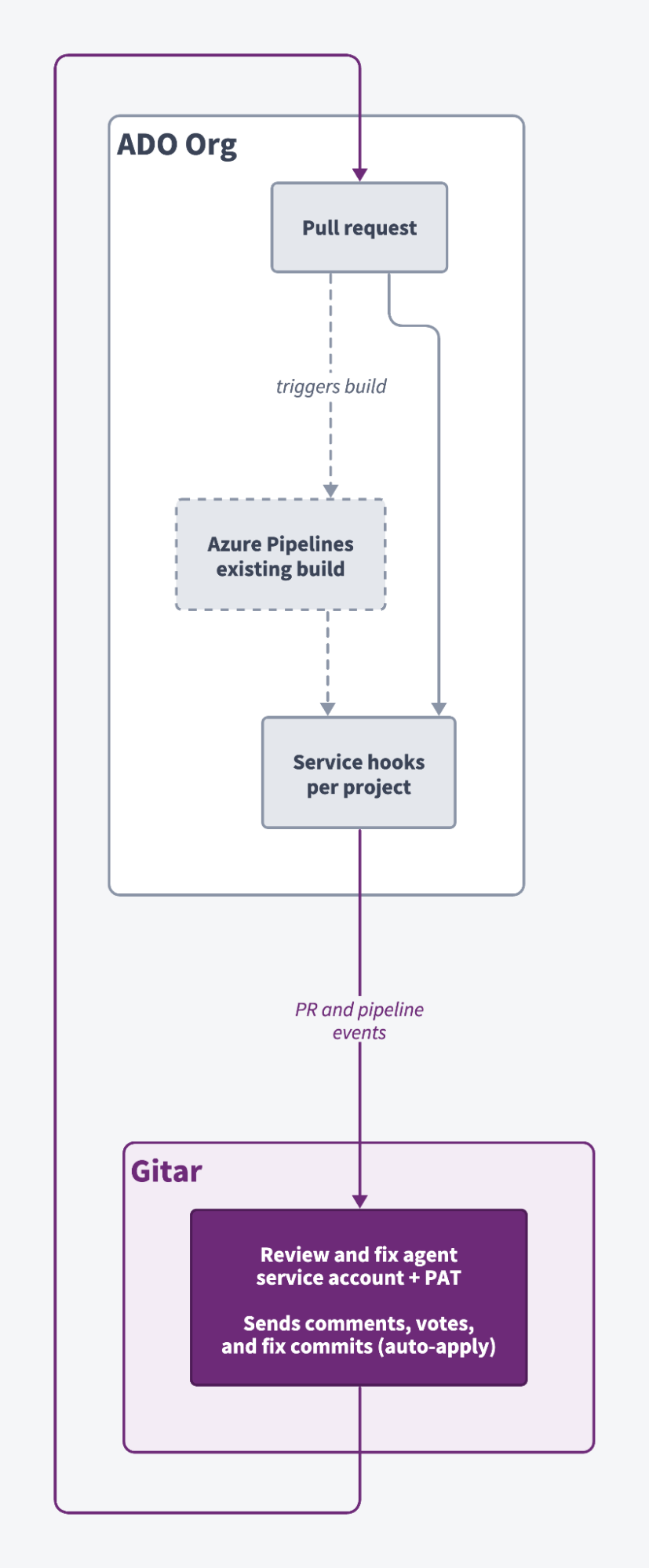
Gitar sits outside your Azure Pipelines definition. When a developer opens a pull request, Azure DevOps fires a project-scoped service hook, provisioned by Gitar during setup, on pull request and pipeline run-state-changed events. Gitar's cloud agent authenticates back as the service account using the personal access token, then reads the diff, the PR metadata, and the build logs. It writes back a PR description summary, a consolidated dashboard comment, and an inline thread per finding. With auto-apply enabled, it authors the fix and pushes a commit to the source branch, and Azure Pipelines reruns against that commit. If the rerun fails, Gitar can analyze the new failure and attempt further fixes. Your pipeline definition never changes.
Prerequisites
- An Azure DevOps organization at
dev.azure.com/<org>, with Project Collection Administrator access or Project Administrator on each project you plan to connect. - Permission to add the dedicated service account to the organization. Verify your own Azure DevOps access-level and licensing requirements before assigning it, since these vary by configuration.
- A Gitar Pro or Enterprise plan for auto-apply. Core covers code reviews, PR summaries, CI failure analysis, and fixes via comments, but not auto-apply. Every organization starts with a 14-day Pro trial.
- An Azure DevOps project with a pull-request build configured in Azure Pipelines, if you want CI failure analysis.
Step 1 — Create the service account and connect Gitar
The token must belong to a dedicated account. Gitar recognizes its own comments by the account ID of the token owner and skips them, so a personal token means Gitar ignores your comments permanently.
- Add the account. Under Organization Settings → Users → Add users, invite a dedicated account such as
gitar-bot@yourcompany.com. - Grant the role. Add the account to Project Collection Administrators under Organization Settings → Permissions for org-wide coverage, or to Project Administrators under Project Settings → Permissions per project. This supplies the "Edit subscriptions" permission Gitar needs to manage service hooks. Keep the role in place for as long as the integration is active, since Gitar also needs it to add projects later and to disconnect.
- Create the token. Signed in as the service account, go to the profile avatar → Personal access tokens → New Token. Name it
Gitar, select your organization, set an expiration, and choose Custom defined scopes:
Select Create and copy the token now. Azure DevOps won't show it again.
- Connect Gitar. In the Gitar dashboard, go to Settings → Integrations and select Connect beside Azure DevOps. Enter your organization name (the segment after
dev.azure.com/, not the full URL), paste the token, select the projects to monitor, and select Connect. Gitar validates the token and provisions the service hooks.
The role and the scopes are independent requirements: pipeline events need the Project Administrator role and Build (read), and granting one doesn't cover the other. And only the projects you select are monitored, so selecting everything today won't enroll what you create tomorrow.
Step 2 — Open a pull request and read the summary
The output across Steps 2 through 4 comes from a demo project called gitar-demo. You'll see similar behavior on any project you've connected, so there's nothing to clone here.
Gitar reviews new pull requests, and new commits pushed to pull requests that are already open. Open one in any connected project to trigger a review.
The demo pull request, "Add ROI hours-saved helper for pricing calculator," adds one file at lib/generated/roi-6ebz6zar.ts:
// Helpers for the demo app's pricing / "time saved" ROI calculator.
export const estimateHoursSaved = (
  prsPerWeek: number,
  automationRate: number,
): number => {
  const minutesSaved = prsPerWeek * 25 * automationRate;
  return (minutesSaved / 60).toFixed(1);
};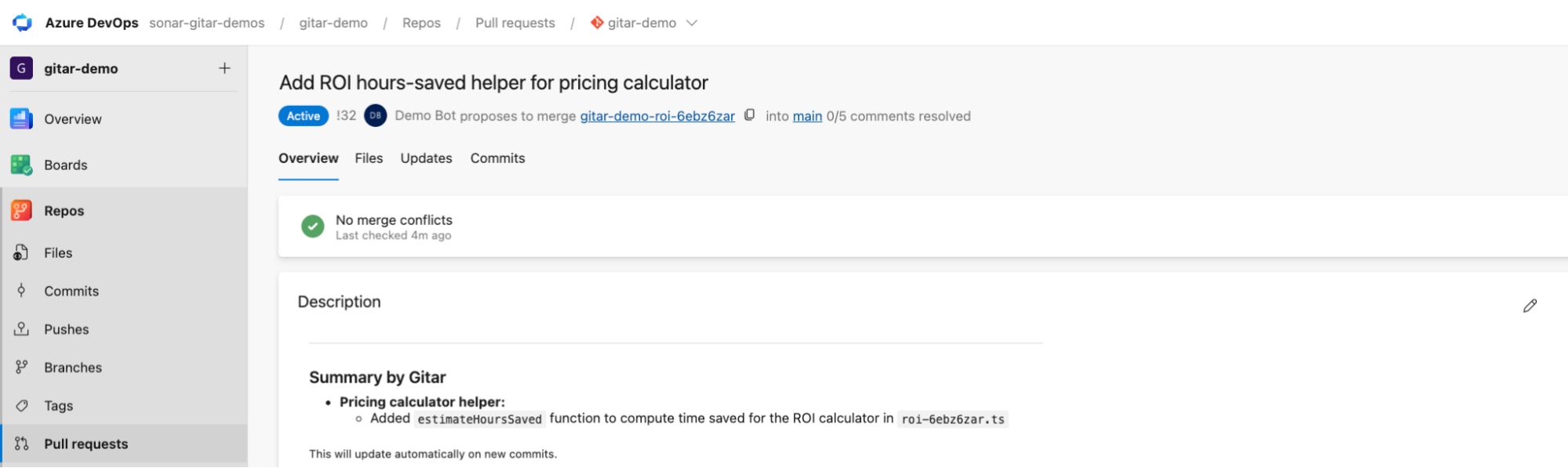
Gitar writes a "Summary by Gitar" block into the pull request description, controlled by the Enhance summaries setting under Settings → Behavior. It refreshes on every new commit, so it stays accurate as the branch changes.
Step 3 — Inspect the findings and the CI failure analysis
Gitar produces two outputs here, from two different features. Read them as separate things.
CI failure analysis explains why the build broke. Here it reported one TypeScript compilation error at high confidence, type build, with the root cause at roi-6ebz6zar.ts:9, where .toFixed(1) returns a string against a declared return type of number. Gitar also classifies failures by origin: one change-related build failure, no flaky or infrastructure failures.
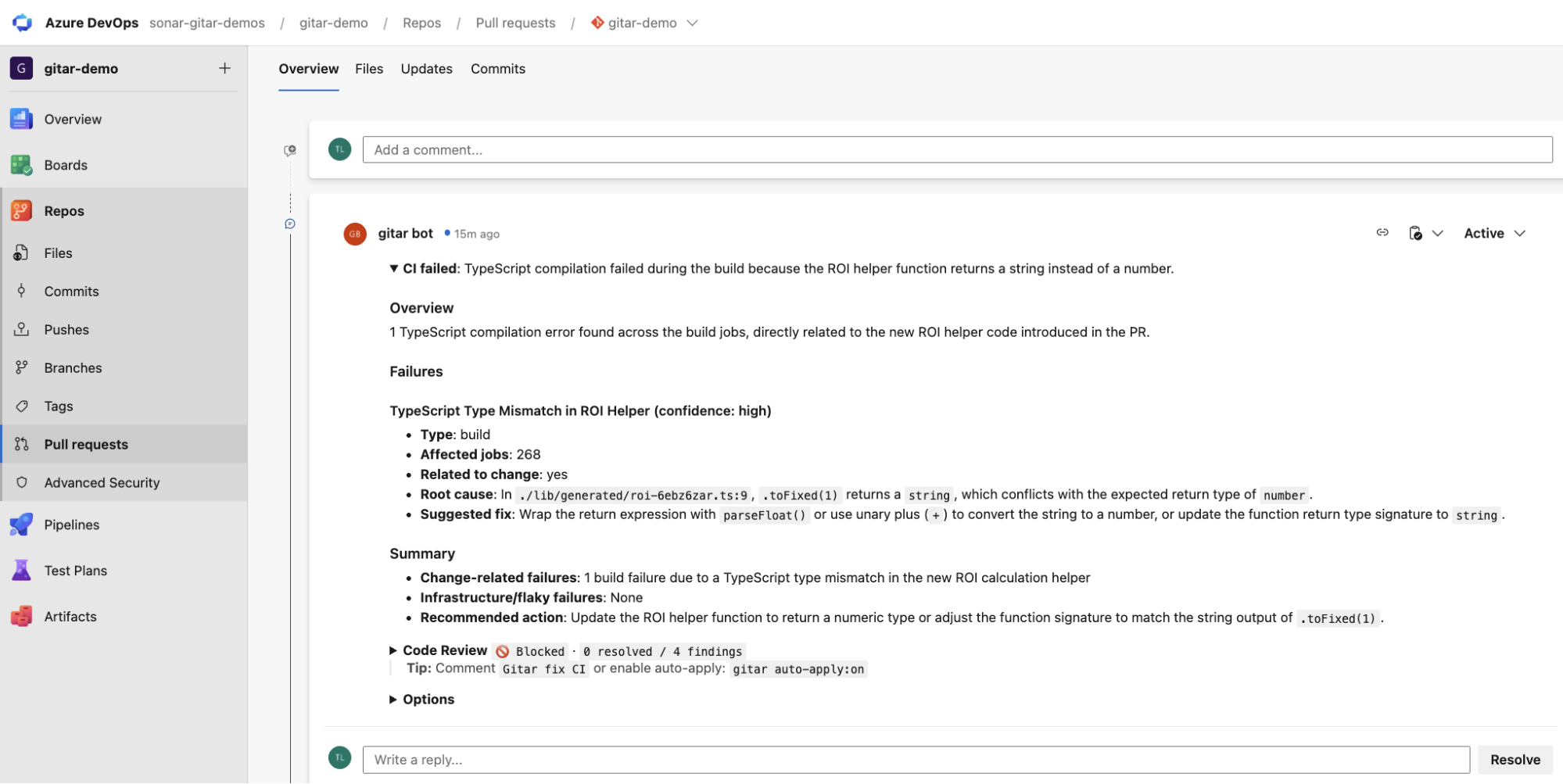
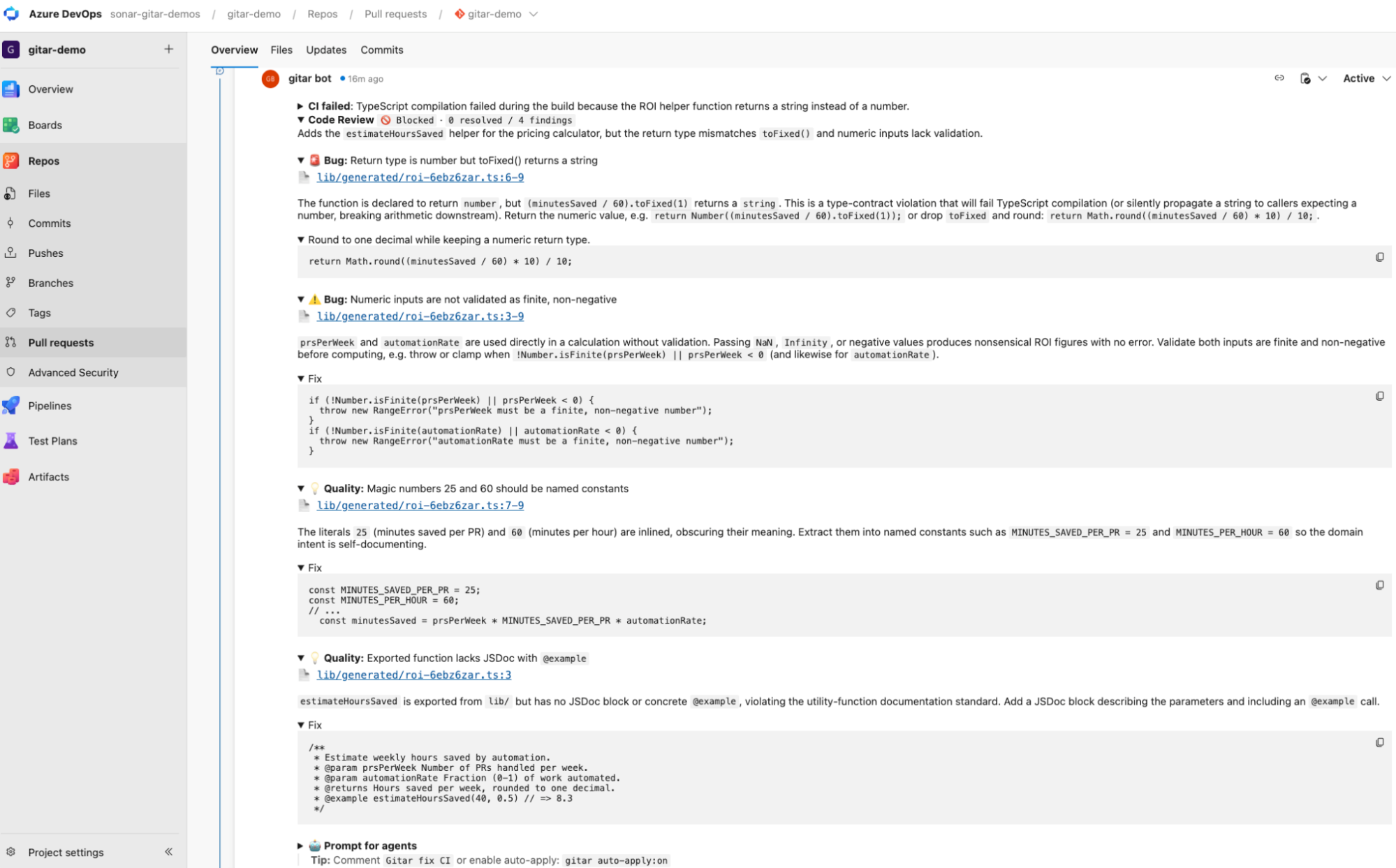
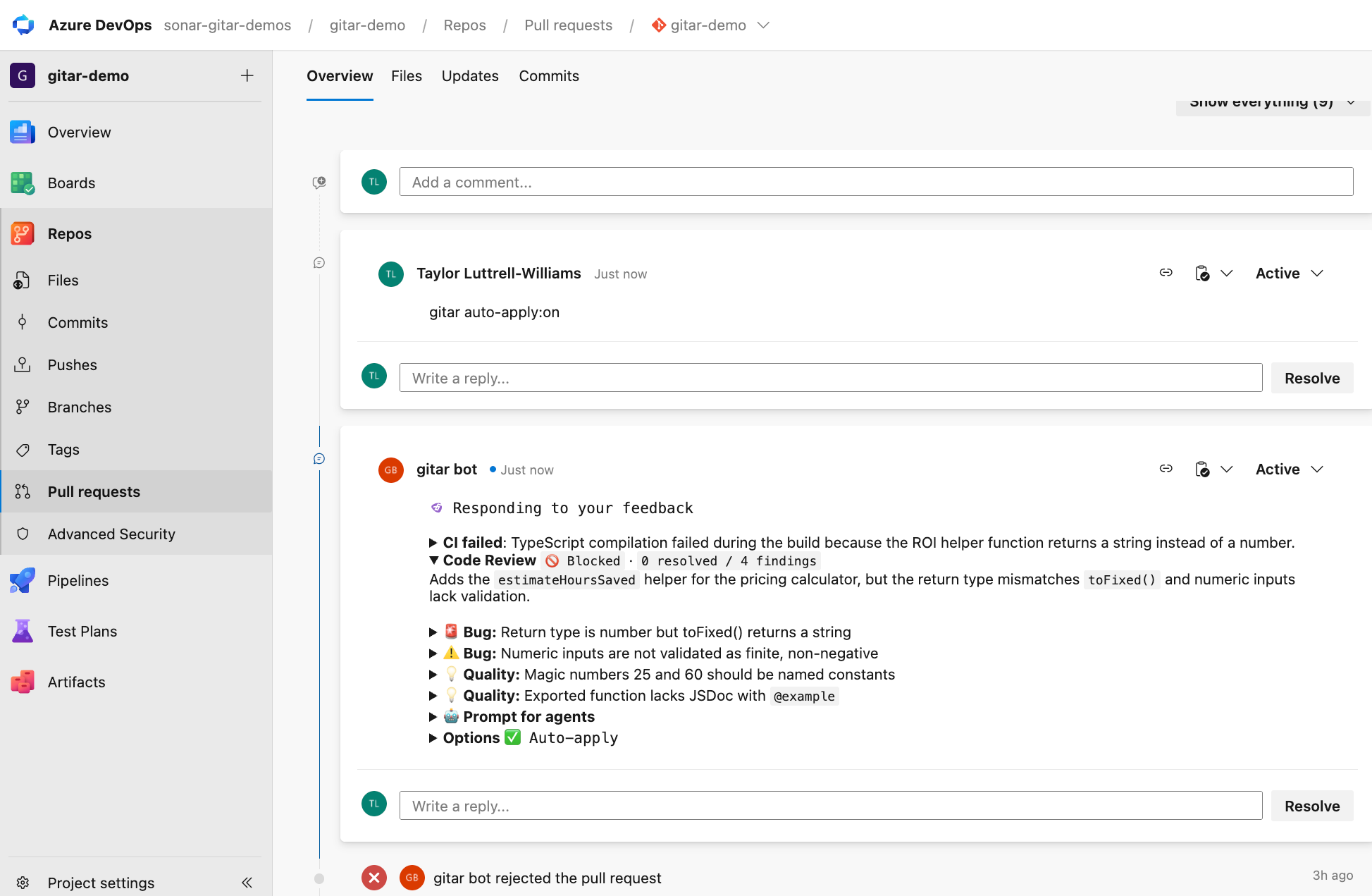
Code review is the verdict on the diff, posted as Code Review 🚫 Blocked · 0 resolved / 4 findings. Gitar keeps a single dashboard comment and updates it in place rather than stacking new ones, alongside an inline thread per finding:
- 🚨 Bug: the return type is
number, buttoFixed()returns a string (lines 6–9). - ⚠️ Bug:
prsPerWeekandautomationRatearen't validated as finite and non-negative (lines 3–9). - 💡 Quality: the magic numbers 25 and 60 should be named constants (lines 7–9).
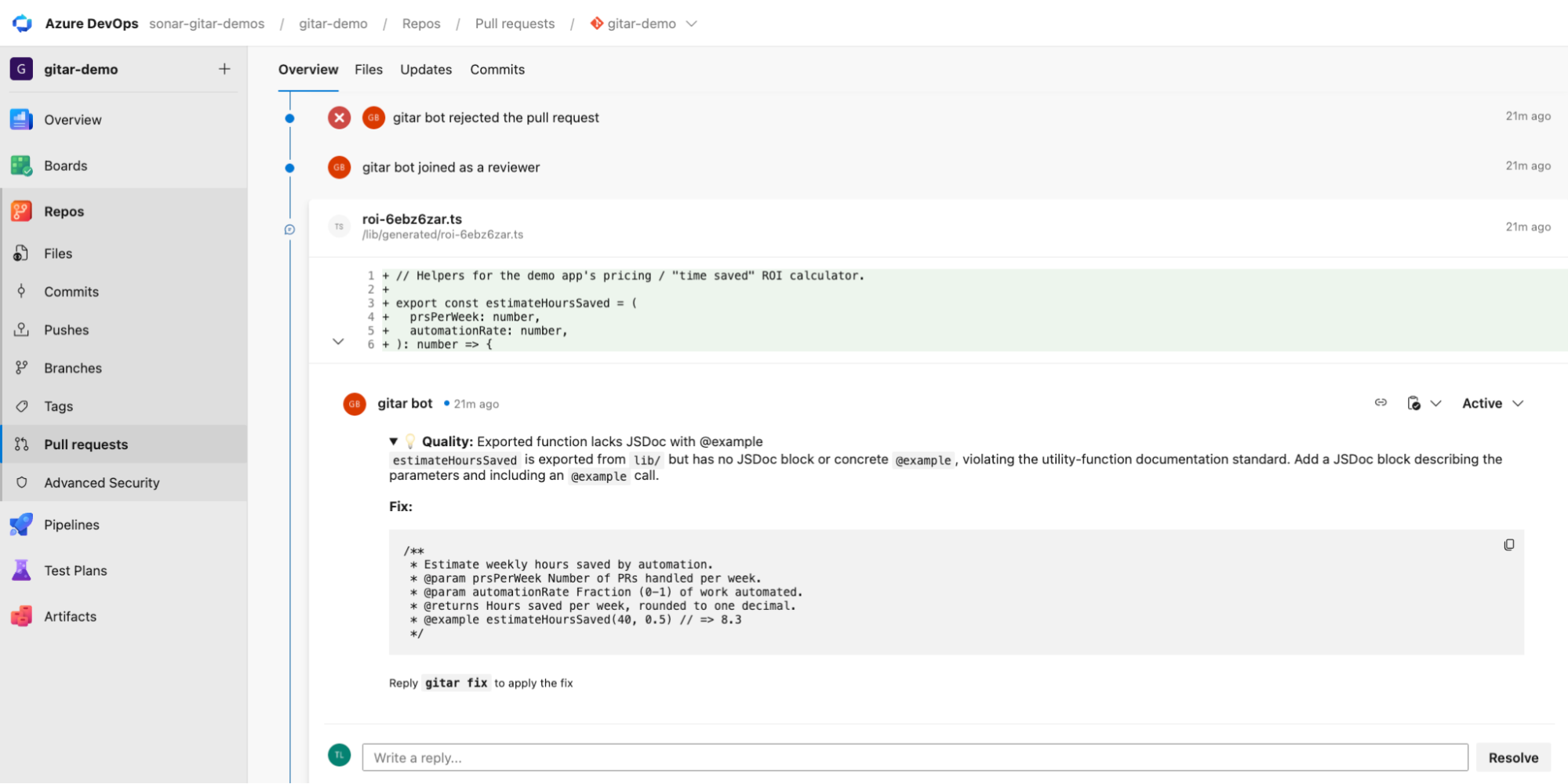
- 💡 Quality: the exported function has no JSDoc block with an
@example(line 3).
Each finding carries a concrete proposed fix, not just a description of what's wrong, and Gitar appends a "Prompt for agents" block packaging all four as instructions a coding agent can consume directly. The Options footer shows the current mode, auto-apply off and display compact, with the commands to change either.
Gitar reports findings across code security, bug, performance, edge-case, and code-quality categories, each carrying a severity and a link to the file and line. The exact findings, wording, and status labels shown here are illustrative. Verify them against your own project rather than treating them as a guarantee.
A comment for each finding:
Step 4 — Enable auto-apply and merge
Comment gitar auto-apply:on on the pull request. Commands are case-insensitive, work either as a plain comment or as a reply to any Gitar comment, and persist for the life of the PR.
Gitar pushed one commit, fix: correct ROI helper return type, validation, and docs, resolving all four findings:
// Helpers for the demo app's pricing / "time saved" ROI calculator.
const MINUTES_SAVED_PER_PR = 25;
const MINUTES_PER_HOUR = 60;
/**
 * Estimate weekly hours saved by automation.
 * @param prsPerWeek Number of PRs handled per week.
 * @param automationRate Fraction (0-1) of work automated.
 * @returns Hours saved per week, rounded to one decimal.
 * @example estimateHoursSaved(40, 0.5) // => 8.3
 */
export const estimateHoursSaved = (
  prsPerWeek: number,
  automationRate: number,
): number => {
  if (!Number.isFinite(prsPerWeek) || prsPerWeek < 0) {
    throw new RangeError("prsPerWeek must be a finite, non-negative number");
  }
  if (!Number.isFinite(automationRate) || automationRate < 0) {
    throw new RangeError("automationRate must be a finite, non-negative number");
  }
  const minutesSaved = prsPerWeek * MINUTES_SAVED_PER_PR * automationRate;
  return Math.round((minutesSaved / MINUTES_PER_HOUR) * 10) / 10;
};
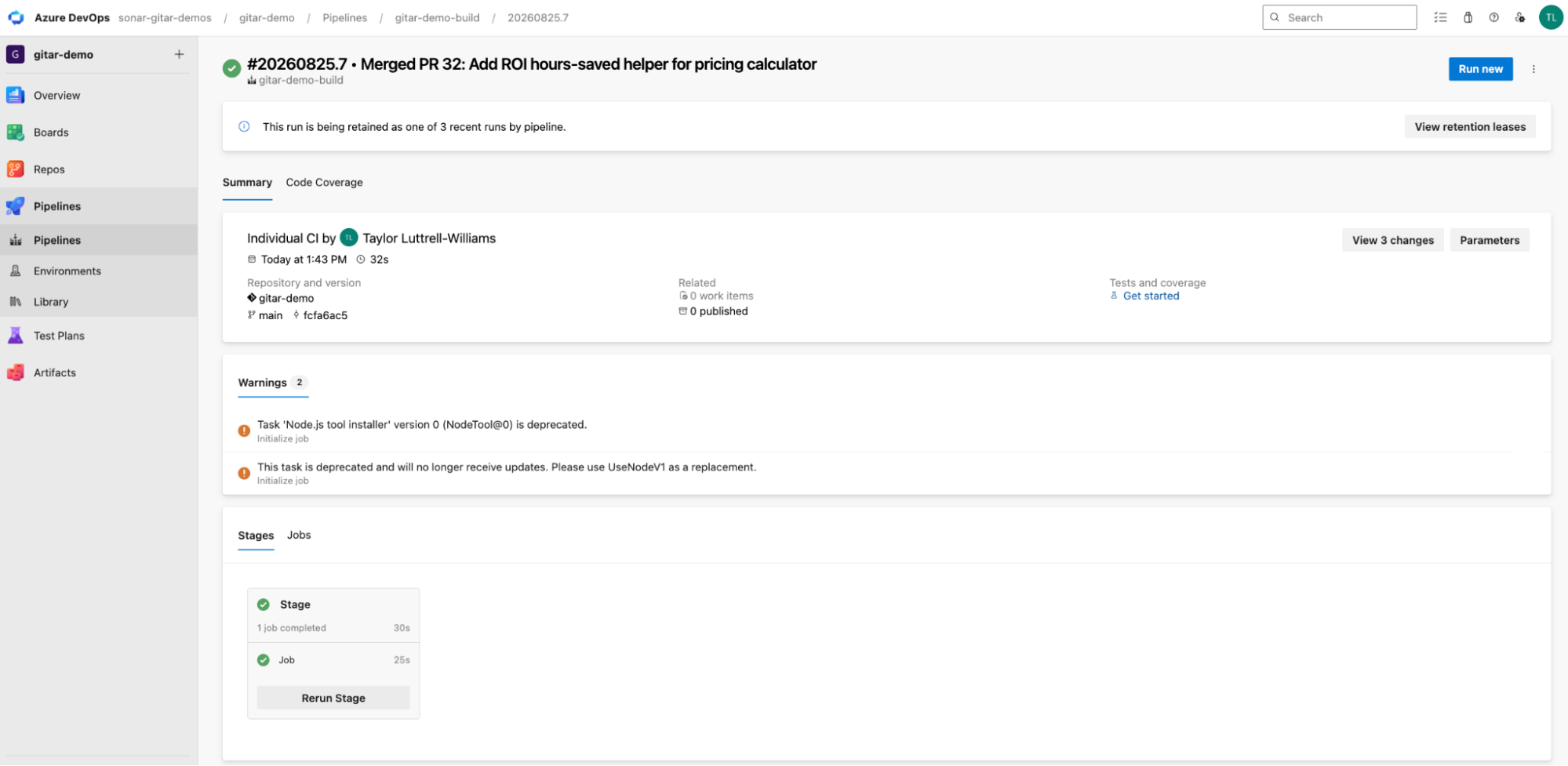
The consolidated comment updated in place to Code Review ✅ Approved · 4 resolved / 4 findings, gitar bot voted to approve, and the pipeline re-ran against the new commit and passed.
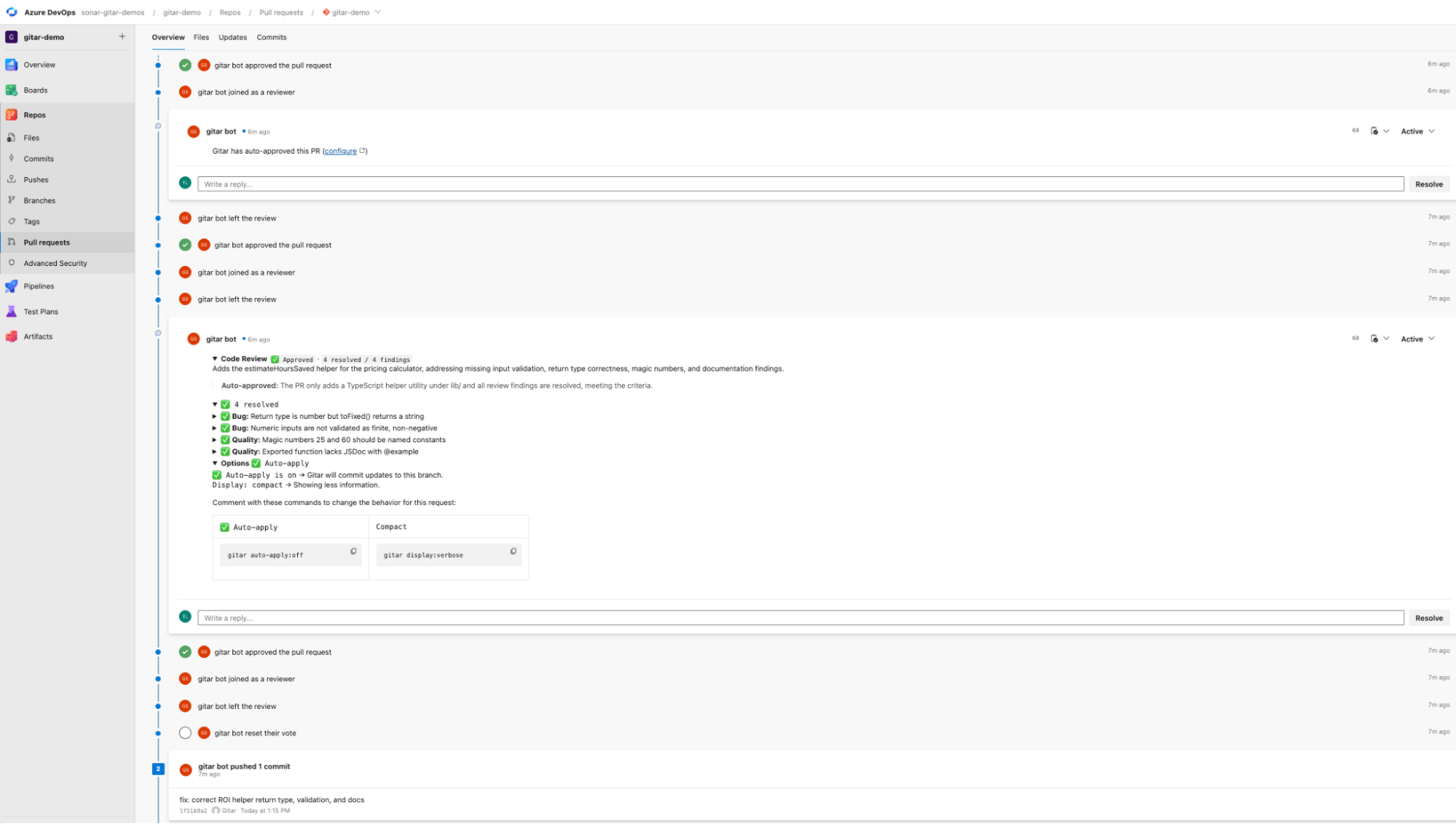
Gitar pushes the fix commit first, then Azure Pipelines reruns against it. If that rerun fails, Gitar can analyze the new failure and attempt further fixes, iterating until CI passes or it can't make further progress.
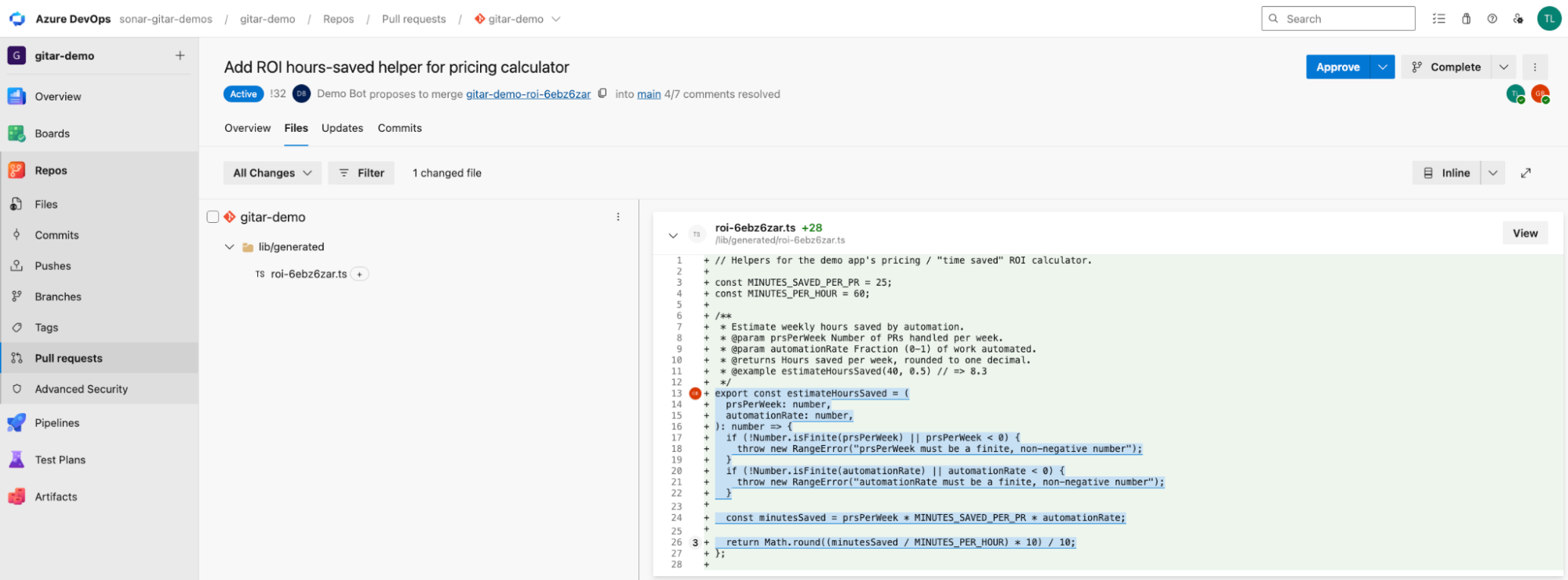
In our example, build passes:
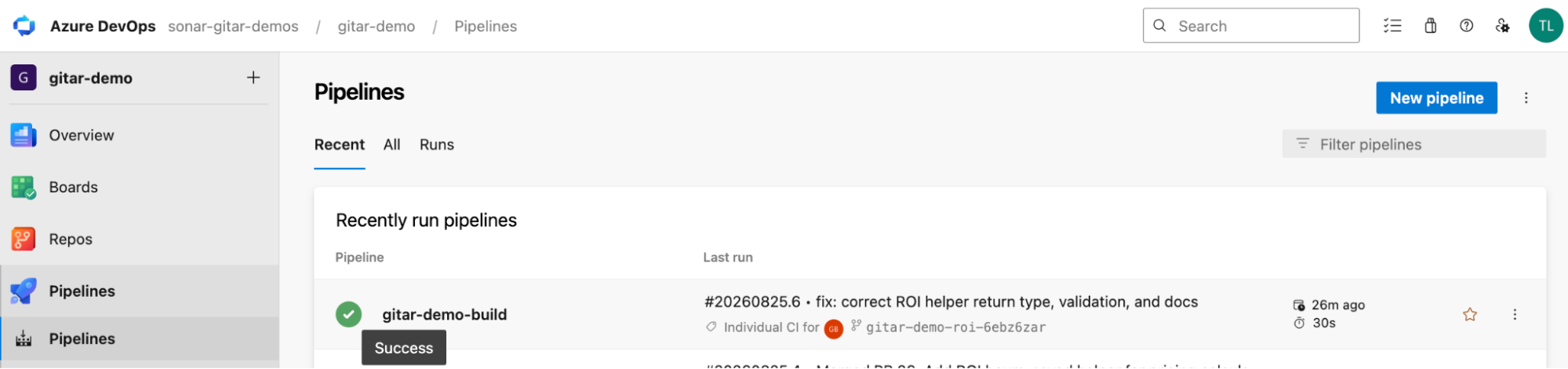
With the pipeline green, the PR is ready to merge. Once configured, Gitar can also approve a clean pull request automatically.
Verify the setup
Check each of the following:
- The service account holds Project Administrator on every connected project, or Project Collection Administrators for org-wide coverage.
- Azure DevOps shows as connected under Settings → Integrations in Gitar, listing the projects you expect.
- Service hooks exist on each connected project under Project Settings → Service hooks.
- Your test pull request has a
gitar botdashboard comment and an inline thread per finding. - With auto-apply enabled, a
gitar botfix commit sits on the source branch and Azure Pipelines re-ran against it. - The Azure Pipelines run on the source branch is green.
Potential setup errors include:
- A service hook permission error means the Project Administrator role is missing.
- A Build scope error means the token lacks Build (read), and the role alone won't fix it.
- Missing repositories mean the project was never selected, so add it under Settings → Integrations → Azure DevOps → Add projects.
What to know
- New projects aren't discovered automatically. Service hooks live only on the projects you selected, so a project created later delivers no events and gives no warning. Add it under Settings → Integrations → Azure DevOps → Add projects.
- A personal access token can go inactive separately from its expiration date. Gitar only detects the failure after a call to Azure DevOps fails, though it emails your organization admins and raises a dashboard alert at that point. Record the expiration date and schedule rotation through Update PAT ahead of it.
- One or more Azure DevOps organizations can map to a single Gitar organization. You can’t bind a single Azure DevOps organization to multiple Gitar organizations but you can bind multiple Azure DevOps organizations to the same Gitar organization.
- Gitar votes as a reviewer and can approve a clean pull request when configured. Decide separately whether a Gitar approval should satisfy your Azure DevOps branch policy.
Next steps
- Get started with Gitar AI code review, which covers the setup on GitHub.
- Multilayered code verification with Gitar and SonarQube Cloud, on pairing AI review with deterministic analysis and quality gates.
- Gitar Azure DevOps documentation and Gitar commands reference for a deeper dive.
- Gitar repository rules, covering
.gitar/rules/todefine automated workflows using plain markdown files.