
TLDR overview
- The SonarQube CLI’s pre-commit hook can run dependency-risk analysis at commit time, blocking newly introduced MEDIUM, HIGH, or BLOCKER vulnerability, malware, and prohibited-license risks before they enter local history.
- The hook skips dependency-risk analysis when only application code changed, while secrets detection still runs.
- Dependency discovery happens locally, while SonarQube Cloud evaluates the uploaded dependency snapshot, manifests, and lockfiles against vulnerability, malware, and license-risk data.
- Risk results can include CVE identifiers, severity, and recommended versions for vulnerability risks, with support for npm, Python, and other ecosystems supported by SonarQube SCA.
This blueprint sets up dependency-risk scanning with the SonarQube CLI so that a pre-commit hook blocks vulnerable packages before they enter your repository. By the end, your Git workflow will analyze staged manifest and lockfile changes against SonarQube Cloud, reject commits that introduce new risks at MEDIUM severity or higher, and skip dependency-risk analysis when nothing dependency-related changes. The primary example uses npm with package.json and package-lock.json, while a secondary section covers Python requirements.txt to show where ecosystem differences affect the setup.
When to use this
You want local, per-commit feedback on dependency risks without waiting for CI results, and your organization already has a SonarQube Cloud project with SonarQube Advanced Security enabled. This setup works well when your team uses the SonarQube CLI for secrets scanning or agent loop verification and wants to extend that same pre-commit hook to cover dependencies.
What you'll achieve
- Terminal-based dependency-risk analysis that reports vulnerabilities, malware, and license risks from SonarQube Cloud
- A pre-commit hook that blocks commits introducing new dependency risks at MEDIUM, HIGH, or BLOCKER severity
- Dependency-risk analysis skips when no manifests or lockfiles changed, while secrets detection still runs
- Fail-open behavior that lets commits proceed when network or infrastructure problems prevent the SCA stage from completing
Architecture
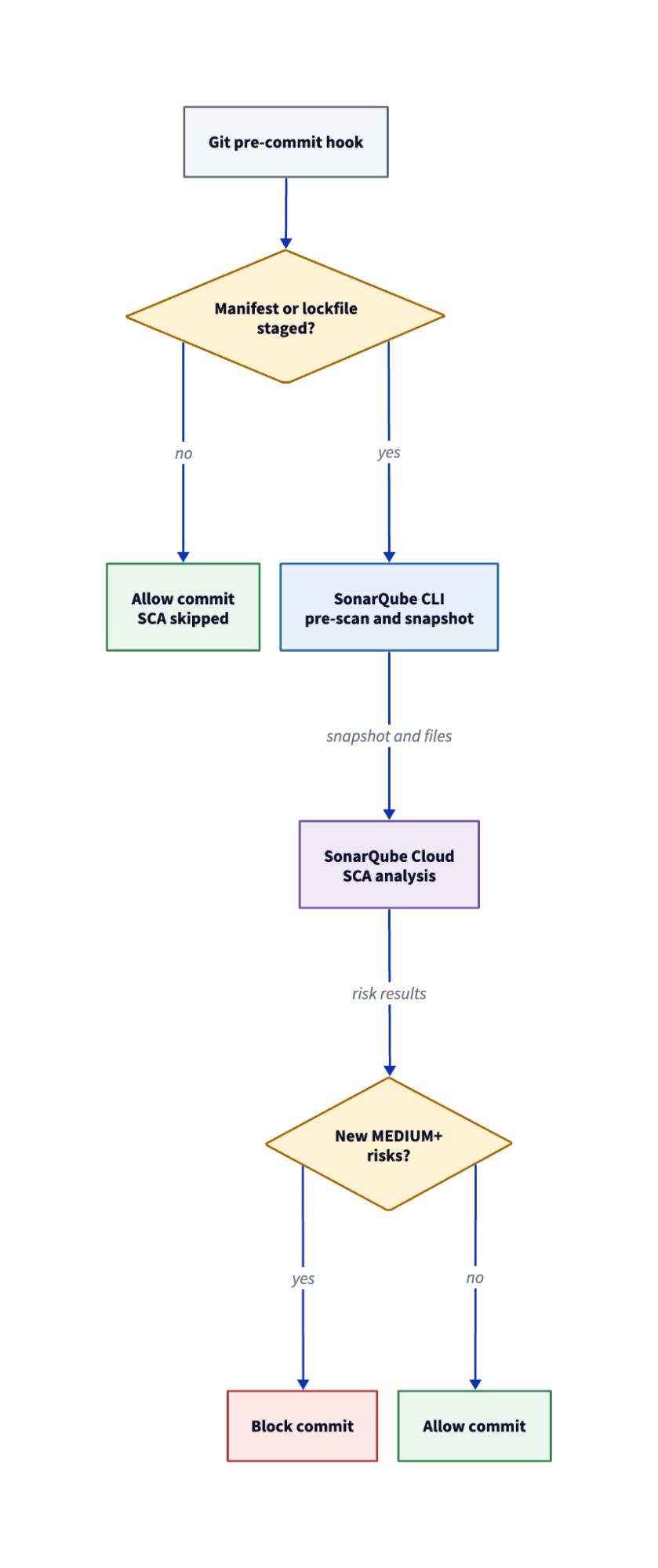
When you run sonar analyze dependency-risks or trigger the pre-commit hook, the CLI discovers manifest and lockfile inputs in your working tree, scans them for hardcoded secrets, and resolves a dependency snapshot using the local sca-scanner-cli binary. That snapshot and the dependency files are uploaded to SonarQube Cloud for analysis, while source code stays on your machine.
SonarQube Cloud applies the project's SCA settings, runs risk analysis against its vulnerability, malware, and license databases, and returns the results with status, severity, CVE data, and remediation recommendations. The pre-commit hook filters that analysis further because it fires only when staged files include dependency manifests or lockfiles, and blocks the commit only when the results contain risks that are both newly introduced and at MEDIUM severity or higher. A commit that changes only application code skips the SCA stage entirely.
Prerequisites
- SonarQube CLI 1.3.0 or later, installed and authenticated (
sonar auth login) - A SonarQube Cloud organization on a plan that includes SonarQube Advanced Security, with SCA enabled on the target project
- An existing SonarQube Cloud project bound to your repository (the CLI does not create projects)
- npm and Node.js for the primary example
- Python 3 and pip for the secondary example (Step 7 only)
- Strongly recommended: a Git repository with a committed
package-lock.json, because npm lockfiles provide exact resolved versions and a complete dependency graph that SCA needs for accurate results - Network access to SonarQube Cloud and to
binaries.sonarsource.comfor the first-run scanner binary download
Commands and output in this blueprint were captured with SonarQube CLI 1.3.0 against SonarQube Cloud.
Step 1 — Authenticated CLI connected to your project
Verify that the CLI can reach your SonarQube Cloud organization and that your credentials are current.
sonar auth statusExpected output:
Verifying token......
[✓ Connected]
Server  https://sonarcloud.io
Org     your-organization
Source  OS Keychain
If the output shows no connection, run sonar auth login to authenticate, and the CLI will store credentials in the OS keychain by default.
Bind the repository to your SonarQube Cloud project by adding a sonar-project.properties file at the repository root:
sonar.projectKey=your-organization_your-projectThe CLI can also detect the project key from a .sonarlint/connectedMode.json binding or a bound Git origin remote, although an explicit properties file is the most portable option when multiple developers need the same binding.
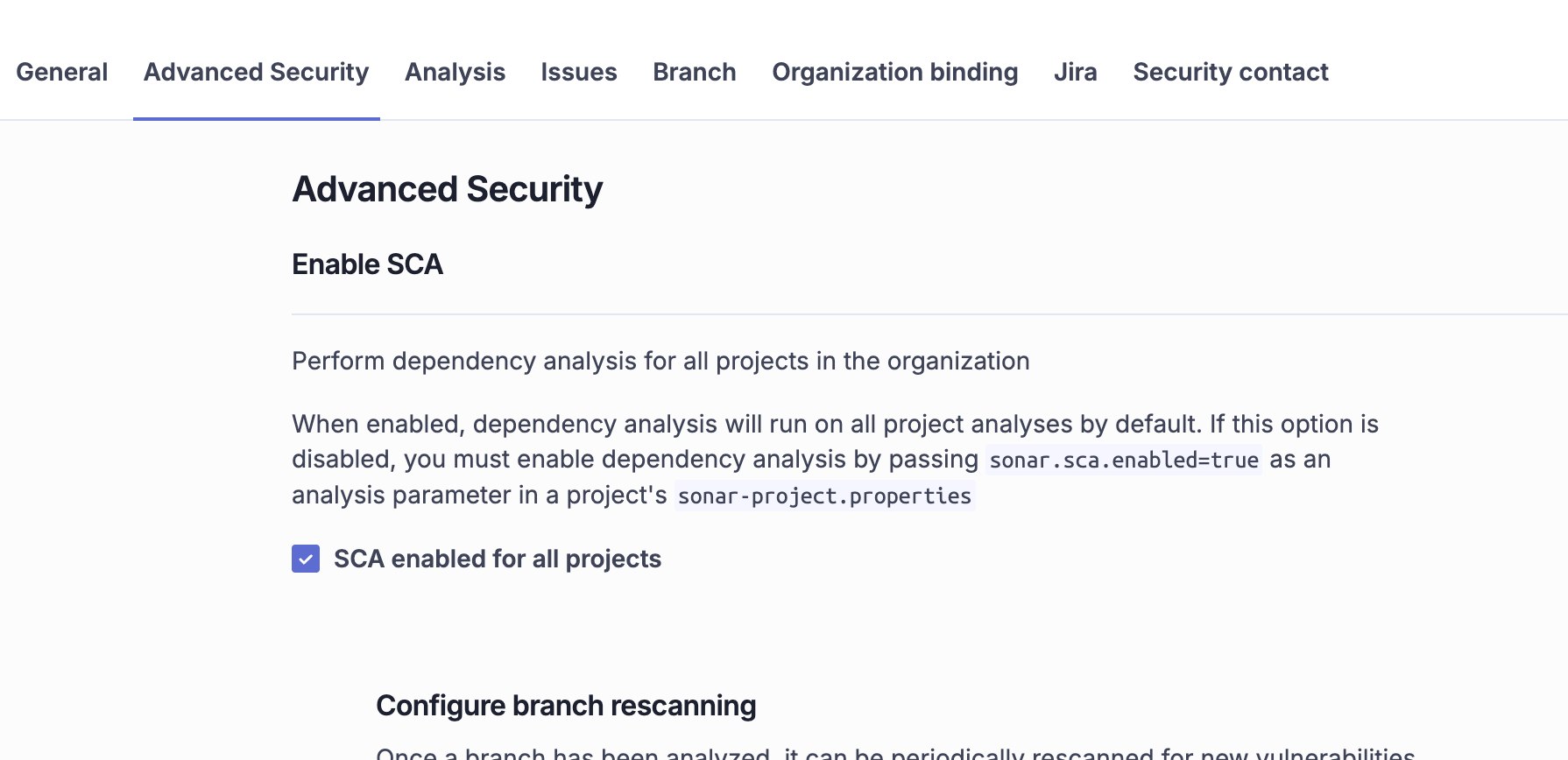
Step 2 — Clean dependency baseline on the default branch
SonarQube Cloud uses the default-branch analysis to determine which dependency risks are new, so the hook cannot distinguish a preexisting risk from one your commit just introduced unless a baseline exists. Run the dependency-risk command on your default branch before installing the hook.
If your repository contains test fixtures, vendor directories, or example projects with their own package manifests, configure sonar.sca.exclusions as an SCA analysis parameter before running the baseline. Patterns like **/test/** or **/fixtures/** prevent the scanner from discovering manifests in those directories and keep your baseline scoped to production dependencies.
sonar analyze dependency-risks -p <YOUR_PROJECT_KEY> --format tableExpected output for a clean baseline:
Synchronizing settings...
Discovering dependency manifests...
Scanning manifests for secrets...
Analyzing dependency risks...
No dependency risks found.

Summary: 1 dependencies checked, 0 risks found
If the baseline reports existing risks, those risks will not block commits through the pre-commit hook because the hook filters to newly introduced risks only. You can address existing risks separately through the SonarQube Cloud UI or by running sonar analyze dependency-risks with --statuses all to see everything regardless of introduction date.
Step 3 — Pre-commit hook installed with dependency-risk scanning
Install the project-scoped pre-commit hook with SCA enabled:
sonar integrate git --hook pre-commit --dependency-risks -p <YOUR_PROJECT_KEY> --non-interactive=== SonarQube Git Integration (source code scanning) ===
Project
✓ Key: your-organization_your-project
[What will be installed]
pre-commit code scanning hook
Scans files for secrets and checks dependencies for known
vulnerabilities (SCA) before each commit.
sonar-secrets binary already installed
sca-scanner-cli binary already installed
Installing pre-commit code scanning hook...
- pre-commit secrets scan
- pre-commit dependency-risks scan
Installed
✓ pre-commit code scanning hookThe generated hook runs two stages on every commit: secrets detection first, then dependency-risk scanning. The SCA stage only fires when the staged changes include files that match the scanner's manifest and lockfile patterns (for npm, that means package.json, package-lock.json, and npm-shrinkwrap.json), so a commit that touches only application code skips dependency analysis and prints a brief skip message. If the sca-scanner-cli binary is unavailable, the hook skips the dependency-risk stage and does not block the commit. Run sonar analyze dependency-risks once before relying on hook enforcement so the CLI can download and cache the binary.
The --dependency-risks flag is only supported for project-scoped pre-commit hooks and cannot be combined with --global or used with pre-push.
Step 4 — Commit blocked for a vulnerable dependency
To test the hook, introduce a known-vulnerable dependency (exercise caution doing so!). The npm package lodash@4.17.4 has multiple published CVEs and is the same fixture the SonarQube CLI's own end-to-end tests use.
git switch -c test-vulnerable-dependency
npm install lodash@4.17.4 --package-lock-only --ignore-scripts
git add package.json package-lock.json
git commit -m "Downgrade lodash to 4.17.4"
The hook detects that package.json and package-lock.json changed, runs the dependency-risk analysis against SonarQube Cloud, and blocks the commit:

The full sonar analyze dependency-risks command (next step) reports 10 total risks for lodash@4.17.4, but the hook blocks only 9 because it filters to MEDIUM severity and above and excludes the one LOW-severity risk in the set. The hook intentionally keeps its output brief so that the blocked-commit message stays readable, while pointing the developer to the full command for investigation.
Step 5 — Full risk report with CVE and remediation detail
Run the full dependency-risk command to see individual CVEs, CVSS scores, and recommended safe versions:
sonar analyze dependency-risks -p <YOUR_PROJECT_KEY> --format tableSynchronizing settings...
Discovering dependency manifests...
Scanning manifests for secrets...
Analyzing dependency risks...
── lodash@4.17.4 [NEW] (10 risks) ─────────────────────────────────────────
in: package.json, package-lock.json
direct
HIGH NEW CVSS 7.4 CVE-2020-8203 → 4.17.20 (fixes 5/10)
HIGH NEW CVSS 7.2 CVE-2021-23337 → 4.17.21 (fixes 7/10)
HIGH NEW CVSS 9.1 CVE-2019-10744 → 4.17.12 (fixes 4/10)
MEDIUM NEW CVSS 6.5 CVE-2019-1010266 → 4.17.11 (fixes 3/10)
MEDIUM NEW CVSS 5.3 CVE-2020-28500 → 4.17.21 (fixes 7/10)
MEDIUM NEW CVSS 6.5 CVE-2018-3721 → 4.17.5 (fixes 1/10)
MEDIUM NEW CVSS 5.6 CVE-2018-16487 → 4.17.11 (fixes 3/10)
MEDIUM NEW CVSS 6.9 CVE-2025-13465 → 4.17.23 (fixes 8/10)
MEDIUM NEW CVSS 9.8 CVE-2026-4800
LOW NEW CVSS 6.5 CVE-2026-2950
Recommended versions without known vulnerabilities:
4.18.1 (latest stable) | 4.18.0 (nearest)
Summary: 1 dependencies checked, 10 risks found
Filtering by: new, open, confirm (discarded: accept, safe, fixed)
MALWARE BLOCKER ✓ 0 HIGH ✓ 0 MEDIUM ✓ 0 LOW ✓ 0 INFO ✓ 0
PROHIBITED_LICENSE BLOCKER ✓ 0 HIGH ✓ 0 MEDIUM ✓ 0 LOW ✓ 0 INFO ✓ 0
VULNERABILITY BLOCKER ✓ 0 HIGH ✗ 3 MEDIUM ✗ 6 LOW ✗ 1 INFO ✓ 0
Recommendations:
lodash@4.17.4 (10 risks, highest severity HIGH)
Recommended versions without known vulnerabilities:
4.18.1 (latest stable) | 4.18.0 (nearest)
❌ Found 10 unresolved dependency risks.Each risk line shows the severity, status, CVSS score, and CVE identifier. When a fix exists, the line also shows the minimum version that addresses that specific vulnerability and how many of the 10 total risks that version resolves. The summary table at the bottom breaks down findings across three risk categories (vulnerability, malware, and prohibited license), and the recommendation section at the end identifies the version that clears all known risks. The --format flag also accepts json for machine-readable output.
Step 6 — Passing commit after remediation
Update to the recommended safe version and commit through the same hook:
npm install lodash@4.18.1 --package-lock-only --ignore-scripts
git add package.json package-lock.json
git commit -m "Upgrade lodash to 4.18.1"Synchronizing settings...
Discovering dependency manifests...
Scanning manifests for secrets...
Analyzing dependency risks...
✓ No dependency risks found.
[test-vulnerable-dependency abc1234] Upgrade lodash to 4.18.1
2 files changed, 8 insertions(+), 8 deletions(-)The commit proceeds because the hook found no new risks at MEDIUM severity or higher in the updated dependency set.
Step 7 — Python dependency risks detected from requirements.txt
Python's requirements.txt does not have a native committed lockfile, so the SCA scanner resolves dependencies differently than npm. When the scanner encounters a requirements.txt, it runs pip install in a temporary virtual environment to build the dependency graph, which means the analysis environment needs a compatible Python runtime and may need a C compiler and development libraries if any dependency requires a native build.
Create a separate SonarQube Cloud project for the Python example to keep npm and Python manifest discovery from overlapping, then run the dependency-risk command:
sonar analyze dependency-risks -p <YOUR_PYTHON_PROJECT_KEY> --format tableSynchronizing settings...
Discovering dependency manifests...
Scanning manifests for secrets...
Analyzing dependency risks...
── requests@2.32.3 (2 risks) ──────────────────────────────────────────────
in: requirements.txt
MEDIUM OPEN CVSS 5.3 CVE-2024-47081 → 2.32.4 (fixes 1/2)
LOW OPEN CVSS 4.4 CVE-2026-25645
Recommended versions without known vulnerabilities:
2.34.2 (latest stable) | 2.33.0 (nearest)
Errors:
[MISSING_LOCKFILE] requirements.txt: No lockfile was found for
'requirements.txt' (pypi).
Summary: 1 dependencies checked, 2 risks found
⚠️ Found 1 analysis error.
❌ Found 2 unresolved dependency risks.The [MISSING_LOCKFILE] warning appears because requirements.txt has no committed lockfile equivalent, so SCA produces a dependency snapshot through pip resolution rather than reading an existing graph. The results may lack complete transitive dependency chains. Poetry projects with a committed poetry.lock, Pipenv projects with Pipfile.lock, or uv projects with uv.lock avoid this warning because their lockfiles provide the full dependency tree directly.
If the analysis fails because the wrong Python runtime attempted the pip resolution, configure sonar.sca.pythonBinary to point to the correct executable. The default is /usr/bin/python, which may not match your project's runtime or virtual environment. You can also set sonar.sca.pythonResolveLocal=true to resolve against your local environment instead of the temporary virtual environment that SCA creates by default.
Verify the setup
Confirm the hook is installed by checking for the generated file:
ls -la .git/hooks/pre-commitThen make a code-only change (edit any source file, stage it, and commit) to verify that the SCA stage skips when no manifests changed. The hook still runs secrets detection and prints a brief dependency-risk skip message before the commit proceeds.
Your project's configuration state at this point:
What to know
The command surface, output format, and hook behavior may change in future CLI releases.
Dependency-risk analysis requires a network connection to SonarQube Cloud on every invocation, even after the sca-scanner-cli binary has been downloaded and cached locally. The CLI uploads the dependency snapshot and receives risk results from the server, so this is not an offline capability.
Developers can bypass the hook with git commit --no-verify, which skips both the secrets scan and the dependency-risk check. The hook provides early developer feedback and complements CI-level analysis, which serves as the governance layer that --no-verify cannot bypass.
When authentication, network connectivity, binary installation, or scanner execution prevents the dependency-risk stage from completing, the hook fails open and allows the commit to proceed. A failed SCA stage does not block the commit.
Dependency-risk scanning is only supported on project-scoped pre-commit hooks. It cannot be combined with --global and is not available for pre-push hooks.
Before uploading dependency files, the CLI scans them for hardcoded secrets. If a secret is found in a manifest or lockfile, the full command aborts before any upload occurs. The pre-commit hook handles this as a separate secrets-detection stage that runs before the SCA stage.
The CLI synchronizes applicable sonar.sca.* configuration on every run, so configuration changes take effect on the next scan without reinstalling the hook. Key settings include sonar.sca.exclusions for filtering out test fixture and vendor manifests, sonar.sca.npmNoResolve for disabling automatic lockfile generation when no lockfile is committed, sonar.sca.pythonNoResolve for disabling Python dependency resolution, and sonar.sca.allowManifestFailures for controlling whether build-tool failures degrade results or fail the analysis. See the SCA analysis parameters documentation for the full parameter reference.
The CLI's Git hook integration is compatible with Husky and the pre-commit framework. When an existing hook manager is detected, the CLI installs through that manager rather than writing directly to .git/hooks/. See the Git hooks documentation for setup details with each manager.
SonarQube SCA supports ecosystems beyond npm and Python, including Java (Maven, Gradle), Go, C#/.NET (NuGet), PHP (Composer), Ruby, and Rust (Cargo). See the supported languages and package managers documentation for the full ecosystem list and per-ecosystem file requirements.
Next steps
Open your project in SonarQube Cloud to see the dependency-risk view, which adds lifecycle management, status transitions, and dependency chain detail that the CLI's table output does not include. For pull-request-level risk tracking, set up CI analysis through GitHub Actions or your preferred pipeline so that dependency risks appear alongside the local hook feedback.
Two companion blueprints cover the broader SonarQube CLI surface:
- The Agent Centric Development Cycle with the SonarQube CLI adds secrets scanning, agentic analysis, and remediation to the workflow alongside dependency-risk scanning
- SonarQube CLI: what it does and how to set it up covers the complete CLI for developers new to the tool
Documentation references: