高度なSAST

他社SASTツールが見逃す脆弱性を検出

Sonarの高度なSASTはコードを超え、サードパーティライブラリの動作を分析し、本番環境到達前に深く隠れたセキュリティリスクを明らかにします。

高度なSASTでさらに深く

SonarQube Advanced Securityに含まれるSonarの高度なSAST機能により、組織はサードパーティのオープンソースライブラリとの相互作用に起因するアプリケーションコードの問題を特定・解決できます。この独自の機能により、SonarのSASTはライブラリへのデータ流入・流出を追跡し、他のツールでは検出できない深く隠されたセキュリティ脆弱性を効果的に発見します。

高度なSASTは、既存のSASTエンジンを強化します。既存エンジンは既に深い汚染分析、包括的なセキュリティルール、クラウドシークレット検出などを網羅しています。この革新的な技術により、SonarQube ServerおよびSonarQube Cloudの商用版は、最も普及しているライブラリの内部動作を完全に可視化し、比類のないコード分析を実現します。

Sonarの高度なSASTにより、組織はコードセキュリティの課題に自信を持って取り組み、堅牢なアプリケーションセキュリティを実現し、信頼性と強化されたコードベースの恩恵を享受できます。

SonarQubeで高度なSASTをお試しください
Image
コードセキュリティ

高度なSASTのメリット

Icon

深く隠されたセキュリティ問題を発見

ソフトウェアアプリケーションの99%は、サードパーティライブラリ(依存関係)のコードを使用し、相互作用しています。現在、ほとんどのSASTツールはアプリケーションコードのみを分析し、ライブラリコード(これらのツールにとってほぼブラックボックス)は対象外です。SonarのAdvanced SASTは、オープンソース依存関係に含まれる未知のコード部分まで分析とスキャンを拡張します。依存関係(ライブラリ)をスキャンすることで、Sonar SASTはデータフロー分析を拡張し、他のツールでは検出できないコード内の深く隠れたセキュリティ問題を発見します。高度なSASTは現在、SonarQube ServerおよびSonarQube CloudにおいてJava、C#、JavaScript/TypeScript向けに提供されています。上位かつ一般的に使用される数千ものオープンソースライブラリ(それらの派生(トランジティブ)依存関係を含む)をサポートします。自動的にスケーリングされ、将来的にはより多くの言語やライブラリをカバーするよう拡張される予定です。最適化には機械学習(ML)が活用されています。

セキュリティ分析

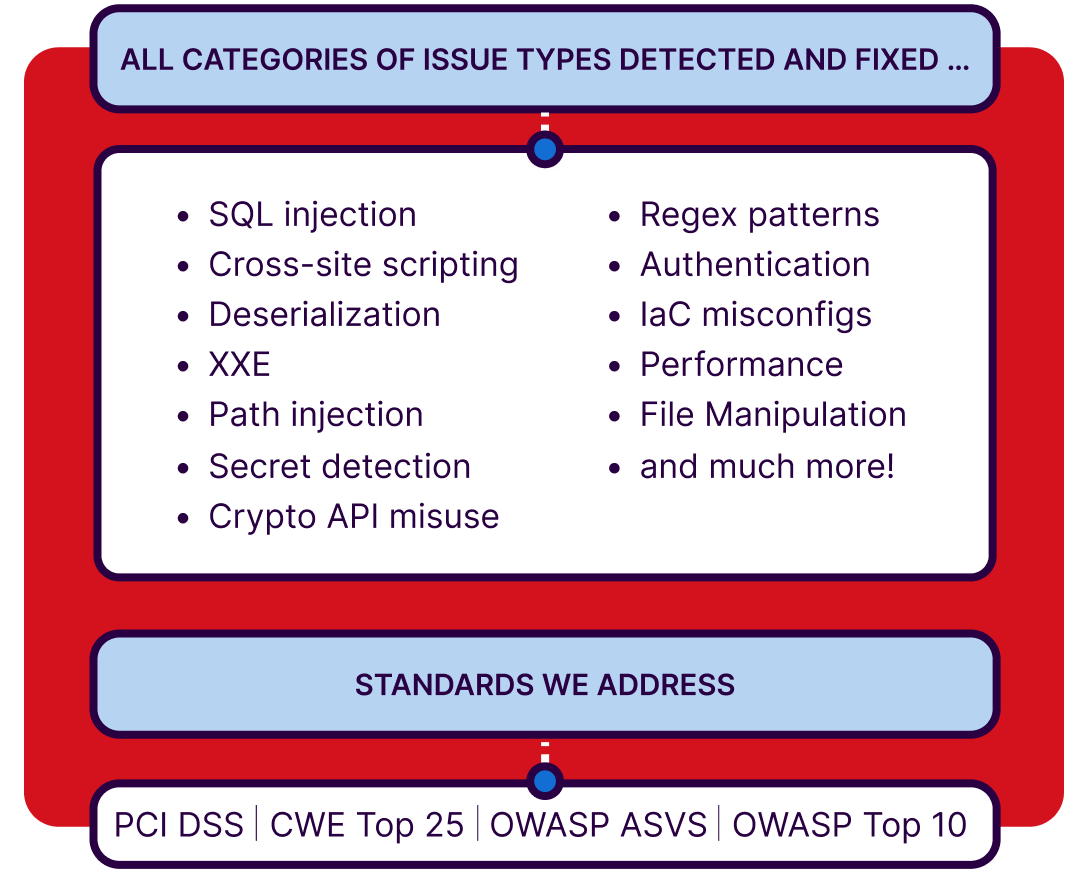
Sonarは、バグやセキュリティ脆弱性につながる幅広いコード問題を検出・修正するために設計されており、30以上のプログラミング言語とフレームワークをサポートしています。Sonarのセキュリティ分析は、SQLインジェクション脆弱性、クロスサイトスクリプティング(XSS)コードインジェクション攻撃、バッファオーバーフロー、認証問題、クラウドシークレット検出など、広範なセキュリティ問題の検出に役立ちます。SonarQube Server Enterprise Edition、Data Center Edition、およびSonarQube Cloud Enterprise Planでは、セキュリティルールはPCI DSS、CWE Top 25、OWASP ASVS、OWASP Top 10、STIG、CASAなどの確立されたセキュリティ基準に基づいて分類されています。

Header image
セキュリティホットスポット > コードレビュー image

セキュリティホットスポット > コードレビュー

セキュリティホットスポットは、人間のレビューが必要なセキュリティ上問題のあるコードの箇所です。開発者はセキュリティホットスポットを扱うことで、セキュリティリスクの評価方法を学び、セキュアコーディングの実践に対する理解を深めることができます。

セキュリティ脆弱性 > コード変更/修正 image

セキュリティ脆弱性 > コード変更/修正

セキュリティ脆弱性には即時の対応が必要です。Sonarは、コードが危険にさらされている理由を説明する詳細な問題説明とコードハイライトを提供します。ガイダンスに従い、修正をコミットしてアプリケーションを保護してください。

汚染分析による最大限の保護

悪意ある要素を追跡

ユーザー提供データが重要なシステム(データベース、ファイルシステム、OSなど)に到達する前にサニタイズされることを保証することで、コードのセキュリティを確保します。汚染分析は、メソッド間だけでなくファイル間にもわたる実行フロー全体で、信頼できないユーザー入力を追跡します。

その他の機能
Image

主要言語向け重要コードセキュリティルール

SASTツールでコードの安全性を維持するため、主要言語向けに高度に関連性の高いルールを提供します。

Java、PHP、C#、C、C++、Python、JavaScript、TypeScriptなど。

Explore all languages
Image
コードセキュリティ

早期のセキュリティフィードバック、開発者のエンパワーメント

責任の所在を明確に

リアルタイムフィードバック

コードレビュー中にセキュリティフィードバックを得ることは、コードセキュリティについて学び、責任を持つ絶好の機会です。

jeff leaves a note about code issues

Sonarセキュリティレポート

セキュリティレポートは、コードのセキュリティ基準への準拠状況を迅速に把握できます。SonarQube Server Enterprise Edition/Data Center EditionおよびSonarQube Cloud Enterprise Planで利用可能なこれらのレポートにより、最も一般的なセキュリティ上の過ちと比較した現状を把握できます。規制レポートは各リリースの品質を追跡し、提供されたコードが組織の品質基準を満たしていることを証明します。

レポートには以下が含まれます:

  • PCI DSS(バージョン4.0および3.2.1)
  • OWASP Top 10(バージョン2021および2017)
  • CWE Top 25(バージョン2022、2021、2020)
  • OWASP ASVS(バージョン4.0、レベル1~3)
  • STIG
  • CASA
OWASP Top 10を参照
Image

エンドツーエンドのSASTツール

静的解析をソフトウェア開発ワークフローにシームレスに統合

DevOpsおよびCI/CD

SASTをDevOpsおよびCI/CDパイプラインに統合することで、組織はソフトウェアのセキュリティ態勢を強化し、開発ライフサイクルの早期段階で脆弱性を特定できるようになります。セキュリティ分析ツールは開発プロセスに不可欠な要素となり、コード変更をコミットする際に早期のリアルタイムフィードバックを受け取ります。 Sonarは、GitHub、GitLab、Azure DevOps、TravisCI、CircleCI、Bitbucketなど主要なDevOps/CI/CDプラットフォームとの連携をサポート。Git、Subversionなどの主要SCMをネイティブ対応し、CVS、Jazz RTC、Mercurial、TFVCなどその他主要SCMにはコミュニティサポートを提供。

Image

プルリクエスト装飾

プルリクエストや開発ブランチ内で直接コードレビューを即時取得。問題化する前に修正を。

  • コードが基準を満たさない場合にCI/CDパイプラインを自動失敗させるGo/No-Go品質ゲートを実装
  • DevOpsプラットフォームインターフェース内で直接コード修正をレビュー・優先順位付け
  • モノレポ内の異なるプロジェクトごとに複数の品質ゲートを設定し、プロジェクト固有のフィードバックメッセージを受信

IDE 統合 SonarQube for IDE

  • 開発者のコード環境に直接組み込まれた優れたコード品質ツール機能
  • リアルタイムの分析フィードバック
  • コード問題のハイライト表示
  • 厳格なコード品質基準、脆弱性問題の詳細、修正ガイダンス
  • カスタマイズ可能なルールにより、開発者は特定の要件に基づいてコーディング可能
  • 高度な柔軟性により、サポートされている複数の言語にわたって開発者の適応と採用が可能
Security Architect

"Sonar has helped our organization by enabling us to maintain code standards and code cleanliness."

Ricky LopezSecurity Architect/AppSec Manager

コードのセキュリティ確保の準備はできていますか?

SAST FAQs

How does advanced SAST find vulnerabilities traditional tools can’t?

Traditional tools create a “black box” around third-party libraries, but Advanced SAST eliminates this blind spot. It extends taint analysis to trace the flow of data into and out of open source dependencies. By seeing how your code interacts with the library code, it uncovers deeply hidden, complex vulnerabilities that traditional static application testing(SAST) tools miss.

How does advanced SAST work?

Advanced SAST focuses on analyzing the interaction between your first-party code and the third-party libraries. It does not search for existing vulnerabilities inside the third-party library code. It pre-scans popular source libraries to create a knowledge base of security sensitive points- like where data enters or leaves a function. Then during the project analysis, it checks if your code is misusing those library functions in a way that creates a vulnerability in your application. 

Why do I need advanced SAST if I already use software composition analysis(SCA)?

SCA focuses on identifying known, public vulnerabilities(CVEs) within a library itself. Advanced SAST solves a different challenge; vulnerabilities that arise from the interaction between your code and third-party library code. By enabling both Advanced SAST and SCA, you get full, integrated visibility of risks that neither tool can provide alone.

What is a real-world example of a vulnerability found by Advanced SAST?

A notable example is the critical Jenkins vulnerability(CVE-2024-23897), which was caused by the insecure interaction between Jenkins code and an imported third-party library. The core issue wasn’t in either piece of the code, but in their combination. Only Advanced SAST would be capable of analyzing this specific interaction to correctly identify and raise the security vulnerability.

How are scan results and remediation suggestions presented to developers using SonarQube's SAST?

Scan results from SonarQube's SAST solution are presented in clear, actionable reports that highlight discovered vulnerabilities and suggest remediation steps. Developers receive this feedback either directly within their IDE or through integrated dashboards, making it easy to incorporate fixes promptly into their workflow.

Actionable suggestions guide developers to resolve security issues while adhering to best practices for writing quality code. By breaking down vulnerabilities to the source and recommending proper fixes, SonarQube helps bridge the gap between detection and remediation, empowering teams to reduce risk efficiently.

What makes SonarQube’s approach to quality code unique compared to other SAST solutions?

SonarQube's SAST solution stands out for its commitment to enhancing both security and maintainability within the codebase. The solution encourages developers to address not only immediate vulnerabilities but also code quality issues such as code duplication, complexity, and outdated patterns. This dual focus ensures that security improvements go hand-in-hand with sustainable development practices.

By integrating security checks into daily coding activities and emphasizing actionable feedback, SonarQube helps teams create high-quality software that evolves with changing requirements and technology landscapes. The holistic approach ensures that code is prepared for future innovation while staying secure and robust.

How often should SAST scans be run to maintain quality code in a rapidly changing codebase?

Security and quality are best maintained when SAST scans are run continuously throughout the development lifecycle. SonarQube supports automated, incremental scans with every code commit, merge request, or build, ensuring that new vulnerabilities and quality issues are detected as soon as they are introduced.

This frequent analysis allows teams to catch problems early, avoid technical debt, and keep codebases secure without slowing down delivery. By integrating SAST into the regular rhythm of development, organizations can sustain high standards for quality code and adapt quickly to new risks and challenges.

What’s the difference between SAST and DAST?

Static Application Security Testing (SAST) analyzes an application’s source code, bytecode, or binaries to find security vulnerabilities before the app runs. It’s performed early in the SDLC (pre-production), integrates with IDEs and CI pipelines, and flags issues at the line-of-code level (e.g., injection risks, insecure APIs). Fixes are typically faster because developers get precise locations and remediation guidance.

Dynamic Application Security Testing (DAST) tests a running application from the outside-in, simulating an attacker’s perspective. It requires a deployed (staging or production-like) environment and detects exploitable issues at runtime (e.g., broken authentication, misconfigurations, server errors). Findings reflect real behaviors and are less prone to false positives, but the root cause in code is less direct and fixes can take longer.