
Resumen
- The SonarQube CLI configures the full Agent Centric Development Cycle for Claude Code with a single command, giving the agent project context from SonarQube Cloud before it writes, automatic verification after every edit, and secrets scanning throughout.
- Before generating code, the agent receives project-specific architecture and coding guidelines. After every edit, SonarQube Cloud analyzes the change and the agent self-corrects without developer intervention.
- A quality gate in CI enforces test coverage, duplication limits, and security ratings across the full change, catching systematic gaps that real-time verification may not.
- The SonarQube Remediation Agent targets accumulated tech debt on the main branch, generating verified fixes as pull requests.
Overview
The SonarQube CLI can configure the full Agent Centric Development Cycle (AC/DC) for Claude Code with a single command. sonar integrate claude installs Sonar Context Augmentation skills, SonarQube Agentic Analysis hooks, secrets scanning hooks, and a SonarQube MCP Server. At runtime, the ACDC loop runs through native CLI commands, calling SonarQube Cloud directly.
This blueprint walks through the full setup and a real coding session that exercises every ACDC stage: Guide (sonar context), Verify (PostToolUse hooks + sonar analyze agentic), and Solve (sonar remediate), plus secrets scanning throughout. The examples use a Java/Maven project (microsoft/gctoolkit), but the setup works for any programming language SonarQube supports for Agentic Analysis.
When to use this
You want the CLI-native path to the Agent Centric Development Cycle. sonar integrate claude handles hook wiring, Context Augmentation setup, and MCP configuration so you don't have to configure each piece manually.
What you'll achieve
- Context Augmentation skills that surface your project's architecture, coding standards, and guidelines before the agent writes code
- Automatic SonarQube Agentic Analysis via a PostToolUse hook that scans every file the agent edits and feeds findings back into Claude's context
- Standalone change-set analysis with
sonar analyze agenticfor batch verification - Secrets scanning hooks that block hardcoded credentials in file reads and prompts
- A SonarQube MCP Server for supplementary queries (quality gate status, issue browsing, rule lookup)
- SonarQube Remediation Agent access via
sonar remediatefor fixing backlog issues
Architecture
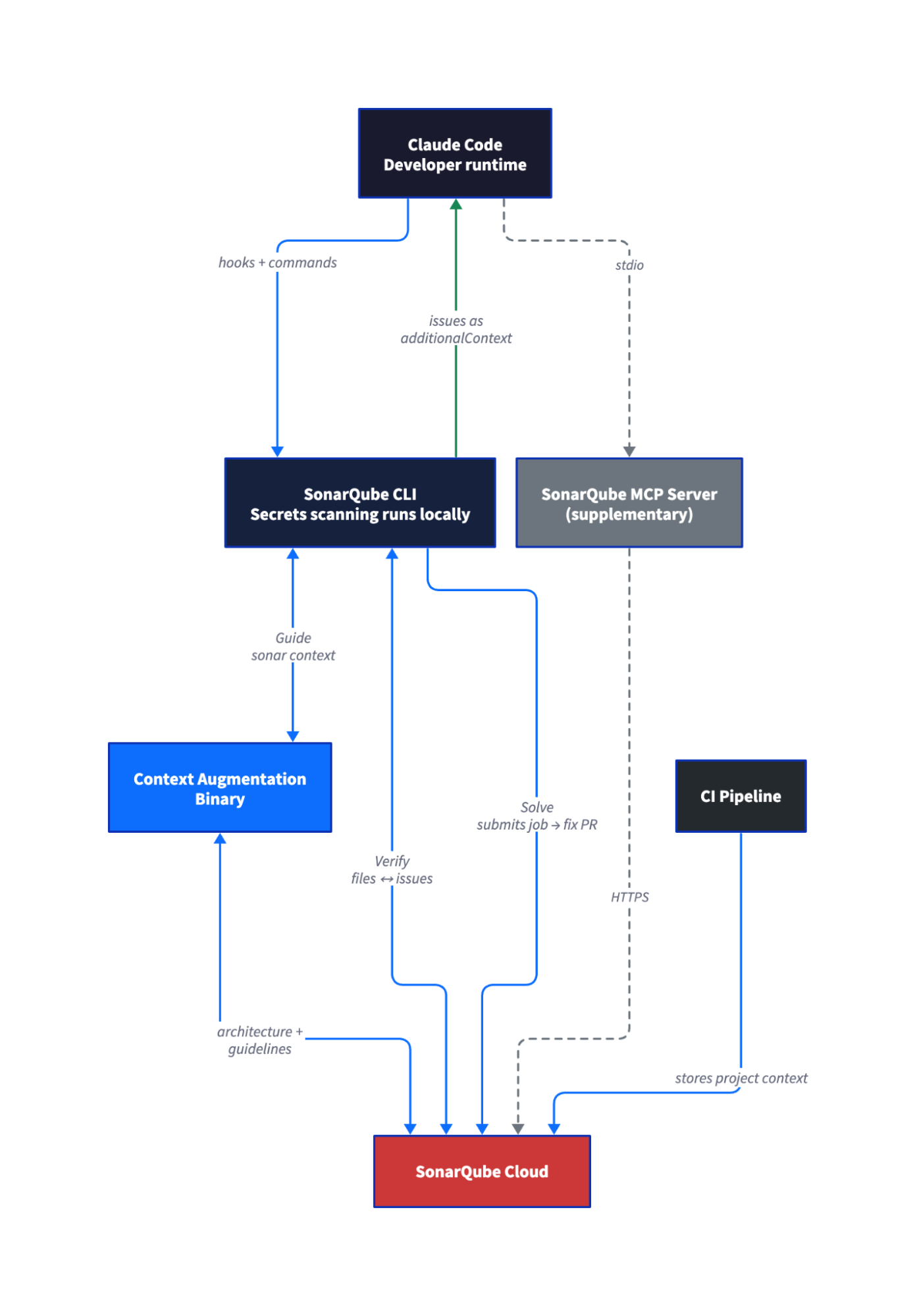
The ACDC loop runs through native CLI commands that call SonarQube Cloud directly. The MCP Server is a separate component that sonar integrate claude sets up for supplementary queries like quality gate checks and rule lookups. It's not part of the Guide → Verify → Solve loop.
Agentic Analysis and Context Augmentation both depend on a CI scan having run first. The CI scan stores project context in SonarQube Cloud, and the CLI commands retrieve it on demand.
Prerequisites
- SonarQube Cloud account on Team or Enterprise plan (the SonarQube Remediation Agent requires Team with annual billing, or Enterprise)
- SonarQube CLI installed (the features in this blueprint require a version with
sonar contextsupport; see Step 1) - Claude Code installed
- Docker running, since
sonar integrate claudeconfigures a SonarQube MCP Server that runs in Docker - A project imported in SonarQube Cloud with at least one CI scan completed. The CI scan stores the context that Agentic Analysis and Context Augmentation retrieve at runtime.
- SonarQube Cloud user token (not a project token or global analysis token, which lack the required permissions)
- Context Augmentation entitlement on your organization (organizations without it still get Agentic Analysis and secrets scanning; the Context Augmentation setup is skipped during integration)
- Supported languages for Agentic Analysis: Java, JavaScript, TypeScript, Python, C#, VB.NET, C++, CSS, HTML, XML, Secrets, Docker, Kubernetes, Terraform
Step 1 — SonarQube CLI installed and authenticated
Install the CLI:
curl -o- https://raw.githubusercontent.com/SonarSource/sonarqube-cli/refs/heads/master/user-scripts/install.sh | bashSource your shell config to pick up the new PATH entry:
source ~/.zshrc # or ~/.bashrcAuthenticate with SonarQube Cloud:
sonar auth loginThe CLI opens a browser for the OAuth flow. Select SonarQube Cloud when prompted, choose your region (EU or US), enter your organization key, and complete authentication. The token is stored in your OS keychain.
For CI or scripted environments where browser auth isn't available, set environment variables instead:
export SONARQUBE_CLI_TOKEN="<YOUR_TOKEN>"
export SONARQUBE_CLI_ORG="<YOUR_ORG_KEY>"
export SONARQUBE_CLI_SERVER="<SERVER_URL>"  # only for SonarQube Cloud US or SonarQube Server
Verify the connection:
sonar auth status[✓ Connected]
Server https://sonarcloud.io
Org <YOUR_ORG_KEY>
Source OS KeychainStep 2 — Project with a completed CI scan
Agentic Analysis and Context Augmentation need a CI scan to have stored project context in SonarQube Cloud before they can work locally. If your project already has CI scanning configured and at least one successful analysis on the default branch, skip to Step 3.
Your project needs a sonar-project.properties at the root:
sonar.projectKey=<YOUR_PROJECT_KEY>
sonar.organization=<YOUR_ORG_KEY>
sonar.host.url=https://sonarcloud.io
And a CI workflow that runs the scanner. For a Maven project with GitHub Actions:
name: SonarQube
on:
  push:
    branches: [main]
  pull_request:
    branches: [main]
jobs:
  analyze:
    runs-on: ubuntu-latest
    steps:
      - uses: actions/checkout@v6
        with:
          fetch-depth: 0
      - uses: actions/setup-java@v5
        with:
          java-version: 21
          distribution: zulu
          cache: maven
      - run: >-
          mvn -B verify org.sonarsource.scanner.maven:sonar-maven-plugin:sonar
          -Dsonar.host.url=https://sonarcloud.io
          -Dsonar.organization=<YOUR_ORG_KEY>
          -Dsonar.projectKey=<YOUR_PROJECT_KEY>
        env:
          SONAR_TOKEN: ${{ secrets.SONAR_TOKEN }}
TABLE
Add SONAR_TOKEN as a repository secret in GitHub, commit the workflow and properties file, and push to your default branch. Wait for the CI workflow to complete. The SonarQube Cloud dashboard should show analysis results for your project once it finishes.
The example above uses Maven with GitHub Actions. For other build tools and CI platforms, see the SonarQube Cloud documentation on CI integration.
Do not proceed until the CI scan completes successfully, since everything after this step depends on the stored context.
Step 3 — Claude Code integrated with the CLI
Navigate to your project root and run:
sonar integrate claude -p <YOUR_PROJECT_KEY>This single command does six things: discovers and validates the project, downloads the sonar-secrets binary, installs three Claude Code hooks (PreToolUse for secrets on file read, UserPromptSubmit for secrets on prompt, PostToolUse for Agentic Analysis on edit/write), downloads the sonar-context-augmentation binary and installs Context Augmentation skills, configures the MCP server, and runs a final health check.
The CLI prints progress as each component installs. When it finishes, the completion summary groups installed features with the files they created:
Installed
  ✓  secret scanning hooks
       * .claude/hooks/sonar-secrets/build-scripts/pretool-secrets
       * .claude/hooks/sonar-secrets/build-scripts/prompt-secrets
       * .claude/settings.json
  ✓  SonarQube Agentic Analysis hook
       * .claude/hooks/sonar-sqaa/build-scripts/posttool-sqaa
       * .claude/settings.json
  ✓  MCP server
       * .mcp.json

=== Setup complete! ===

✅ Claude Code integration successfully configured at the project level
If your organization has the Context Augmentation entitlement, additional lines for the Context Augmentation binary and skill installation appear before the success message.
The command creates several files in your project directory. .mcp.json configures the MCP server to point at your project. .claude/settings.json wires up the three hooks. .claude/skills/sonar-context-augmentation/ contains the Context Augmentation skill definition. .claude/hooks/ contains the hook shell scripts for secrets scanning and Agentic Analysis.
You don't need to edit any of these files. sonar integrate claude generates them for you.
If your organization doesn't have the Context Augmentation entitlement, the integrate command skips the binary download and skill installation but still installs everything else. You can also opt out explicitly with --skip-context.
Step 4 — Setup confirmed
Start a new Claude Code session in the project directory:
claudeCheck hooks. Hooks fire silently and don't show in a status display. Confirm they're installed by checking the config:
cat .claude/settings.json | grep -A2 "PreToolUse\|UserPromptSubmit\|PostToolUse"Check secrets scanning. Paste a fake credential into the prompt:
Read this token: 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The UserPromptSubmit hook should block the prompt with a message like "Sonar detected secrets in prompt."
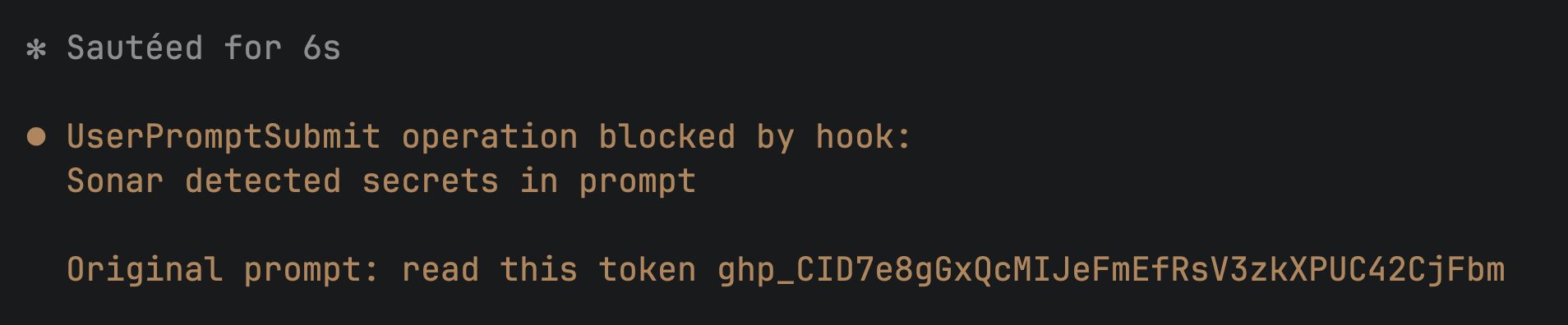
Check Context Augmentation. The skills appear under "Skills" in Claude Code, not under MCP tools. Look for sonar-context-augmentation in the available skills list.

Check the MCP Server. Ask Claude to run a query:
What's the quality gate status for this project?Claude should invoke the SonarQube MCP tool get_project_quality_gate_status and return results from SonarQube Cloud.
Step 5 — Guide: the agent learns the codebase
Start a fresh Claude Code session and give the agent a task that benefits from project context. The prompt should explicitly ask the agent to use SonarQube's context tools before writing code:
I want to add a heap utilization analyzer to the sample module. Before you
write any code, use the SonarQube context tools to understand the project's
architecture, coding patterns, and guidelines. Tell me what you learn about
how this project structures its aggregators and events.
Claude invokes the Context Augmentation skill, and you'll see a permission prompt asking to use sonar-context-augmentation. Under the hood, the skill calls sonar context architecture, sonar context guidelines, and sonar context navigation commands, each of which passes through to the sonar-context-augmentation binary with authentication injected by the CLI.
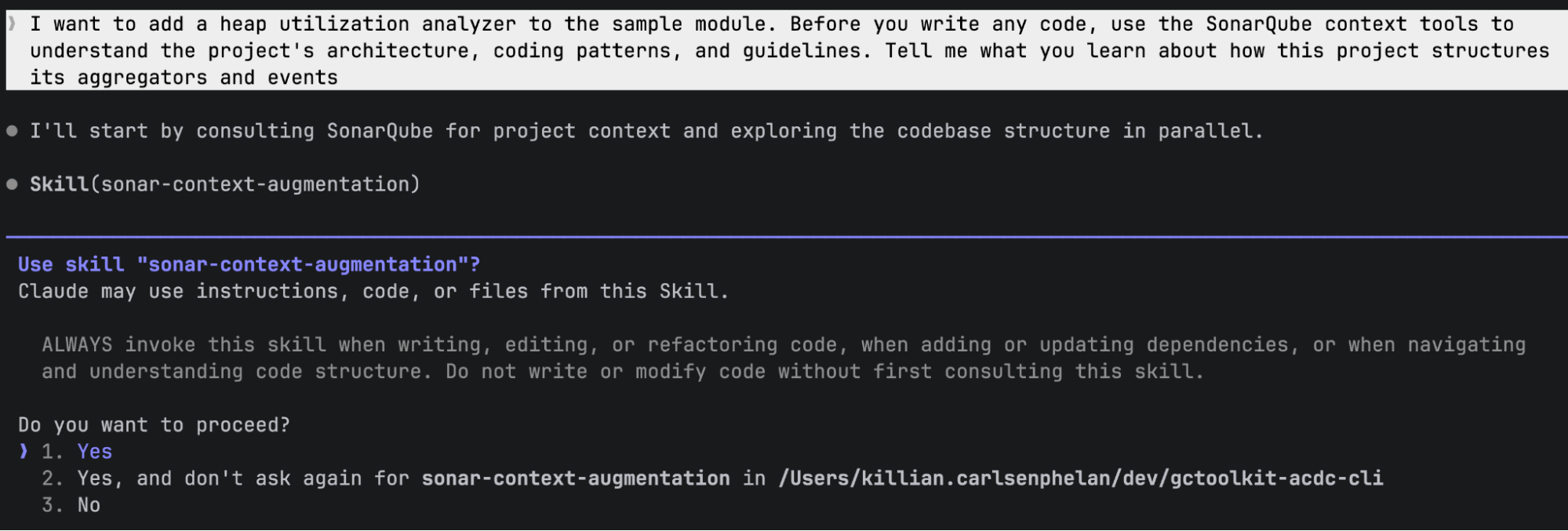
The agent receives project-specific context from SonarQube Cloud: the architecture graph showing module dependencies, categorized coding guidelines (rules relevant to the project's language and quality profile), and code navigation data about existing patterns. In a Java/Maven project like GCToolKit, this surfaces the Aggregator/Aggregation/Summary triad pattern, event hierarchy, and module SPI registration requirements, all derived from the CI scan's analysis, rather than reading every file.
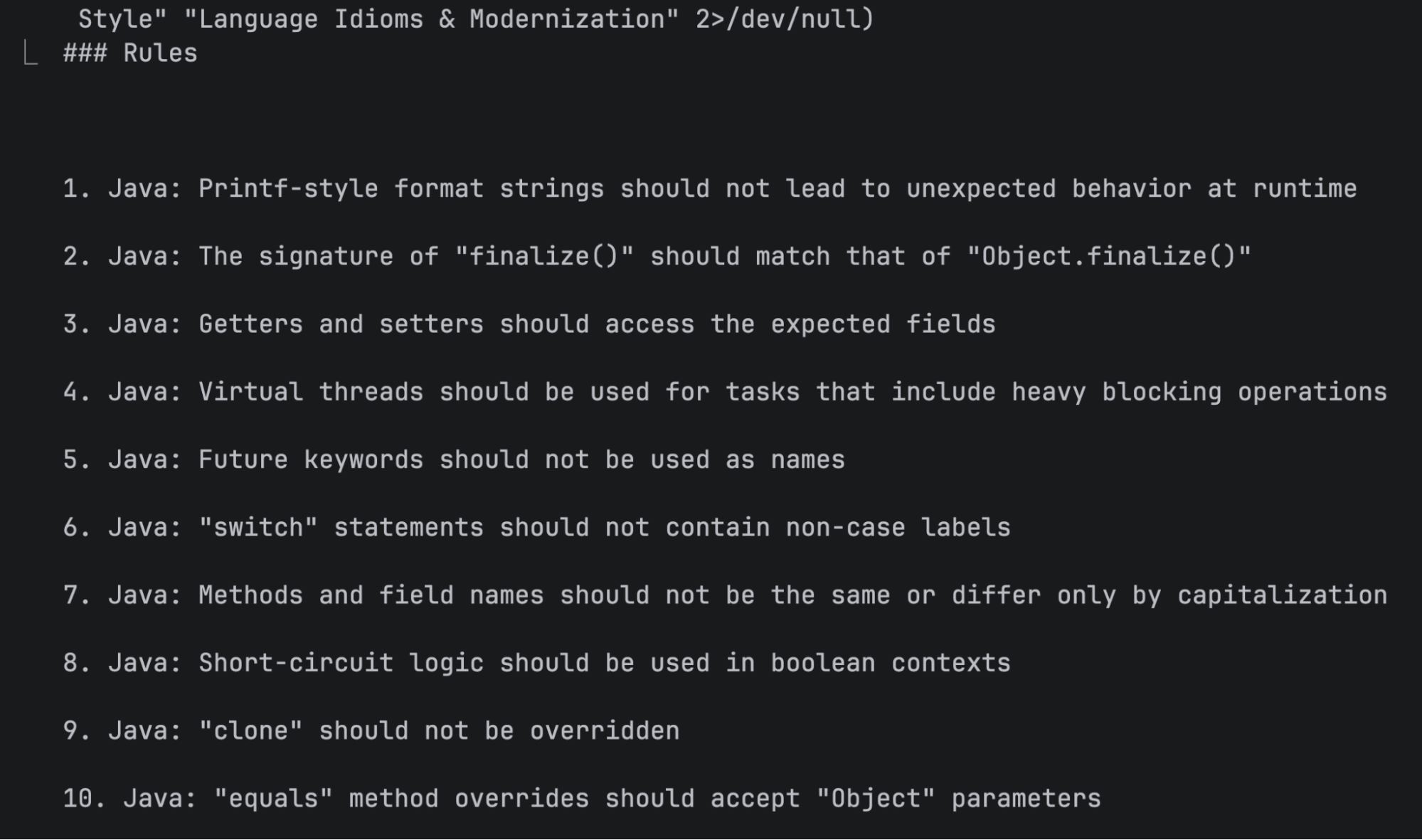
With the Guide stage complete, the agent now has structural knowledge about the codebase that shapes how it writes code in the next step. Explicitly asking the agent to use context tools isn't strictly required (Claude may invoke the skill on its own), but it makes invocation more reliable since LLM tool selection is probabilistic.
Step 6 — Verify: the agent writes code and gets real-time feedback
Continue in the same session and give the coding prompt:
Now write the heap utilization analyzer. The analyzer should track post-GC
heap occupancy from GC events, detect potential memory leak patterns when
post-GC heap usage trends upward across consecutive collections, and export
the analysis results as a JSON report to a file path specified at
construction time.
Let the agent run without intervention, because two things happen simultaneously:
The agent generates code, creating files and following the patterns it learned from Context Augmentation.
The PostToolUse hook fires after every edit. Each time Claude writes or modifies a file, the hook sends the file content to SonarQube Cloud's Agentic Analysis API. Issues come back as additionalContext and Claude self-corrects without being asked.
In our demo run, the first file the agent created had abstract public modifier order instead of the JLS-standard public abstract. The PostToolUse hook flagged it as java:S1124 (modifiers should be declared in the correct order), and the agent immediately rewrote the line:
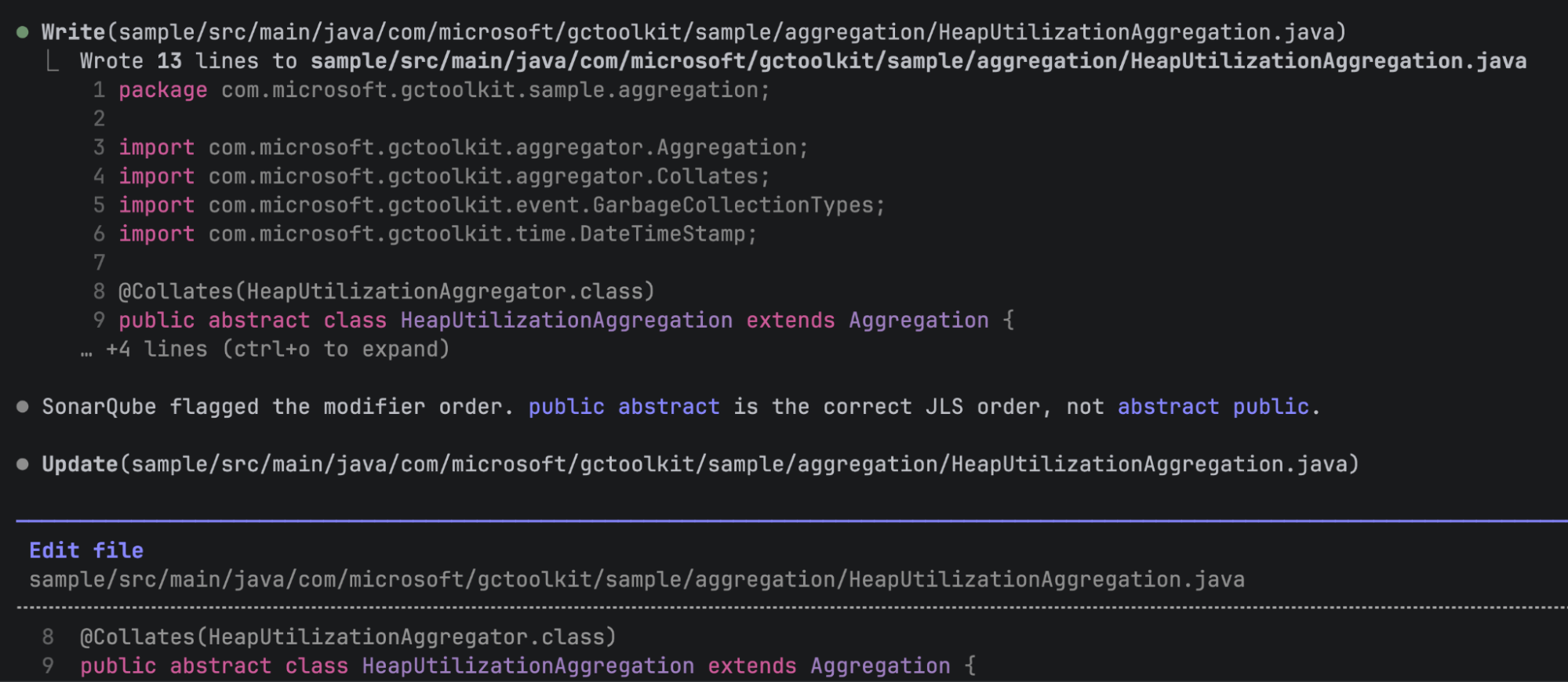
As the agent continued writing, it caught and fixed two more issues in the next file: a deprecated API call (getTimeStamp() replaced with the current toSeconds()) and an unnecessary empty record body. Both were corrected inline without prompting.
That's the automatic Verify loop running without any additional configuration from the developer, who didn't write a CLAUDE.md directive, run a scan, or read an issue list. The CLI wired everything with sonar integrate claude, and the loop runs during normal agent work. Claude interprets the hook feedback naturally, saying things like "SonarQube flagged the modifier order" rather than echoing structured issue data.
Step 7 — Verify: change set verified before push
The PostToolUse hook analyzes one file at a time, scoped to the file just edited. For a broader view after the agent finishes, run sonar analyze agentic from the terminal:
sonar analyze agenticThis analyzes all staged, unstaged, and untracked files in the Git change set. Use --staged to limit scope to staged files, or --format json for machine-readable output:
sonar analyze agentic --staged --format jsonThe output lists issues per file with rule keys, line numbers, and messages. Exit code 51 means issues were found; exit code 0 means clean. If the hook caught and fixed everything during generation, you may see zero new issues here, only pre-existing ones from files in the change set.
You can also run bare sonar analyze to combine secrets scanning and Agentic Analysis in a single pass:
sonar analyze✅ Scan completed successfully
[⣿⣿⣿⣿⣿⣿⣿⣿⣿⣿⣿⣿] 12/12 files analyzed
── sample/src/main/java/com/microsoft/gctoolkit/sample/Main.java
Found 12 issues:
[1] Remove useless curly braces around statement (line 60)
Rule: java:S1602
[2] Replace this use of System.out by a logger. (line 62)
Rule: java:S106
...sonar analyze agentic analyzes entire files, not diffs. In our run it reported 12 issues, all pre-existing in Main.java, with zero issues in the agent's new code. The PostToolUse hook caught and fixed those during generation. The PR analysis in SonarQube Cloud (next step) is what provides the new-code-only view.
Three verification scopes to keep in mind:
- The PostToolUse hook analyzes a single file, firing automatically after each edit. It catches issues as they're introduced.
sonar analyze agenticcovers all files in the change set and runs on demand. The analysis is full-file, not diff-aware, so it reports pre-existing issues alongside new ones.- SonarQube Cloud PR analysis evaluates only new code and runs in CI. The quality gate applies to what changed in the PR, not the full file.
Step 8 — Quality gate: CI catches what inline verification doesn't
Push the agent's code, create a PR, and let CI run the SonarQube Cloud analysis:
git checkout -b feat/heap-utilization-analyzer
git add -A
git commit -m "Add heap utilization analyzer"
git push -u origin feat/heap-utilization-analyzer
gh pr create --title "Add heap utilization analyzer" --body "Heap utilization tracking with leak detection"
git add -A stages everything, including the hook and skill files sonar integrate claude created. That's fine for this walkthrough. In your own workflow, scope staging to the files you want in the PR.
The CI workflow runs SonarQube Cloud analysis on the PR. In our demo, the quality gate failed, but not on code quality:
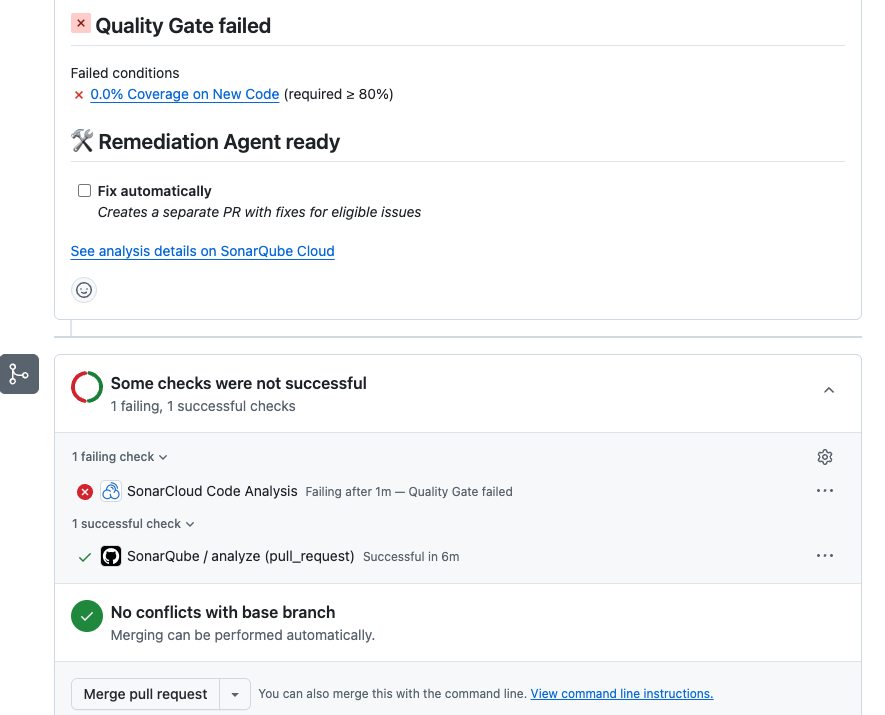
The sole failing condition was coverage: 0.0% on new code against an 80% threshold. Reliability, security, maintainability, duplications, and security hotspots all passed. The inline Verify loop caught every code quality issue during generation, so none reached the PR, but the agent didn't write tests.
AI coding agents producing application code without test coverage is a common pattern, and the quality gate is the layer that catches this systematic blind spot. Inline Agentic Analysis verifies code quality in real time while the quality gate in CI enforces test adequacy, duplication limits, and security ratings across the full change.
Step 9 — Solve: backlog issues fixed via the Remediation Agent
The Remediation Agent operates on main-branch issues in your SonarQube Cloud project, targeting the accumulated backlog rather than PR-scoped findings. Run:
sonar remediate -p <YOUR_PROJECT_KEY>Interactive mode fetches issues marked as fixable by the agent and presents a multi-select list (max 20 issues per job):
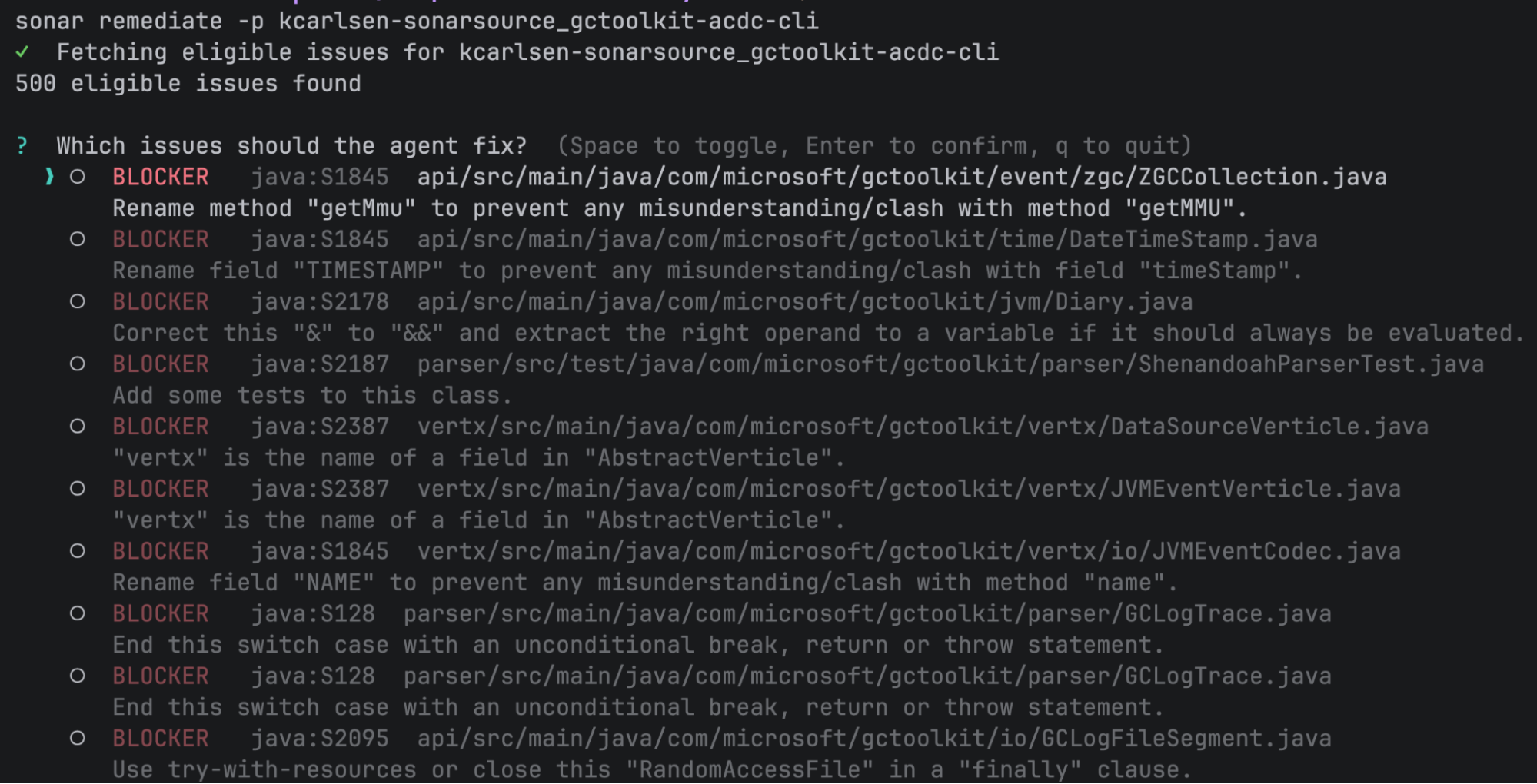
Select the issues you want fixed. The CLI submits the job to SonarQube Cloud's Remediation Agent, which generates a fix in a sandboxed environment, validates it against the analysis engine, and creates a PR.
In our demo, we selected a java:S115 issue where a constant named GarbageCollectionTypes.Full should be FULL per Java naming conventions. The Remediation Agent created a PR renaming the constant across four files, completing in about six minutes.
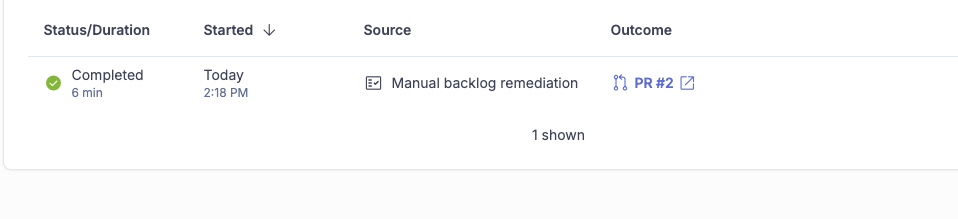
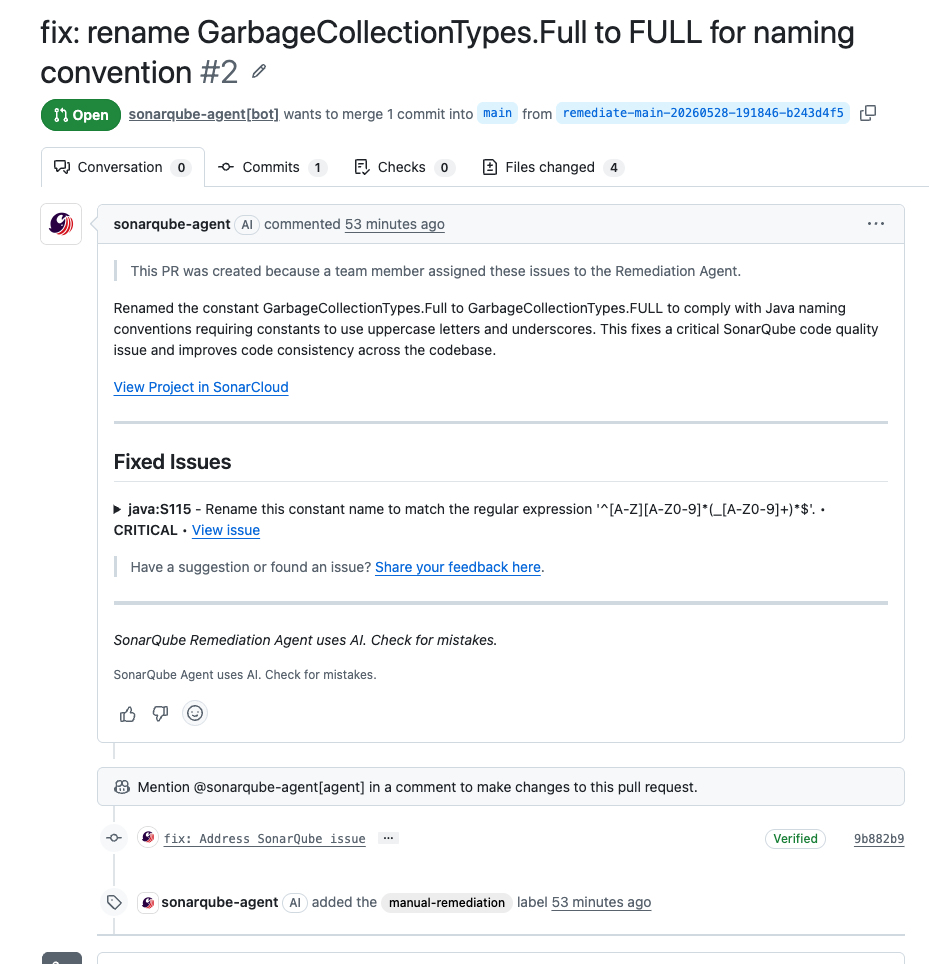
After submission, the CLI prints the Agent Activity page URL where you can track progress.
Verify the setup
To see the full config the integrate command created:
sonar auth status
cat .mcp.json
cat .claude/settings.json
ls .claude/hooks/
ls .claude/skills/
If any piece is missing, re-run sonar integrate claude -p <YOUR_PROJECT_KEY>. The command is idempotent and overwrites existing files.
To verify the ACDC loop end-to-end, give the agent a small coding task and watch for the Context Augmentation skill prompt when it explores the codebase, a brief pause after each edit while the PostToolUse hook calls SonarQube Cloud, and Claude acknowledging and acting on any findings.
What to know
Breaking changes may occur between releases. The command names and flags in this blueprint reflect the current state; check sonar --help if something doesn't match.
SonarQube Cloud only for Context Augmentation, Agentic Analysis, and the Remediation Agent. Secrets scanning hooks work with both SonarQube Cloud and self-managed SonarQube Server. The SonarQube MCP Server works with both Cloud and Server.
The SonarQube Remediation Agent supports C#, Java, JavaScript/TypeScript, and Python code, plus Secrets. Languages supported by Agentic Analysis but not by the Remediation Agent (such as C++) are not eligible for remediation.
The SonarQube Remediation Agent issues must have fixableByAgent: true to be eligible, and the max batch size is 20 issues per job.
sonar remediate operates on project-level backlog. Interactive mode fetches main-branch issues only. The Solve stage handles accumulated tech debt while the Verify stage handles issues during development. They're not a sequential pipeline on the same issue set.
sonar analyze agentic analyzes entire files in the change set, which means it reports pre-existing issues alongside new ones. The PR analysis in CI is what gives you the new-code-only view.
sonar verify is deprecated. Use sonar analyze for combined secrets and Agentic Analysis in one command, or sonar analyze agentic if you only need Agentic Analysis.
Context Augmentation requires the entitlement. If your SonarQube Cloud organization doesn't have it, sonar integrate claude skips the Context Augmentation binary and skill setup but still installs everything else. You can also skip it intentionally with --skip-context.
Secrets scanning runs locally, unlike Agentic Analysis. The sonar-secrets binary runs on your machine and doesn't call SonarQube Cloud. It does require authentication to download the binary initially.
The PostToolUse hook is always project-scoped. Running sonar integrate claude -g without -p installs secrets hooks globally but skips the Agentic Analysis hook, which requires a project key.
Expect quality gates to fail on coverage when AI agents generate application code without tests, since the Sonar way default gate requires 80% coverage on new code. The inline Verify loop catches code quality issues while the gate catches test adequacy.
Next steps
- Agent Centric Development Cycle documentation — full reference for all ACDC stages and supported integrations
- SonarQube CLI documentation — landing page with quickstart, command reference, and installation
- For terminal-based access to issue data and project queries without Docker, the CLI offers
sonar list issuesandsonar apias alternatives to the MCP Server's query tools
