
TL;DR overview
- The SonarQube plugin for Codex CLI brings quality gates, issue scanning, coverage, dependency risks, secrets scanning, Context Augmentation, and Agentic Analysis into Codex through auto-discovered
sonar-*skills and the SonarQube MCP Server. - This setup fits terminal-driven workflows where you want SonarQube results inline rather than at PR or CI time.
- SonarQube findings and fixes compress the development cycle from Codex prompting and PR-time review to analysis, remediation, and verification in a single Codex session.
- Setup installs the SonarQube plugin and CLI, then runs
sonar-integrateto wire the SonarQube MCP Server, secrets-scanning hook, and Agentic Analysis hook into your project's.codex/directory.
This blueprint configures the SonarQube plugin for Codex CLI so that quality gates, issue scanning, coverage data, dependency risks, secrets detection, Context Augmentation, and Agentic Analysis are reachable from inside the same Codex sessions that write your code. The integration is composed of three things: the SonarQube plugin, SonarQube CLI, and the SonarQube MCP Server, all wired together by the sonar-integrate command. Our step-by-step walkthrough follows the Python-based AWS CLI, but the steps apply to any project written in any SonarQube-supported language. While this guide centers around Codex CLI, the plugin also works with the Codex Desktop App; follow along to integrate the SonarQube plugin with both.
When to use this
- You drive Codex from the terminal rather than an IDE, so there's no agent-mode UI reviewing each suggestion before it lands on disk. Alternatively, if using the Codex Desktop App, the same capabilities apply.
- You want SonarQube findings (including secrets in prompts and analysis on every file write) accessible from inside the same Codex session that wrote the code, not waiting on the next CI run.
What you'll achieve
- SonarQube plugin installed in Codex CLI, exposing the
sonar-*skill set auto-discovered from the plugin manifest. - SonarQube MCP Server registered in
.codex/config.toml, started by Codex over stdio for the lifetime of each session and connecting Codex CLI with your project on SonarQube Cloud . - A
UserPromptSubmithook in.codex/hooks.jsonthat scans every prompt for credentials before it reaches the model. - A
PostToolUsehook onapply_patchthat runs Agentic Analysis on every file Codex writes and surfaces findings inline.
Architecture
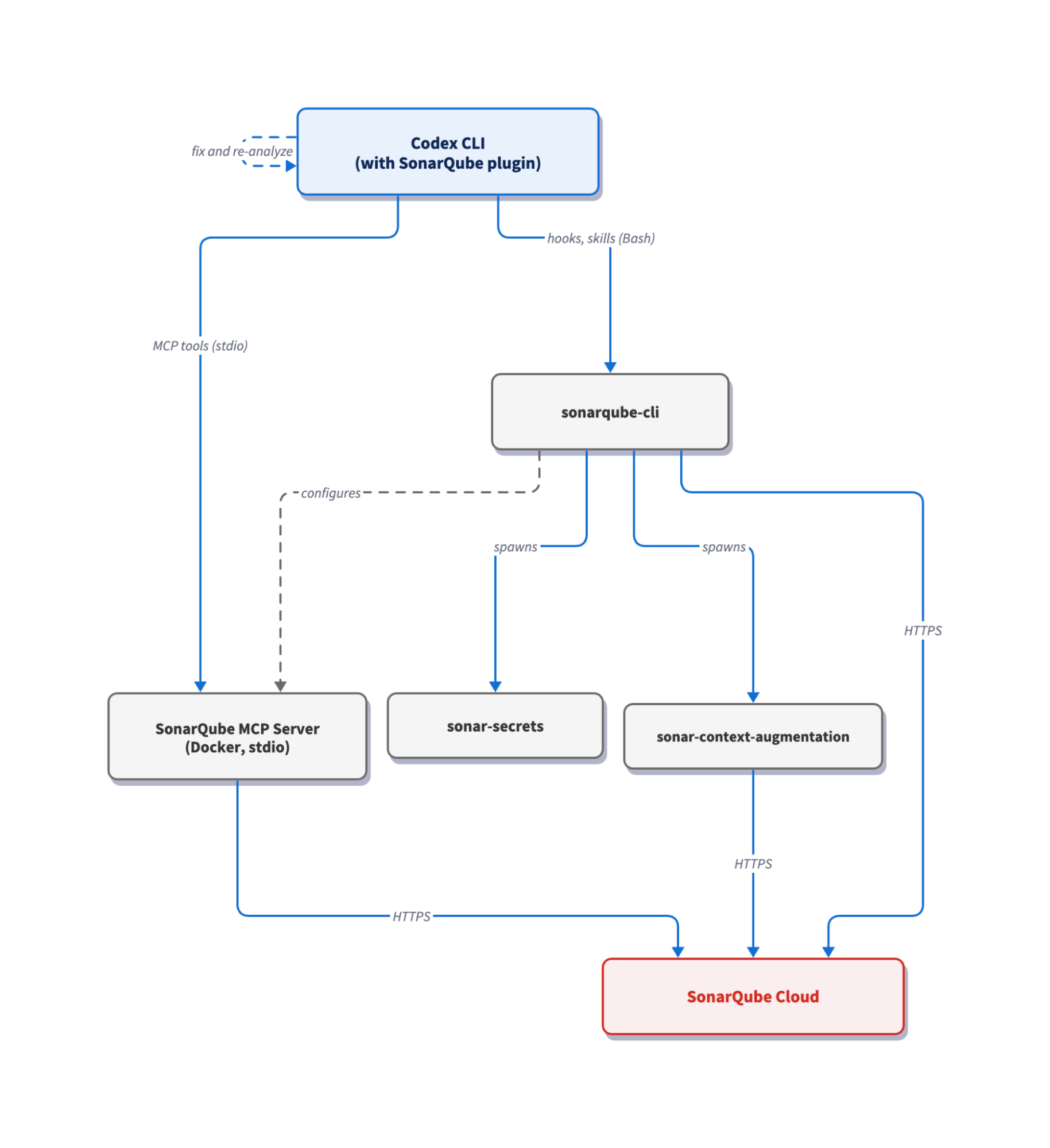
The SonarQube plugin contributes auto-discovered skills inside Codex CLI but owns no runtime infrastructure. That responsibility sits with the SonarQube CLI: it holds the authenticated session in your system keychain after sonar auth login, brings up the mcp/sonarqube container that Codex talks to over stdio, and serves both hook scripts on demand. The secrets hook fires on UserPromptSubmit and scans the prompt text deterministically before Codex sees it. The Agentic Analysis hook fires on PostToolUse with an apply_patch matcher (Codex's tool name for any file edit) so that analysis runs the moment a write completes. A sonar:begin:codex-secrets-on-read block is appended to AGENTS.md to instruct Codex to scan files for secrets before reading them, completing the prompt-and-file secrets surface. Sonar Context Augmentation runs alongside as a sonar-context-augmentation binary the CLI starts per project, plus a Codex-installed skill the agent queries for coding guidelines and architecture before generation, so that the code Codex writes already fits your repo's conventions before Agentic Analysis verifies it.
Prerequisites
- Codex CLI installed and authenticated
- SonarQube Cloud account or SonarQube Server with the demo project on board
- Docker, Podman, or Nerdctl running; the MCP server runs as a container
- (Optional) SonarQube CLI installed. The CLI is installed (or updated if already present) during Step 2 of this guide. The
sonar integrate codexcommand landed in v1.0.0; anything older won't have it - (Optional, but preferred) a
sonar-project.propertiesfile pointing to your project on SonarQube Cloud - (Optional) Agentic Analysis and Context Augmentation enabled at your SonarQube Cloud organization level (Administration → Agent-Centric Development)
Demo project: To follow along, fork aws/aws-cli to your GitHub account, import it into SonarQube Cloud with CI-based analysis enabled, and clone it locally.
Step 1 — Install the SonarQube plugin in Codex CLI
Launch a Codex session from your project root and add the SonarSource marketplace:
codex plugin marketplace add SonarSource/sonarqube-agent-plugins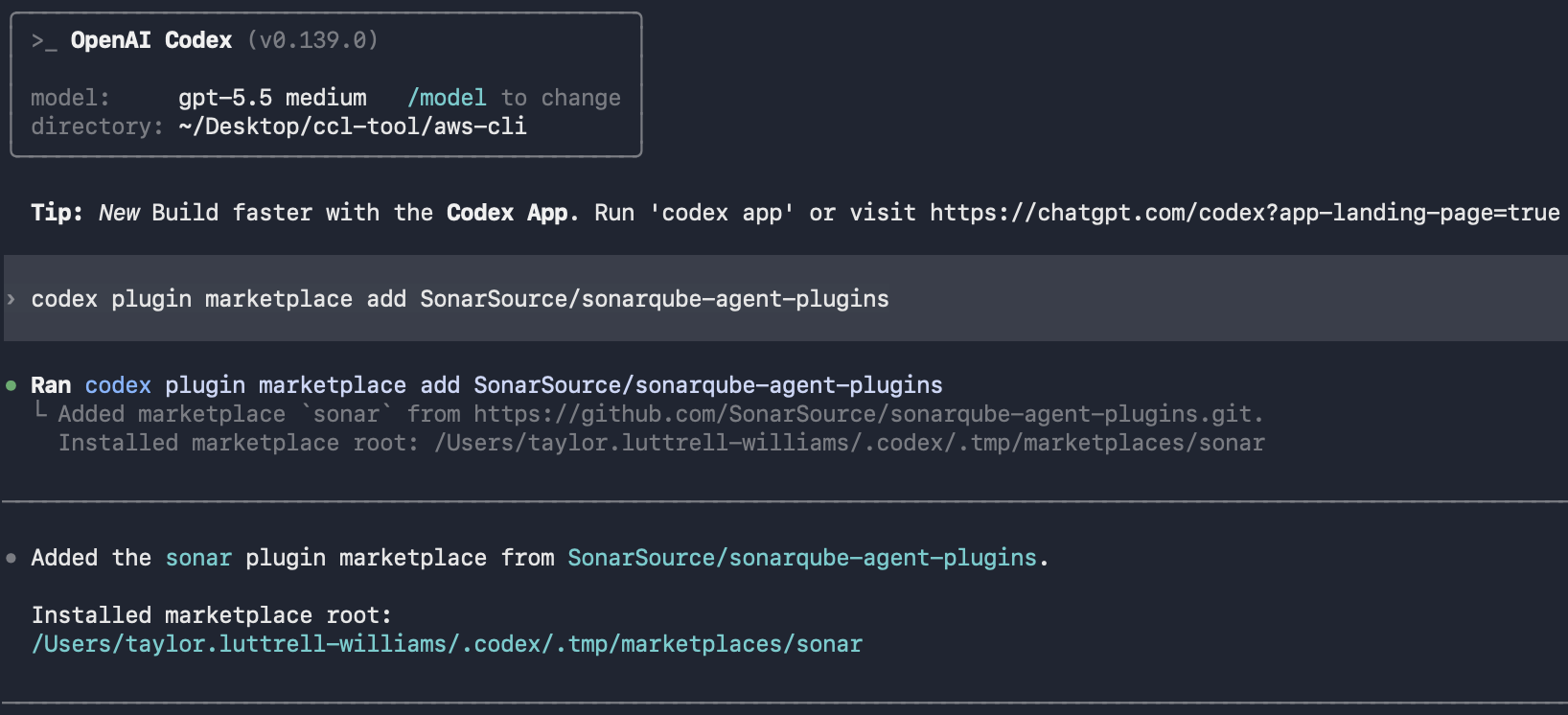
Open the plugin selector and install SonarQube from the sonar catalog:
/plugins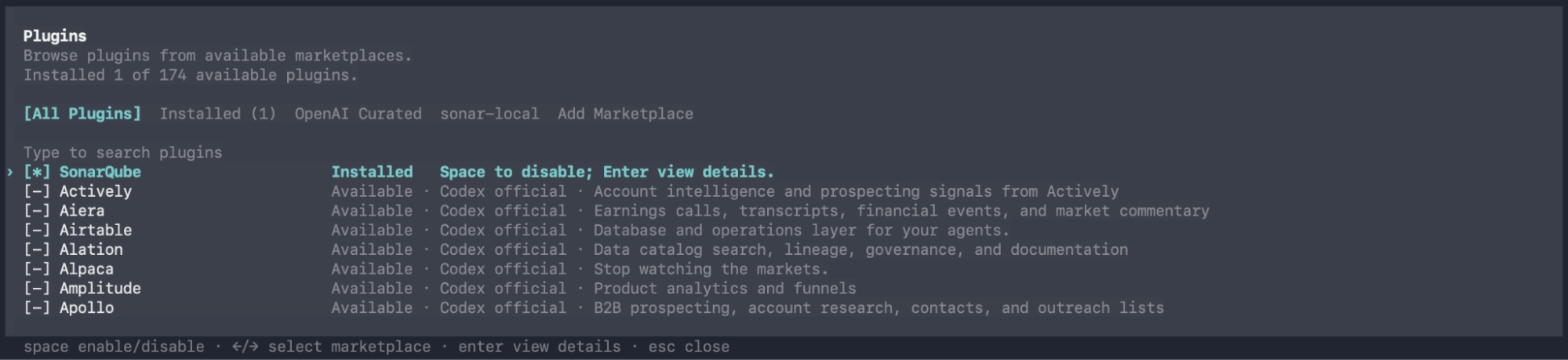
Confirm the install:
codex plugin listYou should see sonarqube@sonar, status installed and enabled.
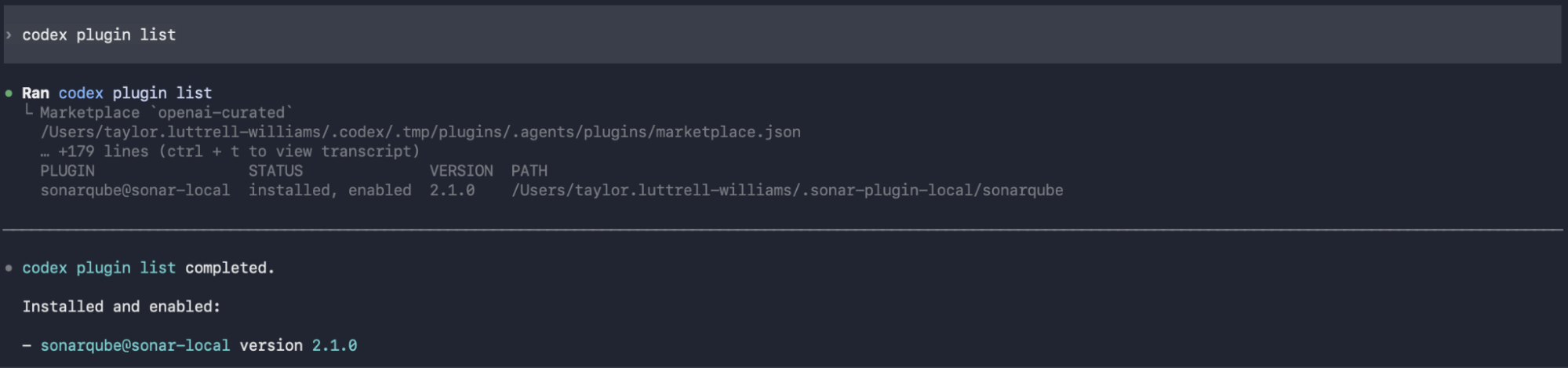
The plugin contributes the sonar-* skills you'll use in the next steps but does not bring up the MCP server or install the hooks. That's the job of sonar-integrate, covered next.
Step 2 — Configure the integration
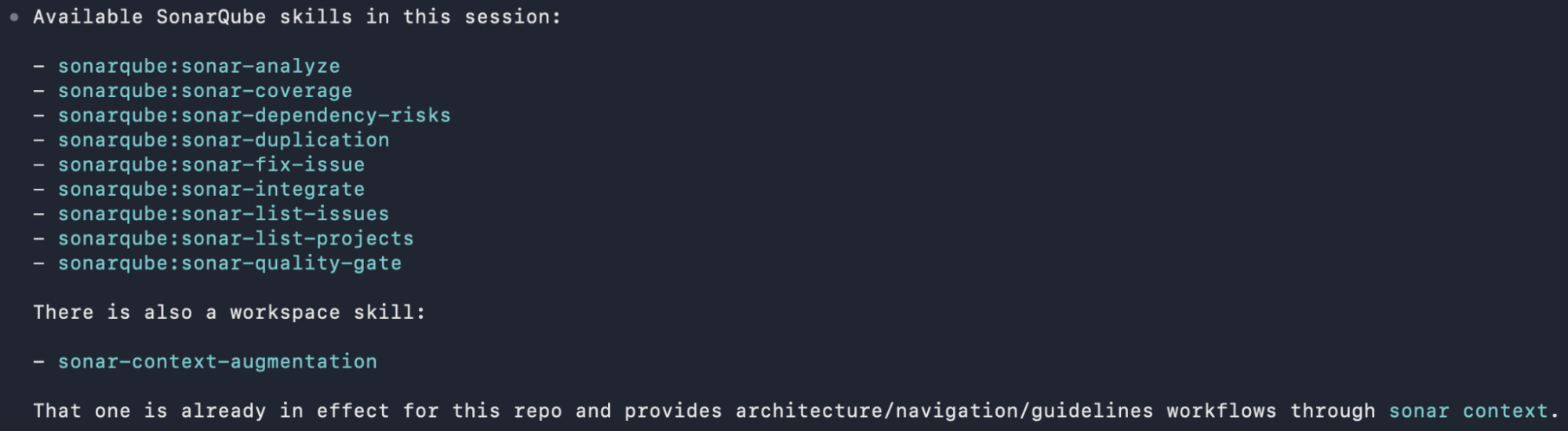
Invoke the sonar-integrate skill from inside your Codex CLI session. The skill is auto-discovered, so you can trigger it by name or ask in natural language ("set up SonarQube for this project"). Run sonarqube:sonar-integrate and follow along with the integration sequence:
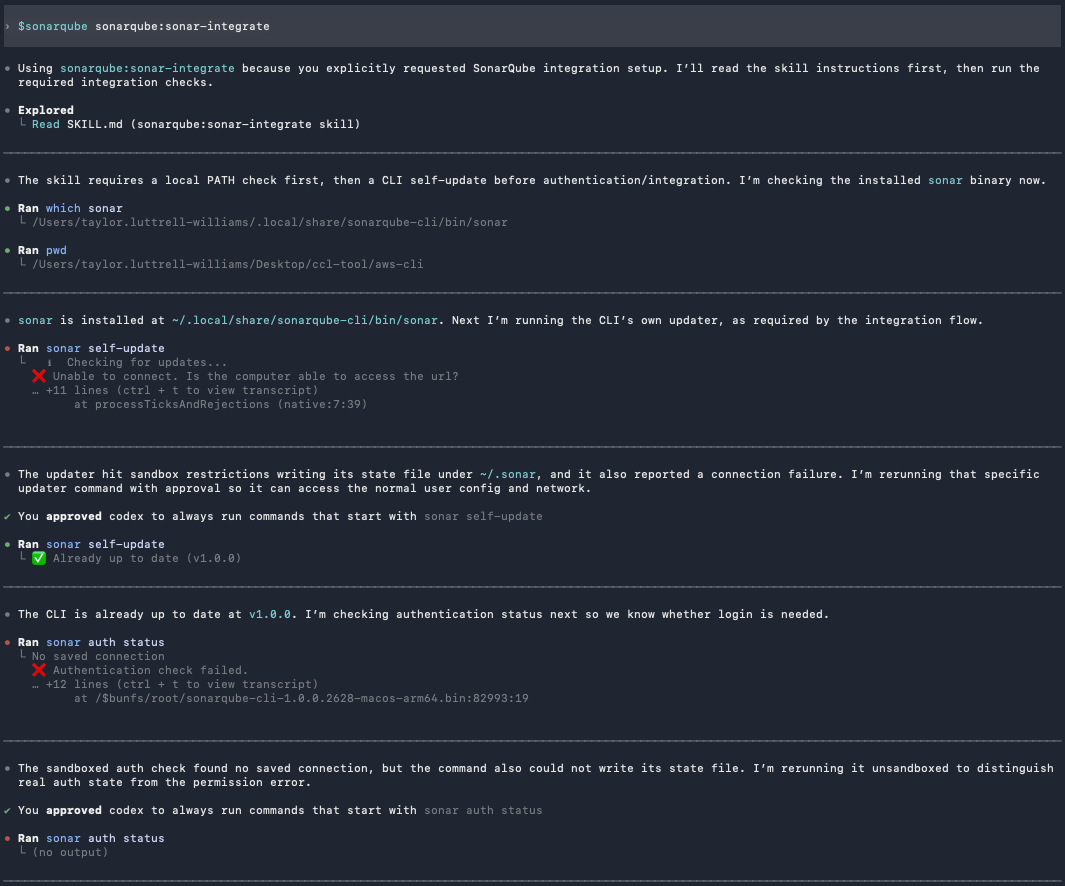
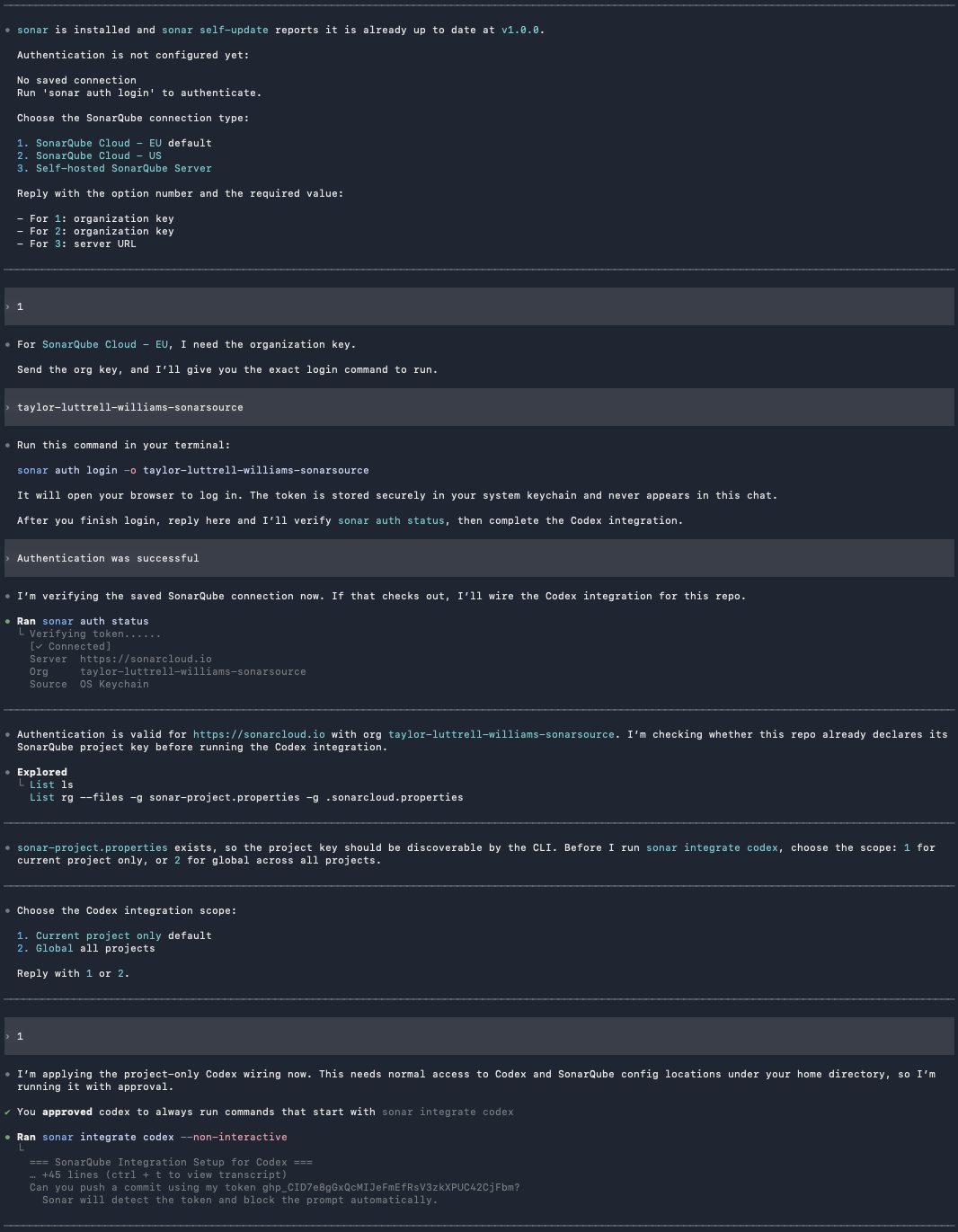
The skill first checks if SonarQube CLI is installed. If not, you'll be prompted to allow Codex to install it. If sonar is already on your PATH, the CLI runs sonar self-update instead.
You'll then be prompted to choose your SonarQube connection type (EU by default), enter your organization key, and authenticate:
sonar auth login -o <your-organization-key-here>The subsequent sonar auth login flow opens your browser, runs OAuth, and stores the resulting token in your system keychain. Every downstream command (including the MCP server and both hook scripts) reuses that session.
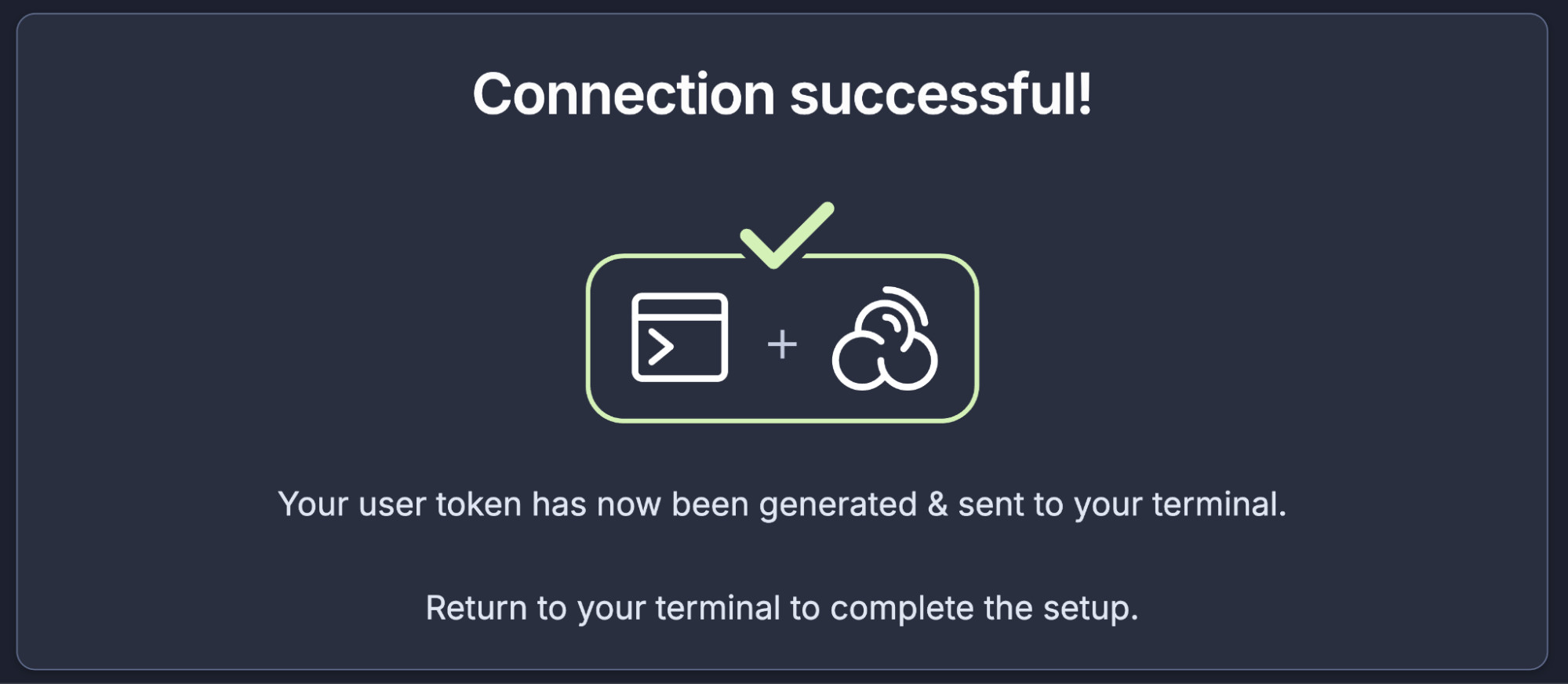
When the browser opens, click Allow connection and confirm that the authentication succeeded:
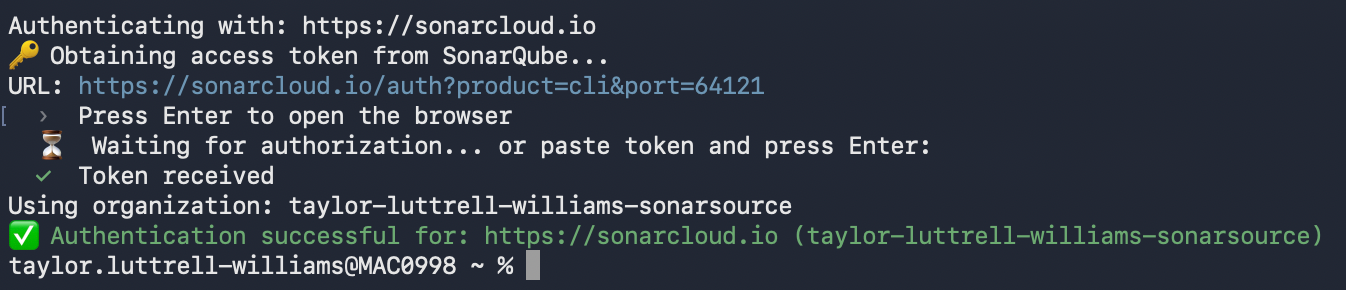
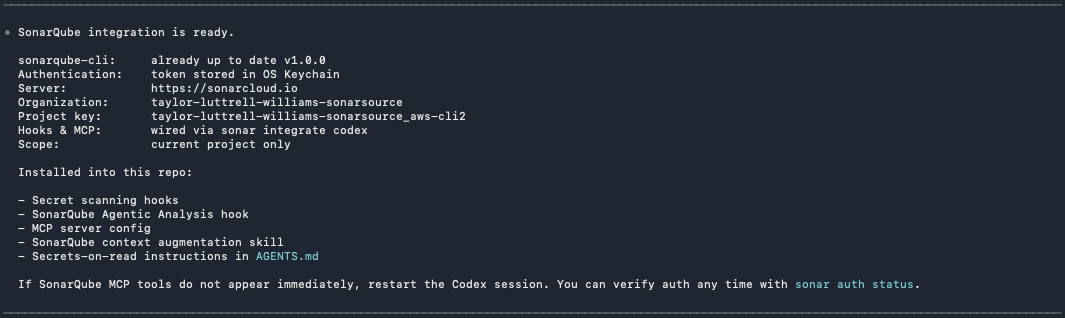
In summary, sonar-integrate accomplishes five things in one shot against your project root:
- Writes
.codex/config.tomlregistering the SonarQube MCP Server. Codex picks this up on the next session start. - Writes
.codex/hooks.jsonregistering aUserPromptSubmithook (all matchers) and aPostToolUsehook on theapply_patchmatcher. - Drops the two hook scripts under
.codex/hooks/sonar-secrets/and.codex/hooks/sonar-sqaa/. Both shell out tosonar hook ...so they reuse the keychain session. - Appends a
sonar:begin:codex-secrets-on-readblock toAGENTS.mdinstructing Codex to runsonar analyze secrets <path>before reading any file in the workspace. - Installs the
sonar-context-augmentationbinary scoped to your project, plus the Codex-installed skill. Skip with--skip-contextif you only want the hook surface and MCP.
Inspect the produced MCP config:
cat .codex/config.tomlYou should see:
[mcp_servers.sonarqube]
command = "sonar"
args = [ "run", "mcp", "--project", "<your-project-key>" ]
The hook scripts and AGENTS.md block live alongside it; the integration prints the full list of installed artifacts in its summary.
Step 3 — Invoke the SonarQube plugin skills
Start a fresh Codex session from the project root so the MCP server loads cleanly:
cd ~/aws-cli
codex
Confirm the MCP server is registered and inspect the available tools:
/mcp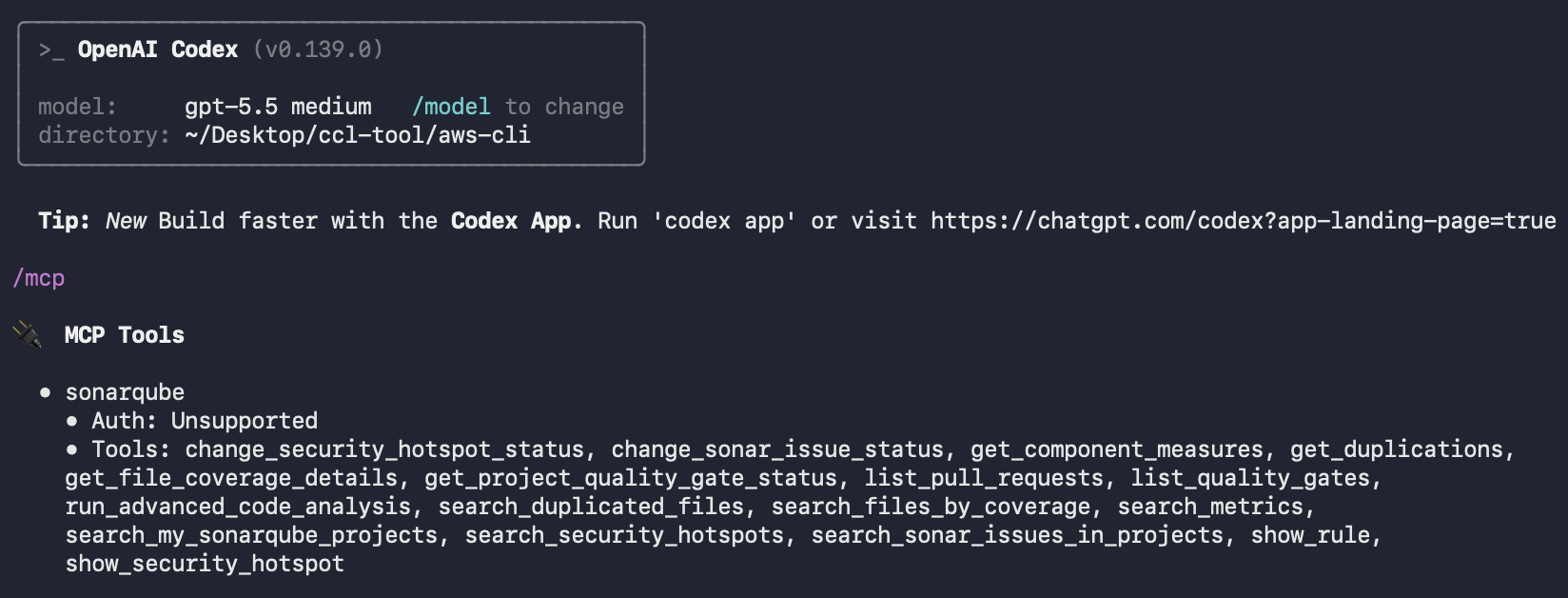
Codex auto-discovers the plugin's skills, so you can either ask in natural language ("List my SonarQube projects") or trigger a specific skill directly. Try the project list first:
$sonarqube sonarqube:sonar-list-projects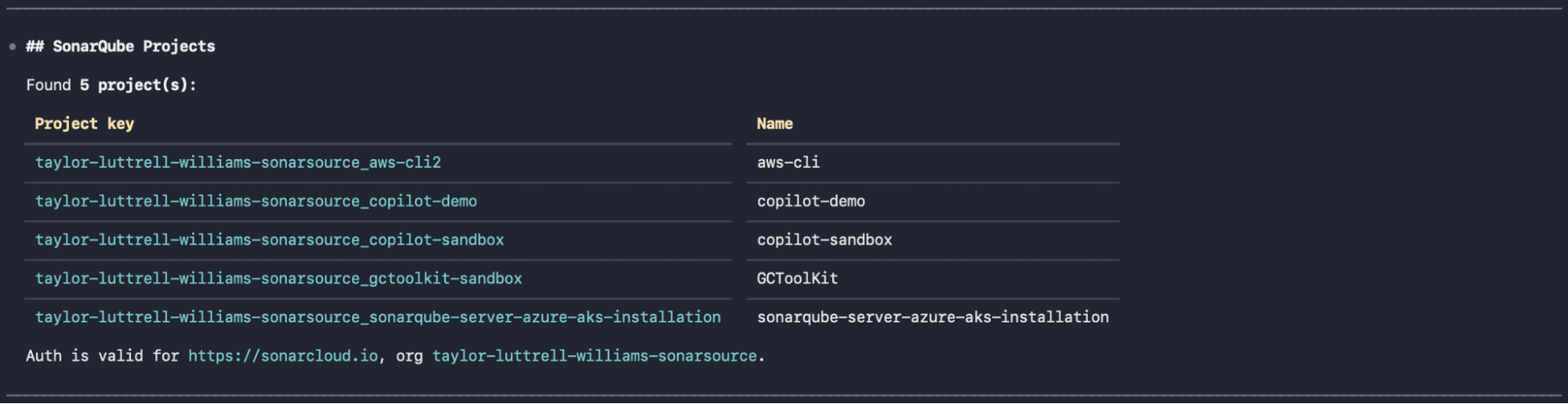
Then list open issues for the demo project:
$sonarqube sonarqube:sonar-list-issues top 20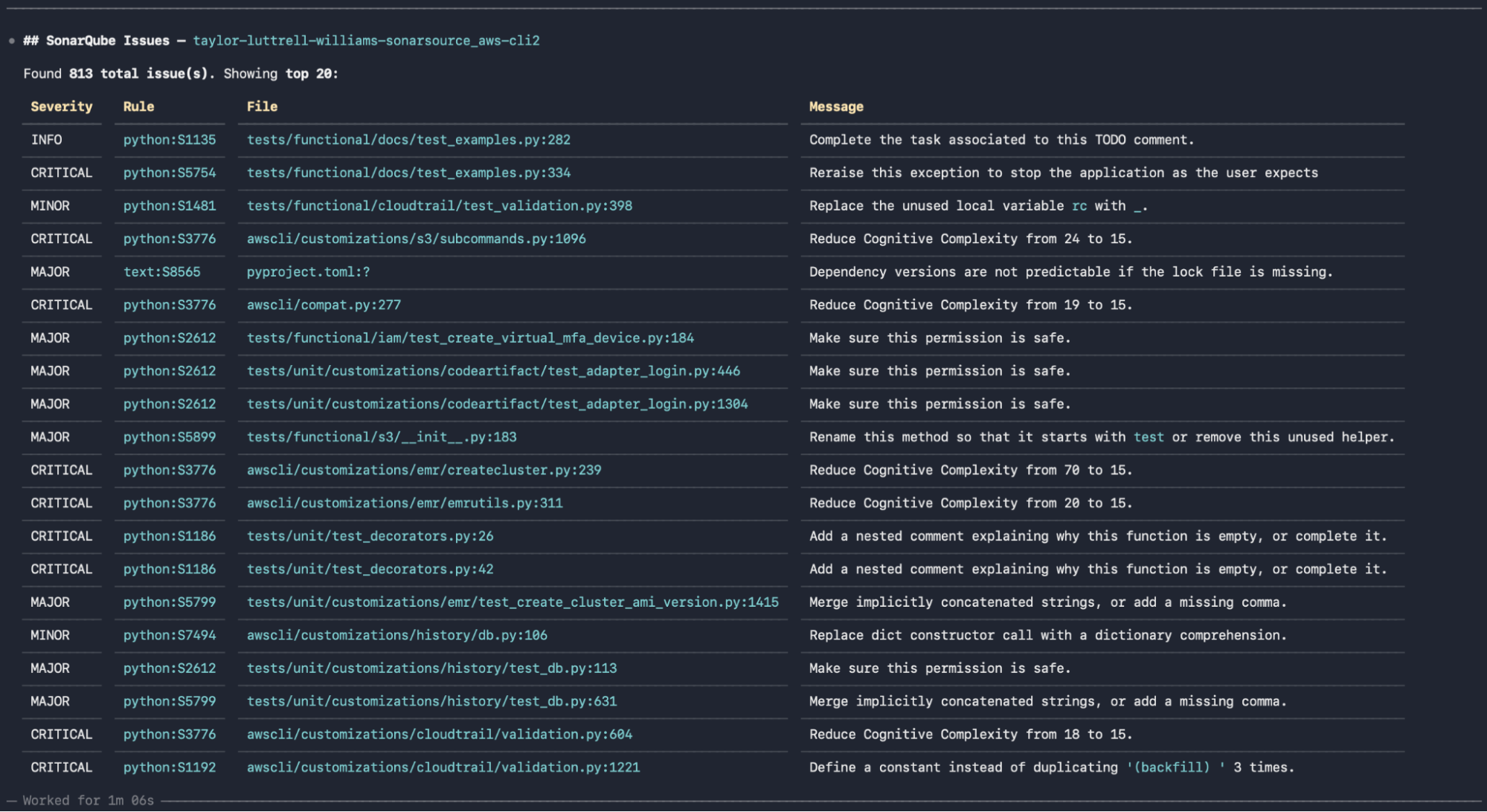
Lastly, in natural language, invoke Context Augmentation by inquiring about project-specific coding guidelines before instructing Codex to write code:
What coding guidelines should I consider when working within this project?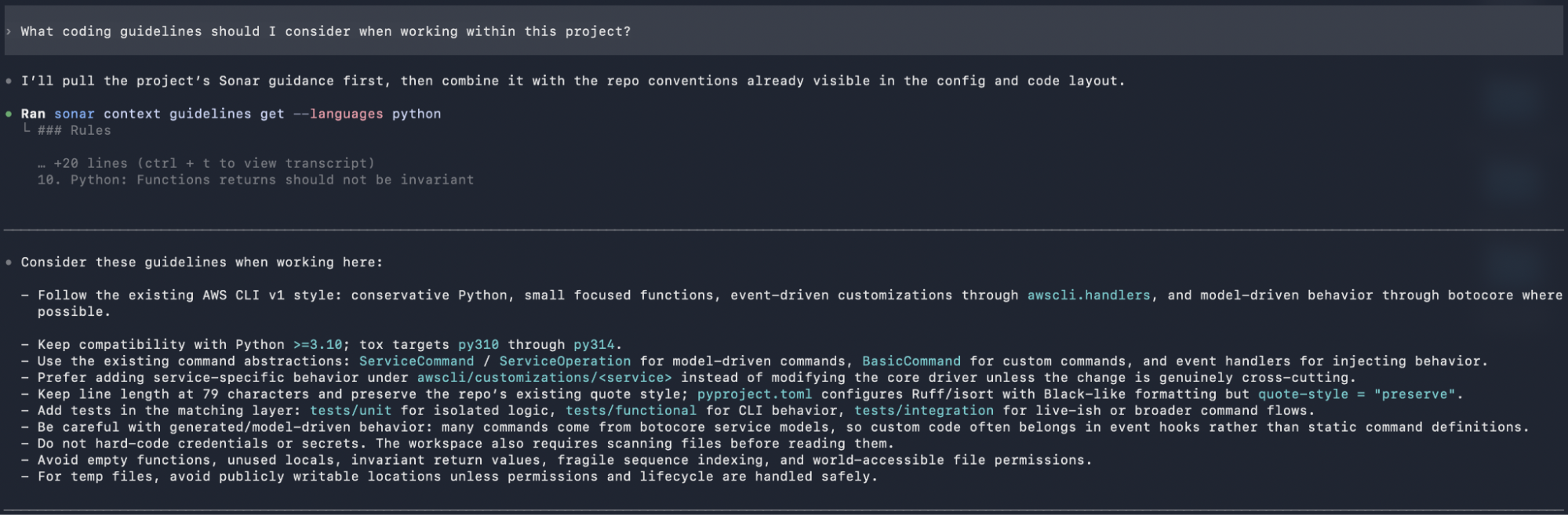
Step 4 — Scan for secrets
The hook from Step 2 sits between the user and the model. Every prompt is run through the SonarQube secrets scanner before it leaves the CLI; if a credential is detected the prompt is blocked outright and never reaches the agent.
To prove it, paste the following prompt with a fake GitHub personal access token:
Can you push a commit using my token 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?The hook intercepts the submission, detects the GitHub PAT pattern, and surfaces a denial. Codex never receives the prompt.
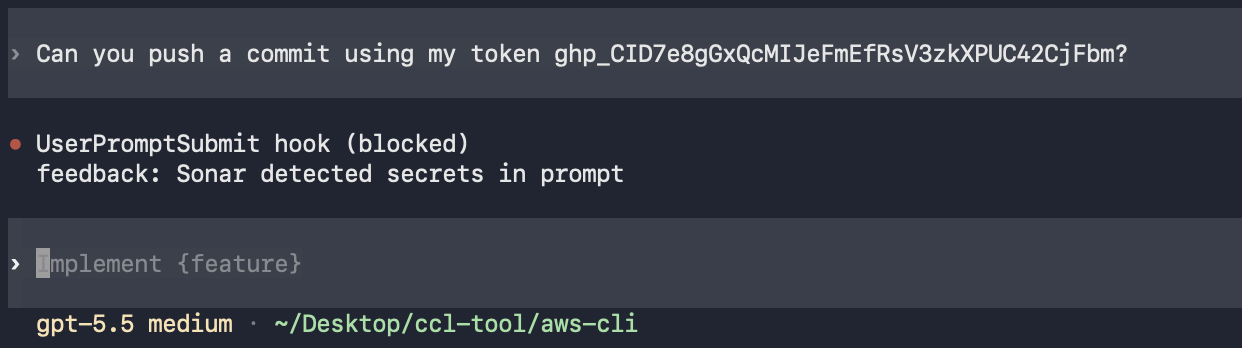
The same protection extends to file reads. The AGENTS.md block installed in Step 2 instructs Codex to call sonar analyze secrets <path> before reading any file in the workspace. If the scanner flags a hit, Codex refuses to read the file and tells you to rotate the leaked credential before continuing. This second layer catches secrets already on disk, not just the ones a user might paste into the prompt.
Step 5 — Run Agentic Analysis on new code
The PostToolUse hook installed in Step 2 watches Codex's apply_patch tool, the call Codex uses for every file write. Every time Codex creates or edits a file, the hook runs sonar hook codex-post-tool-use --project <key> against the git change set, returns surfaced issues to the model, and lets Codex fix them in subsequent turns before ending the response.
To exercise the loop, ask Codex to write a small module:
Add s3_helper.py at the project root with an upload_with_retry(bucket, key, file_path, max_retries=3) function. Retry on transient errors, log each attempt, and raise a clear error if all retries fail. Include a TODO for adding metric emission later.Codex writes the file, the apply_patch hook fires, and Agentic Analysis surfaces findings inline:
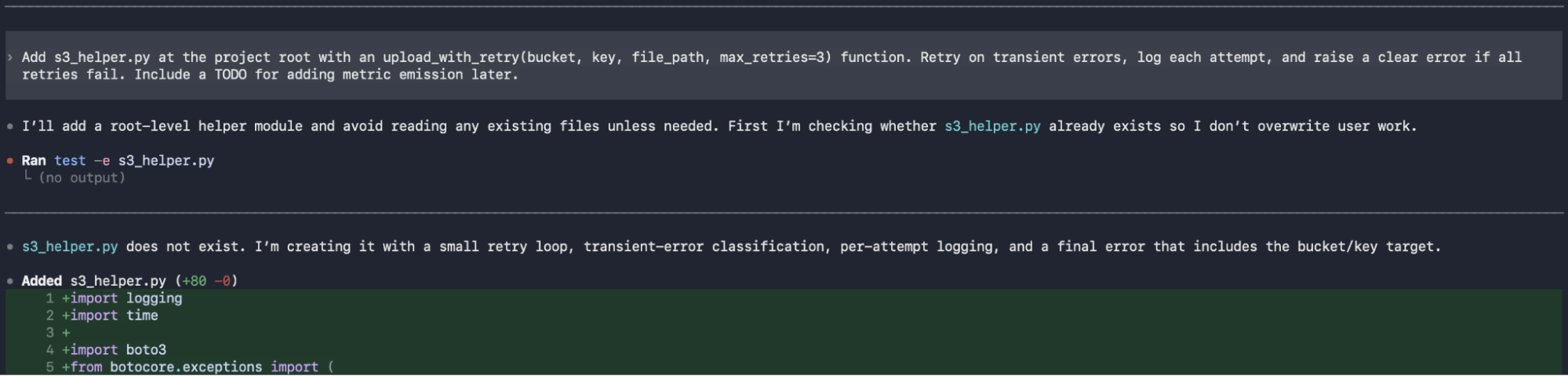
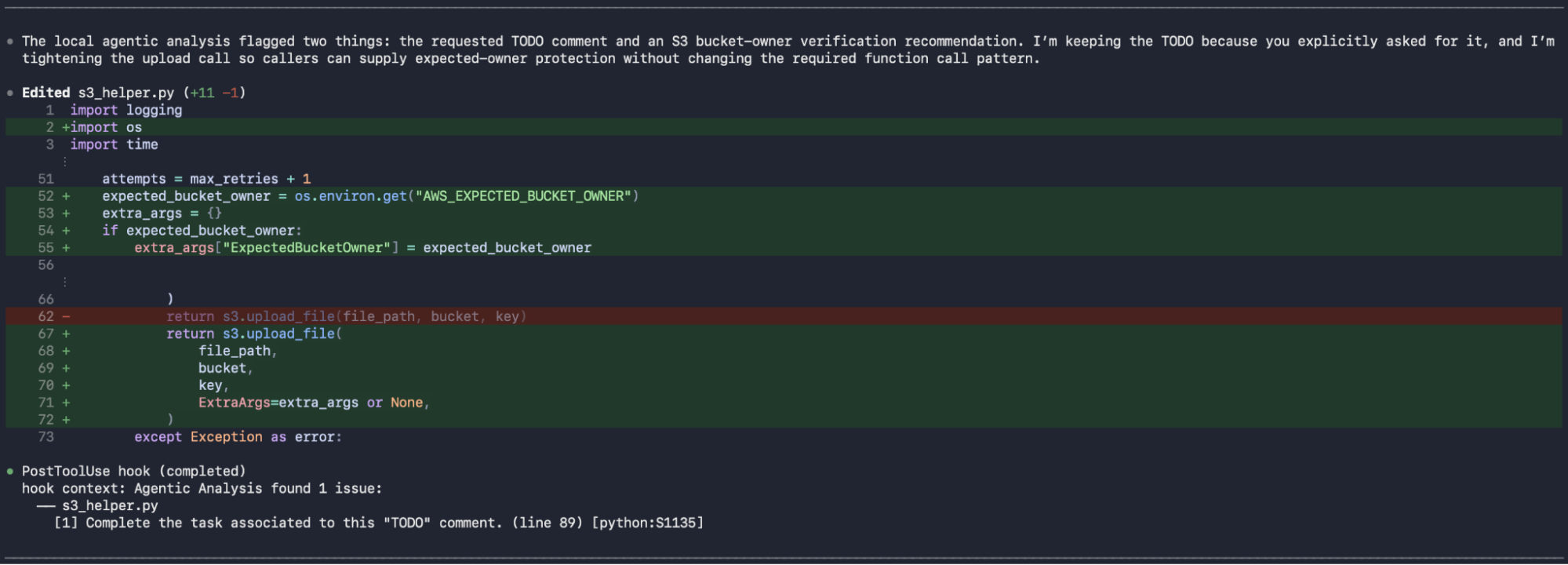
In our run, the scanner flagged two issues on the lines Codex just touched: an S3 bucket-ownership vulnerability on the upload_file call (python:S7608) and the TODO Codex added for metric emission (python:S1135). S7608 is the more interesting catch as it's a High-severity security rule (CWE-441, CWE-693), not a style nudge. SonarQube wants every S3 operation to pass ExpectedBucketOwner so the upload can't silently land in a bucket whose ownership changed out from under the caller. Codex resolves it by reading AWS_EXPECTED_BUCKET_OWNER from the environment and threading it into the upload_file call's ExtraArgs, preserving the four-argument signature we asked for. The TODO is intentionally retained because we asked for it in the prompt; Agentic Analysis re-runs after the edit, flags it once more, and Codex documents the rationale in its reply before ending the turn. The hook fires after every write; Codex only finalizes once each remaining finding is either fixed or explicitly justified, and verifies the result with python3 -m py_compile before handing back control.

Verify the setup
By the end of Step 2 you have a working end-to-end SonarQube + Codex CLI integration. Check:
sonar auth statusreports an authenticated session against your SonarQube backendsonar --versionreports1.0.0or later- Inside Codex,
codex plugin listshowssonarqube@sonarat version2.1.0 /mcplistssonarqubeas connected and its tools are visiblesonar-list-projectsreturns your SonarQube Cloud project details- Pasting a prompt containing a credential pattern is blocked by the
UserPromptSubmithook
The end state across your project should reflect:
- The SonarQube plugin registered in Codex CLI
.codex/config.tomlwith asonarqubeMCP server entry.codex/hooks.jsonwithUserPromptSubmitandPostToolUse(apply_patch)entries.codex/hooks/sonar-secrets/and.codex/hooks/sonar-sqaa/scripts on disk- A
sonar:begin:codex-secrets-on-readblock appended toAGENTS.md - The
sonar-context-augmentationprocess running and bound to your project (unless installed with--skip-context) - The SonarQube CLI session authenticated, token in your system keychain
If anything drifts (the MCP server stops appearing, hooks stop firing, or skills return empty), re-run sonar integrate codex; it's idempotent and reports already installed for artifacts that haven't changed.
What to know
- Per the latest CLI version, the entire integration is interactive and the user can choose each hook/mcp config. Pass
--non-interactiveto install everything available for your scope without prompts. - The
PostToolUsehook onapply_patchis project-scoped only, skipped undersonar integrate codex --global, on SonarQube Server, or without Agentic Analysis entitlement. Secrets scanning still applies in all three cases, and a project install will skip the project-level secrets hook if a global one is already in place to avoid scanning every prompt twice. - The integration uses
sonar run mcp, not a raw Docker invocation. The SonarQube CLI handles container runtime detection (Docker, Podman, Nerdctl) and the keychain handoff under the hood. - If
/mcpreportssonarqubeas failed or not started, first confirm that Docker is running, then restart the Codex CLI session. Lack of a container runtime is a common cause for such failures.
Next steps
- Reference the official SonarQube + Codex CLI integration docs
- Set up the SonarQube Plugin for Claude Code, GitHub Copilot CLI, and more
- Configure Sonar Context Augmentation and Agentic Analysis with Codex CLI
- Familiarize yourself with SonarQube CLI commands
- Dive deeper into the SonarQube MCP Server docs
- Connect the Guide, Verify, Solve dots with Sonar's Agent Centric Development Cycle framing
