
Author: Taylor Luttrell-Williams
TL;DR overview
- SonarQube Agentic Analysis verifies code generated by GitHub Copilot CLI, surfacing issues directly within the agent’s workflow.
- Assists terminal-driven Copilot workflows where there’s no editor UI in the loop.
- Compresses the development cycle from CLI prompting and PR-time review to in-session analysis, remediation, and verification.
- Implementation involves two files (
mcp-config.jsonandcopilot-instructions.md) that together ensure advanced code analysis is run after every agent-driven implementation.
AI coding agents can produce code that compiles and passes local linting, but introduce issues that halt your CI or fail a PR. This evokes a frustrating situation wherein the developer must spend extra time re-prompting their way towards a solution. SonarQube Agentic Analysis removes this step. It exposes SonarQube Cloud's remote analysis engine to the AI agent through the SonarQube MCP Server, so that the agent can analyze its own output before marking the task complete.
This blueprint explores the setup for GitHub Copilot CLI, the terminal-based Copilot agent. The workflow sits in the Verify stage of the Agent Centric Development Cycle and uses Microsoft's GCToolKit (a Java library for GC log analysis) as the demo project.
When to use this
- You drive Copilot from the terminal rather than an IDE, so there's no agent-mode UI reviewing each suggestion before it lands on disk.
- You want code verification inside the agent's session: the same rules your pipeline enforces applied to new code in seconds.
What you'll achieve
- SonarQube MCP Server registered in the GitHub Copilot CLI's
mcp-config.jsonand configured for Agentic Analysis - A
copilot-instructions.mdVERIFY directive at the project root that tells Copilot CLI to callrun_advanced_code_analysison every modified file before declaring the task done - A working Agentic Analysis loop (analyze, fix, and re-analyze) running in the terminal, with newly-surfaced issues resolved automatically
Architecture
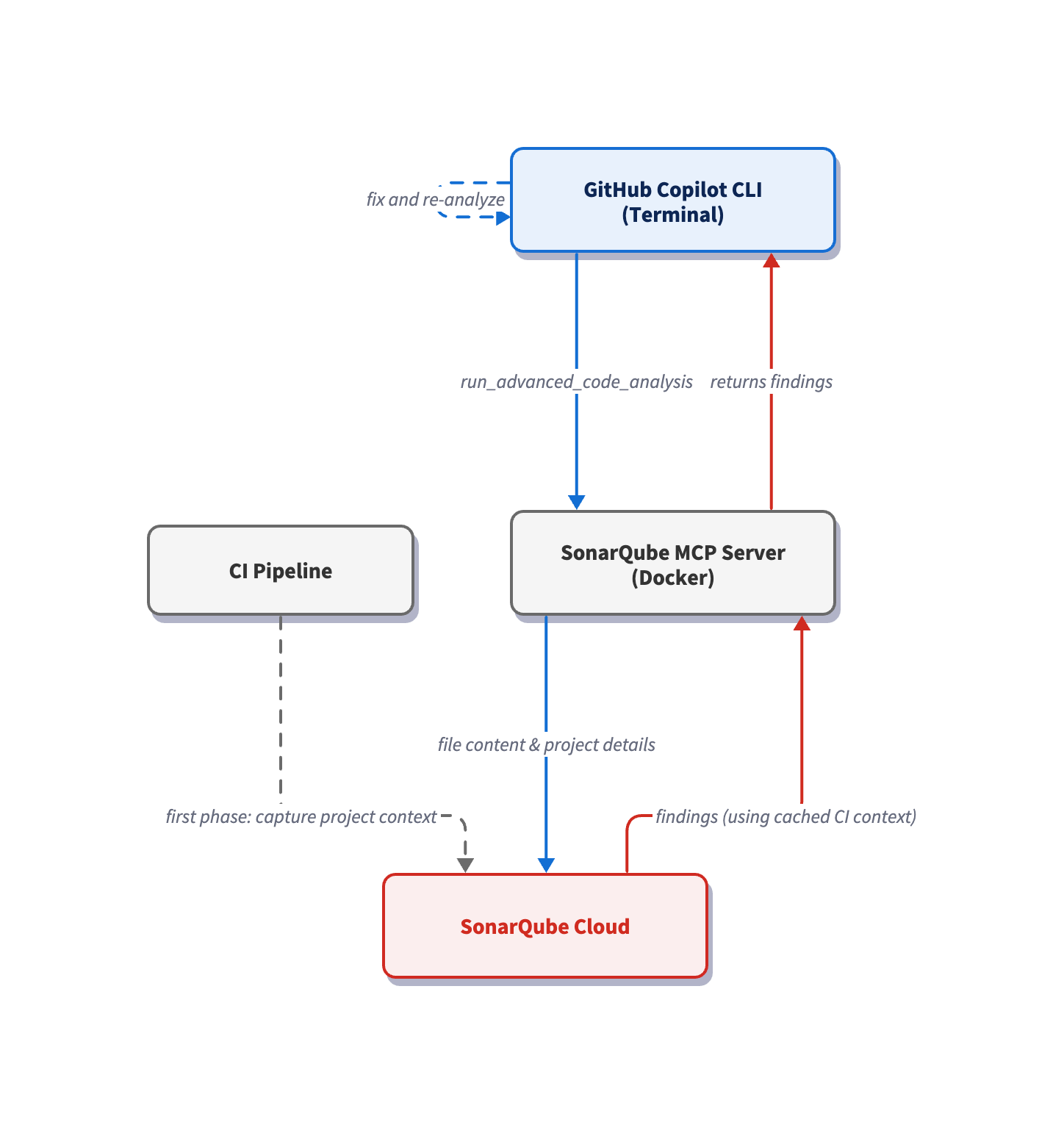
The SonarQube MCP Server runs as a Docker container with your workspace mounted at /app/mcp-workspace and communicates with the CLI over stdio. When Copilot CLI calls run_advanced_code_analysis, the MCP Server reads the modified file via the volume mount and sends its data to SonarQube Cloud, which restores the cached project context from your last CI scan and runs analysis with the precision of a full CI pipeline scan. Single-file analysis returns findings in seconds.
Prerequisites
- GitHub Copilot CLI installed and authenticated
- An active GitHub Copilot subscription
- SonarQube Cloud on a Team or Enterprise plan with Agentic Analysis enabled
- A completed CI scan (after you have enabled Agentic Analysis)
- Docker up and running
- A SonarQube Cloud user token. Create one under My Account > Security on SonarQube Cloud. If Agentic Analysis was recently enabled, generate a fresh token as older tokens may not carry the required permissions.
- Use of a supported programming language. Agentic Analysis is available for Java, Python, JavaScript/TypeScript, CSS, HTML, XML, C#, C++ and VB.NET. Secrets detection, Docker, Kubernetes, and Terraform are also supported. Check the official docs for the latest list.
Demo project: to keep up with this guide, fork microsoft/gctoolkit to your GitHub account, import it into SonarQube Cloud with CI-based analysis enabled, and clone it locally.
Step 1 — Register the SonarQube MCP Server with the CLI
The Copilot CLI reads MCP server registrations from ~/.copilot/mcp-config.json. If the file doesn’t exist yet, create the directory and open it in your editor.
Paste in the following configuration:
{
  "mcpServers": {
    "sonarqube": {
      "command": "docker",
      "args": [
        "run", "-i", "--rm", "--init", "--pull=always",
        "-e", "SONARQUBE_TOKEN",
        "-e", "SONARQUBE_ORG",
        "-e", "SONARQUBE_PROJECT_KEY",
        "-v", "<ABSOLUTE_PATH_TO_YOUR_PROJECT>:/app/mcp-workspace:rw",
        "mcp/sonarqube"
      ],
      "env": {
        "SONARQUBE_ORG": "<YourOrganizationKey>",
        "SONARQUBE_PROJECT_KEY": "<YourProjectKey>"
      }
    }
  }
}
Replace the three placeholder values:
<ABSOLUTE_PATH_TO_YOUR_PROJECT>— the full path to your project on disk (for example,/Users/dev/gctoolkit). Docker requires absolute paths; relative paths like./fail silently.<YourOrganizationKey>— your SonarQube Cloud organization key.<YourProjectKey>— your SonarQube Cloud project key, found on the Project Information page in SonarQube Cloud or insonar-project.properties.
If you work across multiple SonarQube Cloud projects, note that the values above bind the server to one such project. To avoid configuring ~/.copilot/mcp-config.json for every project, place the same config at <your-project>/.mcp.json instead and Copilot CLI auto-loads this workspace-scoped config (same mcpServers schema) when launched from anywhere inside the project. Keep in mind that .copilot/mcp-config.json at the project root is not a recognized path; only .mcp.json works for the workspace config. If you'd rather keep the workspace clean, set COPILOT_HOME per-shell to a project-specific directory containing an mcp-config.json; the CLI then reads $COPILOT_HOME/mcp-config.json instead of the global config.
In our implementation, SONARQUBE_TOKEN is intentionally absent from the env block. Export it in your shell so Docker forwards it via the -e SONARQUBE_TOKEN arg without committing the token to a config file:
export SONARQUBE_TOKEN="<YourSonarQubeUserToken>"Add the export line to ~/.zshrc or ~/.bashrc so it persists across CLI sessions. Keep in mind that the token must be a SonarQube Cloud user token.
The config above does not set SONARQUBE_TOOLSETS as the SonarQube MCP Server enables many toolsets by default. If the workspace is mounted and your SonarQube Cloud organization is enabled for Agentic Analysis, then advanced analysis will be enabled too. If you ever want to restrict the server to a subset of these tools, set SONARQUBE_TOOLSETS explicitly to a comma-separated list.
For SonarQube Cloud in the US region, add -e, "SONARQUBE_URL" to the args and "SONARQUBE_URL": "https://sonarqube.us" to the env block. EU-region users do not need to set SONARQUBE_URL.
One more thing to watch out for: if you've used the SonarQube MCP Server in VS Code, the Copilot CLI uses an mcpServers wrapper at the top level of the config file, while VS Code's .vscode/mcp.json uses servers. The two schemas are not interchangeable; the CLI expects mcpServers at the top level and a servers-wrapped config will register no servers.
Step 2 — Verify the MCP connection
Navigate to your local project's root (the same path used in the -v mount) and launch the CLI:
cd ~/path/to/gctoolkit
copilot
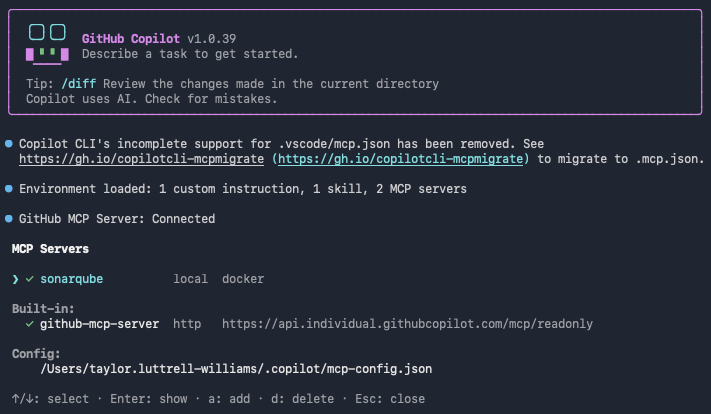
Inside the CLI, list the registered MCP servers:
/mcp showThe sonarqube server should appear in the list.
Then check that the SonarQube MCP Server tools are loaded:
/mcp show sonarqube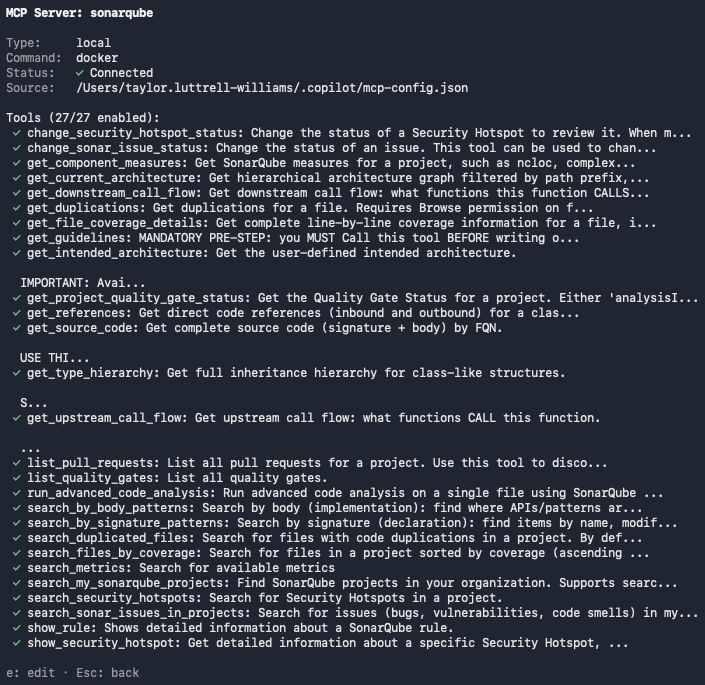
With Agentic Analysis enabled, run_advanced_code_analysis should appear in the tool list.
Step 3 — Add VERIFY directives
Copilot CLI can now leverage Agentic Analysis, but won't necessarily utilize it unprompted. A .github/copilot-instructions.md file at the project root tells the agent when and how to use this toolset. The CLI knows to auto-load this file when launched from anywhere inside the project, per the custom instructions docs. The CLI also reads your AGENTS.md, CLAUDE.md, or GEMINI.md from the project root (if they exist).
If you haven’t already, create the file and supply the following directives:
# SonarQube Agentic Analysis — VERIFY Directive

## After generating or modifying code

You must strictly follow this analyze-then-commit workflow for every code
modification. No code is considered complete until it has passed the following
SonarQube verification loop:

1. Read Phase: After any modification or before commit, use the `Read` tool
   to load the current state of all relevant source files.
2. Analysis Phase: For every new or modified file, call
   `run_advanced_code_analysis` with:
   - `projectKey`: The SonarQube Cloud project key
   - `branchName`: The active development branch
   - `filePath`: Project-relative path (e.g., `src/main/java/MyClass.java`)
   - `fileScope`: `MAIN` or `TEST` depending on the code type
3. Evaluation & Remediation:
   - Call `show_rule` for every issue
   - Mandatory fix any issue with `impacts[].severity` of HIGH or BLOCKER, or any issue with `impacts[].softwareQuality` of SECURITY
4. Verification: Re-run analysis after fixes to confirm resolution and
   no regressions
Be as specific as possible here. A directive like "examine the code" is too vague to trigger a specific tool call; naming the exact tool(s) produces consistent behavior.
The official Agentic Analysis docs include a deeper, combined Guide-and-Verify directive template that also integrates Context Augmentation for the Guide stage.
Step 4 — Generate code with Agentic Analysis
With the directives set, switch Copilot CLI to autopilot mode (Shift + Tab). Autopilot lets the analyze-fix-verify loop run end-to-end without interruption. Supply the following prompt:
Add a CSV exporter to the sample module that writes parsed GC events to disk.Copilot CLI plans the change, and then modifies and creates files in sample/src/main/java/com/microsoft/gctoolkit/sample/.

It next calls run_advanced_code_analysis per modified and created file. This MCP tool accepts one file per call; Copilot dispatches multiple calls concurrently when more than one file is modified:

The first round of analysis returns findings on the new code:

Here’s a breakdown of the issues surfaced by the analysis:
Step 5 — Resolve surfaced issues and re-analyze
After the first round of analysis, Copilot proceeds without further prompting. Working through the findings file by file, the agent applies a targeted fix per rule and then re-runs run_advanced_code_analysis to confirm.

In the demo run, the agent applied these fixes:
GCEventCsvAggregator.java— parameterized the aggregator asAggregator<GCEventCsvAggregation>(resolvesjava:S3740) and removed the unusedrawListfield (resolvesjava:S1068).GCEventCsvFileWriter.java— closed the leakedInputStream(resolvesjava:S2095), replacede.printStackTrace()with a logger call (addresses thejava:S4507Security Hotspot, sinceprintStackTrace()is a debug feature flagged for production review), and turned empty catch blocks into logged handlers (resolvesjava:S108). Write errors now log instead of disappearing.

The follow-up analysis came back clean: zero remaining findings on either modified file. The full loop—from code generation through code analysis, code remediation, and code verification—ran in a single Copilot CLI session with no user intervention after the initial prompt.
Verify the setup
You can confirm that Agentic Analysis is in operation when you see this sequence in the terminal after prompting Copilot CLI to produce code:
- Per the
copilot-instructions.mddirective, Copilot CLI callsrun_advanced_code_analysison each changed file - SonarQube returns findings, surfacing issues or confirming a clean file
- If issues exist, Copilot looks up rules, applies fixes, and re-runs analysis
- Repeated analysis confirms issue resolution and the session completes
Two artifacts are configured during this workflow: ~/.copilot/mcp-config.json (refer to Step 1) and .github/copilot-instructions.md (refer to Step 3).
What to know
- Agentic Analysis is in open beta; consult the product release lifecycle for more information.
- Agentic Analysis is available in SonarQube Cloud currently, and not yet available in SonarQube Server.
- Requires a Team or Enterprise plan.
- If you plan to use Agentic Analysis together with Context Augmentation, you must use a self-hosted SonarQube MCP Server. The embedded Cloud MCP endpoint does not currently support Context Augmentation.
- Docker requires an absolute path for the
-vbind mount. Relative paths (./,../) will fail silently. - The
branchNameparameter must correspond to an actual branch that SonarQube Cloud has already analyzed via CI; a branch that doesn’t have a CI analysis history will return empty results. - If your GitHub organization has Copilot policies configured, an admin may need to enable MCP server access in the org's Copilot settings.
Next steps
- Add the Guide stage with Context Augmentation so that your agent receives the context it needs to remain compliant with your project’s structure and standards.
- For alternative Agentic Analysis implementations, see our companion blueprints for Codex CLI and Claude Code.
- Consult the official Agentic Analysis documentation for the complete reference on tools, supported languages, and configuration options.
