

TL;DR overview
- The SonarQube Remediation Agent automates backlog remediation by scanning the main branch and opening GitHub pull requests with AI-generated fixes for high-priority security vulnerabilities and bugs.
- This feature allows engineering teams to reduce technical debt on a scheduled daily or weekly cadence without manual developer intervention or dedicated sprints.
- The agent opens one GitHub PR per run containing up to five eligible fixes, adhering to configurable open PR limits to prevent reviewer fatigue.
- Project-level settings allow teams to customize remediation frequency and PR limits, ensuring critical repositories receive prioritized attention based on team capacity.
Every engineering team is facing the same challenge: a constantly accumulating backlog of security vulnerabilities, bugs, and code quality issues on the main branch that teams rarely prioritize. While new features are shipped, these problems continue to accumulate.
SonarQube Remediation Agent’s automated backlog remediation feature (currently in beta) offers a different approach. Instead of waiting for a software developer to manually pick up each issue, a scheduled agent scans your main branch, selects the highest-priority issues, and opens GitHub pull requests with AI-generated fixes—automatically, on a cadence you control.
This post walks you through how it works, how to enable it, and how to get the most out of it.
What is automated backlog remediation?
Automated backlog remediation is a feature of the SonarQube Remediation Agent that runs on a schedule rather than on demand. Each time it triggers on an enabled project, it will:
- Scan the issues on your main branch
- Select up to five eligible issues to fix
- Open one GitHub pull request containing the AI-generated fixes, authored by the SonarQube Remediation Agent
You configure how often it runs (daily is the default), set a cap on the number of open PRs the agent can have at any time, and let it work in the background while your team focuses on new development.
Prerequisites to enabling automated backlog remediation
Before enabling the feature, make sure the following are in place:
- Your organization is on a Team (annual) or Enterprise plan on SonarQube Cloud.
- The SonarQube Remediation Agent GitHub app is installed and bound to your organization.
- Your projects are connected to GitHub repositories.
- The projects you want to remediate have issues on the main branch that are eligible for AI fixes.
Step 1: Enable automated backlog remediation
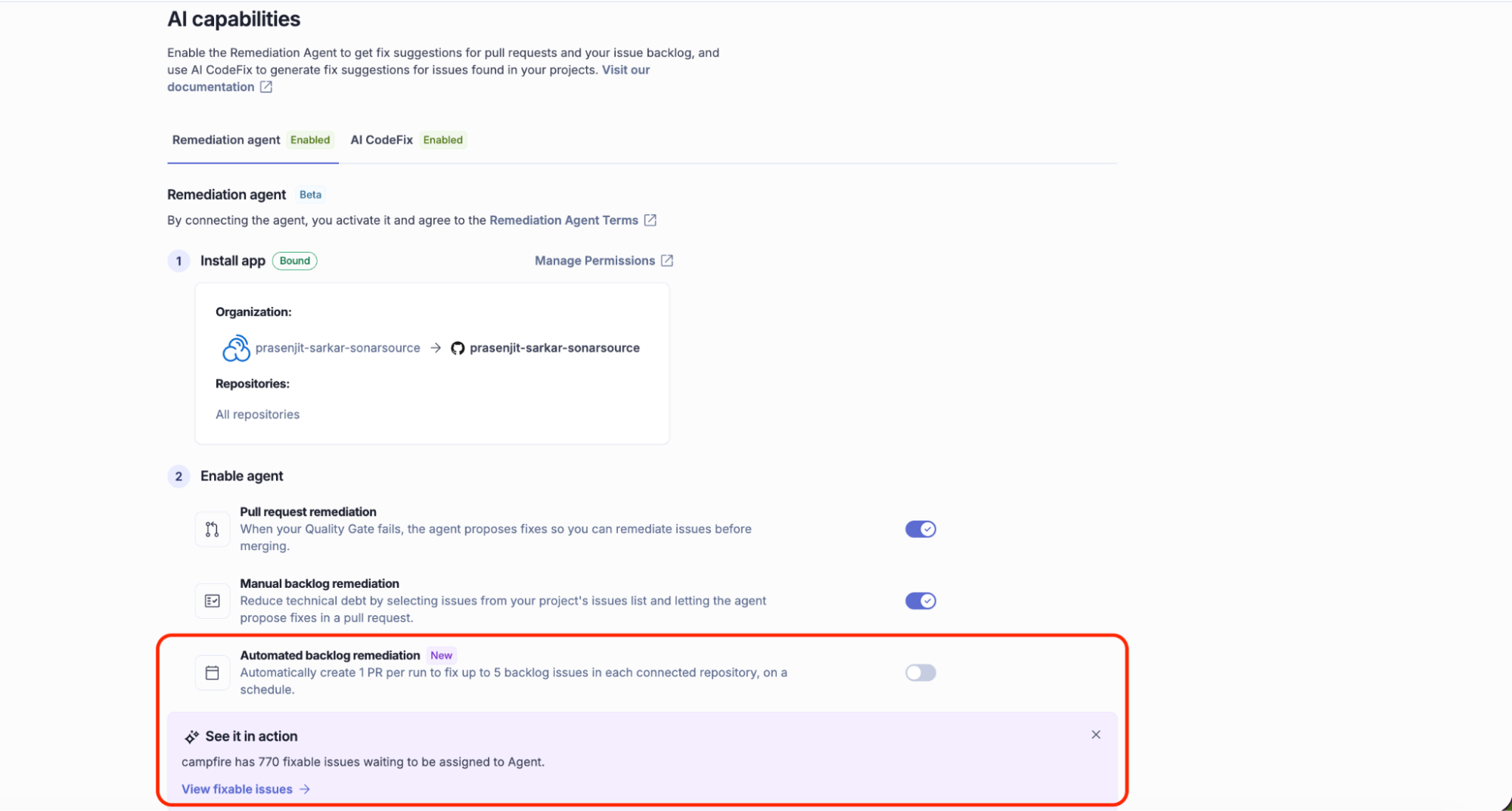
With the GitHub app installed, scroll down to the Enable agent section on the same page.
You will see three toggles:
- Pull request remediation triggers on failing quality gates in PRs
- Manual backlog remediation lets developers assign individual issues to the agent
- Automated backlog remediation is the scheduled feature covered in this post
Toggle automated backlog remediation on. Two configuration options will appear:
Set your frequency
Set how often the agent runs using the Frequency setting. Options include daily and weekly. You can also set the time of day and timezone, for example, daily at 09:00 Europe/London means the agent runs each morning before your team starts their review cycle.
Open PR limit
The open PR limit controls the maximum number of agent-created PRs that can be open simultaneously across your repositories. The default is three, while the maximum is 100.
When this limit is reached, the agent pauses and does not open new PRs until existing ones are merged or closed. This prevents the agent from flooding your repository with unreviewed PRs.
Tip: Start with the default limit of three while your team gets familiar with reviewing agent PRs. You can increase it once you have a feel for the review cadence.
The limit set here is an org-level default. Individual projects can override it — covered in the next step.
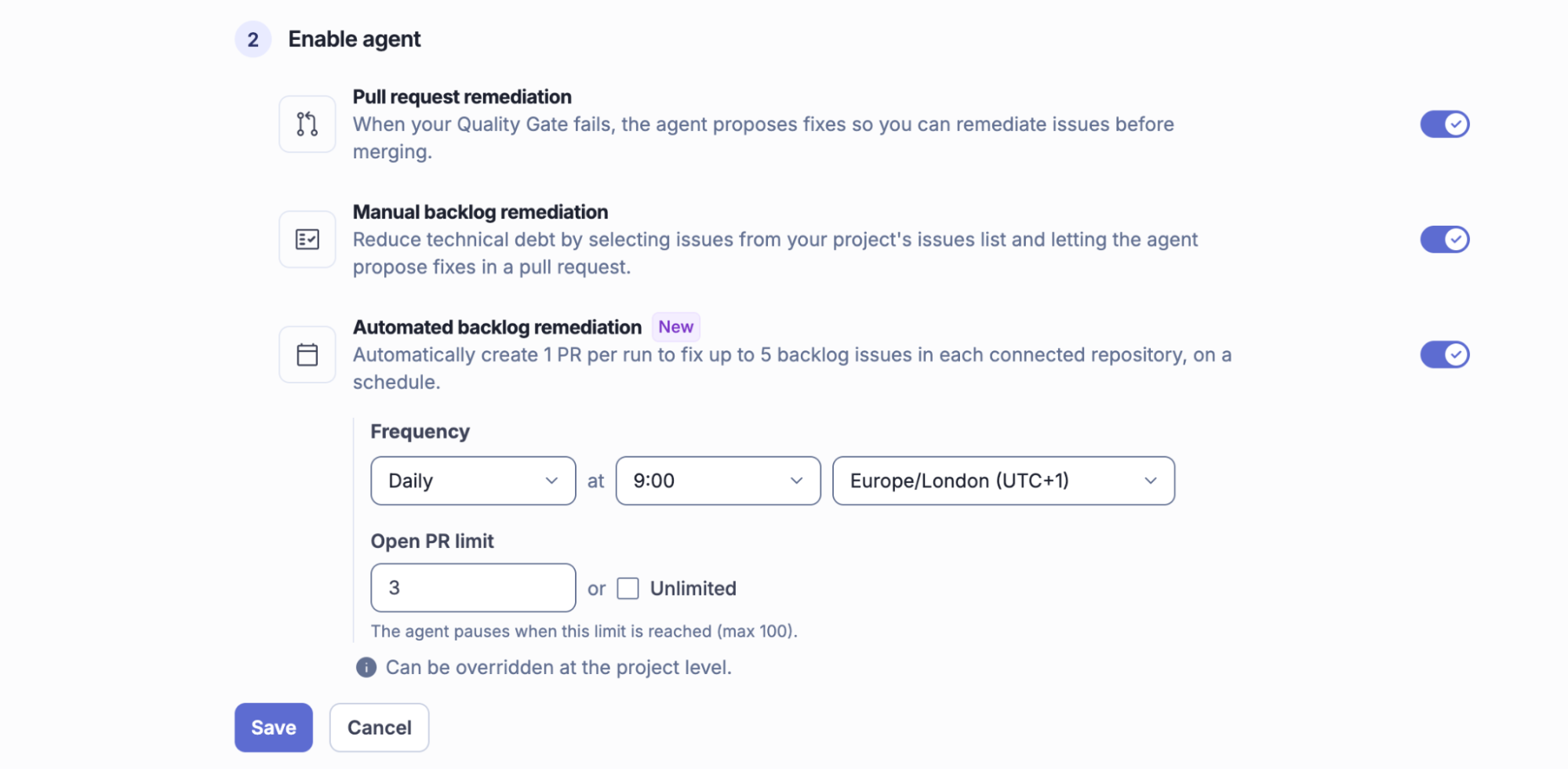
Click Save to activate the schedule.
Step 2: Configure at the project level (optional)
For teams with projects that have different review capacity or priority, you can override the org-level settings at the project level.
Navigate to your project in SonarQube Cloud, go to Project settings → AI capabilities, and adjust the frequency or PR limit for that specific project. Project-level settings take precedence over the org default.
This is useful when, for example, a critical security project should run daily while a lower-priority project only needs a weekly run.
What the pull request looks like
When the agent creates a PR, it:
- Names itself as the author (SonarQube Remediation Agent)
- Includes a PR description with the list of Fixed issues, each with the rule name, description, and severity—the same information you would see in a SonarQube rule description
- Delivers each fix as a separate commit, so reviewers can evaluate changes individually
The PR is a standard GitHub pull request. Your existing branch protection rules, required reviewers, and CI pipelines apply to it just as they would to any human-authored PR.
Monitoring with the agent activity page
Every agent run is logged on the Agent activity page, accessible from your project in SonarQube Cloud.
For each run, you can see:
- Status and duration: Whether the run succeeded and how long it took
- Started: The timestamp of when the agent was triggered
- Source: Confirms this was a backlog fix run against the main branch
- Outcome: A direct link to the GitHub PR the agent opened
This gives you a clear audit trail of what the agent has done, when it ran, and which issues it addressed, without needing to check GitHub separately.
Get started with automated backlog remediation
Automated backlog remediation is a low-friction way to make steady progress on technical debt without scheduling dedicated sprints or pulling developers away from feature work. The setup takes a few minutes, the agent runs on a schedule you control, and every fix lands as a reviewable GitHub PR.
To get started, head to Administration → AI capabilities → Remediation agent in your SonarQube Cloud organization.
For the full documentation, visit the SonarQube Remediation Agent docs.
