

TL;DR overview
- Optimizing SonarQube for AI-generated code review involves activating security-focused rule sets and ensuring quality gates enforce standards that catch common LLM code patterns like exposed secrets and missing validation.
- AI-generated code tends to reproduce vulnerabilities from training data—particularly injection flaws, hardcoded credentials, and insecure API usage—making security rule coverage especially important.
- Teams can configure SonarQube's quality profile to prioritize security rules relevant to AI code risks and adjust hotspot definitions based on the languages and frameworks used by their AI tools.
- Combining SonarQube's automated scanning with pull request decoration creates a review workflow that surfaces AI code quality issues before human reviewers, reducing review time and oversight burden.
Copilot, Claude, Cursor. Your team is shipping code faster than ever. But speed doesn’t equal quality. Without guardrails, AI-generated code introduces technical debt, security vulnerabilities, and reliability issues that are hard to track. The engineering productivity paradox in action: the time you save writing code gets eaten by debugging and remediation downstream.
AI agents don’t get tired. They can generate unit tests instantly. So why hold them to the same standards as human developers? Hold them to higher ones.
Below, you’ll create a hardened, AI-specific quality gate and quality profile in SonarQube Cloud, moving your team from “hope it works” to “vibe, then verify.”
Why AI code may need a different quality gate
AI coding assistants prioritize probability and pattern matching over strict logic. They’re great at scaffolding and boilerplate, but they have distinct failure modes:
- Hallucinated dependencies. Importing libraries that don’t exist or pulling in insecure versions.
- Complexity creep. Writing convoluted logic where a simple function would do, because the LLM lost the broader architectural context.
- Security blind spots. Introducing injection vulnerabilities or weak cryptography because the training data contained insecure examples.
Since generating code (and tests) is cheap for an AI, you can afford to be stricter. Making a human developer hit 90% test coverage slows them down. Making an AI agent do it? That’s just another prompt.
Start from the baseline: Sonar way for AI code
AI Code Assurance in SonarQube Cloud lets you tag projects as containing AI code and run them through a stricter validation process.
Out of the box, Sonar provides the Sonar way for AI Code Quality Gate. It enforces:
- New code: No new issues, all new security hotspots reviewed, 80% coverage, and 3% or less duplication.
- Overall code: Security rating of A, reliability rating of C or better, all security hotspots reviewed.
That’s a solid starting point. But if you want to tighten the screws on AI-generated code, you can go further.
Step 1: Design a stricter quality gate
Create a custom quality gate that pushes harder on security, reliability, and testability.
The logic is simple: the AI wrote it just now, so fix it now. Demand more proof that the logic holds up, and force modular code instead of copy-pasted blocks.
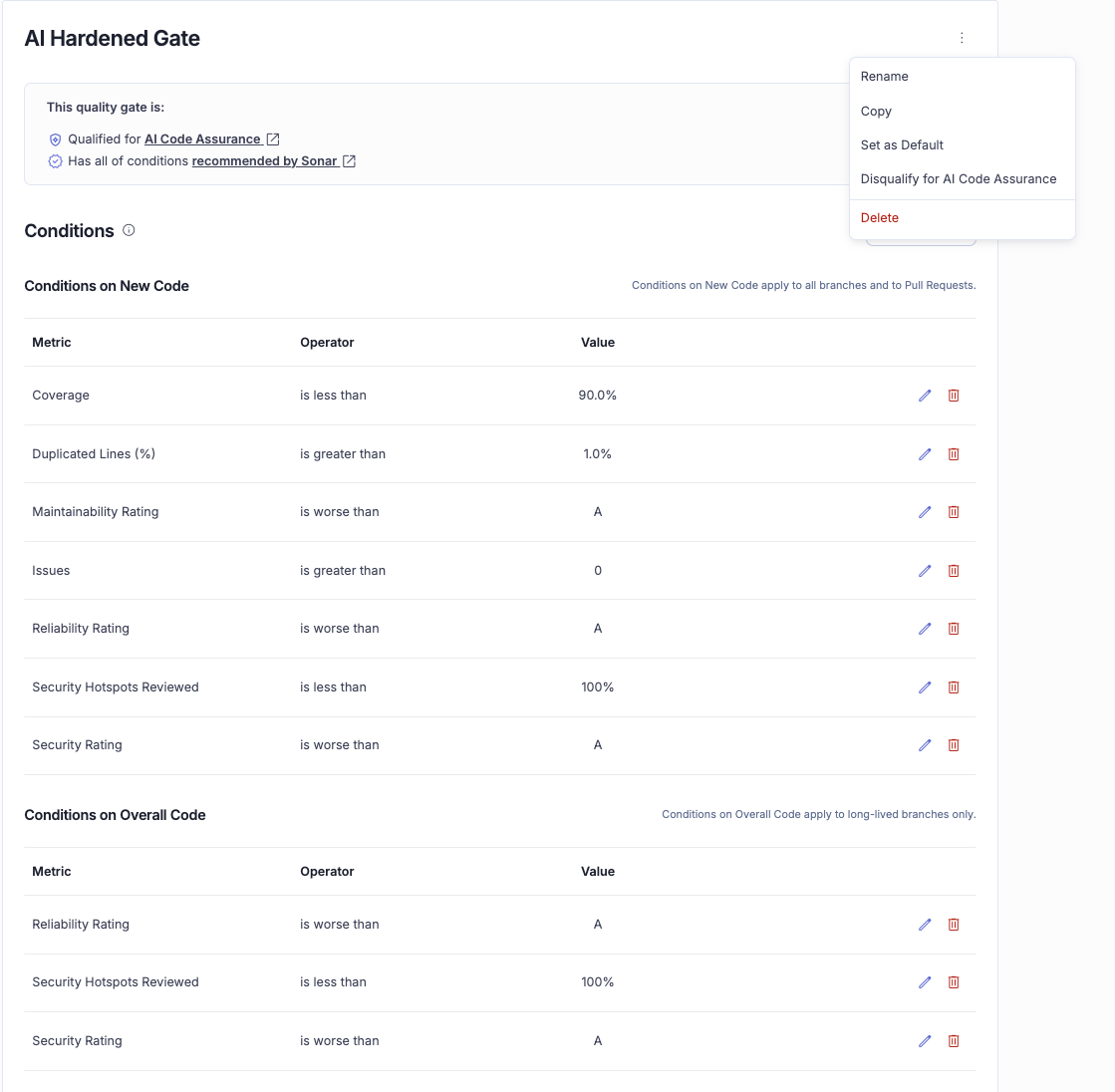
Opinionated thresholds for a hardened gate: bump Coverage on New Code to 90% (up from 80%), drop Duplicated Lines on New Code to 1.0% or less (down from 3%), and tighten Reliability Rating on New and Overall Code to A.
How to set it up
- Go to your Organization page in SonarQube Cloud.
- Click Quality Gates and select Create.
- Name it something descriptive, like AI Hardened Gate.
- Modify the conditions:
- Set “Coverage on New Code” to 90.0%.
- Set “Duplicated Lines (%) on New Code” to 1.0%.
- Set “Reliability Rating” to A.
- Open the action menu and select “Qualify for AI Code Assurance.” Without this, SonarQube won’t recognize your gate for the AI Code Assurance badge.
Step 2: Harden rules with a custom quality profile
A quality gate sets the thresholds (e.g., “pass if you have 0 bugs”), but the quality profile decides what counts as a bug.
AI models write code that’s technically correct but cognitively dense: nested loops, long methods, complex condition chains. A custom profile forces the AI to keep things simple.
Example: tuning Python for AI
- Go to Quality Profiles.
- Find the default Sonar way profile for Python (or your target language).
- Click the three-dot menu and select Extend.
- Name it Python - AI Hardened.
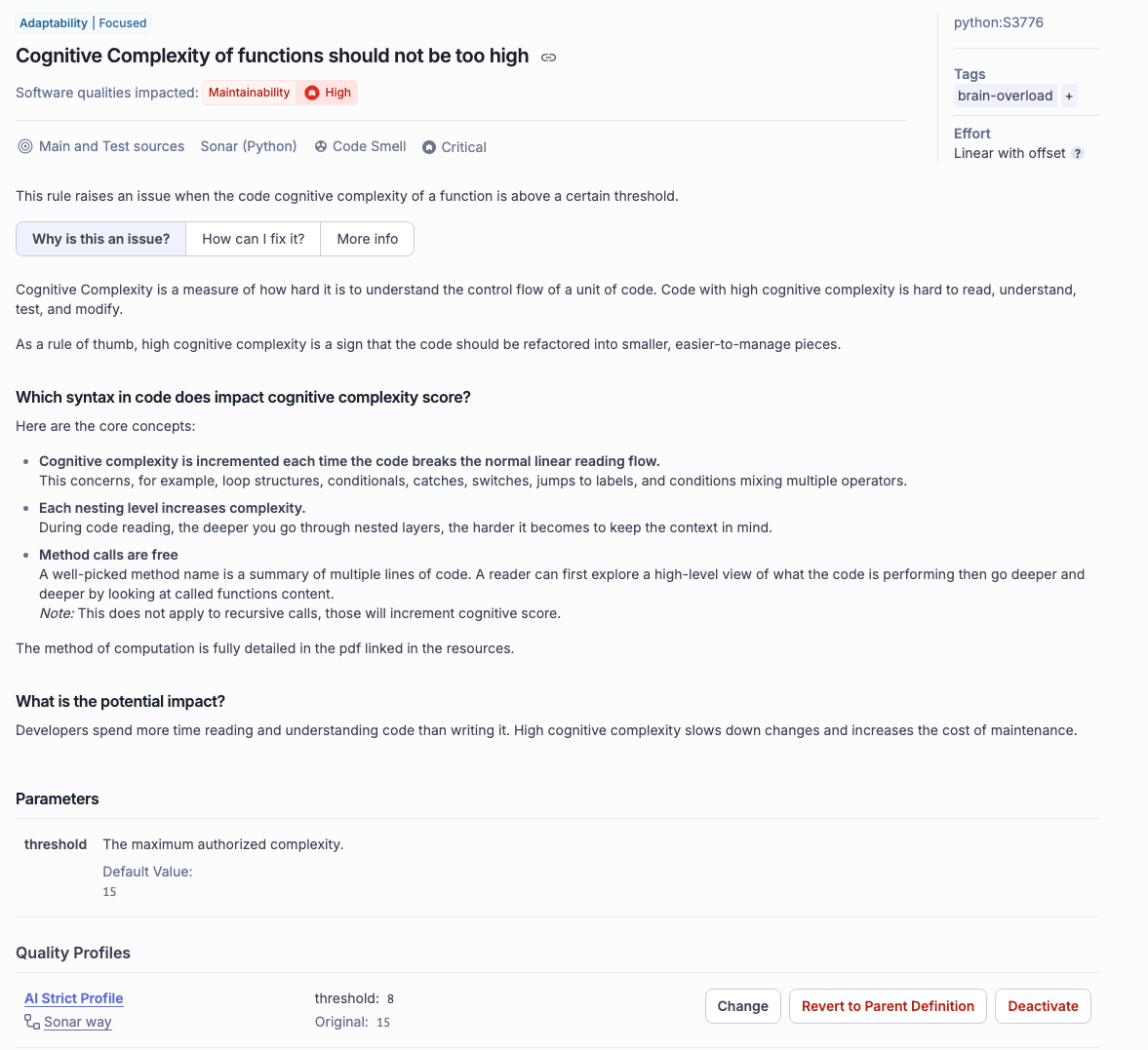
- Search for the rule Cognitive Complexity of functions should not be too high (Rule ID: python:S3776). The default threshold is 15. Change it to 8. The AI (or the developer prompting it) will have to break logic into smaller, more readable functions.
- Filter rules by “Security” and “Inactive.” Activate rules that are too noisy for legacy code but worth enforcing on AI-generated code: stricter input validation, explicit type checking, and similar.
Step 3: Apply AI Code Assurance
Now that you have your gate and profile, connect them to your projects.
- Go to your Project dashboard.
- Navigate to Administration > AI Code Assurance.
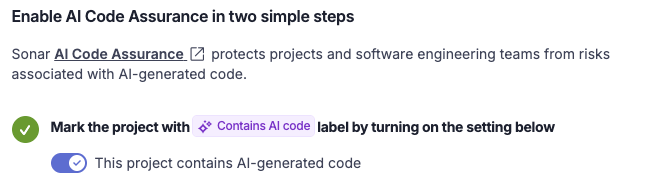
- Toggle the switch: “This project contains AI-generated code.”
- SonarQube flags this project for the assurance workflow.
Next, link your hardened configurations:
- Go to Project > Quality Gate and select your AI Hardened Gate.
- Go to Project > Quality Profile and assign your Python - AI Hardened profile.
Once these are set, your project overview displays the AI Code Assurance status.
Operationalize the gate
Shift left: AI fixing AI
If you’re using an AI assistant that supports the Model Context Protocol (Claude Code, Cursor, etc.), connect the SonarQube MCP Server.
You can ask the agent to “scan this code against my project rules” or “fix this complexity issue.” The agent pulls SonarQube’s findings from your hardened profile and iteratively rewrites the code until it passes.
Learn more: Read the SonarQube MCP Server docs to set up agentic remediation.
Your AI quality gate checklist
- Mark relevant repos as “Contains AI code” in Project Settings.
- Extend a quality profile (e.g., AI Hardened) and lower complexity thresholds.
- Create a custom quality gate with 90% coverage, less than 1% duplication on new code, and any stricter conditions you see fit.
- Select “Qualify for AI Code Assurance” in your gate’s action menu.
- Link the new gate and profile to your AI-labeled projects.
- Confirm your CI pipeline fails when the quality gate fails.
With these guardrails in place, you get the speed of AI without sacrificing the long-term health of your software. You’re not policing the AI. You’re teaching it to be a better developer.
