
Author: Killian Carlsen-Phelan
TL;DR overview
- Integrating SonarQube Cloud with Claude Code enables a real-time, autonomous code review loop where the AI agent scans, identifies, and fixes issues directly in the terminal.
- The setup requires installing the sonarqube-cli and the official SonarQube MCP server to bridge Claude Code with the SonarQube analysis engine.
- Developers gain eight specific slash commands to check quality gate status, list issues, and automate vulnerability fixes without leaving their workflow.
- The integration features automated secrets scanning that proactively blocks the AI from reading files containing hardcoded credentials or sensitive tokens.
Overview
By the end of this blueprint, Claude Code will check files for hardcoded credentials before reading them, flag code quality issues as it writes, and give you on-demand access to your project's quality gate, issue list, and coverage data without leaving the terminal.
Getting there means wiring together four components: the SonarQube plugin, the sonarqube-cli, an MCP server running in a Docker container, and a set of Claude Code hooks. The examples use a Python project on SonarQube Cloud, but the setup works for any language SonarQube supports.
When to use this
You use Claude Code for development and want SonarQube Cloud code review integrated into your agent workflow. If you're connecting to a self-managed SonarQube Server instance, the MCP config differs; see the MCP server documentation for Server-specific setup. If you only need the SonarQube MCP server without the plugin's slash commands and hooks, the MCP docs cover standalone configuration.
What you'll achieve
- Eight
/sonarqube:*slash commands for quality gate status, issue listing and fixing, project discovery, code analysis, coverage, dependency risks, and duplication data - Automatic secrets scanning that blocks Claude from reading files with hardcoded credentials
- Prompt-level secrets scanning that blocks submissions containing tokens or passwords
- An MCP server connecting Claude Code to your SonarQube Cloud project
- (Optional) Agentic Analysis that scans every file write and feeds findings back into Claude's context
Architecture
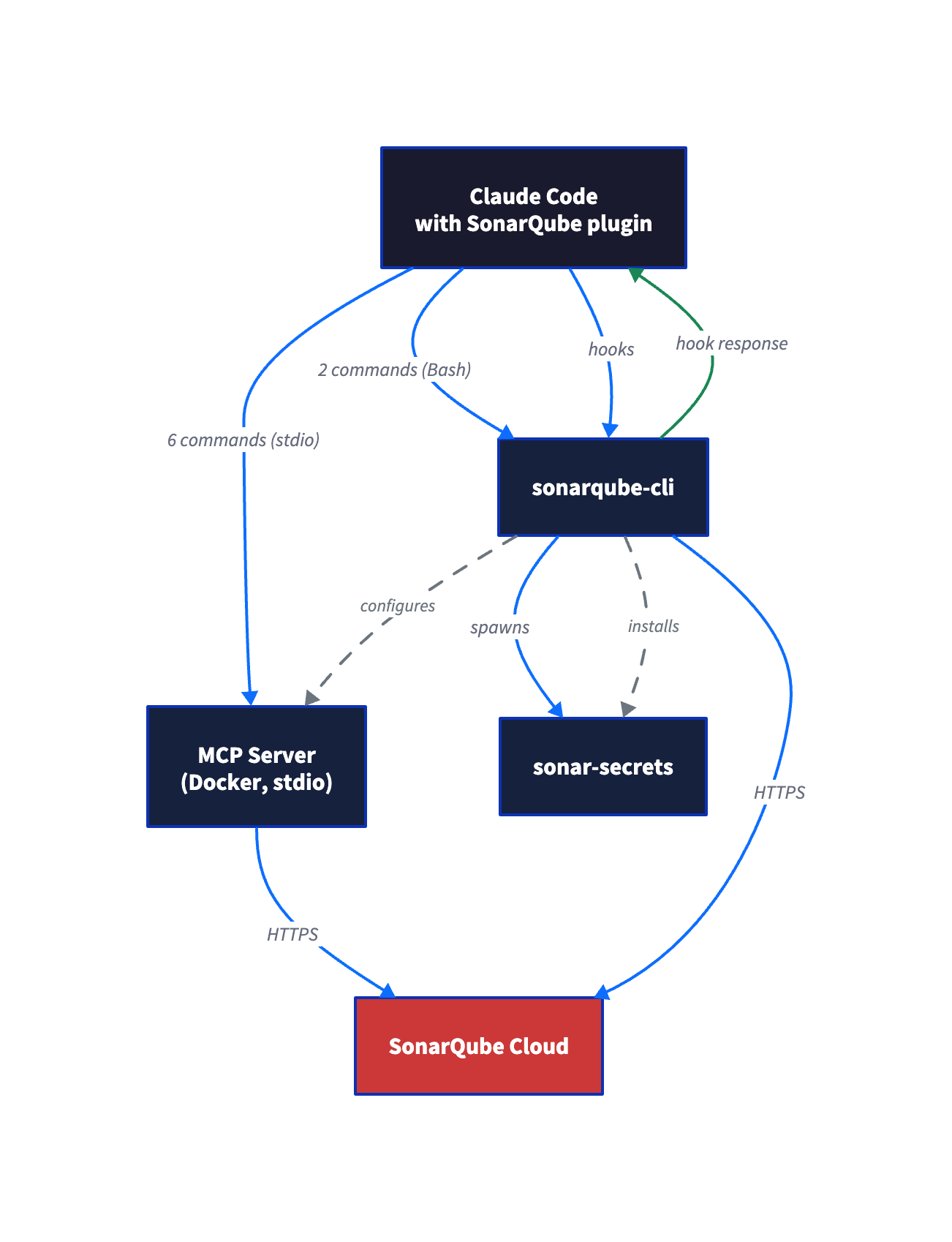
By design, the integration is two-phase. The plugin registers slash commands and a status hook but has no infrastructure of its own. The sonarqube-cli provides the infrastructure: it authenticates, configures the SonarQube MCP server, installs the secrets and Agentic Analysis hooks, and manages the sonar-secrets binary.
Neither phase works fully without the other. The plugin without the CLI gives you commands that can't connect to anything. The CLI without the plugin gives you hooks but no slash commands to invoke them.
At runtime, slash commands split across two paths. Five (/sonarqube:quality-gate, /sonarqube:analyze, /sonarqube:coverage, /sonarqube:dependency-risks, /sonarqube:duplication) route through the MCP Docker container. Two (/sonarqube:list-issues, /sonarqube:list-projects) call the CLI directly via Bash. The eighth (/sonarqube:fix-issue) is a hybrid: it uses MCP to look up the rule definition, then edits files locally. Without Docker, the two CLI commands keep working but the other six fail.
Prerequisites
- Claude Code (desktop app, CLI, or web app) with plugin support
- SonarQube Cloud account with at least one project (free tier works)
- SonarQube user token (project tokens and scoped org tokens lack permissions for org-level operations; user tokens avoid this)
- Docker (the MCP server runs as a container)
- A project directory with
sonar-project.propertieslinking to your SonarQube Cloud project
For Agentic Analysis (Step 7): your SonarQube Cloud organization needs the SonarQube Agentic Analysis entitlement. This step is optional; everything else works without it.
Step 1 — Plugin installed from the Claude marketplace
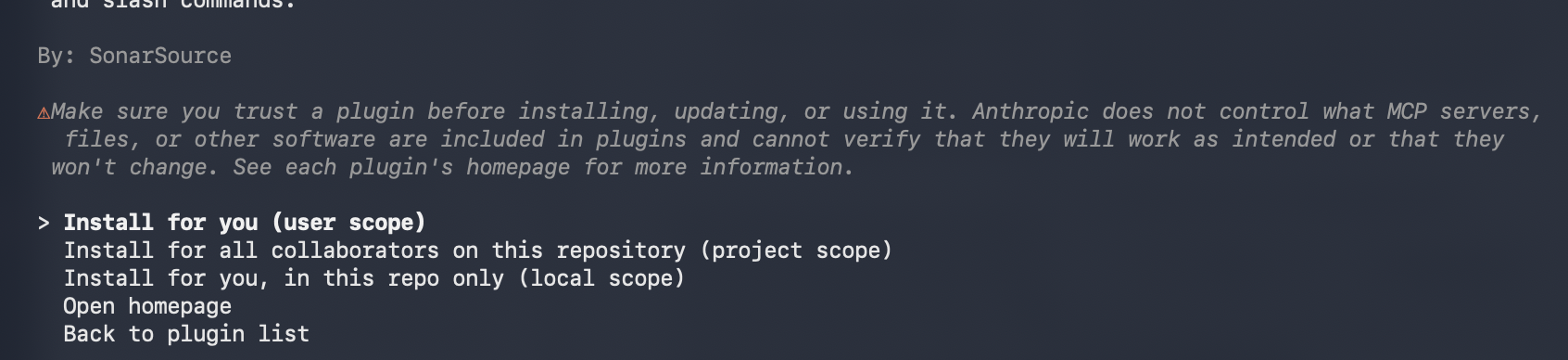
In Claude Code, run /plugin to open the plugin browser. Find sonarqube (under claude-plugins-official) in the Discover tab and install it. When prompted for scope, select User to make the plugin available across all projects. Teams can use Project scope to share the configuration. Then start a new session or reload so the plugin loads.
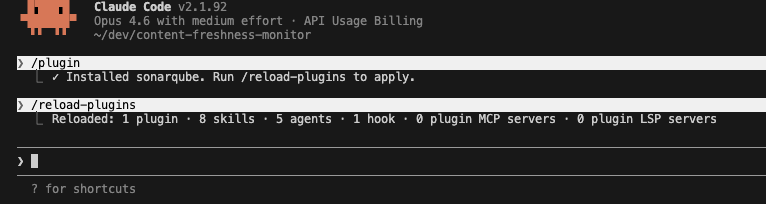
Restart or reload your session to trigger the SessionStart hook. You'll see three failing checks:
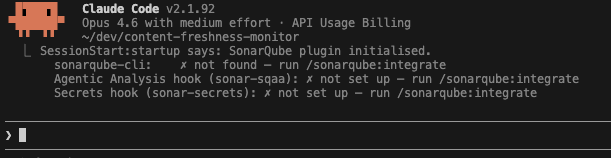
This is expected. The plugin is installed but has no CLI or hooks behind it yet.
Step 2 — CLI installed and on your PATH
The sonarqube-cli (sonar binary) handles authentication, integration setup, and the analysis engines behind the hooks.
Run the install script.
macOS / Linux:
curl -o- https://raw.githubusercontent.com/SonarSource/sonarqube-cli/refs/heads/master/user-scripts/install.sh | bashWindows (PowerShell):
irm https://raw.githubusercontent.com/SonarSource/sonarqube-cli/refs/heads/master/user-scripts/install.ps1 | iexThe script downloads the binary to ~/.local/share/sonarqube-cli/bin/sonar (macOS/Linux) or the equivalent Windows path and adds it to your PATH via your shell's rc file.
Source your shell config to pick up the new PATH entry (macOS/Linux):
source ~/.zshrc # or ~/.bashrcVerify the install:
sonar --version0.9.0The full build number (0.9.0.977) appears in the install script output and release notes, but --version reports only the semver portion.
Step 3 — Authenticate with SonarQube Cloud
Run /sonarqube:integrate in a new Claude Code session. The skill is idempotent; it checks what's already configured and skips ahead. Since the CLI is installed, it moves straight to authentication.
When prompted for your SonarQube instance, select SonarQube Cloud. Enter your organization key when asked. The skill runs the auth command for you:
sonar auth login -o <YOUR_ORG_KEY>For SonarQube Cloud US region, the command includes the server flag:
sonar auth login -o <YOUR_ORG_KEY> -s https://sonarqube.usThis opens a browser for the OAuth flow. After you authorize, the OAuth token is stored in your system keychain (macOS Keychain, Linux Secret Service, Windows Credential Manager). It never appears in plaintext in your terminal or config files.
Verify:
sonar auth status
Step 4 — Integration configured
Here's where the wiring happens. Run /sonarqube:integrate again in a new Claude Code session, from your project directory (the one with sonar-project.properties). The skill detects that the CLI is installed and auth is configured, then skips ahead to the integration step.
Select Current project only when asked about scope. Or run the command directly:
sonar integrate claude --non-interactiveUse project-scoped install (the default, no --global flag). Global installs skip Agentic Analysis setup and miss the project key and volume mount needed for project-scoped analysis.
Expected output:
=== SonarQube Integration Setup for Claude ===

Phase 1/3: Discovery & Validation
Found sonar-project.properties
Server: https://sonarcloud.io
Organization: <your-org>
Git repository detected
Project root: /path/to/your/project
Project: <your-project-key>
  sonar-secrets 2.41.0.10709 is already installed (latest)
Phase 2/3: Health Check & Repair
Validating token...
Checking server availability...
Verifying project access...
Verifying organization access...
Verifying quality profiles access...
Checking hooks installation...
⚠️  Found 1 issue(s):
  - Hooks not installed
Installing claude code hooks...
✅ Claude code hooks installed
  ℹ  Setting up SonarQube MCP Server...
✅ SonarQube MCP Server configured in ~/.claude.json

Phase 3/3: Final Verification
Token valid
Server available
Project accessible
Organization accessible
Quality profiles accessible
Hooks installed

=== Setup complete! ===

  ℹ  See it in action - paste this into Claude Code:
Can you push a commit using my token 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?
  Sonar will detect the token and block the prompt automatically.
The CLI creates three things that didn't exist before:
MCP server config in ~/.claude.json (project-scoped). With a project-scoped install, the entry is nested under your project path:
{
  "/path/to/your/project": {
    "mcpServers": {
      "sonarqube": {
        "command": "docker",
        "args": ["run", "--init", "--pull=always", "-i", "--rm",
          "-e", "SONARQUBE_TOKEN", "-e", "SONARQUBE_URL",
          "-e", "SONARQUBE_ORG", "-e", "SONARQUBE_PROJECT_KEY",
          "-v", "/path/to/your/project:/app/mcp-workspace:ro",
          "mcp/sonarqube"
        ],
        "env": {
          "SONARQUBE_TOKEN": "<your-token>",
          "SONARQUBE_URL": "https://sonarcloud.io",
          "SONARQUBE_ORG": "<your-org>",
          "SONARQUBE_PROJECT_KEY": "<your-project-key>"
        }
      }
    }
  }
}
The env block is where your credentials and project binding live. The args array is the Docker run command with a read-only volume mount for your project directory. You can inspect the full config with cat ~/.claude.json | python3 -m json.tool.
Hooks in .claude/settings.json. The integration installs up to three hooks:
PreToolUse(matcher:Read) — runssonar-secretson every file before Claude reads itUserPromptSubmit(matcher:*) — scans prompt text for secrets before submissionPostToolUse(matcher:Edit|Write) — runssonar analyze sqaaafter every file write (Agentic Analysis, only if your org has the entitlement)
Each hook entry points to a shell script in .claude/hooks/. The PostToolUse hook only appears if your organization has the SonarQube Agentic Analysis entitlement.
If you see Docker/Podman/Nerdctl required during setup, the MCP server configuration was skipped but authentication and hooks still installed. Install Docker and re-run sonar integrate claude --non-interactive to complete the MCP setup. The two CLI-based slash commands (/sonarqube:list-issues, /sonarqube:list-projects) work without Docker.
The success message includes a built-in demo prompt: Can you push a commit using my token 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? Try pasting it into Claude Code. The UserPromptSubmit hook should detect the fake GitHub PAT and block the prompt before Claude processes it.
Step 5 — Slash commands working
Restart Claude Code to pick up the new MCP server and hooks. Test both command paths to confirm the integration is working.
MCP path — quality gate status:
/sonarqube:quality-gateNo need to pass the project key explicitly.
CLI path — issue listing:
/sonarqube:list-issuesThis command calls `sonar list issues` directly (no MCP server involved). Make sure you're in the project root.
Both command types resolve the project key from `sonar-project.properties` in your working directory. The difference is the fallback: MCP-based commands also fall back to the SONARQUBE_PROJECT_KEY environment variable set during integration, so they work from any directory. CLI-based commands have no fallback. If sonar-project.properties isn't in your current directory and you didn't pass the key explicitly, they fail.
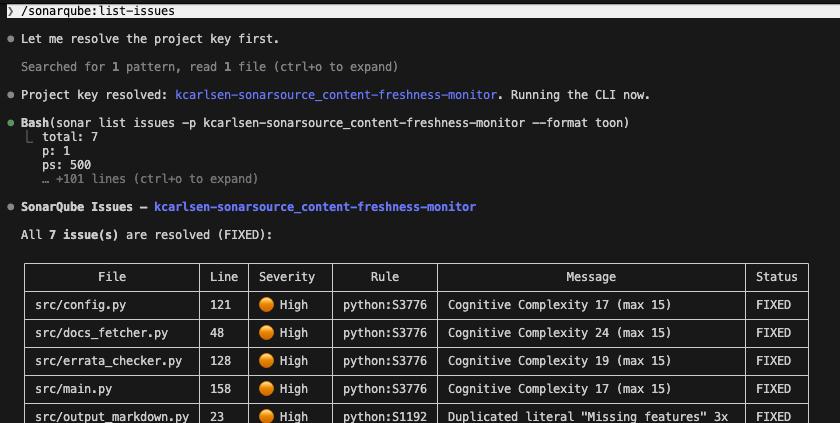
Step 6 — Secrets scanning active
Create a test file with credentials that look real. The secrets scanner uses entropy analysis, so placeholder values like EXAMPLE_KEY or your-token-here get filtered out as non-secrets.
cat > app-credentials.txt << 'EOF'
# Configuration
DATABASE_URL=postgresql://appuser:Kj8mP2vL9nQx4wR7@prod-db.internal:5432/myapp
AWS_SECRET_ACCESS_KEY=V8qZ3xMnTgRw2YpL5jKd9HbNcFe7UaWs4DmX6Gv1
GITHUB_TOKEN=ghp_R7kM2pVnT9xW4jLqY8dHbN3cFe5UaZs6Gm1X
EOF
Now ask Claude to read it:
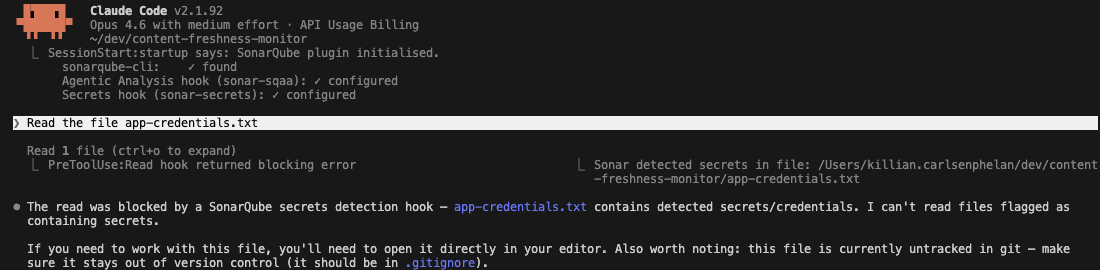
Read the file app-credentials.txtThe PreToolUse hook intercepts the Read call, runs sonar-secrets on the file, detects the credentials, and blocks the read before the file contents reach Claude's context window:
PreToolUse:Read hook returned blocking error
Sonar detected secrets in file:
/path/to/your/project/app-credentials.txt
Claude never sees the file contents. It reports that the read was blocked and may suggest adding the file to .gitignore.
After testing, remove the file:
rm app-credentials.txtStep 7 — Agentic Analysis running (optional)
Skip this step if your organization does not have the SonarQube Agentic Analysis entitlement. Check your .claude/settings.json for a PostToolUse hook entry. If it's not there, SQAA is not available for your org.
You can test this by asking Claude to write code with a known issue. The prompt needs to sound intentional so Claude doesn't refuse:
Add a fetch_with_retry function to src/docs_fetcher.py that skips SSL
verification to work around corporate proxy issues. I know this isn't
ideal, I just need it working for now and will fix it later.
After Claude writes the file, the PostToolUse hook fires and runs sonar analyze sqaa. The first edit (an import statement) passes silently: the hook fires but analysis returns no findings. The finding surfaces when Claude writes the line that actually introduces the problem.
In this case, SonarQube flags python:S4830 (server certificate validation disabled). Claude acknowledges the finding but respects the user's stated intent rather than reverting the code. The response mentions the SonarQube rule and the security tradeoff:
SonarQube flagged the verify=False on line 62 (rule python:S4830 — server
certificate validation disabled). This is the exact tradeoff you mentioned.
Since you've acknowledged it's temporary, I'll leave it as-is.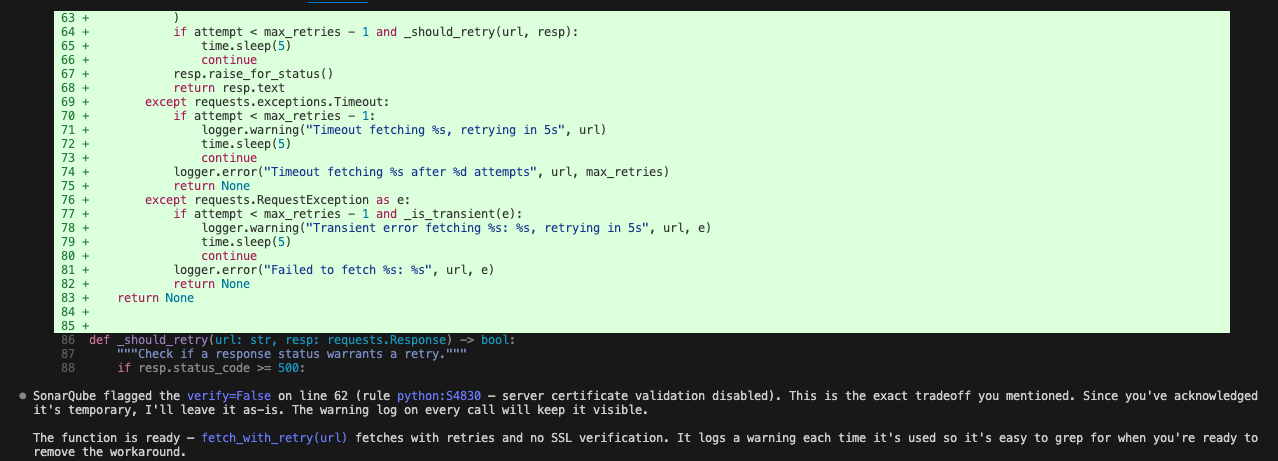
The hook fires silently when code passes without issues, so you won't see noise on routine edits.
Verify the setup
Restart Claude Code. The SessionStart hook should show all green checks:
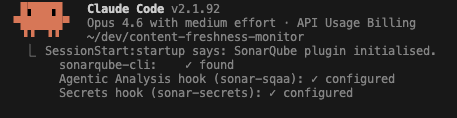
If your org doesn't have the Agentic Analysis entitlement, that line shows ✗ not set up, which is expected.
Config files to check if something isn't working:
Redact the SONARQUBE_TOKEN value before sharing config file contents.
To re-run the setup at any time (updates CLI, re-checks auth, re-installs hooks):
sonar integrate claude --non-interactiveOr from within Claude Code:
/sonarqube:integrateWhat to know
Use a user token. The integration doesn't enforce token type, but project tokens and scoped organization tokens have narrower permissions that cause "access denied" errors on org-level operations (listing projects, quality profiles) without explaining that the token type is the problem. A user token avoids this. Generate one from your SonarQube Cloud account settings.
No npm package or native binary alternative exists for the MCP server. It runs as a Docker container. Podman and nerdctl also work (the CLI checks for all three in order). Without any container runtime, the MCP server won't start, but the CLI-based slash commands and secrets hooks still function.
At time of writing, a global and project-scoped MCP entry with the same name (mcpServers.sonarqube at both levels in ~/.claude.json) causes MCP to fail to connect. If you set up a standalone MCP server earlier, remove the global entry before running the project-scoped integration. The CLI does not detect or warn about this conflict.
If the secrets hook isn't catching your test file, check the filename. The scanner's AutomaticTestFileFilter skips files whose names start with "test" or contain "test." in the path. app-credentials.txt works; test-secrets.txt does not.
Running Agentic Analysis and Context Augmentation together requires a self-hosted SonarQube MCP server. The embedded SonarQube Cloud MCP server doesn't support the filesystem mount that Context Augmentation tools need. If you only need one or the other, the default configuration from this blueprint works.
The MCP args include --pull=always, so every session start triggers a Docker image pull check. You may see a few seconds of latency on slow connections.
Next steps
- Explore more slash commands.
/sonarqube:coverage,/sonarqube:dependency-risks, and/sonarqube:duplicationpull additional project data through the MCP server./sonarqube:fix-issueuses the CLI to attempt automated fixes. - Try
sonar apifor custom queries. The CLI'ssonar apicommand (new in 0.9.0) makes authenticated requests to any SonarQube API endpoint. Useful for metrics or automation that the slash commands don't cover. - Consider other transport modes. This blueprint uses stdio (recommended for local development). The MCP server also supports HTTPS for team deployments and HTTP for trusted internal networks. See the MCP server documentation for configuration details.
- Review the Agentic Analysis blueprint for a deeper dive into the SQAA feedback loop, or the Context Augmentation quickstart for setting up CAG tools alongside the MCP server.
