

TL;DR overview
- SonarQube's taint analysis traces data from where it enters an application to where it reaches a dangerous operation, catching injection vulnerabilities across file and method boundaries.
- AI coding agents reproduce SQL injection patterns from training data, and the code generation loop does not follow data across call boundaries to catch these patterns.
- The execution flow view annotates each hop in the taint chain, showing exactly how user-controlled data reaches the vulnerable database call.
- The same source-to-sink model applies to every taint-traced finding, from XSS to path traversal, making the capability transferable.
SQL injection has been in the OWASP Top 10 for over a decade, and AI coding agents keep producing it. Invicti analyzed Copilot's security suggestions and found that likely because the model is trained on public repositories including non-production code, its suggestions can reproduce the same insecure patterns. The injection path continues to exist despite code compiling and tests passing because nothing in the generation loop follows the data across method call boundaries.
SonarQube's taint engine catches these by building a data flow graph of every assignment, method call, and parameter passing in your code, then following the data from where it enters the application to where it gets used in a dangerous operation. Below we will trace a single SQL injection finding across three Spring Boot files, from the HTTP request parameter where tainted data enters to the database call where it arrives unsanitized.
Prerequisites
- A SonarQube Cloud account (any plan, including Free) or SonarQube Server Developer Edition or higher. Note: the Free plan analyzes main-branch code only. See plans and pricing. SonarQube Community Build does not support taint analysis and has very limited security coverage.
- Java 17 or higher, Maven
The taint chain
The app we’re using is a minimal Spring Boot 3 API with a single endpoint: GET /users/search?name=.... The vulnerability arises from the following three classes:
UserController.java accepts the request parameter and passes it to the service:
@GetMapping("/users/search")
public List<User> searchUsers(@RequestParam String name) {
    return userService.findUsersByName(name);
}
UserService.java passes it straight to the repository:
public List<User> findUsersByName(String name) {
    return userRepository.searchByName(name);
}
UserRepository.java uses the value to build a SQL string:
public List<User> searchByName(String name) {
    String sql = "SELECT * FROM users WHERE name = '" + name + "'";
    return jdbcTemplate.query(sql, new BeanPropertyRowMapper<>(User.class));
}
To both human eyes and AI, the controller and service look unremarkable in isolation. UserService.java is a standard pass-through; nothing in that method necessarily signals a problem because the problem isn't there. The string concatenation in UserRepository.java is where the vulnerability lives, but you'd only know that name was dangerous if you knew it came from an HTTP request parameter two method calls away. Unfortunately, static analysis that examines files in isolation can’t make that connection.
SonarQube’s finding
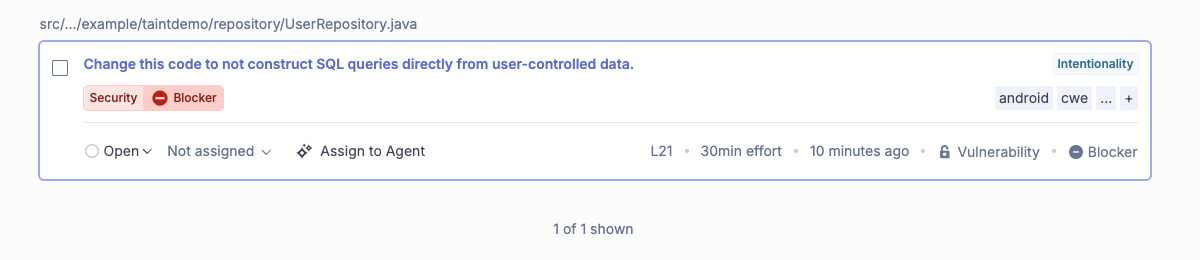
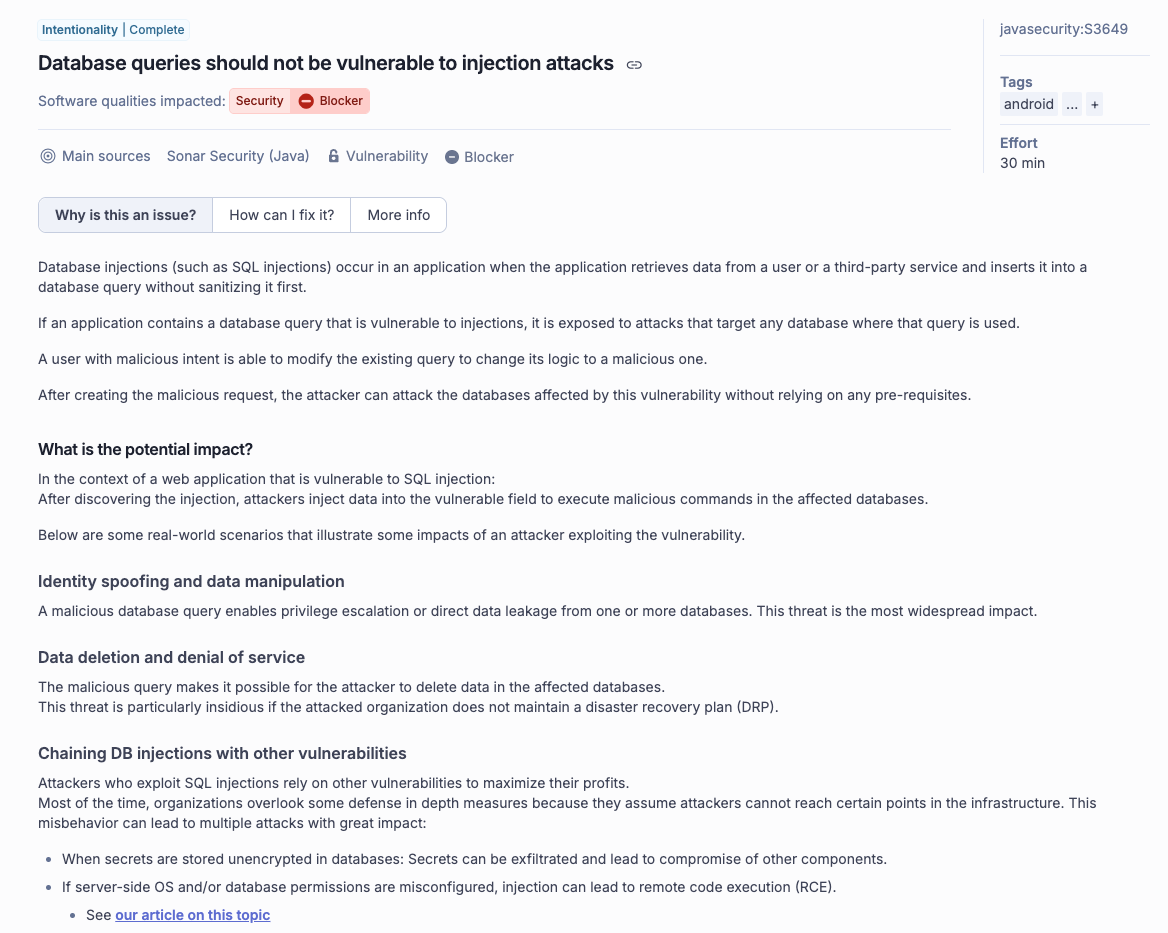
After scanning, SonarQube returned one issue: rule javasecurity:S3649 at BLOCKER severity, with Security impact, mapping to CWE-89 and OWASP Top 10 2021 A03.
The finding lands on jdbcTemplate.query() in UserRepository.java, which is the right location. However, this finding alone doesn't explain how SonarQube knew that the name argument to searchByName() was user-controlled. In order to find that out, you have to look in the execution flow.
Reading the execution flow
In the left sidebar, you'll see "1 execution flow"; click it and SonarQube expands 12 numbered steps (in this example), grouped by file.
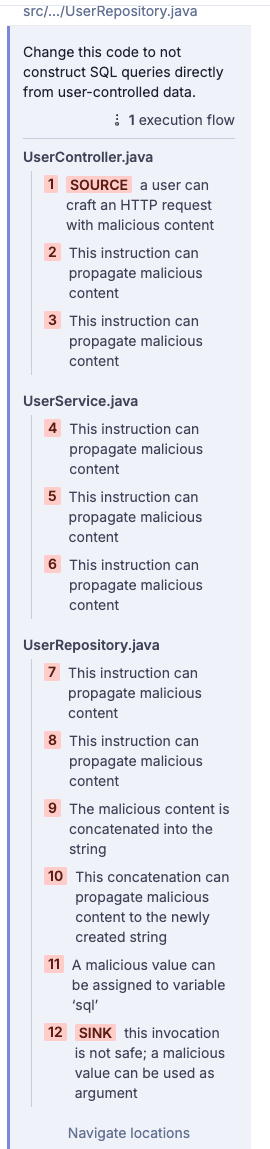
Step 1 is labeled SOURCE: "a user can craft an HTTP request with malicious content." That annotation sits on the @RequestParam String name declaration in UserController.java. SonarQube recognizes Spring MVC's @RequestParam as a taint source, an entry point where externally supplied data enters the application, and marks everything that flows from it as potentially tainted.
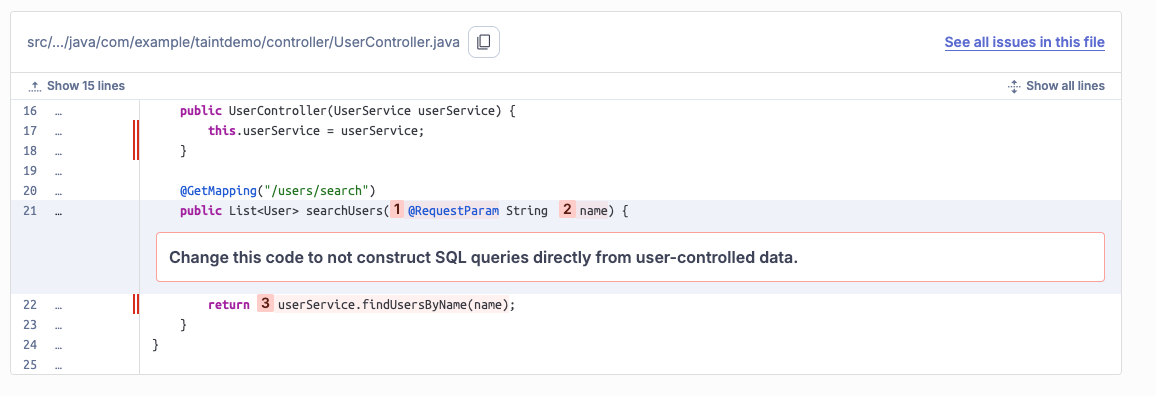
Steps 2 and 3 document the parameter passing through the controller. Steps 4, 5, and 6 track it through UserService.findUsersByName(), a single-line pass-through that takes the tainted name and hands it to the repository. SonarQube continues to follow along because taint analysis keeps going as long as the data keeps moving, unhindered by method boundaries.
Starting at step 9, each annotation in UserRepository.java describes what's happening to the tainted value:
- Step 9: "The malicious content is concatenated into the string"
- Step 10: "This concatenation can propagate malicious content to the newly created string"
- Step 11: "A malicious value can be assigned to variable
sql"
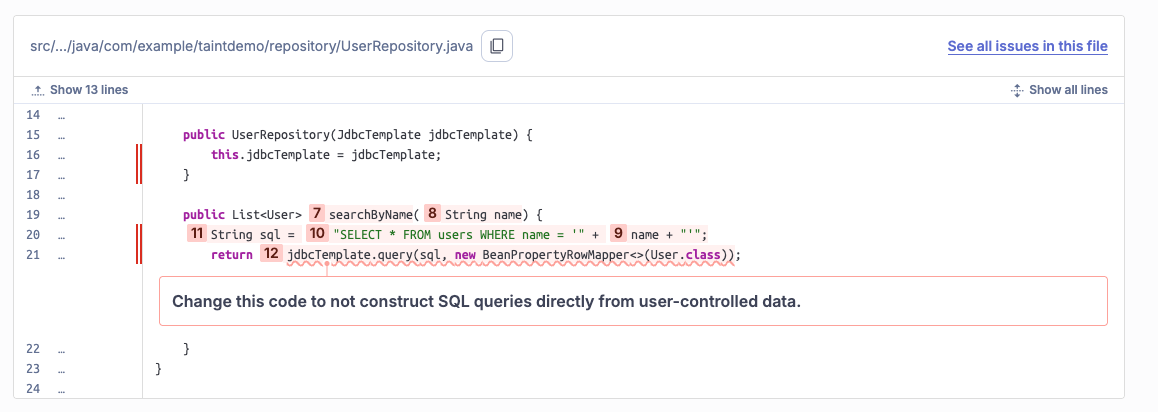
Step 12 is labeled SINK: "this invocation is not safe; a malicious value can be used as argument." That's jdbcTemplate.query(sql, ...) on line 21, the database call where the tainted string gets executed.
The 12 steps serve as proof that begins with user-controlled data entered at @RequestParam, traveled through findUsersByName() unchanged, got concatenated into a SQL string, and arrived at jdbcTemplate.query() without ever being sanitized. A scanner that only read UserRepository.java in isolation might flag the concatenation, but it couldn't confirm that name was actually user-controlled, which SonarQube is able to do because it traced the data across all three files.
What can the injection do?
Opening the issue shows three impact categories in the "Why is this an issue?" tab: specifically, identity spoofing, data manipulation and deletion, and in database configurations with elevated permissions, remote code execution. The finding maps to CWE-89 and OWASP Top 10 A03 (Injection), which has remained on the OWASP list for over a decade because this pattern keeps surfacing in production code.
Fixing the taint chain
The "How can I fix it?" tab auto-detects your framework (SonarQube selected Spring for this project) and covers Hibernate, Java JDBC API, Couchbase, and the Spring Data drivers for Cassandra and Neo4j.
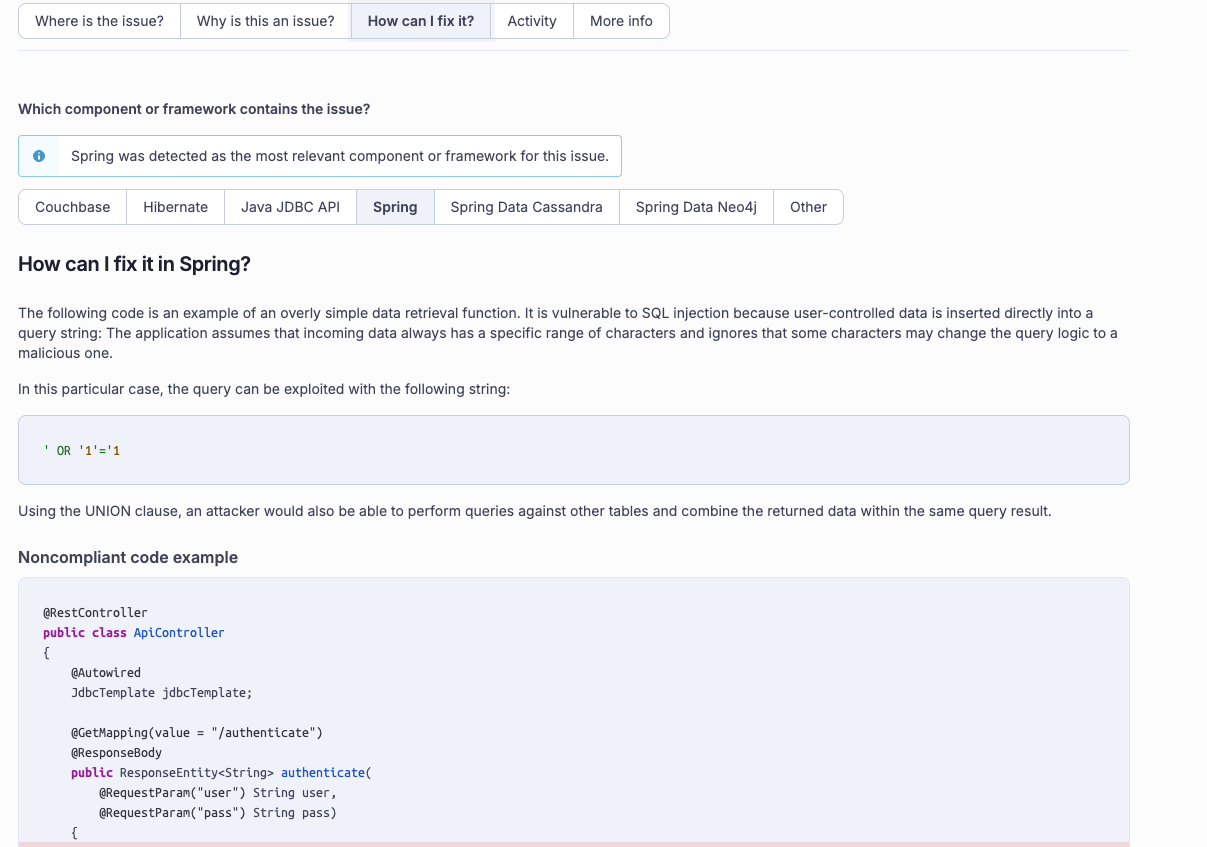
The fix for searchByName() is a one-line change:
// before
String sql = "SELECT * FROM users WHERE name = '" + name + "'";
return jdbcTemplate.query(sql, new BeanPropertyRowMapper<>(User.class));

// after
String sql = "SELECT * FROM users WHERE name = ?";
return jdbcTemplate.query(sql, new BeanPropertyRowMapper<>(User.class), name);
The tab explains that when you use a prepared statement, the database server compiles the query logic before the application passes the actual values. The ? placeholder becomes a parameter, the query structure is frozen at that point, and whatever string arrives as name gets treated as data rather than SQL. An attacker can inject '; DROP TABLE users;-- and it won't execute as the database treats it as a literal string value, not an instruction.
SonarQube traced the path from source to sink, told you what to fix and where, identified your framework, and surfaced the fix pattern, all without you having to leave the issue page.
What the next taint finding looks like
Every taint-traced finding has a structure consisting of a source where externally controlled data enters the application (HTTP parameters, form fields, file contents), a propagation chain of assignments and method calls that carry it through the codebase, and a sink where it reaches a dangerous operation.
When opening the execution flow on an XSS finding, you'll see the same numbered steps from @RequestParam to response.getWriter().write(), and for path traversal, from user input to new File(path).
SonarQube uses this model across nine languages including Java, Javascript, Typescript, Python, C#, Go, and PHP. For Java, the taint rules cover JPA, Hibernate, raw JDBC, and the Spring Data drivers, so the execution flow view works regardless of which database layer your team uses.
