

TL;DR overview
- Sonar Context Augmentation is a tool that injects real-time SonarQube intelligence, like coding standards and architecture awareness, directly into AI agent workflows.
- This integration eliminates the rework tax by guiding AI coding agents like Claude Code to follow project-specific rules before generating code.
- Developers use the SonarQube MCP Server and a project-level CLAUDE.md file to automate the "Guide-and-Verify" loop during the development cycle.
- The solution reduces technical debt by ensuring AI-generated outputs pass SonarQube analysis and align with existing codebase structures and dependencies.
AI coding agents generate code that compiles, passes basic tests, and looks reasonable in isolation. What they don't know is your project's coding standards, the issues SonarQube has flagged on the files they're about to edit, or how your codebase is actually structured. That gap between "works in a vacuum" and "meets your team's bar" creates a rework tax on every pull request.
Sonar Context Augmentation closes that gap. It extends the SonarQube MCP Server with tools that dynamically inject your project's SonarQube analysis (coding guidelines, architecture awareness, semantic code navigation) directly into your agent's workflow. The standard MCP tools report issues and quality gate status after code exists. Context Augmentation feeds your agent the right context in the inner loop, before it writes anything.
In the Agentic Centric Development Cycle (AC/DC), the Guide stage is what happens before an agent writes a single line of code, defining the rules of engagement: your standards, your architecture, your guardrails. Without it, agents generate code in a vacuum. Context Augmentation is Sonar's implementation of that stage: it feeds the agent the right context from SonarQube automatically, so the output fits your codebase from the start.
By the end of this walkthrough, you'll have Context Augmentation running in Claude Code, and you'll watch the agent call get_guidelines automatically before touching a single file.
Prerequisites
- SonarQube Cloud Teams (annual or monthly) or Enterprise plan
- A SonarQube Cloud project analyzed via CI pipeline (not Automatic Analysis) with a long-lived branch
- Docker installed and running SonarQube MCP Server
- Claude Code installed
- A SonarQube Cloud personal access token (My Account > Security > Generate Token)
Step 1: Configure the MCP file
Context Augmentation is enabled through the SonarQube MCP Server. You'll add a project-level .mcp.json file to your repo root (not a global config directory) because the volume mount and project key are specific to each repository.
Create .mcp.json in your project root. For the latest configuration format, check the official setup guide. Here's the structure:
{

  "mcpServers": {

    "sonarqube-context-augmentation": {

      "command": "docker",

      "args": [

        "run", "-i", "--rm", "--pull=always",

        "-e", "SONARQUBE_URL",

        "-e", "SONARQUBE_TOKEN",

        "-e", "SONARQUBE_ORG",

        "-e", "SONARQUBE_PROJECT_KEY",

        "-e", "SONARQUBE_TOOLSETS",

        "-v", "/ABSOLUTE/PATH/TO/YOUR/PROJECT:/app/mcp-workspace:rw",

        "mcp/sonarqube"

      ],

      "env": {

        "SONARQUBE_URL": "https://sonarcloud.io",

        "SONARQUBE_ORG": "<YourOrganizationKey>",

        "SONARQUBE_PROJECT_KEY": "<YourProjectKey>",

        "SONARQUBE_TOOLSETS": "cag,projects,analysis",

      }

    }

  }

}
Three things to get right:
- Volume path must be absolute. Replace
/ABSOLUTE/PATH/TO/YOUR/PROJECTwith the full path to your local clone (e.g.,/Users/yourname/projects/myapp). Relative paths like./cause silent failures. On Windows, use forward slashes:C:/Users/yourname/projects/myapp. - Docker pulls the latest image automatically. The
--pull=alwaysflag ensures you're running the current version of the SonarQube MCP Server each time Claude Code starts. No manual download needed. SONARQUBE_TOKENis passed by reference. The config above passes the environment variable name, not the value. Docker reads it from your host environment at runtime, so the token never appears in the file.
The SONARQUBE_TOOLSETS value cag,projects,analysis enables three tool categories: the Context Augmentation tools (guidelines, architecture, navigation), project management tools, and analysis tools. Advanced analysis (the tools that verify agent-generated code after it’s written) is enabled automatically based on your token’s permissions.
Step 2: Set the token and launch Claude Code
The MCP server reads SONARQUBE_TOKEN from your host environment at runtime. The quickest way to set it:
export SONARQUBE_TOKEN="<your-personal-access-token>"

cd /path/to/your/project

claude
That works for a single session. For persistence, add the export to your shell profile (.zshrc, .bashrc) or use a tool like direnv with a gitignored .envrc file in your project root. Either way, launch Claude Code from the same terminal session where the variable is set. If you open Claude Code from a GUI launcher or a different terminal window, SONARQUBE_TOKEN won't be available and the MCP server will fail to authenticate silently.
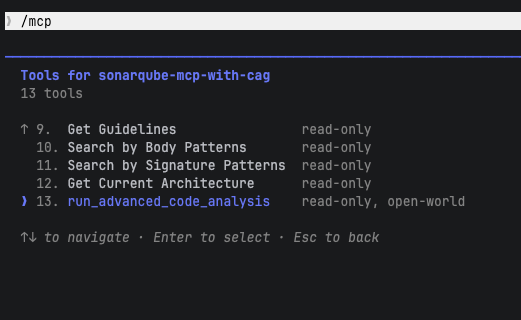
Once Claude Code starts, verify the connection. Run /mcp in the Claude Code prompt. The SonarQube MCP server should appear as connected, with Context Augmentation tools including get_guidelines, search_by_signature_patterns, and get_current_architecture listed.

Step 3: Add a CLAUDE.md directive
Without explicit instructions, Claude Code may not consistently use the Context Augmentation tools before editing code. A project-level CLAUDE.md file fixes that.
Create CLAUDE.md in your project root:
# SonarQube Agentic Workflow - Usage Directive (MUST FOLLOW)

**Always use the Guide-and-Verify workflow** for code generation and modification.

## GUIDE Phase - Before Generating Code

**Before generating or editing code** you MUST:

1. Call `get_guidelines` for project context and coding standards

2. Locate existing code with `search_by_signature_patterns` or `search_by_body_patterns`

3. Read implementation with `get_source_code`

**When changing architecture or dependencies** you MUST:

- Check `get_current_architecture` and `get_intended_architecture`

- Analyze impact using:

  - `get_upstream_call_flow` / `get_downstream_call_flow` - trace method calls

  - `get_references` - find all usages

  - `get_type_hierarchy` - check inheritance

## VERIFY Phase - After Generating Code

You must strictly follow this Analyze-Then-Commit workflow for every code modification. No code is considered complete until it has passed the following SonarQube validation loop:

1. **Read Phase:** After any modification or before commit, use the `Read` tool to load the current state of all relevant source files.

2. **Analysis Phase:** For every new or modified file, you must call `run_advanced_code_analysis` using:

   - `filePath`: The project-relative path to the file (e.g., `src/main/java/MyClass.java`)

   - `branchName`: The active development branch

   - `fileScope`: `["MAIN"]` or `["TEST"]` depending on the code type

3. **Evaluation & Remediation:**

   - **Rule Lookup:** For every issue flagged, call `show_rule` with the specific rule key (e.g., `java:S1874`)

   - **Mandatory Fixes:** You are prohibited from committing code with **CRITICAL** or **HIGH** issues. Implement fixes based on the rule's rationale and recommended guidance immediately.

4. **Verification:** After applying fixes, re-run the analysis to ensure issues are resolved and no regressions were introduced.
The file goes in the project root, not in your global Claude config. Different projects have different SonarQube configurations, and the directive should travel with the repo so every contributor gets the same behavior.
Watching get_guidelines in action
Here's the payoff. With Context Augmentation configured, you can prompt Claude Code with a natural coding task and watch the agent consult your project's SonarQube analysis before writing anything.
For this walkthrough, we're working on Microsoft's GCToolKit, a multi-module Java project for analyzing GC logs. SonarQube Cloud flagged several resource management and null safety issues in the codebase, including unclosed Stream handles (S2095: "Resources should be closed," a BLOCKER-severity reliability issue) and unsafe Optional.get() calls.
We gave Claude Code this prompt:
Fix the resource management and null safety issues in RotatingLogFileMetadata.java. The constructor accepts any path without validation, and some methods have unsafe stream and Optional usage.
Before editing a single line, Claude called get_guidelines automatically.

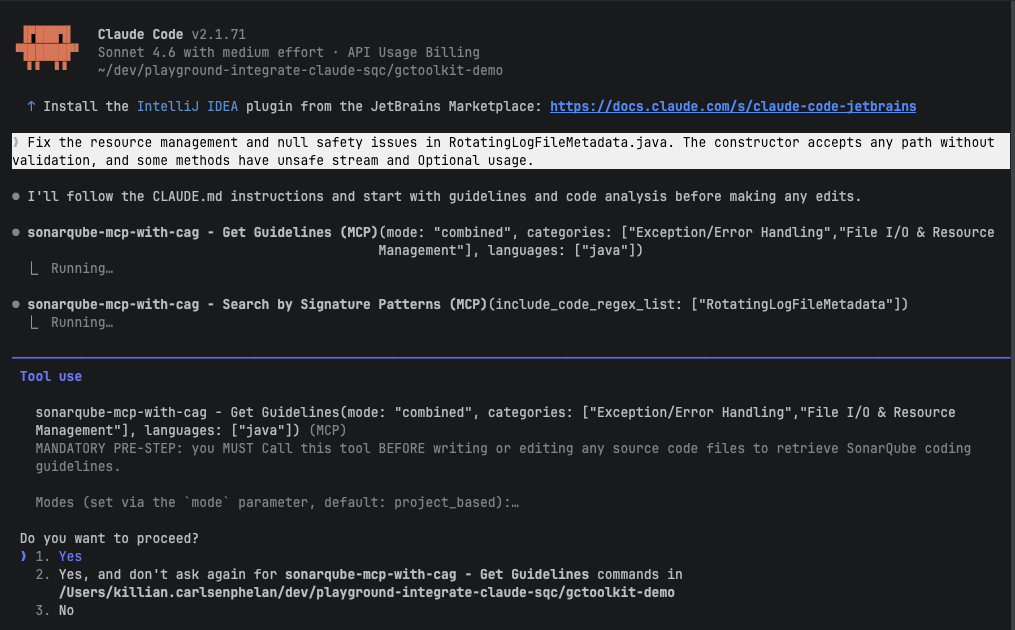
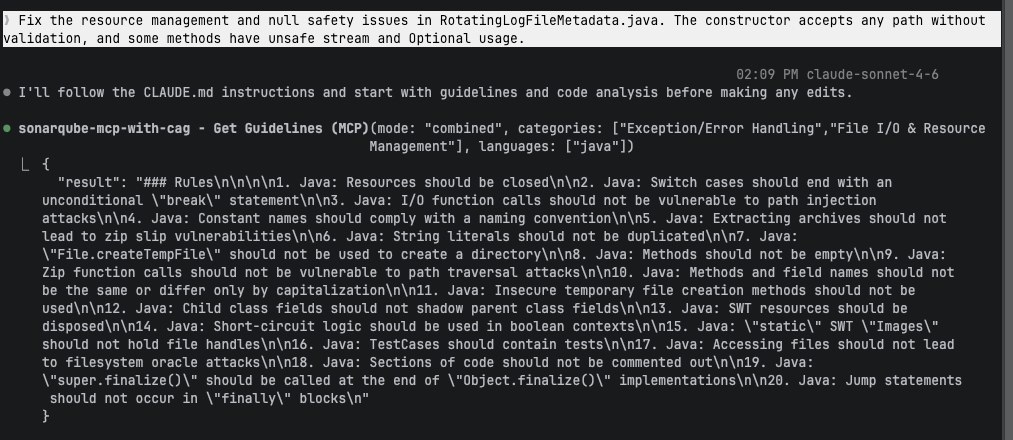
The agent didn't use a hardcoded category list. It analyzed the prompt, determined the relevant categories ("Exception/Error Handling" and "File I/O & Resource Management"), and called get_guidelines automatically. The tool merges two sources: rules relevant to the task's categories (based on prompt classification) and rules from SonarQube issues found in files related to the task.
The response contained 20 Java rules tailored to this task, including:
- "Resources should be closed"
- "I/O function calls should not be vulnerable to path injection attacks"
- "Extracting archives should not lead to zip slip vulnerabilities"
- "Zip function calls should not be vulnerable to path traversal attacks"

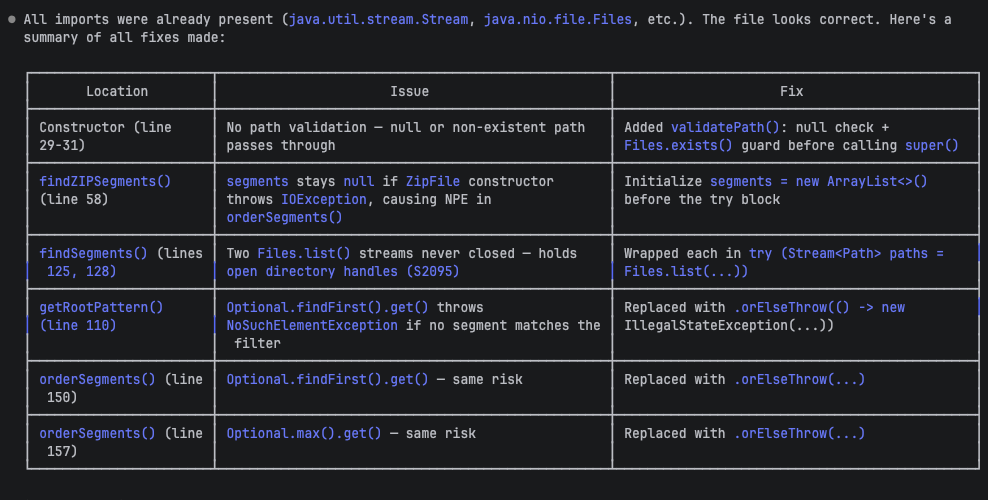
With those guidelines loaded, Claude applied six targeted fixes:
| Location | Issue | Fix |
| Constructor | No path validation; null or nonexistent path passes through | Added validatePath(): null check + Files.exists() guard |
| findZIPSegments() | segments stays null on IOException, causing NPE downstream | Initialized segments = new ArrayList<>() before the try block |
| findSegments() | Two Files.list() streams never closed (S2095) | Wrapped each in try (Stream<Path> paths = Files.list(...)) |
| getRootPattern() | Unsafe Optional.get() throws NoSuchElementException | Replaced with .orElseThrow() |
| orderSegments() (line 150) | Same unsafe Optional.get() | Replaced with .orElseThrow() |
| orderSegments() (line 157) | Unsafe Optional.max().get() | Replaced with .orElseThrow() |
The agent didn't produce generic refactoring. It consulted your project's SonarQube rules, understood which issues had historically appeared in the codebase, and wrote fixes that specifically address those patterns.

Beyond guidelines
Context Augmentation provides more than coding guidelines. It also includes architecture-aware tools that give agents a structural understanding of your codebase. These tools use the dependency graph generated by your project's analysis:
get_current_architectureandget_intended_architectureshow the agent your project's actual and planned module structure, so it respects established boundariesget_upstream_call_flowandget_downstream_call_flowtrace how functions connect, preventing the agent from introducing tangled dependenciessearch_by_signature_patternsandsearch_by_body_patternsprovide semantic, language-aware code search (not text-based grep)get_type_hierarchymaps class inheritance so the agent understands polymorphism in your codebase
What's next
Context Augmentation handles the Guide stage, giving your agent the right context before it writes code. After a coding session, you'll want to close the loop:
- Run your CI pipeline to analyze the agent's changes through SonarQube Cloud and confirm they pass the quality gate
- Use the SonarQube MCP Server's review tools for post-coding verification: pull issue details, check quality gate status, and fix anything that slipped through. See the SonarQube MCP Server quickstart.
- Read the full documentation for advanced configuration, tool reference, and architecture feature details: Sonar Context Augmentation docs
- Learn more about the Agentic Centric Development Cycle and how Guide, Generate, Verify, and Solve work together: The future is AC/DC
