

Start your free trial
Verify all code. Find and fix issues faster with SonarQube.
EmpezarTL;DR overview
- SonarQube for IDE is a free IntelliJ plugin that detects bugs, vulnerabilities, and code smells in real time as Java developers write code.
- Issues are categorized by severity (Blocker, Critical, Minor) and type, helping developers prioritize fixes without leaving the IDE.
- The plugin supports 20+ languages and technologies - including Infrastructure as Code - and detects hardcoded secrets before commits.
- A Focus on new code setting filters out legacy technical debt older than 30 days, letting teams improve quality incrementally.
You know the feeling. You write a piece of code, it compiles perfectly, the unit tests pass, and you feel confident. Then, the CI/CD pipeline fails 20 minutes later because of a security vulnerability. Or worse, a NullPointerException wakes you up on the weekend because you forgot to check if that Optional was actually present.
We all want to deliver high code quality and code security, but we are human. We get tired, and we lose focus. The problem isn't your skillset—it’s the feedback loop. Waiting for a code review or a CI server to report a mistake slows you down.
This is where SonarQube for IDE (formerly known as SonarLint) changes the workflow. It serves as your first line of defense, allowing you to catch and fix issues instantly as you write code.
In this guide, we focus on the “standalone mode”—how to install the extension and use it to solve daily coding headaches directly inside IntelliJ.
1. Get started quickly
You don't want to spend hours configuring a linter script or managing complex configuration files. That’s why SonarQube for IDE is designed to be plug-and-play, analyzing your code locally as you type.
To get started:
- Open IntelliJ IDEA.
- Go to Settings > Plugins.
- Search for SonarQube for IDE.
- Click Install and Restart .

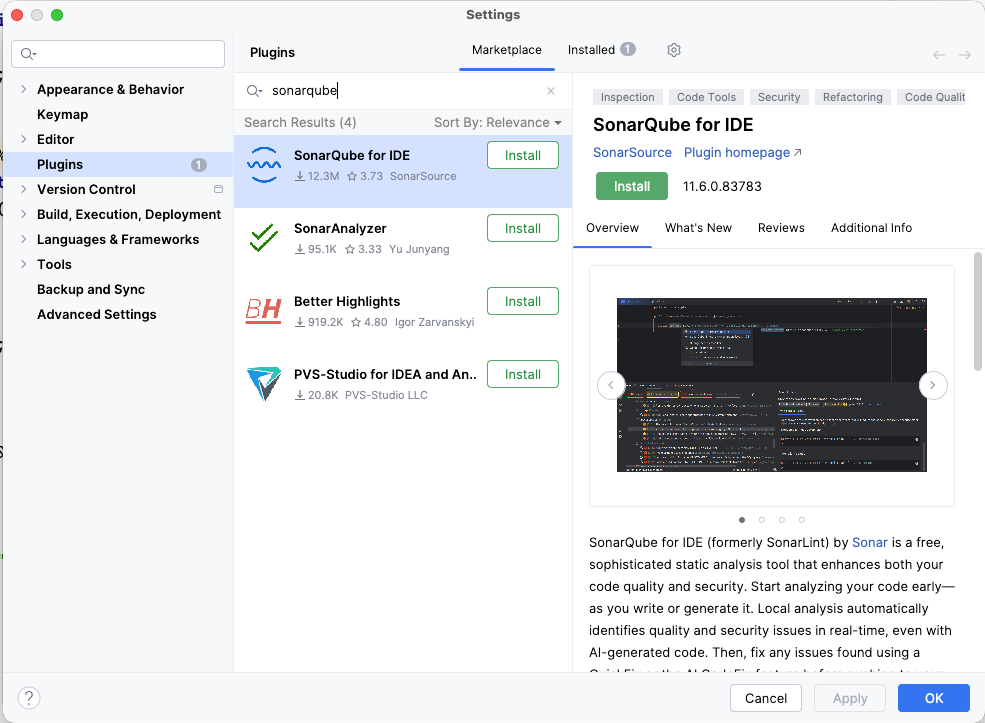
That is it. No servers to configure initially. It just works.
2. Verify code accuracy in real-time
Working quickly could mean accidentally introducing a memory leak or a security flaw.
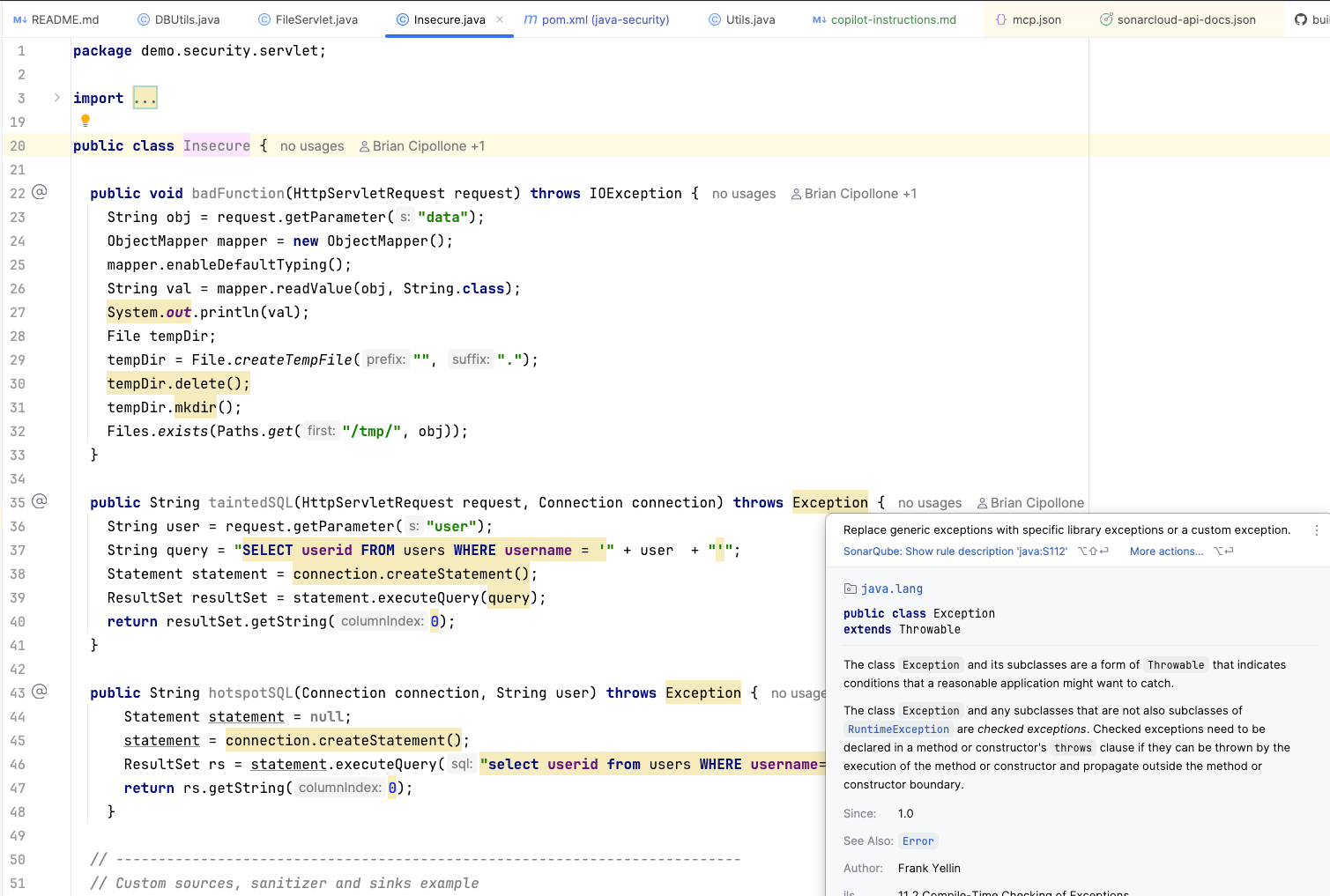
SonarQube for IDE acts like a spellchecker for your code's logic and security. It scans every single line you type in real time. You don't need to run a manual command; as soon as you write a line that introduces a risk, the extension highlights it.
- Yellow squiggly line: Indicates a code smell (confusing code or bad practice) that affects maintainability.
- Red squiggly line: Indicates a bug (broken code) or a vulnerability (security risk).
This immediate feedback catches the details that are easy to miss after staring at a screen for hours.

3. Prioritize urgent issues
If you are working on a large file, you might see multiple warnings. Which one should you fix first? The naming convention issue or the potential application crash?
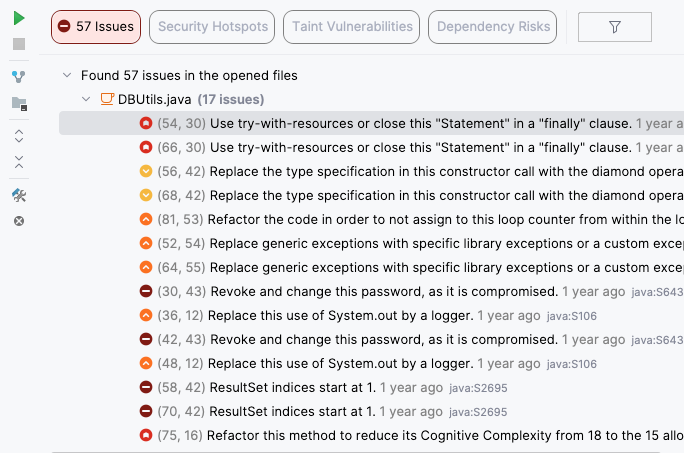
SonarQube for IDE provides the details you need to prioritize effectively. In the tool window, issues are categorized so you can make informed decisions:
- Severity: Filter by Blocker, Critical, or Minor to tackle the most dangerous issues first.
- Type: Distinguish between a Bug (fix immediately), a Vulnerability (fix immediately), or a Code Smell (fix to improve maintainability).

4. Support your full stack
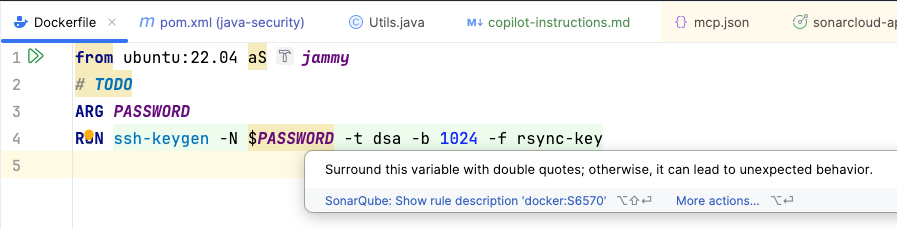
In modern projects, a Java developer rarely writes only Java. You are likely editing a Dockerfile, tweaking a Jenkinsfile, writing JavaScript for the frontend, or adjusting JSON configuration.
You do not need multiple plugins to cover these bases. SonarQube for IDE supports over 20 languages and technologies, including:
- Java
- JavaScript / TypeScript
- Python
- HTML / CSS
- Infrastructure as Code (IaC): Docker, Kubernetes, Terraform, CloudFormation .
This ensures that your deployment scripts and infrastructure definitions are just as secure as your Java classes.

5. Focus on new code
A common friction point for developers adopting quality tools is opening a legacy file and being overwhelmed by hundreds of errors created years ago.
You do not have to fix the past to improve the future. You can simply ensure that the new code is high-quality.
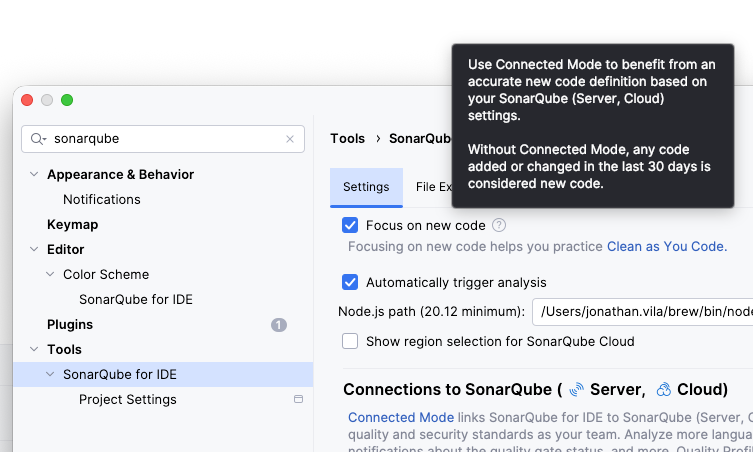
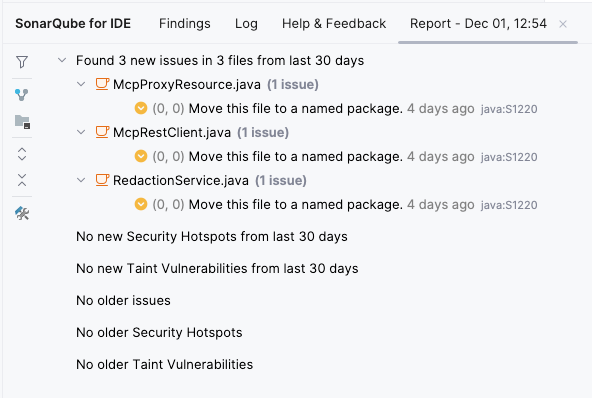
In the tool settings, you can enable Focus on new code. This feature filters out technical debt older than 30 days (default setting in standalone mode), allowing you to focus on improving code quality and security as you write, without being distracted by legacy issues.


6. Learn how to fix issues
SonarQube for IDE does not just flag errors—it helps you learn.
Real example: the "Optional" trap
Using "Optional" helps avoid nulls, but using it incorrectly can still crash the app.
Non-compliant code:
Optional<User> user = findUser("juan");

// Risk: Throws NoSuchElementException if empty

String name = user.get().getName();
The educational fix:
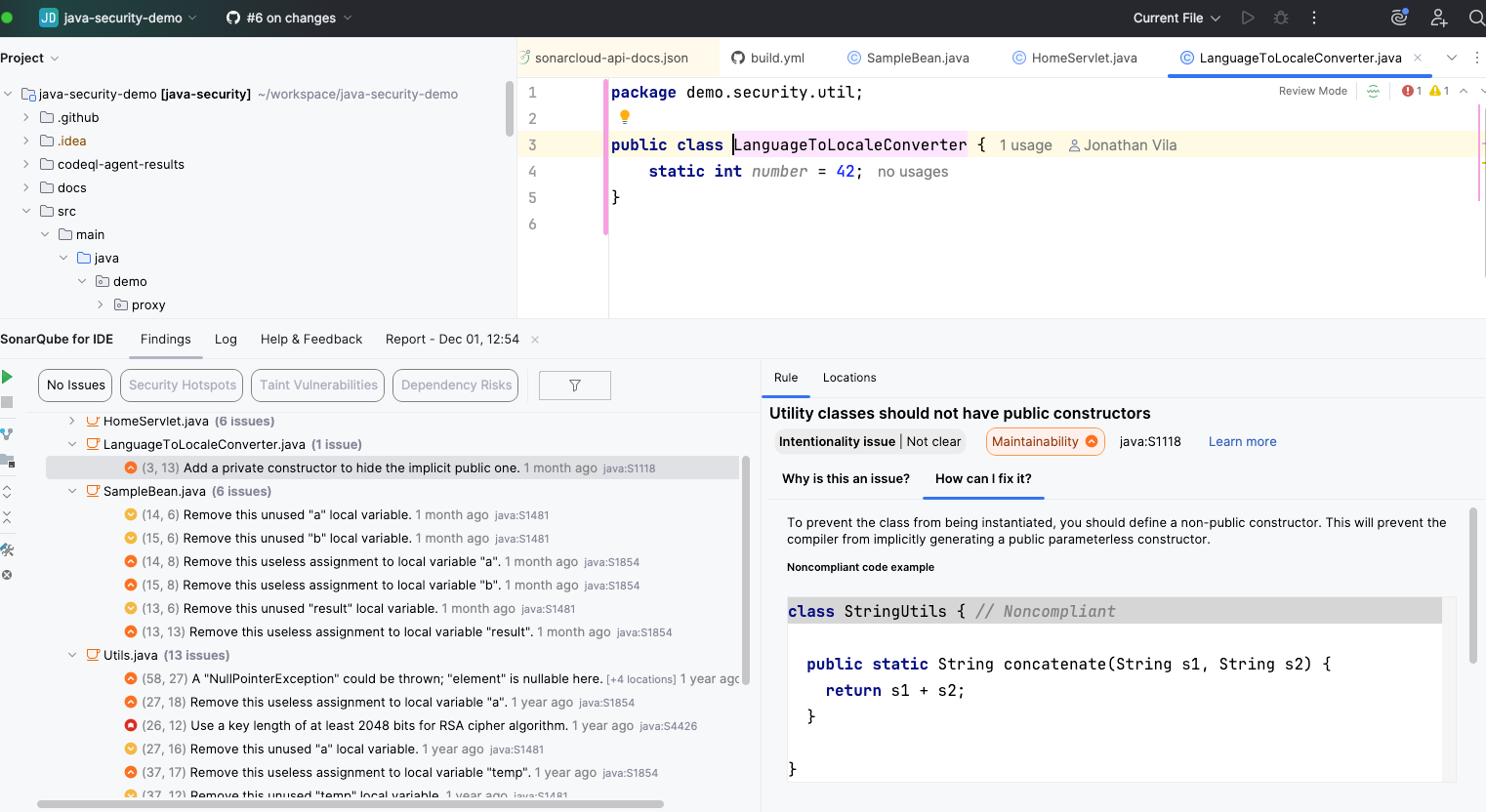
When you select an issue, SonarQube for IDE opens a Rule Description tab. This provides a clear explanation of why the code is flagged and offers "Non-Compliant" vs. "Compliant" code examples. This context turns the fix into a learning moment.

The quick fix:
For many rules, you can simply hit Alt + Enter (or Option + Enter) and let the tool automatically rewrite the code for you.
Compliant code:
String name = user.map(User::getName).orElse("Unknown");7. Detect secrets before you commit
Hardcoding credentials is a nightmare scenario. You might hardcode a password to test a database connection, intending to remove it later, but then forget and push the commit.
SonarQube for IDE includes secrets detection. It identifies strings that look like credentials—such as high-entropy strings, AWS keys, or JDBC tokens—and warns you before you commit. This safety net ensures sensitive data moves to environment variables or property files where it belongs.
Non-compliant code:
public Connection getDBConnection() {

    String url = "jdbc:mysql://localhost:3306/db";

    // SonarQube for IDE triggers a Security Hotspot here

    // "Review this potentially hardcoded secret"

    String password = "superSecretPassword123";

    return DriverManager.getConnection(url, "root", password);

}
8. Configuration control
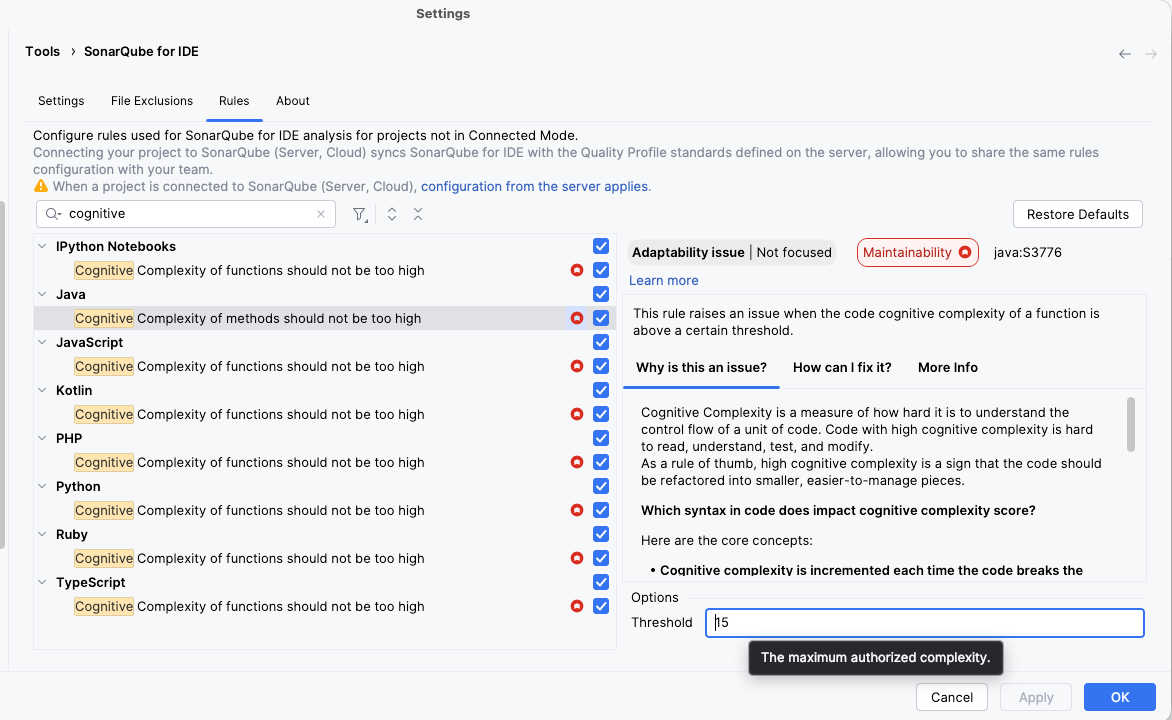
While the out-of-the-box configuration works for most teams, you remain in control. If a specific rule feels too strict for your context (e.g., method length limits), you can adjust it.
Navigate to Settings > Tools > SonarQube for IDE > Rules to disable specific rules or configure thresholds to match your preferences.

Summary
Using SonarQube for IDE is about coding with confidence. It catches logic errors, security holes, and bad practices in real-time across your entire project.
However, working in a team often requires shared standards. In Part 2 of this series, we will cover the Connected Mode superpower, which allows you to sync your local configuration with SonarQube Cloud or SonarQube Server to ensure the whole team follows the same quality profile .
