

TL;DR overview
- This guide demonstrates how to build an autonomous code review workflow by connecting Claude Code to SonarQube Cloud via the SonarQube MCP Server—enabling the AI agent to write, scan, and self-correct code in a single automated loop.
- Claude Opus 4.6 uses MCP tools to fetch real-time quality gate status and issue data from SonarQube Cloud, then autonomously fixes flagged security vulnerabilities (including a high-severity S3 bucket ownership issue) and low test coverage.
- Safety guardrails include CLAUDE.md instructions that force the agent to verify all code with the SonarQube scanner before committing, and Claude's --max-turns flag and hooks system to prevent runaway automation.
- The result is an AI agent that doesn't just write code but holds itself accountable to engineering standards—verifying that every fix passes the quality gate before any code is pushed.
Claude Opus 4.6 has just been released, and we are officially in the age of hyper-speed coding. These incredible tools are able to generate code at even more incredible speeds.
However, this capability does not come without downsides—AI tools have blindspots. Speed does not equal quality. They can introduce security vulnerabilities, use deprecated libraries, or write logic that technically works but is a nightmare to maintain 6 months from now. If you’re not careful, that means you as a software developer end up effectively being a “janitor,” having to read line by line, reviewing and cleaning up software bugs, and tediously explaining to the model what it did wrong.
But there’s a better way! We can close the loop. If we give Claude direct access to SonarQube Cloud, it can do code reviews and self correct. It can write code, scan it, realize it introduced a security hole, fix it, and then hand you the clean result.
Here is how we architect this flow:
- Agent generates code locally.
- Agent triggers the
sonar-scannerbinary to upload a snapshot. - SonarQube Cloud does the code review and processes the analysis asynchronously.
- Agent queries the SonarQube MCP Server to fetch the specific errors.
- Agent refactors the code autonomously until the Quality Gate passes.
1. Prerequisites
To follow along, you need the basic plumbing in place.
- SonarScanner CLI: The engine that packages code for analysis.
- Quick check: Run
sonar-scanner -v. (Ensure you have a Java Runtime installed).
- Quick check: Run
- SonarQube MCP Server: The bridge that allows Claude to "speak" SonarQube.
- Setup Guide: Official SonarQube MCP Docs
Note: we recommend using the manual JSON configuration.
- Claude Code: Installed and authenticated
2. Project configuration
So we don’t have to explain the project structure to the scanner every time we run a prompt, drop a sonar-project.properties file in your project root.
Create the file and paste this in:
sonar.projectKey=YOUR_PROJECT_KEY

sonar.organization=YOUR_ORG_KEY

sonar.sources=.

sonar.sourceEncoding=UTF-8

sonar.exclusions=**/node_modules/**,**/dist/**,**/.git/**,**/venv/**

sonar.qualitygate.wait=true
3. Behavior enforcement
We need to tell Claude that quality isn’t optional. We can do this by creating an CLAUDE.md file in the root directory
1. You MUST verify All generated code before asking me to push.

2. To verify code, run the `sonar-scanner` command.

3. When running the scanner, use the `SONAR_TOKEN`, which I will have exported in the session.

4. After scanning, use your MCP tools to check the Quality Gate status or read the scanner output to identify issues.

5. If SonarQube reports bugs or smells, fix them immediately and re-scan. If low test coverage is causing a failed quality gate, you MUST treat this as a blocking issue requiring code generation (Unit Tests).

Only recommend pushing when the Quality Gate PASSES.
4. Seeing it in action (The fun part)
Now that we are set up, let's look at a real run. I'm going to ask Claude to generate a Python script that uploads a CSV to AWS S3, which can often include hidden security risks.
The prompt: I start by passing my token securely in the session and giving the prompt (adding a space before the command avoids history in some shells, which is ideal). If you have the token set as an environment variable, you do not have to do this, as the sonar-scanner binary automatically looks for the SONAR_TOKEN.
export SONAR_TOKEN=your_token_value

claude
The context check: Claude is smart enough to ensure it's looking at the right project. It uses the MCP tool to search my account.

The vulnerability: Here is where it gets interesting. Claude wrote the code, ran the scanner, and SonarQube Cloud flagged failing some conditions, which include test coverage as well as a High Severity issue. Specifically, rule S7608: S3 operations should verify bucket ownership.
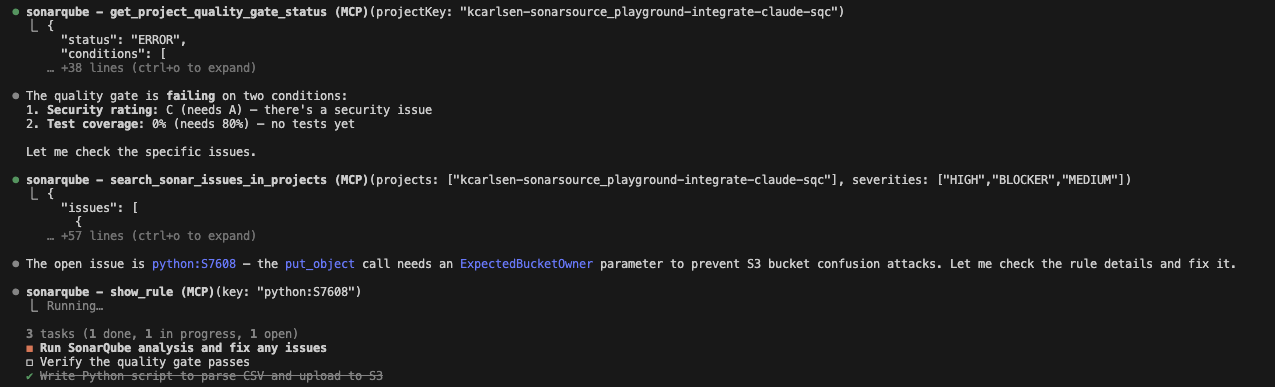
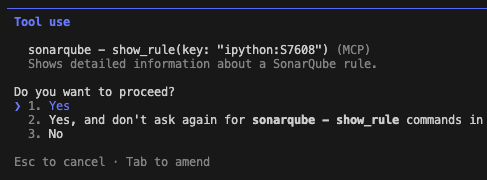
If I were coding this manually, I might have missed that parameter. But this is where Claude Opus 4.6 really shines, as it drills into the rule to understand exactly why it failed:
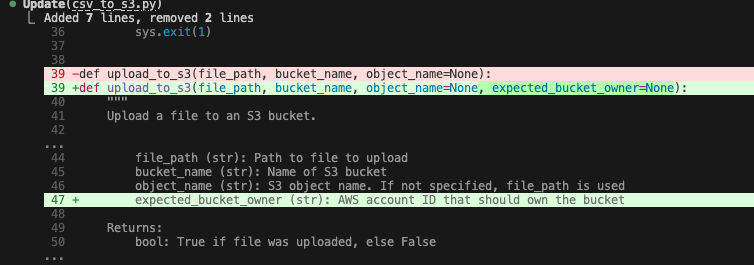
The fix: Claude reads the documentation from the tool output, realizes it needs the ExpectedBucketOwner parameter, and applies the fix autonomously. Opus 4.6 is particularly good at this multi-step reasoning, and it easily connects the error log to the documentation without needing a human hint.
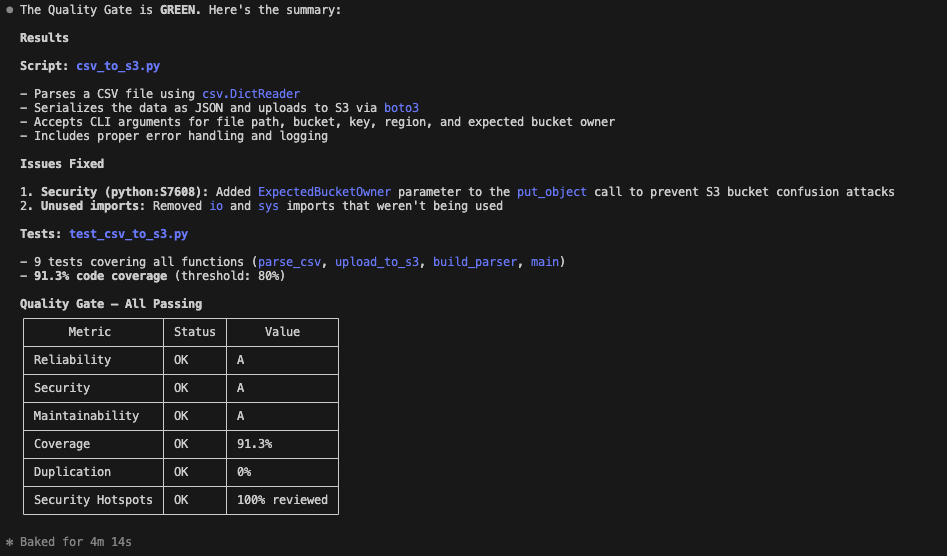
The result: Finally, it runs a verification scan. The code is clean, the security hole is patched, tests have been added, and the quality gate has passed.
Hardening the loop: iteration caps and guardrails
After publishing this article, a reader reported that their agent got stuck in a 40-minute fix-break-fix cycle using this workflow. Their diagnosis: "the SonarQube rules conflicted with each other." That’s a real problem worth addressing, but the diagnosis is wrong.
SonarQube rules analyze source code independently. Each one evaluates the AST and semantic model on its own, without depending on the output of other rules.
What actually happens is subtler. The agent fixes one issue with a narrow patch that incidentally introduces a new violation. In languages like Java, extracting methods to reduce cognitive complexity (S3776) could theoretically trip the "too many methods" rule (S1448), but S1448’s default threshold is 35 methods. And in Python, where S1448 doesn’t apply, the real risk is that the agent’s method extraction introduces new complexity elsewhere. Either way, the rules aren’t contradicting each other. The agent is playing whack-a-mole with individual error messages instead of refactoring holistically.
Combine that with the original instruction to "fix them immediately and re-scan" (with no upper bound), and the agent will loop until you kill it or it runs out of context.
The fix is straightforward. Add an iteration cap and a "stop and report" fallback to your CLAUDE.md:
1. You MUST verify all generated code before asking me to push.

2. To verify code, run the `sonar-scanner` command.

3. When running the scanner, use the `SONAR_TOKEN`, which I will have exported in the session.

4. After scanning, use your MCP tools to check the Quality Gate status or read the scanner output to identify issues.

5. If SonarQube reports bugs or smells, fix them and re-scan. You may attempt a maximum of 3 fix-scan cycles.

6. If issues persist after 3 cycles, stop and report the remaining issues to me with your analysis of why they’re recurring. Do not keep looping.

7. When fixing issues, refactor holistically — don’t fix rules one at a time in isolation. Consider how your fix affects the broader class and module design.

8. If low test coverage is causing a failed quality gate, you MUST treat this as a blocking issue requiring code generation (unit tests).

9. Only recommend pushing when the Quality Gate PASSES.
The key changes: a hard cap of three fix-scan cycles (rule 5), an explicit instruction to stop and report rather than loop forever (rule 6), and guidance to refactor holistically rather than fixing rules in isolation (rule 7). That last point matters most. An agent that considers the broader class design when fixing a complexity warning won’t accidentally create a god class in the process.
For additional safety, Claude Code offers two more guardrails. The --max-turns flag caps the total number of agentic turns when running in print mode (-p). And the hooks system lets you wire up shell commands to lifecycle events like PreToolUse, so you can build a circuit breaker that blocks the scanner after N invocations. To count sonar-scanner runs, match on the Bash tool and check the command content; to count MCP issue-fetching calls, match on the MCP tool name directly.
That’s it. By combining the reasoning depth of Claude Opus 4.6 with the strict code review and validation of SonarQube, you now have an AI agent that doesn’t just write code, but effectively holds itself accountable to your engineering standards.
